
Introduction
Modern applications rarely ask users for passwords directly anymore. Instead, they rely on protocols like OAuth 2.0 to delegate authentication securely.
For example, when you click "Login with Google", OAuth is working behind the scenes.
But here's the problem:
⚠️ If OAuth is implemented incorrectly, it can introduce serious vulnerabilities.
To understand this better, I built a hands-on OAuth security lab where I:
- Created a vulnerable OAuth flow
- Simulated a real attack (authorization code interception)
- Secured it using
stateand OAuth 2.0 PKCE
This article walks through everything — step by step.
🧠 What is OAuth (in simple terms)?
Think of OAuth like this:
You allow an app to access your data without giving it your password.
Example:
- You log in to a website using Google
- Google authenticates you
- The website gets limited access (via a token)
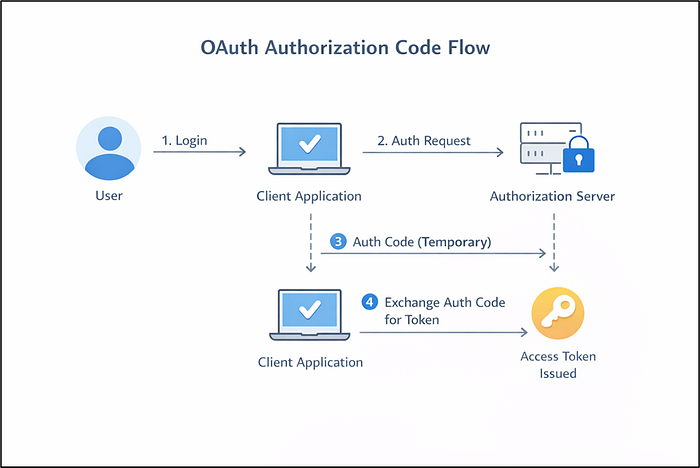
🔁 OAuth Authorization Code Flow
Here's a simplified flow:
🔥 The Problem: Authorization Code Interception
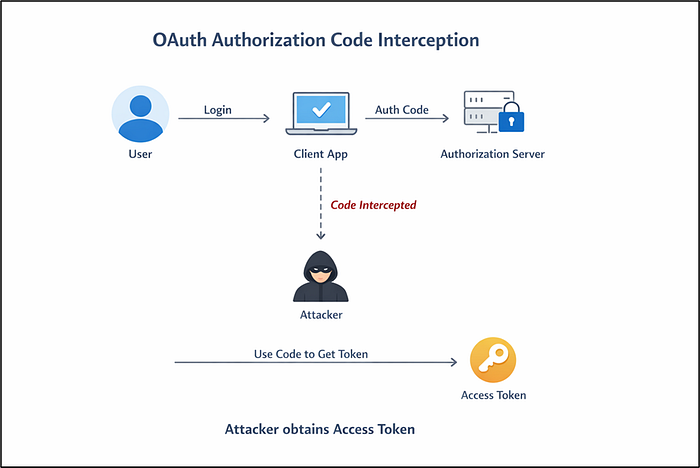
In the OAuth flow, the authorization code is very important.
If an attacker somehow steals this code, they might try to: Exchange it for an access token
And if successful:🚨 The attacker can act as the user.
🧪 Building the Lab
To understand this practically, I built a simple lab using Flask.
Components:
Client App (port 5001)
Authorization Server (port 5000)
Attacker Server (port 9000)
1️⃣ Vulnerable Authorization Server
My initial implementation looked like this:
@app.route("/authorize")
def authorize():
    client_id = request.args.get("client_id")
    redirect_uri = request.args.get("redirect_uri")

    code = str(uuid.uuid4())
    auth_codes[code] = client_id

    return redirect(f"{redirect_uri}?code={code}")
Problem:
❌ No state parameter
❌ No PKCE
❌ No validation
2️⃣ Attacker Server
I created a simple attacker endpoint:
@app.route("/steal")
def steal():
    code = request.args.get("code")
    print(f"[ATTACKER] Captured authorization code: {code}")
If the redirect URI is manipulated, the authorization code gets sent to the attacker.
💥 Simulating the Attack
Attack flow:
🛡️ Fix 1: Adding the state Parameter
To prevent Login CSRF, I added:
state = secrets.token_urlsafe(16)
session["oauth_state"] = state
And sent it in the request:
&state={state}Then validated it in /callback:
if state != session.get("oauth_state"):
    return "Invalid state parameter!"
What this fixes:
This prevents attackers from tricking users into logging into the wrong account
🔐 Fix 2: Implementing PKCE (The Real Protection)
Now comes the most important part — OAuth 2.0 PKCE
Step 1 — Generate code_verifier
code_verifier = secrets.token_urlsafe(32)
session["code_verifier"] = code_verifier
Step 2 — Generate code_challenge
code_challenge = base64.urlsafe_b64encode(
    hashlib.sha256(code_verifier.encode()).digest()
).rstrip(b"=").decode()
Step 3 — Send challenge to authorization server
&code_challenge={code_challenge}
&code_challenge_method=S256
Step 4 — Store challenge on server
auth_codes[code] = {
    "client_id": client_id,
    "code_challenge": code_challenge
}
Step 5 — Verify during token exchange
computed_challenge = base64.urlsafe_b64encode(
    hashlib.sha256(code_verifier.encode()).digest()
).rstrip(b"=").decode()

if computed_challenge != stored_challenge:
    return {"error": "invalid_code_verifier"}
🚫 What happens to the attacker now?
The attacker would still be able to steal the authorization code but when tries to exchange it, it fails as there is no code_verifier sent and the attack is failed
🧠 What I Learned
Building this lab helped me understand:
- OAuth is easy to misuse
- Security depends on implementation details
- PKCE is critical for modern apps
- Attacks become obvious when you simulate them
🔗 Project Link
👉 GitHub: https://github.com/AshSecures/02-oauth2-lab
🏁 Conclusion
OAuth is powerful — but also dangerous if misunderstood.
By building this lab, I moved from:
Just reading about OAuth → Breaking OAuth → Fixing OAuth
And that's where real learning happens.