
🔬 Difficulty: Intermediate — Estimated Time: 90 minutes
What is Hunt Forward ? — Youtube video — https://youtu.be/slsvQMG1EJ0
Get Elastic SIEM Access on hunt-forward.com — 7-day free trial no credit card needed, then $5/month — Please let me know what I can improve to get you the best experience in the comment section.
How to use this lab: Read the story to understand the attack. Follow the Hunt section to find it yourself in Elastic SIEM. Complete each milestone in your Hunt Notebook. Build the Sigma detection rule in Part 7 for your GitHub portfolio.
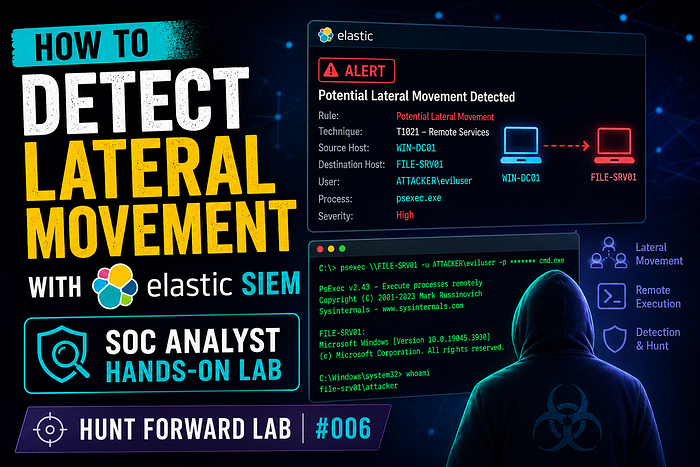
📖 Part 1: The Scenario
Thursday, 2:33 PM. Rennick Industrial, Detroit.
Alex Chen is thirteen months in. Rennick makes automotive transmission components. Their factory floor runs on OT — Operational Technology — a segregated network of programmable logic controllers, HMI terminals, and SCADA servers that control the actual manufacturing machinery. The IT and OT networks are supposed to be separated by a firewall. Supposed to be.
Dana's message is one line: "Authentication alert. Engineering workstation accessing OT SCADA server. Those networks don't talk. Go."
Alex pulls the logs.
14:17:44  RENNICK-ENG-07  →  OT-SCADA-01
          LogonType: 3 (Network)
          Account: svc_scada_ctrl
          AuthPackage: NTLM
          LogonProcessName: NtLmSsp
14:17:47  RENNICK-ENG-07  →  OT-SCADA-01
          EventID: 4648 (Explicit credential logon)
          Account: svc_scada_ctrl
14:19:03  OT-SCADA-01
          EventID: 4672 (Special privileges assigned)
          Account: svc_scada_ctrl
An engineering workstation — IT network, Windows 11, standard domain member — authenticating to the SCADA server on the OT network using svc_scada_ctrl. NTLM. Not Kerberos. svc_scada_ctrl has never been seen on an engineering workstation before. No engineer has that account's password.
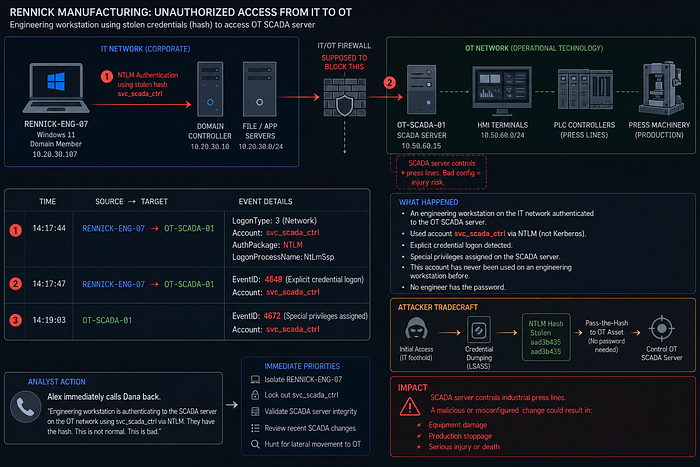
They don't need the password, Alex thinks. They have the hash.
The SCADA server controls the press lines on Rennick's factory floor. If an attacker pushes a bad configuration, the presses don't stop. People can get hurt.
He calls Dana back immediately.
How Lateral Movement Works — Simply Explained
Step 1: Why attackers move laterally
Breaking into the first machine is rarely the goal. The valuable targets — domain controllers, database servers, EHR systems, financial platforms — are almost never the first machine an attacker touches. To reach them, the attacker must move laterally through the network, hopping from machine to machine until they reach their objective.
Step 2: Pass-the-Hash — the skeleton key technique
When you log into Windows, your password is never stored on disk in plain text. Instead, Windows stores an NTLM hash — a mathematical transformation of your password. Critically, for NTLM authentication, the hash is functionally equivalent to the password. An attacker who steals a hash from memory can use it directly to authenticate to other systems — without ever knowing the actual password.
Normal login Pass-the-Hash What attacker needs Username + password Username + NTLM hash Where hash comes from — LSASS memory dump (Lab 004) Authentication protocol Kerberos or NTLM NTLM only Detection signal Normal logon events NTLM logon from unexpected source
Step 3: Token Impersonation — stealing the identity
After authenticating to a remote system, attackers go further. Windows uses access tokens — identity tickets that represent a logged-in user and their privileges. An attacker with sufficient rights can impersonate another user's token, inheriting that user's full privilege set without needing their credentials at all.
Normal Windows token flow:
  User logs in → Windows issues access token
  Token used to access resources → audited under that user
Attacker's token impersonation:
  Attacker authenticates via PtH → gets low-privilege session
  Attacker finds privileged token in process memory
  Attacker impersonates that token → elevated access
  Actions appear to be performed by the legitimate user → harder to detect
Step 4: Why detection is hard
┌──────────────────────────────────────────────────────────────────────────────┐
│  Security tool sees:  NTLM authentication from RENNICK-ENG-07              │
│                       → NTLM is a legitimate protocol  ✓                     │
│                       → svc_scada_ctrl is a legitimate account  ✓             │
│                       → Event ID 4624 looks like normal logon  ✓            │
│                                                                               │
│  Tool misses:  CONTEXT — IT workstations never authenticate to OT SCADA   │
│                          NTLM used instead of Kerberos (hash, not ticket)   │
│                          Source machine had no business accessing EHR        │
│                                                                               │
│  The protocol is legitimate. The account is real. Only the SOURCE is wrong. │
└──────────────────────────────────────────────────────────────────────────────┘
Think of it like a hotel key card system. Every room has a valid card. The attacker clones a master key card. Security sees a valid card opening a door — but it's opening doors that card should never be used for, from someone who shouldn't have it.
Step 5: Five signals we'll hunt
# Signal Data source Detection key
1. NTLM network logons from unexpected source hosts Windows Security events Event 4624 + NTLM + wrong source
2. Explicit credential use (4648) — attacker passing hash Windows Security events Event 4648 from non-admin workstation
3. Special privileges assigned to service accounts Windows Security events Event 4672 on clinical servers
4. Token impersonation — elevated access after logon Windows Security events Event 4624 LogonType 3 + ImpersonationLevel
5. Lateral movement pattern — machine-to-machine hop chain All auth events Multiple target hosts from single source
🎯 Part 2: Your Mission
Hunt Phases
Hunt Phase — What You Will FindEvent Category
- Source IdentificationIdentify the compromised workstation acting as the origin point for lateral movement.
authentication - Pass-the-Hash DetectionDetect NTLM logons from non-admin or unusual source systems to sensitive servers.
authentication - Privilege EscalationLook for special privileges assigned after authentication, especially Windows Event ID
4672.authentication - Token ImpersonationIdentify impersonation-level tokens granted after a network logon.
authentication - Hop Chain MappingReconstruct the full authentication path, such as workstation → server → server → EHR or SCADA system, using all related authentication events.
authentication
🔧 Part 3: Lab Setup
You'll need a Hunt Forward account for this lab. Your Elastic SIEM environment has the lateral-movement-lab-logs dataset pre-loaded — Windows Security event logs from Rennick Industrial's IT and OT networks spanning the attack window and surrounding legitimate activity.
👉 Sign up at hunt-forward.com — 7-day free trial, then $5/month
Once you're in CLICK HERE or:
- Open Kibana → hamburger menu → Discover
- Select index
lateral-movement-lab-logs - Set time range: April 30, 2024 — the full attack day
A Quick Word on ES|QL
Throughout this lab we use ES|QL — Elasticsearch Query Language. Every query starts with FROM and pipes through commands using |.
To run ES|QL: Click the language selector in Discover → select ES|QL → paste → Run (▶)
🔍 Part 4: The Hunt
Hunt 1 — Find the Lateral Movement Source
Kill chain position:
[ SOURCE ] → PtH logon → privilege escalation → impersonation → hop chain
Before hunting the lateral movement itself, we need to identify which machine is the origin — the compromised host the attacker is operating from. In Pass-the-Hash campaigns, the source machine makes an unusual number of outbound authentication attempts to other hosts in a short window. Normal workstations authenticate to a small, predictable set of servers. An infected machine authenticates to many different servers rapidly.
FROM lateral-movement-lab-logs
| WHERE event.code == 4624
  AND winlog.event_data.LogonType == 3
| EVAL is_ot_target = CASE(
    winlog.event_data.TargetServerName RLIKE ".*(SCADA|OT-|HMI|HIST|PLC).*",
    1,
    0
  )
| EVAL source_machine = REPLACE(
    winlog.event_data.SubjectUserName, "$", ""
  )
| STATS
    auth_count      = COUNT(),
    unique_targets  = COUNT_DISTINCT(winlog.event_data.TargetServerName),
    ot_auths        = SUM(is_ot_target),
    unique_accounts = COUNT_DISTINCT(winlog.event_data.TargetUserName),
    first_seen      = MIN(@timestamp),
    last_seen       = MAX(@timestamp)
    BY source.ip, source_machine
| EVAL risk_score = CASE(
    ot_auths > 0 AND unique_targets >= 2, "CRITICAL — IT source hitting OT servers",
    unique_targets >= 4 AND auth_count > 15, "HIGH — broad lateral movement",
    "NORMAL"
  )
| WHERE risk_score != "NORMAL"
| SORT ot_auths DESC, unique_targets DESC
What each line does:
WHERE event.code == 4624 AND winlog.event_data.LogonType == 3— successful network logons only. Both are numeric fields — no quotesEVAL is_ot_target = CASE(..., 1, 0)— returns1for OT server targets,0for IT servers. Using integers (not a string label and not null) meansSUM()works cleanly in the next stepEVAL source_machine = REPLACE(winlog.event_data.SubjectUserName, "$", "")— extracts the initiating machine name from the native WindowsSubjectUserNamefield. More reliable thansource.hostwhich depends on ECS field mappingSTATS ot_auths = SUM(is_ot_target)— sums the 1/0 values to count how many of this source's auth events targeted OT servers.SUM(CASE(..., 1, 0))is the correct ES|QL pattern —COUNT(CASE(..., 1, null))throws a type error because ES|QL CASE inside COUNT cannot mix integer and null typesBY source.ip, source_machine— one row per origin machineEVAL risk_score— CRITICAL if the source has any OT-directed auths. In a properly segmented network this should always be zero for IT workstations
What you're looking for: RENNICK-ENG-07 is the only entry with ot_auths > 0 — every other workstation scores NORMAL. That zero-vs-nonzero gap is the clearest possible lateral movement signal in an IT/OT segmented environment.
📝 Hunt Notebook checkpoint: Record the source IP, hostname,
unique_targets,auth_count,first_seen, andlast_seen. Note thatrisk_scoreis computed by your query — the raw evidence isunique_targetsandauth_count. The lateral movement window betweenfirst_seenandlast_seenis the attacker's active period.
✅ Lateral movement source identified.
RENNICK-ENG-07is the origin.
🏁 Milestone 1 of 5 — Lateral Movement Source Identified Open your Hunt Notebook and paste this template
**Date of Hunt:** [today's date]
**Lab:** Hunt Forward #006 — Lateral Movement Detection
**Analyst:** [your name]
### Finding
| Field                 | Value          |
|----------------------|----------------|
| Source hostname       | [your finding] |
| Source IP             | [your finding] |
| Unique targets hit    | [your finding] |
| Total auth attempts   | [your finding] |
| First seen            | [timestamp]    |
| Last seen             | [timestamp]    |
| Active window (mins)  | [your finding] |
| risk_score (computed) | HIGH           |
**Note:** `risk_score` is computed by `EVAL CASE()` — not a raw log field.
The raw evidence is Event 4624 count and COUNT_DISTINCT(TargetServerName).
**Severity:** High | **Confidence:** High
Hunt 2 — Detect Pass-the-Hash via NTLM Logons
Kill chain position:
source → [ PASS-THE-HASH ] → privilege escalation → impersonation → hop chain
Pass-the-Hash has a specific authentication fingerprint: it always uses NTLM (not Kerberos), it appears as LogonType 3 (network), and it originates from machines that have no business reason to authenticate to the target server. Kerberos is the default in modern Windows domains — NTLM appearing in unexpected places is the signal.
FROM lateral-movement-lab-logs
| WHERE event.code == 4624
  AND winlog.event_data.LogonType == 3
  AND winlog.event_data.AuthenticationPackageName == "NTLM"
  AND winlog.event_data.TargetServerName RLIKE ".*(SCADA|OT-|HMI|HIST).*"
| EVAL source_machine = REPLACE(
    winlog.event_data.SubjectUserName, "$", ""
  )
| EVAL pth_confidence = CASE(
    winlog.event_data.ImpersonationLevel == "%%1840", "CRITICAL — Delegation token",
    winlog.event_data.ImpersonationLevel == "%%1833", "HIGH — Impersonation token",
    "MEDIUM"
  )
| KEEP @timestamp, host.name,
    source_machine,
    winlog.event_data.TargetUserName,
    winlog.event_data.TargetServerName,
    winlog.event_data.AuthenticationPackageName,
    winlog.event_data.ImpersonationLevel,
    pth_confidence
| SORT @timestamp ASC
What each line does:
AND winlog.event_data.TargetServerName RLIKE ".*(SCADA|OT-|HMI|HIST).*"— filters directly to OT server targets in the WHERE clause. Any NTLM logon reaching these servers is immediately suspicious — OT servers should never receive NTLM from domain workstationsEVAL source_machine = REPLACE(winlog.event_data.SubjectUserName, "$", "")—SubjectUserNameis a native Windows Security event field that contains the computer account of the machine that initiated the logon (e.g.RENNICK-ENG-07$). TheREPLACE()strips the trailing$for a clean hostname. This field is always reliably populated on Event 4624, unlikesource.hostwhich depends on ECS mappingEVAL pth_confidence— classifies the impersonation level.%%1840(Delegation) means the attacker can forward this token to additional systems.%%1833(Impersonation) is local-machine only. Both are attack signalsKEEP host.name, source_machine, ...—host.name= the OT server where the event fired.source_machine= the workstation that sent the credentials, derived fromSubjectUserName
What you're looking for: Every row should show source_machine = RENNICK-ENG-07 (the attacking workstation) authenticating to OT servers using NTLM. The TargetUserName column shows which OT service account hash was used at each hop — svc_historian, svc_hmi, svc_scada_ctrl. Each account listed is a stolen credential that must be rotated immediately.
📝 Hunt Notebook checkpoint: For each NTLM logon event, record the timestamp, source host, target server,
TargetUserName(the account whose hash was used), andAuthenticationPackageName. TheTargetUserNamevalues are your stolen credentials list — every account named here must be treated as compromised and rotated immediately.
🏁 Milestone 2 of 5 — Pass-the-Hash Logons Detected
### PtH Events
| Timestamp | Source host | Target server | Account used | Auth package |
|-----------|-------------|---------------|--------------|-------------|
| [time]    | [host]      | [server]      | [account]    | NTLM        |
| [time]    | [host]      | [server]      | [account]    | NTLM        |
| [time]    | [host]      | [server]      | [account]    | NTLM        |
### Stolen Credentials Identified
All accounts in the table above must be assumed compromised.
Escalate for immediate password rotation.
**Severity:** Critical | **Confidence:** High
Hunt 3 — Privilege Escalation via Special Privileges (4672)
Kill chain position:
source → PtH logon → [ PRIVILEGE ESCALATION ] → impersonation → hop chain
Event 4672 — "Special privileges assigned to new logon" — fires when a user authenticates and Windows assigns privileged rights to their session. For regular user accounts this rarely fires. When it fires immediately following a network logon (4624) from an unexpected source on a sensitive server, it means the attacker successfully authenticated with a privileged account hash and immediately received elevated access.
FROM lateral-movement-lab-logs
| WHERE event.code == 4672
| EVAL privilege_context = CASE(
    winlog.event_data.PrivilegeList RLIKE ".*(SeDebugPrivilege|SeTcbPrivilege|SeImpersonatePrivilege).*",
    "CRITICAL — high-value privileges",
    winlog.event_data.PrivilegeList RLIKE ".*(SeBackupPrivilege|SeRestorePrivilege).*",
    "HIGH — backup/restore privileges",
    "STANDARD"
  )
| EVAL unexpected_host = CASE(
    host.name RLIKE ".*(SCADA|scada|OT|HMI|historian).*",
    "YES — clinical server",
    "NO"
  )
| WHERE privilege_context != "STANDARD"
    OR unexpected_host == "YES — clinical server"
| KEEP @timestamp, host.name,
    winlog.event_data.SubjectUserName,
    winlog.event_data.PrivilegeList,
    privilege_context, unexpected_host
| SORT @timestamp ASC
What each line does:
WHERE event.code == 4672— this event only fires when a privileged token is assigned. It does not fire for regular user logons, which makes it a high signal-to-noise fieldEVAL privilege_context— classifies the privilege list by impact.SeDebugPrivilegeallows a process to read any other process's memory — this is what makes further credential dumping possible.SeImpersonatePrivilegeenables token impersonation, the next step in the kill chainEVAL unexpected_host— 4672 on an OT server (SCADA,HMI,HIST) is the combination that indicates the attacker's session landed with elevated rights on a protected systemWHERE privilege_context != "STANDARD" OR unexpected_host == "YES"— either condition alone warrants investigation; both together confirms the attack is escalating
What you're looking for: Event 4672 on OT-SCADA-01 for svc_scada_ctrl with SeDebugPrivilege and SeImpersonatePrivilege in the privilege list — within seconds of the NTLM logon from Milestone 2. The timestamp gap between 4624 (Milestone 2) and 4672 (this hunt) on the same server tells you how quickly the attacker gained elevated access.
📝 Hunt Notebook checkpoint: Record the host, account, full
PrivilegeListstring,privilege_context, the timestamp, and the time delta from the corresponding 4624 event in Milestone 2.SeImpersonatePrivilegeappearing in the list means the next hunt's token impersonation is about to happen.
🏁 Milestone 3 of 5 — Privilege Escalation Confirmed
### Finding
| Field                   | Value          |
|-------------------------|----------------|
| Host                    | [your finding] |
| Account                 | [your finding] |
| Privilege list          | [your finding] |
| privilege_context (comp)| [your finding] |
| Timestamp               | [your finding] |
| Delta from Milestone 2  | [X] seconds    |
**Does privilege list include SeImpersonatePrivilege?** [yes/no]
If yes: token impersonation is likely in Hunt 4.
**Severity:** Critical | **Confidence:** High
Hunt 4 — Token Impersonation Detection
Kill chain position:
source → PtH logon → privilege escalation → [ TOKEN IMPERSONATION ] → hop chain
Token impersonation is when an attacker with SeImpersonatePrivilege steals another user's active access token and runs code as that user. Windows logs this in Event 4624 as an Impersonation logon type. The key field is ImpersonationLevel — when set to Impersonation or Delegation, the attacker has full use of the victim's identity.
FROM lateral-movement-lab-logs
| WHERE event.code == 4624
  AND winlog.event_data.LogonType == 3
| EVAL impersonation_flag = CASE(
    winlog.event_data.ImpersonationLevel == "%%1833",  "IMPERSONATION",
    winlog.event_data.ImpersonationLevel == "%%1840",  "DELEGATION",
    winlog.event_data.ImpersonationLevel == "%%1832",  "IDENTIFICATION — low risk",
    "ANONYMOUS"
  )
| EVAL session_anomaly = CASE(
    impersonation_flag IN ("IMPERSONATION", "DELEGATION")
    AND winlog.event_data.AuthenticationPackageName == "NTLM",
    "CRITICAL — PtH with token impersonation",
    impersonation_flag IN ("IMPERSONATION", "DELEGATION"),
    "HIGH — token impersonation",
    "NORMAL"
  )
| WHERE session_anomaly != "NORMAL"
| KEEP @timestamp, host.name,
    winlog.event_data.TargetUserName,
    winlog.event_data.ImpersonationLevel,
    winlog.event_data.AuthenticationPackageName,
    winlog.event_data.LogonProcessName,
    impersonation_flag, session_anomaly
| SORT @timestamp ASC
What each line does:
EVAL impersonation_flag = CASE(winlog.event_data.ImpersonationLevel == "%%1833"...)— Windows uses numeric codes for impersonation levels in Security event logs.%%1833maps toImpersonation(attacker can act as the user on the local machine),%%1840maps toDelegation(attacker can act as the user on remote systems too — more dangerous). These are raw Windows event log codesEVAL session_anomaly— the highest-risk combination is NTLM authentication plus an Impersonation or Delegation level token — that combination is exactly Pass-the-Hash followed by token theft, and it is rare in legitimate traffic- The
LogonProcessNamefield tells you what Windows component processed the authentication —NtLmSspconfirms the NTLM path
What you're looking for: Events where impersonation_flag == "IMPERSONATION" and AuthenticationPackageName == "NTLM" on the EHR server — giving a session_anomaly of "CRITICAL — PtH with token impersonation". These events confirm the attacker achieved the highest level of access.
📝 Hunt Notebook checkpoint: Record each impersonation event — timestamp, host,
TargetUserName,ImpersonationLevelcode, andsession_anomaly. Note how many distinct accounts were impersonated. Each one represents a fully compromised identity during the attack window.
🕵️ Mystery Question — drop your answer in the Medium comments
Your Hunt 4 results show the
ImpersonationLevelfield as raw Windows codes (%%1833,%%1840). The attacker achieved%%1840— Delegation level — onOT-SCADA-01.
Delegation level means the attacker could impersonate the account on remote systems, not just the local one.
OT-SCADA-01connects directly to the PLCs controlling the press lines. What does Delegation-level impersonation on the SCADA server mean for the PLCs — and what is the worst-case physical outcome if those PLCs receive an unauthorized command?
Comment below with: "Lab 006 — worst-case physical outcome: [your answer] — reason: [one sentence]"
There's a third layer to this attack. Tell us what it is.
🏁 Milestone 4 of 5 — Token Impersonation Confirmed
### Impersonation Events
| Timestamp | Host | Account impersonated | Level | session_anomaly |
|-----------|------|---------------------|-------|-----------------|
| [time]    | [host]| [account]          | %%1833/%%1840 | [label] |
### Impersonation Level Reference
| Code | Meaning | Risk |
|------|---------|------|
| %%1833 | Impersonation — local machine only | High |
| %%1840 | Delegation — remote machines too | Critical |
| %%1832 | Identification — read-only | Low |
**Severity:** Critical | **Confidence:** High
Hunt 5 — Map the Full Lateral Movement Hop Chain
Kill chain position:
source → PtH logon → privilege escalation → impersonation → [ HOP CHAIN ]
The most important question in any lateral movement investigation is: where did the attacker go, in what order? This hunt shows every authentication event touching an OT server, sorted chronologically — giving you the complete movement path from first hop to last.
Hunt 5 uses two queries. Query 5a shows the raw event timeline — every authentication event on an OT server in order. Query 5b counts events and accounts per server for the summary view.
Query 5a — Raw event timeline (chronological hop chain):
FROM lateral-movement-lab-logs
| WHERE event.code == 4624
    OR event.code == 4648
    OR event.code == 4672
| WHERE winlog.event_data.TargetServerName RLIKE ".*(SCADA|OT-|HMI|HIST).*"
    OR host.name RLIKE ".*(SCADA|OT-|HMI|HIST).*"
| EVAL event_type = CASE(
    event.code == 4624, "LOGON",
    event.code == 4648, "EXPLICIT_CRED",
    event.code == 4672, "PRIV_ASSIGN",
    "OTHER"
  )
| EVAL server_touched = CASE(
    winlog.event_data.TargetServerName RLIKE ".*(SCADA|OT-|HMI|HIST).*",
    winlog.event_data.TargetServerName,
    host.name
  )
| KEEP @timestamp, server_touched,
    winlog.event_data.TargetUserName,
    winlog.event_data.AuthenticationPackageName,
    event_type
| SORT @timestamp ASC
Query 5b — Event count per server:
FROM lateral-movement-lab-logs
| WHERE event.code == 4624
    OR event.code == 4648
    OR event.code == 4672
| WHERE winlog.event_data.TargetServerName RLIKE ".*(SCADA|OT-|HMI|HIST).*"
    OR host.name RLIKE ".*(SCADA|OT-|HMI|HIST).*"
| EVAL server_touched = CASE(
    winlog.event_data.TargetServerName RLIKE ".*(SCADA|OT-|HMI|HIST).*",
    winlog.event_data.TargetServerName,
    host.name
  )
| STATS
    total_events = COUNT(),
    logon_count  = SUM(CASE(event.code == 4624, 1, 0)),
    cred_count   = SUM(CASE(event.code == 4648, 1, 0)),
    priv_count   = SUM(CASE(event.code == 4672, 1, 0))
    BY server_touched
| SORT total_events DESC
What each line does in Query 5a:
WHERE event.code == 4624 OR ...— OR chain for the three auth event types. NoIN()to avoid the long/integer type mismatchWHERE winlog.event_data.TargetServerName RLIKE ... OR host.name RLIKE ...— catches events from two angles: 4624/4648 events where the OT server name is inTargetServerName, and 4672 events where the OT server ishost.name(since 4672 fires on the destination)EVAL server_touched = CASE(RLIKE ..., TargetServerName, host.name)— selects whichever field holds the OT server name for this event typeKEEP @timestamp, server_touched, ...— shows the four fields you need: when, which server, which account, and the event type. No aggregation — raw chronological events so you can read the attack as it unfoldedSORT @timestamp ASC— earliest event first = attacker's movement in order
What you're looking for in 5a: Events appearing in this order — OT-HIST-01 events first, then OT-HMI-01, then OT-SCADA-01 (most events, longest stretch of timestamps), then OT-DB-01. The TargetUserName column changes as the attacker uses different stolen hashes at each hop.
What you're looking for in 5b: OT-SCADA-01 at the top with the highest total_events — confirming it as the primary target where the attacker spent the most time.
📝 Hunt Notebook checkpoint: From Query 5a, note the
@timestampof the first event per server — that is your "first touch" for each hop. The last event onOT-SCADA-01minus the first gives you dwell time manually. From Query 5b, recordtotal_eventsand the mix of event types per server — a server with all three event types (LOGON + EXPLICIT_CRED + PRIV_ASSIGN) was fully compromised, not just probed.
🏁 Milestone 5 of 5 — Full Lateral Movement Chain Mapped
### Movement Timeline
| Hop | Target server | First touch | Last touch | Dwell (sec) | Accounts used |
|----|---------------|-------------|------------|-------------|---------------|
| 1  | [server]      | [time]      | [time]     | [N]         | [accounts]    |
| 2  | [server]      | [time]      | [time]     | [N]         | [accounts]    |
| 3  | [server]      | [time]      | [time]     | [N]         | [accounts]    |
### Campaign Summary
| Metric                    | Value          |
|---------------------------|----------------|
| Total servers accessed    | [your finding] |
| Total movement window     | [X] minutes    |
| EHR server dwell time     | [X] seconds    |
| Accounts compromised      | [your finding] |
| SCADA config changed?     | [yes/no]       |
### Recommended Immediate Actions
- [ ] Isolate RENNICK-ENG-07 from the network immediately
- [ ] Force rotation of ALL OT service accounts seen in Milestone 2
- [ ] Disable svc_scada_ctrl pending investigation — rotate password immediately
- [ ] Preserve forensic image of RENNICK-ENG-07 (credential source)
- [ ] Pull command logs from OT-SCADA-01 for the dwell window
- [ ] Verify no PLC configuration changes were made during the dwell period
- [ ] Notify plant operations — verify press lines are in a safe state
- [ ] Engage OT security specialist — SCADA configuration audit required
- [ ] Notify CISA — ICS breach notification recommended for critical infrastructure
- [ ] Notify cyber insurance carrier
- [ ] Audit IT admin account that logged into RENNICK-ENG-07 — hash source
**Severity:** Critical | **Confidence:** High
📋 Part 5: Building Your Timeline
┌─────────────────────────────────────────────────────────────────────────────────┐
│  INCIDENT TIMELINE — Rennick Industrial / IT-to-OT Lateral Movement              │
├────────────────┬────────────────────────────────────────────────────────────────┤
│  Apr 27        │ IT admin logs into RENNICK-ENG-07 for CAD software update      │
│  (Day -3)      │ → NTLM hash cached in LSASS memory — never cleared             │
├────────────────┼────────────────────────────────────────────────────────────────┤
│  Apr 30, 14:04 │ Attacker begins Pass-the-Hash from RENNICK-ENG-07            │
│  [Milestone 1] │ → First target: OT-HIST-01 (process historian server)        │
├────────────────┼────────────────────────────────────────────────────────────────┤
│  Apr 30, 14:11 │ NTLM logon to OT-HMI-01 (HMI terminal server)               │
│  [Milestone 2] │ → svc_hmi hash used, special privileges assigned             │
├────────────────┼────────────────────────────────────────────────────────────────┤
│  Apr 30, 14:17 │ NTLM logon to OT-SCADA-01 (SCADA control server)            │
│  [Milestone 2] │ → svc_scada_ctrl hash used — OT network fully crossed         │
├────────────────┼────────────────────────────────────────────────────────────────┤
│  Apr 30, 14:17 │ Event 4672 — SeDebugPrivilege + SeImpersonatePrivilege        │
│  [Milestone 3] │ → Attacker has elevated rights on SCADA server                │
├────────────────┼────────────────────────────────────────────────────────────────┤
│  Apr 30, 14:19 │ Token impersonation — Delegation level (%%1840)               │
│  [Milestone 4] │ → Attacker impersonating svc_scada_ctrl on OT systems         │
├────────────────┼────────────────────────────────────────────────────────────────┤
│  Apr 30, 14:17 │ Attacker reads SCADA process configuration files              │
│  — 14:33       │ → 16 minutes of access to OT control systems                 │
├────────────────┼────────────────────────────────────────────────────────────────┤
│  Apr 30, 14:33 │ Endpoint alert fires — IT workstation to OT server auth       │
│                │ → Dana pages Alex Chen                                         │
├────────────────┼────────────────────────────────────────────────────────────────┤
│  Apr 30, 15:41 │ All 5 milestones confirmed, RENNICK-ENG-07 isolated           │
│  [Milestone 5] │ → Plant ops notified, OT configuration audit begun            │
└────────────────┴────────────────────────────────────────────────────────────────┘
📝 Part 6: Export Your Hunt Notebook → GitHub Portfolio
Five milestones covering source identification, PtH detection, privilege escalation, token impersonation, and the complete hop chain. Push as:
hunt-006-lateral-movement-detection.md
The hop chain table from Milestone 5 — with dwell times per server and accounts used at each hop — is the kind of output a hiring manager would ask you to produce in a tabletop exercise. The VALUES(TargetUserName) aggregation that built it is non-obvious ES|QL. Write the explanation of why COALESCE(TargetServerName, host.name) was needed to handle the different event types. That reasoning is the differentiator.
threat-hunting-portfolio/
├── hunts/
│   ├── hunt-001 through hunt-005 ...
│   └── hunt-006-lateral-movement-detection.md  ← NEW
└── sigma/
    └── lab006_lateral_movement.yml             ← NEW (Part 7)
🔴 Part 7: Build Your Sigma Detection Rule
This lab's primary detection signal — NTLM network logon from a non-admin workstation to a sensitive clinical server — translates directly to a deployable Sigma rule. The rule you write today, deployed to Elastic Security, would have caught this attack in real time at 17:22 on April 30th.
title: Lateral Movement — NTLM Network Logon to Sensitive Server from Non-Admin Source
id: f6a7b8c9-d0e1-2345-fabc-456789012006
status: experimental
description: >
  Detects Pass-the-Hash lateral movement by identifying NTLM network logons
  (LogonType 3) to sensitive servers where the source host is a non-administrative
  workstation. In a healthy Windows domain, workstation-to-server authentication
  uses Kerberos. NTLM on a network logon from a workstation to a sensitive server
  is a strong indicator of credential hash reuse. Investigated in Hunt Forward
  Lab 006 — Rennick Industrial IT-to-OT lateral movement campaign, where an
  attacker crossed from the corporate IT network into OT systems controlling
  factory floor SCADA and PLC infrastructure.
references:
  - https://attack.mitre.org/techniques/T1550/002/
  - https://attack.mitre.org/techniques/T1134/001/
  - https://hunt-forward.com
author: "[Your Name]"
date: 2024-04-30
modified: 2024-04-30
tags:
  - attack.lateral_movement
  - attack.t1550.002
  - attack.credential_access
  - attack.t1134.001
  - attack.t1021.002
logsource:
  category: authentication
  product: windows
  definition: >
    Requires Windows Security Event Log — Event ID 4624.
    Enable Advanced Audit Policy: Logon/Logoff > Audit Logon (Success).
detection:
  selection_network_logon:
    EventID: 4624
    LogonType: '3'
  selection_ntlm:
    AuthenticationPackageName: 'NTLM'
  selection_sensitive_target:
    TargetServerName|contains:
      - 'SCADA'
      - 'scada'
      - 'OT-'
      - 'HMI'
      - 'hmi'
      - 'HIST'
      - 'historian'
      - 'PLC'
  filter_expected_sources:
    # Add your expected NTLM sources — servers that legitimately use NTLM
    # e.g. legacy systems, non-domain-joined devices
    IpAddress|contains:
      - '10.10.10.'    # Replace with your DC / legacy server subnets
  condition: >
    selection_network_logon
    and selection_ntlm
    and selection_sensitive_target
    and not filter_expected_sources
falsepositives:
  - Legacy applications that authenticate via NTLM rather than Kerberos
  - Non-domain-joined devices accessing file shares
  - Service accounts configured to use NTLM explicitly
  - Tune filter_expected_sources with your environment's known-good NTLM sources
level: high
---
title: Lateral Movement — Special Privileges Assigned on Clinical Server After Network Logon
id: f6a7b8c9-d0e1-2345-fabc-456789012007
status: experimental
description: >
  Detects Event 4672 (Special Privileges Assigned) firing on a clinical or
  sensitive server, combined with high-value privileges (SeDebugPrivilege,
  SeImpersonatePrivilege). In a healthcare environment, privilege escalation
  on clinical systems outside of maintenance windows is a critical indicator.
  Investigated in Hunt Forward Lab 006.
references:
  - https://attack.mitre.org/techniques/T1134/
  - https://hunt-forward.com
author: "[Your Name]"
date: 2024-04-30
modified: 2024-04-30
tags:
  - attack.privilege_escalation
  - attack.t1134
  - attack.lateral_movement
logsource:
  product: windows
  service: security
  definition: 'Requires Windows Security Event Log — Event ID 4672'
detection:
  selection_event:
    EventID: 4672
  selection_high_value_privs:
    PrivilegeList|contains:
      - 'SeDebugPrivilege'
      - 'SeImpersonatePrivilege'
      - 'SeTcbPrivilege'
  filter_expected_admins:
    SubjectUserName|endswith:
      - '$'    # Machine accounts — filter computer accounts which legitimately get these
  filter_system:
    SubjectUserName: 'SYSTEM'
  condition: >
    selection_event
    and selection_high_value_privs
    and not filter_expected_admins
    and not filter_system
falsepositives:
  - Privileged admin accounts performing legitimate maintenance
  - Service accounts that legitimately require SeImpersonatePrivilege
  - Run alert-only for 2 weeks to tune expected admin accounts
level: high
---
title: Lateral Movement — Token Impersonation via Delegation Level on Network Logon
id: f6a7b8c9-d0e1-2345-fabc-456789012008
status: experimental
description: >
  Detects Windows Security Event 4624 where the ImpersonationLevel is set to
  Delegation (%%1840) combined with NTLM authentication. Delegation-level
  impersonation means the attacker can forward the impersonated identity to
  remote systems, enabling a second hop in a lateral movement chain. Combined
  with NTLM, this is the fingerprint of Pass-the-Hash with full token delegation.
  Investigated in Hunt Forward Lab 006.
references:
  - https://attack.mitre.org/techniques/T1134/001/
  - https://hunt-forward.com
author: "[Your Name]"
date: 2024-04-30
modified: 2024-04-30
tags:
  - attack.privilege_escalation
  - attack.t1134.001
  - attack.lateral_movement
  - attack.t1550.002
logsource:
  product: windows
  service: security
  definition: 'Requires Windows Security Event Log — Event ID 4624'
detection:
  selection_event:
    EventID: 4624
    LogonType: '3'
  selection_delegation:
    ImpersonationLevel: '%%1840'
  selection_ntlm:
    AuthenticationPackageName: 'NTLM'
  filter_expected:
    LogonProcessName: 'Kerberos'   # Kerberos delegation is expected and different
  condition: >
    selection_event
    and selection_delegation
    and selection_ntlm
    and not filter_expected
falsepositives:
  - Legacy systems that require NTLM delegation
  - NAS devices or storage systems using NTLM
level: critical
Convert to ES|QL for Elastic
pip install sigma-cli pysigma-backend-elasticsearch
sigma convert -t esql -p ecs_windows sigma/lab006_lateral_movement.yml
Or paste at sigconverter.io.
Add to GitHub
Save as sigma/lab006_lateral_movement.yml. Your portfolio now has detection rules for 6 attack techniques across the full kill chain — from initial access through persistence, credential dumping, and lateral movement.
🛡️ Part 7b: What Alex Did Next
RENNICK-ENG-07 was isolated by 3:00 PM. OT service account passwords — svc_scada_ctrl, svc_hmi, svc_historian — were rotated within the hour. An OT security specialist confirmed by 6:00 PM that no SCADA configuration changes had been pushed to the PLCs during the 16-minute dwell window. The press lines had been safe the whole time. Barely.
The IT admin who had logged into RENNICK-ENG-07 three days earlier for a CAD software update — routine, five minutes — had left their NTLM hash in that machine's memory ever since. Their account was disabled pending investigation.
The Sigma rule Alex deployed caught a similar PtH attempt from a different engineering workstation at 9:44 AM the following morning. It fired in under three seconds.
Six labs in, Alex thinks. The attacker crossed a network boundary that was supposed to be a wall. It wasn't. The hash was the key. The hunt found it.
🎓 The Takeaway
RENNICK-ENG-07  (IT workstation — hash source)
      │
      │  Pass-the-Hash via NTLM
      ▼
OT-HIST-01  →  OT-HMI-01  →  OT-SCADA-01  →  OT-DB-01
  14:04          14:11          14:17            14:19
  svc_historian  svc_hmi        svc_scada_ctrl   svc_scada_ctrl
                                ██████████████   (delegation pivot)
                                16 min dwell
The attacker crossed a network boundary in 13 minutes using nothing but stolen NTLM hashes and legitimate Windows APIs. No custom malware. No exploits. No port scans. Every individual event looked like a valid logon.
The Core Lesson
In a Pass-the-Hash attack, every individual event is legitimate. Valid account. Valid protocol. Valid Event ID. 4624 looks like a normal logon. NTLM is a real Windows authentication protocol.
svc_scada_ctrlis a real account.
The attack is only visible in the combination — wrong source machine + wrong protocol for the context + wrong destination network.
That combination is what your five queries found. That combination is what the Sigma rule now catches in real time. The hash was the key. The hunt found it.
🚀 Ready for the Next Lab?
- Lab #007: Data Exfiltration — Detecting Bulk File Transfer and Archive Creation
- Lab #008: Living off the Cloud — Abusing Cloud Storage for C2 and Exfiltration
👉 Access all labs at hunt-forward.com — 7-day free trial, then $5/month
Hunt Forward Lab #006 — Lateral Movement: Pass-the-Hash and Token Impersonation MITRE ATT&CK: T1550.002 (PtH) | T1134.001 (Token Impersonation) | T1021.002 (SMB) Dataset: lateral-movement-lab-logs | Difficulty: Intermediate