

This room is designed to provide a comprehensive and well-rounded understanding of the concepts covered under Web enumeration, while guiding you step-by-step with a beginner-friendly approach. Grab a cup of coffee
What is Web Enumeration?
Web enumeration is the process of gathering information about a web application or web server to understand its structure, technology:
- Hidden directories & files | Subdomains | Technologies used | Usernames | Authentication mechanisms | Misconfigurations
Your browser is:
A passive reconnaissance tool that already collected data for you.
Your browser keeps detailed records of: What data it received, Who sent it, How it was sent, What scripts were loaded, What cookies were set, What requests were made in the background.
Modern browsers like Mozilla Firefox and Google Chrome include powerful Developer Tools that allow you to inspect, analyze, and even interact with web applications from the client side. This suite includes a range of tools including:
- Viewing page source code
- Finding assets
- Debugging & executing code such as JavaScript on the client-side (our Browser)
Before using automated tools like:
- Gobuster
- Nikto
- WPScan
You should be able:
- Inspect the page manually
- Analyze network traffic
- Review JavaScript files
- Check cookies & storage
However, for this room we would explore tools that can automate the process of web enumeration
Introduction to Gobuster
Gobuster is a command-line tool used for brute-forcing URLs, DNS subdomains, virtual hosts, and storage buckets. This tool is written in Go, an open-source language.
Why Gobuster Exists?
Web servers often contain hidden resources; more often, these are not publicly available and won't appear in Google searches, and they are not visible in the browser. Gobuster systematically guesses these paths using a wordlist. This is called Brute-Force Content Discovery.
Installing Gobuster on Kali Linux: sudo apt install gobuster
Useful Global Flags
This is not an extensive list but this is what you are gonna use for the tasks in this room
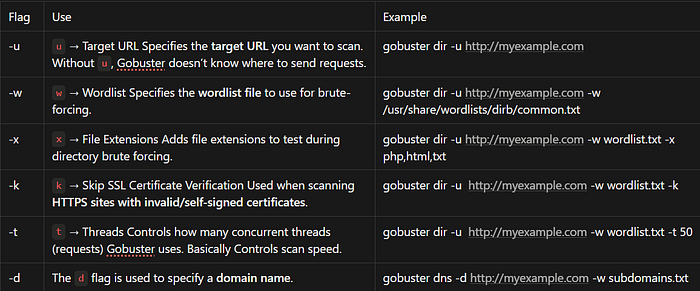
You can see other flags here: GitHub — OJ/gobuster: Directory/File, DNS and VHost busting …
Gobuster Modes
"dir' mode: It is used to enumerate website directories and used to see the directory structure of a website. Due to HTTP response codes it returns, Gobuster allows one to know if an outsider can request a directory or not
gobuster dir -u http://myexample.com -w /usr/share/wordlists/dirbuster/directory-list-2.3-medium.txt
What Gobuster Actually Does
1. Taking a target (u)
2. Taking a wordlist (w)
3. Sending HTTP requests for each word
4. Checking the HTTP response code
5. Reporting valid results
"dns" mode: It used to enumerate subdomains. The domain {example.com} may be configured properly but not the subdomain {about.example.com}. Used in: External reconnaissance, Attack surface mapping
gobuster dns -d example.com -w subdomains.txt
What Gobuster Actually Does
1. Takes the base domainexample.com
2. Reads each word from the wordlist
3. Appends the word as a subdomain it builds: admin.example.comdev.example.commail.example.comtest.example.com
4. Performs DNS lookup (NOT HTTP request): Gobuster asks a DNS server "Does admin.example.com exist?" It performs a DNS query
5. Checks if it resolves. If the DNS server responds with an IP:admin.example.com → 192.168.1.20
Gobuster prints it as valid. If it does NOT resolve: Gobuster ignores it.
"vhost" mode: Discovers hidden virtual hosts hosted on same IP. A virtual host allows multiple websites to run on the same server and IP address. Instead of purchasing multiple servers organizations configure one server to serve multiple sitesgobuster vhost -u http://example.com -w /usr/share/wordlists/SecLists/Discovery/DNS/subdomains-top1million-5000.txt
What Gobuster Actually Does
1. Connects to the IP of example.comExample:example.com → 192.168.1.10
2. Reads each word from the wordlist
3. Sends HTTP requests with modified Host headers Instead of DNS resolving, it sends:GET / HTTP/1.1Host: dev.example.comThen:GET / HTTP/1.1Host: admin.example.comEven if DNS does NOT resolve publicly.
4. Checks HTTP Response: Gobuster looks at Status code, Response length Differences in content If response changes → it found a valid vhost.
Why This Is PowerfulSometimes:DNS does NOT expose admin.example.comBut the server still hosts it internally DNS mode won't find it. VHOST mode will.
Useful Wordlists
There are many useful wordlists to use for each mode. Kali Linux comes by default with these wordlist. However, you can install an amazing GitHub repo called SecLists. sudo apt install seclists
Gobuster Deploy 1:
Configure your local DNS mapping: So your machine knows how to resolve the domain name to the target IP address you have to
Add "webenum.thm" to your /etc/hosts file to start off with like so:
echo "10.113.180.152 webenum.thm" >> /etc/hosts
You are to do this for the subdomains you may find
echo "10.113.180.152 mysubdomain.webenum.thm" >> /etc/hosts
Question 1: Run a directory scan on the host. Other than the standard css, images and js directories, what other directories are available?
gobuster dir -u http://10.113.180.152 -w /usr/share/wordlists/dirbuster/directory-list-2.3-medium.txt
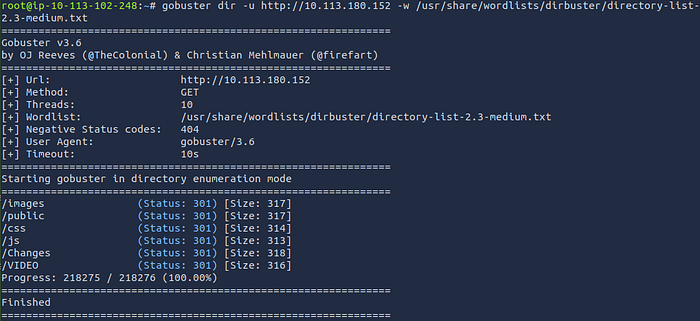
Ans: public,Changes,VIDEO
Question 2: Run a directory scan on the host. In the "C******" directory, what file extensions exist?
gobuster dir -u http://10.113.180.152/Changes -w /usr/share/wordlists/dirbuster/directory-list-2.3-medium.txt -x txt,conf,config,php,html,js
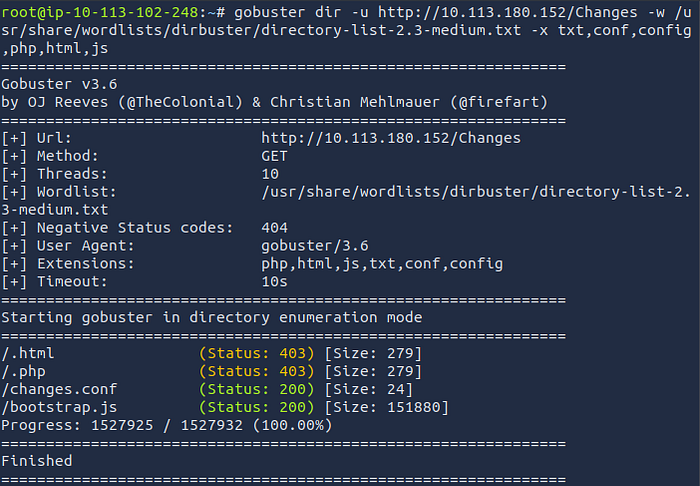
Ans: conf,js
Question 3: There's a flag out there that can be found by directory scanning! Find it!
gobuster dir -u http://10.113.180.152/VIDEO -w /usr/share/wordlists/dirbuster/directory-list-2.3-medium.txt -x txt,conf,config,php,html,js
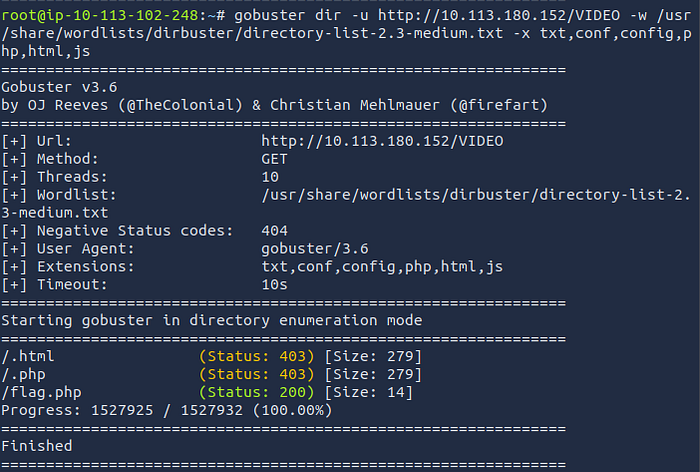
Copy and paste the URL path into your browser to retrieve the flag http://10.113.180.152/VIDEO/flag.php

Ans: thm{n1c3_w0rk}
Question 4: There are some virtual hosts running on this server. What are they?
In my case, the scan returned false results because the domain was not appended correctly. Adding the -append-domain flag resolved the issue. Depending on your setup, you may not need this flag, so try running the command without it first.
gobuster vhost -u http://webenum.thm -w /usr/share/wordlists/SecLists/Discovery/DNS/subdomains-top1million-5000.txt — append-domain
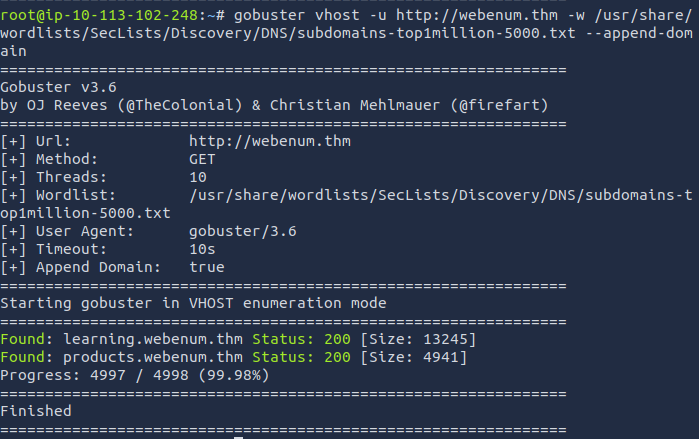
Ans: learning,products
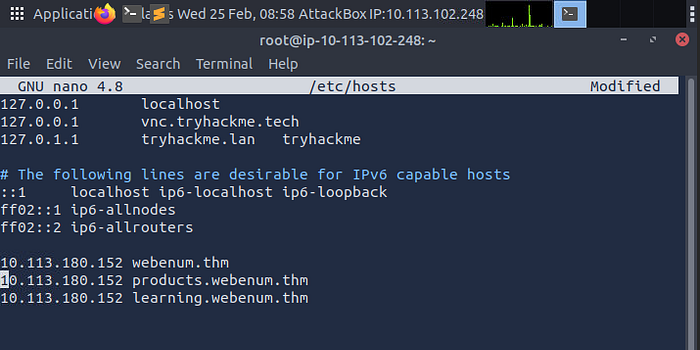
Don't forget to add them to /etc/hosts, so we can enumerate them as well
echo "10.113.180.152 learning.webenum.thm" >> /etc/hosts
echo "10.113.180.152 products.webenum.thm" >> /etc/hosts
or you can do sudo nano /etc/hosts
10.113.180.152 products.webenum.thm
10.113.180.152 learning.webenum.thm
Question 5: There's another flag to be found in one of the virtual hosts! Find it!
Here we'll scan both subdomains using popular extensions, take note the wordlist is now small.txt
gobuster dir -u http://learning.webenum.thm/ -w /usr/share/wordlists/dirbuster/directory-list-2.3-small.txt -x txt,conf,config,php,html,js
gobuster dir -u http://products.webenum.thm/ -w /usr/share/wordlists/dirbuster/directory-list-2.3-medium.txt -x txt,conf,config,php,html,js
The subdomain products.webenum.thm gave a postive result for the flag
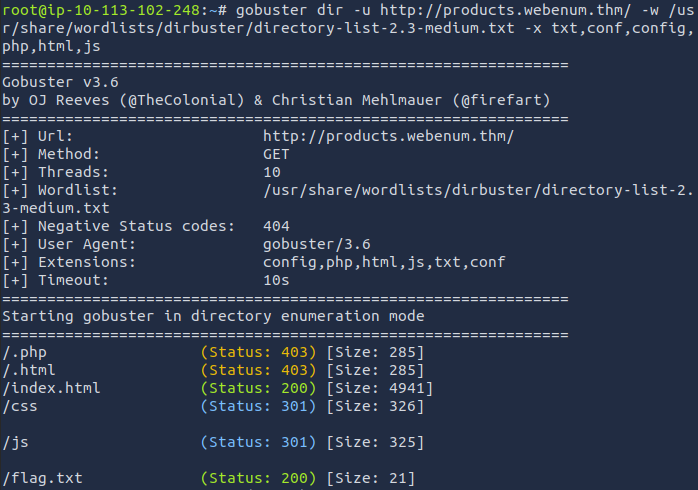
Go to your Browser and type in the path http://products.webenum.thm/flag.txt
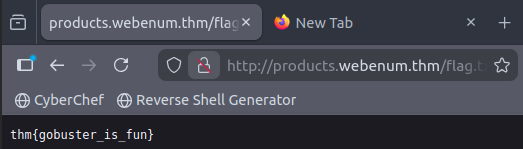
Ans: thm{gobuster_is_fun}
WPScan
The WPScan framework is capable of enumerating & researching a few security vulnerability categories present in WordPress sites.
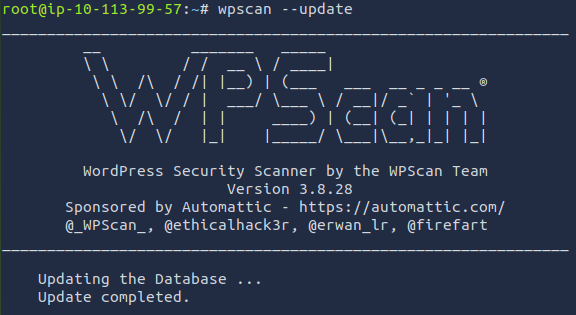
Before using WPScan, it is highly recommended that you update this database before performing any scans. Simply run
wpscan --update
Enumerating Installed Themes
It means discovering which theme a WordPress site is using. This can be done manually by examining the network tab under developer tools to see what files are loaded when you visit a webpage. However, we can use WPScan to speed this process up by using the --enumerate flag with the t argument like so:
wpscan --url <http://cmnatics.playground/> --enumerate t
The great thing about WPScan is that the tool lets you know how it determined the results it has got.
Enumerating for Installed Plugins
Identifying which WordPress plugins are installed on a target site. Plugins are small software add-ons that extend the functionality of a website
wpscan — url <http://cmnatics.playground/--enumerate> p
Breakdown:
-url→ Target website-enumerate→ Enable enumeration modep→ Enumerate plugins
Enumerating Users
WordPress authors are users, and WPScan can discover them easily:
wpscan — url <http://target-site/> — enumerate u
This reveals valid usernames that can later be used in password attacks.
Checking for Vulnerabilities
Instead of manually searching CVEs, WPScan can cross-reference findings with the WPVulnDB API:
wpscan — url <http://target-site/> — enumerate vp
The v flag checks for known vulnerabilities in discovered plugins.
Performing a Password Attack
After identifying usernames, you can perform a brute-force attack:
wpscan — url <http://target-site/> — usernames username — passwords rockyou.txt
Practical: WPScan (Deploy #2)
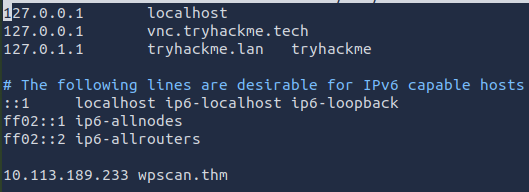
Deploy the new machine. You may have to terminate your previous Gobuster machine and then start the WPScan Machine. Once the machine has stated up follow the instructions to update your /etc/hosts file with the proper entries for the lab.
wpscan — update
echo "10.113.180.152 wpscan.thm" >> /etc/hosts
Question 1: Enumerate the site, what is the name of the theme that is detected as running?
wpscan — url http://wpscan.thm — enumerate t
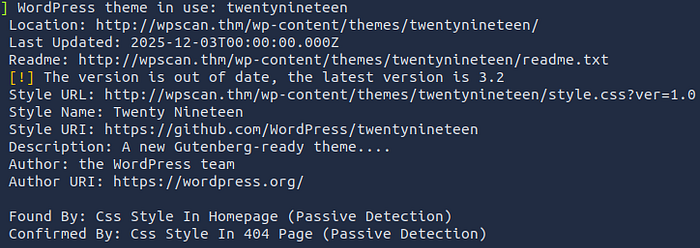
Answer: twentynineteen
Question 2: Enumerate the site, what is the name of the plugin that WPScan has found?
wpscan — url http://wpscan.thm — enumerate p
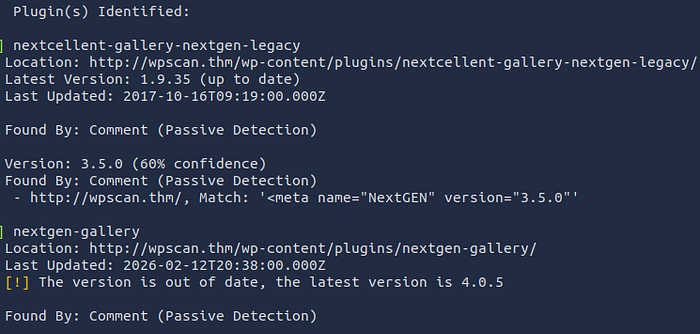
Answer: nextgen-gallery
Question 3: Enumerate the site, what username can WPScan find?
wpscan — url http://wpscan.thm — enumerate u
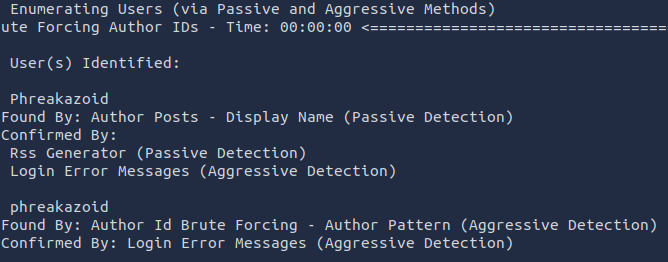
Question 4: Construct a WPScan command to brute-force the site with this username, using the rockyou wordlist as the password list. What is the password to this user?
wpscan — url http://wpscan.thm — passwords /usr/share/wordlists/rockyou.txt — usernames phreakazoid
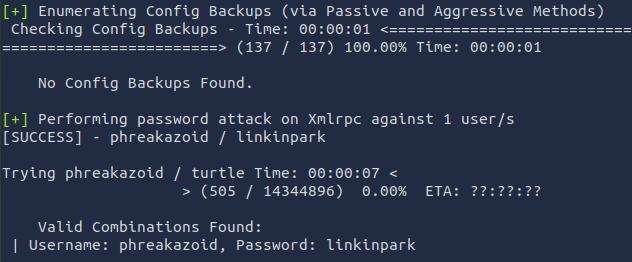
Nikto
Nikto is an open-source web server scanner used in web enumeration and vulnerability assessment.
In simple terms: Nikto scans a website (web server) and tells you if it finds security weaknesses, misconfigurations, or dangerous files.
Basic Scanning: The most basic scan can be performed by using the -h flag and providing an IP address or domain name as an argument. This scan type will retrieve the headers advertised by the webserver or application (I.e. Apache2, Apache Tomcat, Jenkins or JBoss) and will look for any sensitive files or directories (i.e. login.php, /admin/, etc)
Scanning Multiple Hosts & Ports: Nikto is extensive in the sense that we can provide multiple arguments in a way that's similar to tools such as Nmap. In fact, so much so, we can take input directly from an Nmap scan to scan a host range.
Saving Your Findings: Rather than working with the output on the terminal, we can instead, just dump it directly into a file for further analysis — making our lives much easier!
Nikto Practical (Deploy #3)
Deploy the new machine. You may have to terminate your previous Gobuster machine and then start the Nikto Machine.
Question 1: What is the name & version of the web server that Nikto has determined running on port 80?
nikto -h 10.113.143.5:80
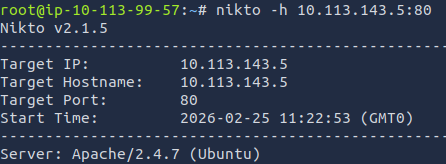
Answer: Apache/2.4.7
Question 2: There is another web server running on another port. What is the name & version of this web server?
nikto -h 10.113.143.5:8080
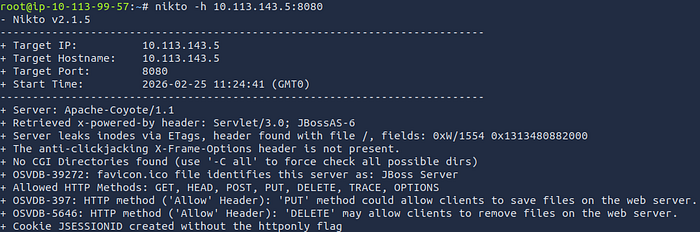
Answer: Apache-Coyote/1.1
Question 3: What is the name of the Cookie that this JBoss server gives?
nikto -h 10.113.143.5:8080 -Display 2
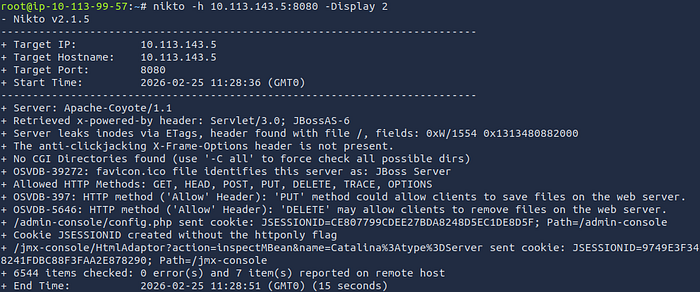
Answer: JSESSIONID
Conclusion
If you've made it this far, you're the real MVP. Taking the time to understand enumeration at this depth already puts you ahead of the curve. Most people rush to exploitation, but you chose to understand the foundation.
Everything we've covered here isn't just theory it's a prerequisite for the Upload Vulnerabilities lab.
I'll appreciate your honest feedback so as to serve you better next time.
Thanks for reading.