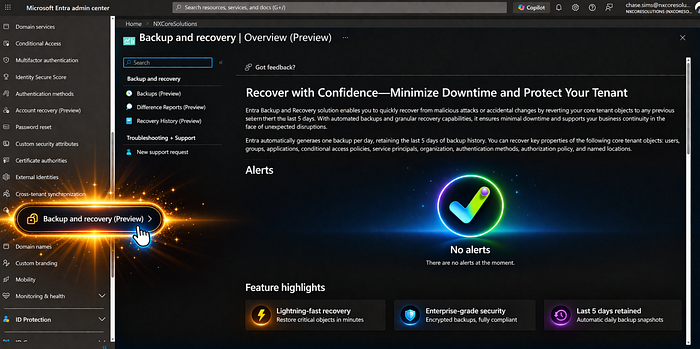
Hidden Graph API endpoints reveal that a first-party recovery solution for Microsoft Entra is imminent. Here is what we know and why Managed Service Providers (MSPs) should be celebrating.
If you manage Microsoft environments, you know the underlying anxiety of directory management. Protecting your Microsoft Entra ID tenant configuration has long felt like a complex DIY project. But recently, quiet changes in the backend suggest that Microsoft is preparing to release a highly anticipated feature: Native Backup for Microsoft Entra.
While Microsoft hasn't made an official splashy announcement yet, eagle-eyed experts over at Our Cloud Network noticed something hidden in the Graph API. Specifically, two brand-new roles have quietly appeared.
Though the user interface features are currently locked behind a service-side whitelist, the writing is on the wall. A first-party recovery solution is coming. And if you are a Managed Service Provider (MSPs), this is arguably one of the most exciting developments of the year.
Here is a breakdown of what we know, and why this is poised to completely change how MSPs manage client tenants.
The Current Nightmare of Entra Restores
To understand why native backup is so revolutionary, we have to look at the current state of Entra disaster recovery. Right now, backing up Entra configurations involves relying on community tools like Entra Exporter to dump configurations into JSON files, or paying for third-party solutions.
While these tools do a great job of saving your configuration state, the real nightmare begins during the restore process. Because there is no native "undo" button in Entra, third-party tools essentially have to recreate deleted objects from scratch. Though if I am a little bias… Some 3rd parties do it very well.
When a new object is created, it is assigned a brand-new Object ID. If you accidentally delete a critical security group or an Enterprise Application and try to restore it with a third-party tool, the new Object ID means you now have to manually track down and re-link all your Conditional Access policies, application permissions, and user assignments. It is a tedious, highly manual, and error-prone process.
Deep Dive: The New Entra Backup Roles
The technical breadcrumbs found in the Graph API give us a clear look at how Microsoft plans to structure this service. Currently, these roles are invisible in the standard Entra portal, trapped behind a tenant whitelist, but the permissions themselves reveal a robust snapshot and recovery system.
1. Entra Backup Administrator
- Role ID:
b6a27b2b-f905-4b2e-81b5-0d90e0ef1fdb - Purpose: This is the "Power User" role. It allows an admin to handle the full lifecycle of a backup, from triggering snapshots to initiating and managing recovery jobs.
- Key Capabilities: It includes specific permissions to create and cancel both preview and recovery tasks, alongside standard read access to the backup state.
Stateful permissions:
microsoft.directory/backup/preview/cancel
microsoft.directory/backup/preview/create
microsoft.directory/backup/recovery/cancel
microsoft.directory/backup/recovery/create
microsoft.directory/backup/standard/read
2. Entra Backup Reader
- Role ID:
f42252d9-5400-4d7b-b9ef-cc582dbb8577 - Purpose: Ideal for auditing or monitoring, this role provides visibility without the power to change the environment.
- Key Capabilities: Users can view snapshot lists and monitor active recovery or preview jobs, but they cannot initiate a full restoration.
Stateful permissions:
microsoft.directory/backup/preview/cancel
microsoft.directory/backup/preview/create
microsoft.directory/backup/standard/read
Interestingly, while the UI is missing, you can technically use PowerShell to assign these roles to accounts right now. This is the clearest evidence yet that a native, directory-wide "undo" button is no longer a wish, it's a roadmap.
PowerShell Instructions and Considerations
Important Notes for MSPs:
- Module Requirement: Ensure you have the Microsoft Graph module installed (
Install-Module Microsoft.Graph). - Permissions: You must run this with Global Administrator or Privileged Role Administrator permissions.
- Propagation: Even though the role is assigned via PowerShell, remember that the UI features (the "Backup" menu in the Entra portal) may still be hidden if your tenant isn't yet included in the Microsoft preview whitelist.
For Entra Backup Administrator (replace your UPN in the email field):
# 1. Connect to Microsoft Graph with the necessary permissions
# You need 'RoleManagement.ReadWrite.Directory' and 'User.Read.All'
Connect-MgGraph -Scopes "RoleManagement.ReadWrite.Directory", "User.Read.All"

# 2. Define the Target User and the Role ID
$userPrincipalName = "user@yourdomain.com"
$roleDefinitionId = "b6a27b2b-f905-4b2e-81b5-0d90e0ef1fdb"

# 3. Get the User Object
$user = Get-MgUser -UserId $userPrincipalName

if ($user) {
    # 4. Create the Role Assignment
    $params = @{
        "@odata.type"      = "#microsoft.graph.unifiedRoleAssignment"
        "RoleDefinitionId" = $roleDefinitionId
        "PrincipalId"      = $user.Id
        "DirectoryScopeId" = "/" # Applies to the entire directory
    }

    try {
        New-MgDirectoryRoleAssignment -BodyParameter $params
        Write-Host "Successfully assigned Entra Backup Administrator to $($userPrincipalName)" -ForegroundColor Green
    }
    catch {
        Write-Error "Failed to assign role. Ensure the role ID is active in your tenant and you have sufficient permissions."
    }
}
else {
    Write-Host "User not found: $($userPrincipalName)" -ForegroundColor Red
}
As for the reader, do the same (replace your UPN):
# 1. Connect to Microsoft Graph
# Requires 'RoleManagement.ReadWrite.Directory' to assign roles
Connect-MgGraph -Scopes "RoleManagement.ReadWrite.Directory", "User.Read.All"

# 2. Define the Target User and the Reader Role ID
$userPrincipalName = "user@yourdomain.com"
$roleDefinitionId = "f42252d9-5400-4d7b-b9ef-cc582dbb8577"

# 3. Retrieve the User Object
$user = Get-MgUser -UserId $userPrincipalName

if ($user) {
    # 4. Prepare the Role Assignment parameters
    $params = @{
        "@odata.type"      = "#microsoft.graph.unifiedRoleAssignment"
        "RoleDefinitionId" = $roleDefinitionId
        "PrincipalId"      = $user.Id
        "DirectoryScopeId" = "/" # Tenant-wide scope
    }

    try {
        # 5. Execute the assignment
        New-MgDirectoryRoleAssignment -BodyParameter $params
        Write-Host "Successfully assigned Entra Backup Reader to $($userPrincipalName)" -ForegroundColor Green
    }
    catch {
        Write-Error "Failed to assign role. This often happens if the role is already assigned or if the ID is not yet active in your tenant's region."
    }
}
else {
    Write-Host "User not found: $($userPrincipalName)" -ForegroundColor Red
}
Why This is a Game-Changer for MSPs
If you run an MSP, time is your most valuable commodity. Managing dozens or hundreds of disparate client tenants means that when an accidental deletion or bad configuration push happens, your helpdesk is on the clock. Here is why native Entra backup is a massive win for the channel:
1. The End of the "Object ID" Headache
Because this will be a native, first-party tool, Microsoft has the underlying access required to restore original metadata. This means that a native restore will likely retain the original Object IDs. For an MSP, this eliminates the hours of manual labor previously required to re-link policies and applications. It turns a multi-hour disaster into a simple point-in-time rollback.
2. Faster RTOs (Recovery Time Objectives)
When a client's Conditional Access policy gets accidentally wiped, locking users out, every minute counts. Having a native snapshot to revert to directly within the portal drastically reduces your recovery time. You can get your clients back to a working state in minutes, vastly improving your SLA compliance and client satisfaction.
3. Streamlined Stack Management
MSPs love standardization. While third-party tools will always have a place, having a native snapshot feature means fewer disjointed scripts and custom workflows to maintain across your client base.
The Air-Gapped Reality Check
Does this mean MSPs should abandon their third-party backup vendors? Not necessarily.
While native backups will be incredible for accidental deletions, MSPs must still plan for total compromise. If a bad actor gains Global Administrator privileges, they can potentially wipe out your native snapshots. For catastrophic scenarios, an air-gapped, third-party solution remains vital for a resilient strategy.
Wrapping Up
Microsoft has yet to officially announce the timeline for a general rollout. However, the discovery of these specific Backup Administrator and Reader roles proves that the architecture is ready.
For MSPs tired of treating Entra recovery like a high-stakes puzzle with missing pieces, a native "undo" button cannot come soon enough. The secret is out, and it's looking to be one of the most practical tools Microsoft has built for identity administrators in years.