

After a recent upgrade to Debian 12, I noticed a large number of Critical vulnerabilities in my Wazuh Dashboard Manager. My aim with this post is to review the vulnerabilities, talk about the potential impacts, and research or mitigate them to reduce the count displaying in Wazuh. See screenshot below. I am still in the early phases of upgrading from Debian 11 to Debian 12, so my clean up process is still taking place.
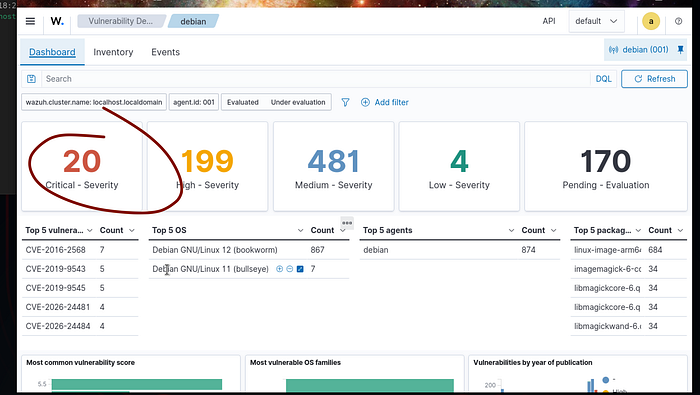
My focus will be reducing my attack surface by patching as many of these 20 vulnerabilities you see listed in the screenshot above.
As I drill down on the 20 critical vulnerabilities listed, I see the majority of them are associated with the ImageMagick Software. One of the associated vulnerability IDs is CVE-2026–26284
Also see the Debian Security Tracker for more info about this.
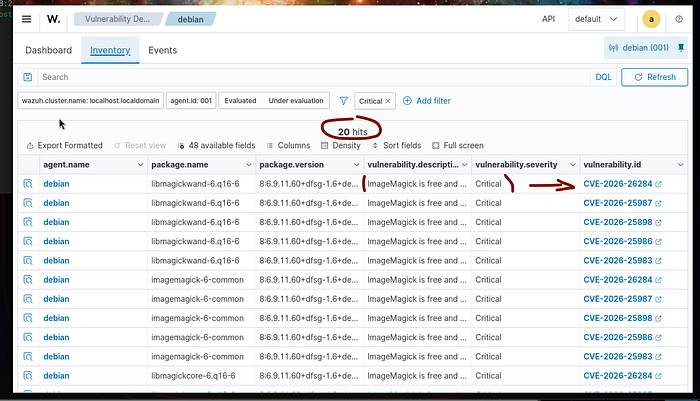
What is the Vulnerability? CVE-2026–26284
- Root Cause: It is a heap-based buffer overflow and out-of-bounds read flaw within ImageMagick's Photo CD (PCD) file decoder.
- The Risk: An attacker could craft a malicious PCD image file that, when processed by your Debian server, could cause the application to crash (Denial of Service) or potentially leak sensitive memory contents.
- Affected Versions: All ImageMagick versions prior to 7.1.2–15 and 6.9.13–40.
My next step is to attempt to simply upgrade the ImageMagick application within Debian.

This command ultimately did not solve the issue, as the vulnerability count remained the same and 0 packages were upgraded. See below.

After some research, it was discovered that the ImageMagick application itself was not installed on my distribution, but the vulnerability libraries such as libramagickmore and libramagickwand were installed as dependencies for other software. We essentially have the "guts" or innerworkings of the software, but not the actual software.
To resolve, I am going to attempt to install a fresh version of the patched version, which will in turn pull in the latest version of the clean security libraries and resolve CVE-2026–26284
The Mitigation attempt
I will perform a simple install of ImageMagick in the Debian 12 terminal.


I also had some old vulnerable older libraries from my Debian 11 ( previous OS) I will run a remove command to get rid of those since I am now running Debian 12.

The key thing I noticed here when updating my older libraries with the sudo apt autoremove -y command, my totals actually jumped.
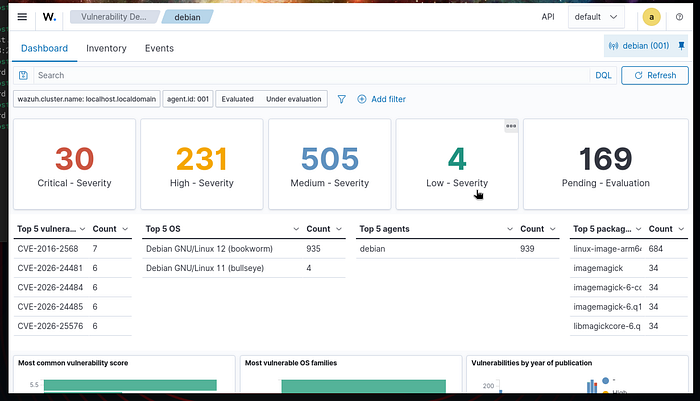
At first glance, seeing my Critical vulnerability count jump from 20 to 30 after an upgrade felt like a step backward. However, in cybersecurity, blindness is not the same as safety.
This spike represents the 'Full Visibility' phase of my lab. By moving to Debian 12, I enabled a high-fidelity security feed that finally processed my 'Pending' evaluations and revealed the true attack surface. The jump in numbers wasn't a failure of the OS, but a victory for the real picture or transparency .
I verified that while the current fix is version 6.9.13, Debian 12 maintains security by backporting these critical fixes into version 6.9.11–60+dfsg-1.6+deb12u6. This ensures stability while neutralizing the threat.
Ultimately, while Wazuh continues to display this vulnerability as 'Critical' due to a version numbering discrepancy, my manual verification of the Debian backports confirms this is a false positive; the system is effectively patched and the risk is mitigated.
As the Wazuh manager continues to process the remaining 169 pending evaluations, I expect the vulnerability landscape to shift further. My next task will be addressing the 684 kernel-level vulnerabilities flagged in the linux-image-arm-64 package.
I now have the data needed to actually begin remediation on 2026-dated threats.
See you in the next lab!