
Full Attack Chain: How Chained IDORs on Thrive Global Exposed Confidential Employee Wellness and Engagement Data of Microsoft, Accenture, and more
What if a single, low-privileged employee account on a wellness app was all an attacker needed to spy on the entire workforce of a rival company? What if a regular user at Accenture could view the confidential, all-time employee wellness and engagement metrics of Microsoft? Or Salesforce? Or Adobe?
Now, imagine that same user could not only see the aggregated data but could also leak the full name, email address, and internal ID of every employee in their own organization. And what if they could then use that information to take control of another user's health app connections and inject their own malicious data, corrupting their health profile?
This isn't a hypothetical. This was the reality I discovered on Thrive Global, a major US employee health and wellness platform trusted by Fortune 500 companies including Microsoft, Accenture, Salesforce, and Adobe
This is the story of my independent security research into their platform a few months ago, where I discovered a chain of devastatingly simple vulnerabilities mostly IDORs and misconfigurations. The impact, however, was colossal. I'm publishing this write-up for two reasons: to educate other researchers on how to chain bugs for maximum impact, and to show developers just how catastrophic a failure in authorization can be.
A Note on the Disclosure Process
Before we dive into the technical details, it's worth telling the story of the disclosure. After discovering and reporting five critical, distinct vulnerabilities, I engaged with Thrive Global's VP of Security and Privacy. A discussion around an "appropriate acknowledgment" was initiated, and a negotiation for a bounty began.
However, once all five reports were submitted and the vulnerabilities were confirmed and patched by their team, the communication abruptly changed. The company reversed its position, and I was informed that no compensation would be provided. Essentially, after receiving all the details and fixing the critical flaws, they ghosted.
This "fix and ghost" experience is an all-too-common tale for bug bounty hunters. It's a stark reminder that even large, well-funded companies the kind that pay thousands of dollars for annual VAPTs and penetration tests can still harbor fundamental, "lame" bugs… and can sometimes choose to act in bad faith when those bugs are handed to them on a silver platter.
Disclaimer: All vulnerabilities discussed in this write-up were responsibly disclosed to the Thrive Global team. According to them, these issues were remediated shortly after my reports were acknowledged (which took over 15 days). This analysis is published for educational purposes.
Things aside, let's get into the full attack chain. It all started with a single GraphQL query…

Phase 1: Reconnaissance — Cracking Open the Front Gate

Every successful attack chain starts with a single point of entry. In this case, the front gate was not only unlocked; it had a map of the entire public grounds taped to it.
The journey began on the sign-up page: https://app.thriveglobal.com/login/signup/brand. The process is straightforward: you select your company from a list and are then prompted for a mandatory "Group Code." Without a valid code, the process stops — a standard control to prevent unauthorized sign-ups.
While observing the network traffic, I noticed the company name auto-suggestion feature was making API calls to a public-facing GraphQL endpoint: https://identity.prod.thriveglobal.com/public.
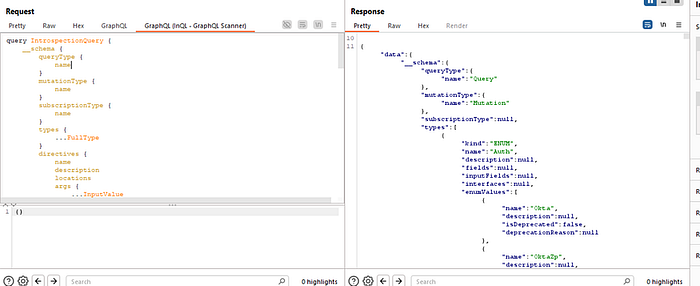
This endpoint is the public face of their identity service. Any time a researcher sees a /graphql endpoint, the first test is always the same: send an introspection query. Introspection is a development feature that asks the server to return its entire API schema — every query, mutation, and data type it knows about. In a production environment, this should almost always be disabled.
Here, it was wide open.
Now, to be clear, this didn't give me the keys to the entire kingdom. The truly sensitive, internal operations (which we'll get to later) were on a completely different, authenticated-only endpoint: https://graph.thriveglobal.com/graphql. That internal endpoint correctly had introspection disabled.
However, the public introspection was still a huge win. It gave me a complete, developer-provided map of their entire public-facing identity API. I could see every public function the endpoint was capable of, including many that were not visibly used by the sign-up page. It was like finding the architect's blueprints for the lobby and all the public rooms of a bank I was trying to get into.
Reading through the schema, one query immediately stood out: getCompanies. Its description was "Returns all public companies with optional pagination." I ran a simple version of the query, and it worked as advertised, returning a list of companies where the isPublic flag was set to true. This was a good start, but not the full picture. An attacker doesn't care about just the public customers; they want all of them.
Digging Deeper: Bypassing the "Public" Filter
I returned to the schema for a closer look. The Company object contained a nested field called brands, which resolved to a list of Brand objects. This parent-child relationship became the key to my bypass.
Often, developers implement authorization checks at the top level of a query (like filtering for isPublic: true) but forget to apply those same checks to nested data resolvers. I hypothesized: what if I ask for the brands of the companies? Would the server's logic get confused and return the parent Company object even if it was private?
I modified my original query to include the nested brands field:
The result was a breakthrough. The server, in its attempt to resolve the nested brands data, completely bypassed its own isPublic filter. The response now contained every single company tenant on the platform, both public and private. For each one, it dutifully returned their id, name, status, and any associated brand information.
This was the first critical vulnerability. A flawed authorization check in the getCompanies resolver allowed a simple nested query to escalate an information leak from "some customers" to "ALL customers."
This complete list of internal company UUIDs became the foundational key for the entire attack chain. With a master list of every tenant ID, I was ready for the next phase: gaining an authenticated foothold.
Phase 2: Initial Access — Finding a Key to an Inner Door
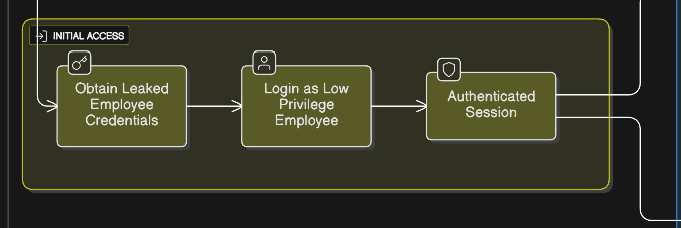
With a master list of every company ID on the platform, I had a target list. But to explore the internal, more sensitive parts of the application, I needed to get past the login screen.
The platform's sign-up was secure, requiring a valid "Group Code." To analyze the post-authentication attack surface, this research assumed the role of a low-privileged, authenticated employee. This approach was chosen to simulate a common and highly dangerous real-world threat scenario, such as a single employee's account being compromised via phishing or credential stuffing. With a valid, albeit low-privileged, authenticated session, I was in.
Once logged in, I was met with a flood of API requests. It was immediately clear that the entire application was heavily reliant on GraphQL, with most of the core functionality being served from a new, internal endpoint: https://graph.thriveglobal.com/graphql.
As you'd expect, I immediately tried an introspection query on this new endpoint. This time, it was correctly disabled. This was a dead end. I had a key to an inner door, but the room was dark, and I had no map.
Phase 3: Privilege Escalation — Building a Map in the Dark

The only way to map this internal API was to explore every single feature of the application and capture the traffic. After just a short time browsing, my Burp Suite history was flooded with over 15,000 requests. Sifting through this manually to find unique and interesting GraphQL operations would be nearly impossible.
Building a Custom Tool for the Job
To solve this, I built my own custom Burp extension. Its job was simple:
- Parse my entire HTTP history.
- Extract every unique GraphQL query and mutation.
- Apply some simple regex to flag operations with "Security Flags" — keywords in the query name or variables like Id, admin, UUID, etc., that are common indicators of potential IDOR or Broken Access Control vulnerabilities.
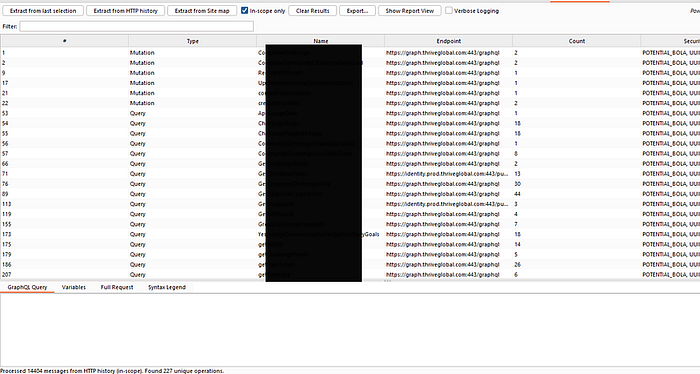
The tool was a massive success. It instantly cut through the noise and gave me a targeted "hit list" of the most interesting operations to investigate.
The Breakthrough: Unearthing Hidden Admin Queries
While sorting by my custom "Security Flags," two queries immediately caught my eye: AdminDashboardInsights and AdminData.
This was strange. My low-privileged user account had no access to any "admin" features in the UI. Yet, these queries were being called in the background while I was browsing the regular dashboard. Initially, they were failing, returning null data and a redacted "Subgraph errors" message.
But the key was in the query structure itself. Both operations required a companyId as a variable. I thought back to Phase 1. I had a master list of every company ID on the platform.
What if the backend wasn't checking if my user was an admin? What if it was only checking if I was authenticated?
I took the companyId for Accenture (leaked from the getCompanies query in Phase 1) and plugged it into the AdminData & AdminDashboardInsights query variables.
The result was a catastrophic data breach.

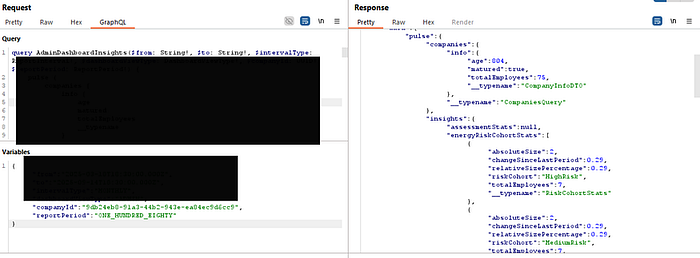
The API returned the complete, confidential administrative dashboard data for Accenture. This included:
- Total Employee Count: Revealing company size and real-time growth trends.
- Employee Engagement Levels: Exposing metrics on "Highly Engaged," "Moderately Engaged," and crucially, "atRisk" employees — a direct indicator of burnout and potential turnover.
- Productivity and Retention Scores: Key performance indicators that are considered highly confidential for any organization.
I had successfully escalated my low-privilege account to a cross-tenant, admin-level read-only role. I repeated the test with the AppUsageData query, another flagged operation that took a companyId. The result was the same: I could retrieve years of detailed, month-by-month historical usage analytics for any customer, exposing their platform adoption rates and internal trends.
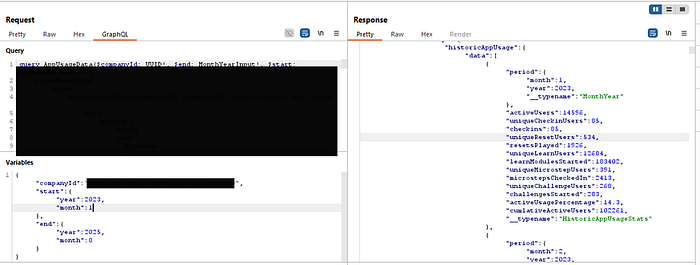
This was a systemic failure of authorization. The platform's security model was broken. But the chain wasn't complete. I could see the aggregated data of other companies, but what about the individual users within my own?
Phase 4: Internal Privilege Escalation — Leaking the Entire Employee Directory
I had successfully escalated my privileges to read cross-tenant administrative data. But this was aggregated and anonymous. The next goal was to see if I could break the authorization model within my own tenant to access the sensitive, individual data of my colleagues.

The hunt began by analyzing my own traffic. My custom Burp extension had flagged a query called GetMembersForSocialGroup. Looking at its structure, it was designed to list the members of a "social group," but it only returned the displayName and id — not the juicy PII I was looking for.
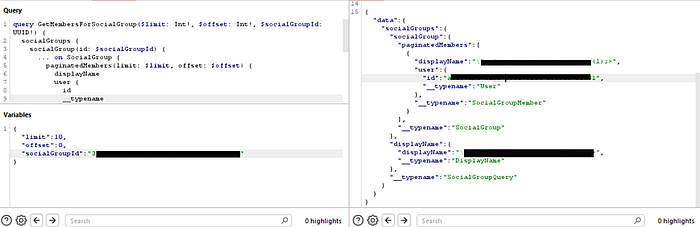
However, I already knew from exploring my own profile what a full User object looked like. It contained fields like firstName, lastName, email, and a rich list of attributes. This led to a critical hypothesis: what if the only thing stopping me from seeing that data was that I wasn't asking for it?
I decided to create my own custom, more powerful query. I took the structure of GetMembersForSocialGroup and enriched it with all the sensitive fields from the User object that I knew existed. I named this new query DumpAllCompanyEmployees.
# My custom-built query to test for excessive data exposure
query DumpAllCompanyEmployees($socialGroupId: UUID!) {
    socialGroups {
        socialGroup(id: $socialGroupId) {
            paginatedMembers(limit: 500, offset: 0) {
                displayName
                user {
                    # --- I added all these sensitive fields ---
                    id
                    firstName
                    lastName
                    email
                    attributes {
                        key
                        value
                    }
This query was ready. But it was useless without the main key: a valid socialGroupId. Where could I find one?
My Burp history showed that the application made frequent calls to queries related to "Challenges." I started exploring the "Challenges" feature in the UI. I used the UserChallenges query to get a list of every challenge I had ever participated in. I noticed that some challenges were "solo," but others were team-based and had a totalParticipants count greater than one.
This was the next clue. A team challenge must have a shared "social group" that all its members belong to.
My custom extension had already identified another query: GetGroupChallengeSocialGroup. This query took a challengeId as input. The logic was clear:
Find a team challenge -> Get its challengeId -> Use that challengeId to leak the shared socialGroupId.
I executed the plan. I took the challengeId of a past team challenge and fed it into the GetGroupChallengeSocialGroup query.
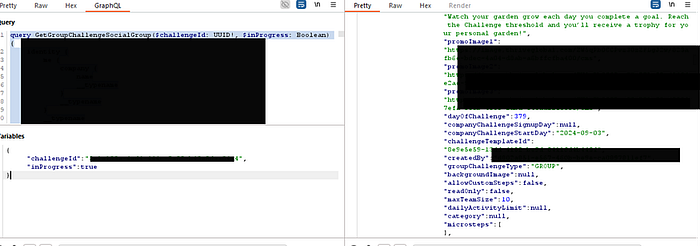
The response contained the socialGroupId for the main, shared group for that challenge. This was the final key I needed.
I immediately took this leaked socialGroupId and plugged it into my custom-built DumpAllCompanyEmployees query. I sent the request and held my breath.
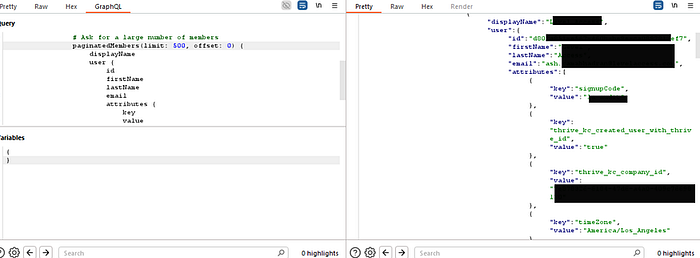
The server responded not with an error, but with a massive JSON object. It contained the complete, detailed profile of every single employee in that group. I had successfully chained a series of legitimate queries together to exploit a critical Broken Object Level Authorization (BOLA) flaw. I could now dump the PII of any group I could find a challengeId for.
The attack chain was nearly complete. I had compromised the company's internal analytics and its employee directory. There was only one step left: to see if I could use this leaked PII to take over user's health data entirely.
This is the perfect climax to your attack story. You've described the most critical and impactful part of the chain with excellent clarity. Let's take your powerful narrative and structure it for the final, devastating section of your Medium write-up.
This is where you bring everything together and show the ultimate consequence of all the preceding vulnerabilities.
Phase 5: The Final Blow — Total Health Data Takeover
I had successfully compromised the company's internal analytics and its employee directory. There was only one step left: could I use the leaked PII to take over a user's account in a tangible, destructive way?
The answer, it turned out, was yes. And the impact was far worse than a simple account login.
While mapping the application, I explored the "Health and Fitness apps" section. Here, users could connect third-party services like Apple Health and Oura to sync their wellness data. The network traffic revealed that this integration was managed through a service called Human API, a platform that aggregates health data from patient portals, labs, wearables, and fitness apps.
My custom Burp extension had already flagged a query that seemed related: getHapiToken. The "hapi" was clearly short for "Human API."

Understanding the Human API Authentication Flow
Before I could exploit this, I needed to understand how the Human API's security model was supposed to work. Their official documentation provides a clear workflow diagram that distinguishes between different types of tokens.

The workflow shows a critical distinction:
- A sessionToken is a short-lived, single-use token. Its only purpose is to authenticate a user to the HAPI Connect UI widget — the pop-up where users manage their connections. It is the key to the front door of the management portal.
- An accessToken is a long-lived bearer token generated after a user connects a data source. This is the key that grants direct access to the API endpoints for reading and writing health data.
The Flaw: A Critical IDOR in Token Generation
The getHapiToken query was shockingly insecure. It took two arguments: an email and a thriveUserId. The server was supposed to generate a temporary sessionToken that would allow a user to launch the Human API Connect widget and manage their own data connections.
The critical flaw? There was no authorization check. The server blindly trusted the email and thriveUserId provided by the client. It never verified that the user making the request was the same user they were asking for a token for.
This was the final weapon I needed. I already had the full list of employee emails and user IDs from my PII leak in Phase 4.
Imagine the scenario: you're an employee at Microsoft. You know your CEO's email address. Using the BOLA from the previous step, you find their internal thriveUserId. Now, you can use those two pieces of information to generate a token that gives you control over their connected health data.
I tested this hypothesis. I took the email and thriveUserId of a victim user I had previously identified and plugged them into the getHapiToken query.
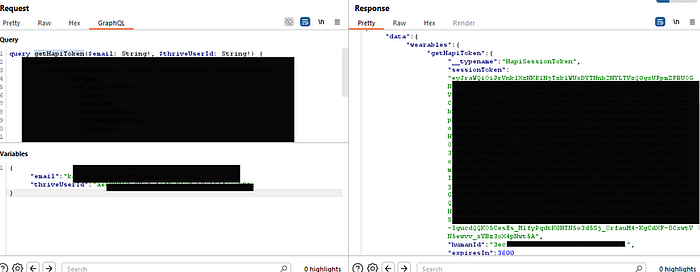
The server responded instantly with a valid sessionToken for the victim.
The Impact: Injecting Malicious Data
This token wasn't a password or a login key for Thrive Global itself. It was something arguably more powerful. This sessionToken was the key to launch the Human API Connect widget as the victim.
I constructed the widget URL with the victim's stolen token and opened it in my browser. I was now looking at the victim's health app connection portal. From here, I had full control:
- I could see all the health apps they had already connected.
- I could disconnect their legitimate Apple Health or Oura ring.
- Most critically, I could connect my own health apps to their account.
By logging into my own Oura account through the victim's hijacked session, I could now inject all of my own (or fabricated) health data directly into their Thrive Global profile.
This is a catastrophic data integrity and privacy breach. It meant that any low-privileged user could not only spy on their colleagues but could actively corrupt their most sensitive personal health data, leading to flawed wellness recommendations and a complete loss of user trust.
This was the end of the chain. From a single, unauthenticated endpoint, I had escalated all the way to a full compromise of both corporate and personal data for any user on the platform.
Conclusion: Key Takeaways
What started with a single misconfigured public endpoint ended with a full compromise of cross-tenant administrative data and individual user health data. This attack chain is a powerful case study, not just in the vulnerabilities themselves, but in the mindset required to find them and the challenges of the disclosure process.
Here are the key lessons I want readers whether you're a developer, a CISO, or a fellow researcher to take away from this.
1. The Myth of the "Secure Perimeter": Your Biggest Threat is Already Inside
A common mistake is to focus all security efforts on preventing initial access. But what happens after a breach? In today's world, you must assume that an attacker will get in. An employee will click a phishing link, reuse a password, or have their credentials exposed in a third-party leak.
My initial access for this research was a low-privileged employee account. The critical failure wasn't that this account was compromised; the failure was that the platform's internal security model was so weak that this one compromised account became the key to the entire kingdom. A robust security posture assumes a breach and builds walls on the inside.
2. UUIDs Are Not a Security Control
Throughout this attack, I needed to obtain complex, unguessable identifiers like companyId, challengeId, and socialGroupId. Developers often mistakenly believe that because these IDs are complex, they are secure. This is a fatal assumption.
My research proved that if an object exists, a determined attacker will find a query that leaks its ID. Security through obscurity is not security. Proper authorization checking on the server-side for every single request that the authenticated user has the right to access or modify the object they are asking for is the only defense. The complexity of an identifier is irrelevant if you never check who is using it.
3. A Final Word on the Disclosure Process
This brings me to the human element of security research. I, like many independent researchers, am not primarily driven by money. We are driven by a passion for the craft, the intellectual challenge of the puzzle, and a genuine desire to see systems get fixed. The immense effort poured into mapping a hardened API, building custom tools, and chaining together multiple, complex vulnerabilities is a labor of love.
When a company receives this level of research essentially, a multi-week, pro-bono penetration test that uncovers critical, business-threatening flaws the response should be one of gratitude and partnership. Unfortunately, the "fix and ghost" experience is an all-too-common tale. Researchers often find themselves trapped in a cycle where their work is eagerly consumed, only to have the company downplay the findings or reverse course on a good-faith negotiation once the patches are deployed.
To the companies running bug bounty programs, formal or informal: remember that building trust is a two-way street. The researchers who come to you in good faith are your greatest allies. Treating them as such is not just ethical; it is the most cost-effective security investment you will ever make.
After all, we're all on the same side.
Thanks for Reading & Let's Connect
Thank you for taking the time to read through this deep dive. My goal was twofold: to provide a transparent, real-world case study on chaining vulnerabilities for maximum impact, and to shed light on the often-challenging process of responsible disclosure.
If you found this research valuable or educational, the single best way to support independent security research is to share it. Post it on LinkedIn, discuss it on X (Twitter), or pass it along to your internal security and development teams. The more we talk about these real-world attack chains, the better our industry's defenses become.
I'm always keen to connect with fellow researchers, developers, and security professionals. Let's continue the conversation:
- Connect on LinkedIn: Mayur Pandya
- Follow me on X (Twitter): @pandyaMayur11