Disclaimer
This project was performed in a controlled lab environment using Metasploitable 2 (intentionally vulnerable machine). All activities were conducted for educational purposes only.
Report repository(Git Hub): Link

Why I Built This
Most beginners run scans manually.
Run Nmap → Check results → Stop.
But in real-world cybersecurity, that's not enough.
Networks are dynamic:
- New devices appear
- Ports open and close
- Services change
So I wanted to build something smarter:
A system that scans automatically, updates itself, and shows results live — without any manual work.
Lab Setup
- Kali Linux → Attacker & scanner
- Metasploitable 2 → Target
- VirtualBox → Isolated environment
- Apache2 → Web server
Everything runs inside a safe lab.
The Idea (Architecture)
This project works like a pipeline:
- Discover network
- Scan ports
- Detect services
- Convert output → HTML
- Host on web server
- Automate using cron
Then repeat every 10 minutes automatically
Step 1 — Network Discovery
I started by identifying live devices:
nmap -sn 192.168.56.0/24Found:
- Target machine (Metasploitable 2)
- Network range
This step is crucial — you can't scan what you don't know exists.
Step 2 — Port Scanning (Deep + Fast)
🔹 Nmap (Detailed Scan)
nmap -sV 192.168.56.101- Detects services
- Identifies versions
- Finds vulnerabilities
Masscan (Fast Scan)
masscan 192.168.56.101 -p1-10000 --rate=10000- Scans 10,000 ports in seconds
- Confirms open ports quickly
Found 19+ open ports including:
- FTP (21)
- SSH (22)
- HTTP (80)
- SMB (445)
- Backdoor (1524)
Step 3 — Building the Automation Script
This is the core of the project
I created a bash script:
#!/bin/bash
TIMESTAMP=$(date "+%Y-%m-%d %H:%M:%S")
echo "<html><body>" > /var/www/html/scan_results.html
echo "<h1>Network Scan Results</h1>" >> /var/www/html/scan_results.html
echo "<p>Last Updated: $TIMESTAMP</p><pre>" >> /var/www/html/scan_results.html
nmap -sV 192.168.56.101 >> /var/www/html/scan_results.html
echo "</pre></body></html>" >> /var/www/html/scan_results.html
What This Script Does
- Gets current time
- Creates HTML page
- Runs Nmap scan
- Embeds results inside webpage
- Updates file every time it runs
Important concepts:
>→ overwrite file>>→ append data
Step 4 — Hosting Results on Web Server
I used Apache2:
sudo systemctl start apache2Saved results in:
/var/www/html/scan_results.htmlNow I can open:
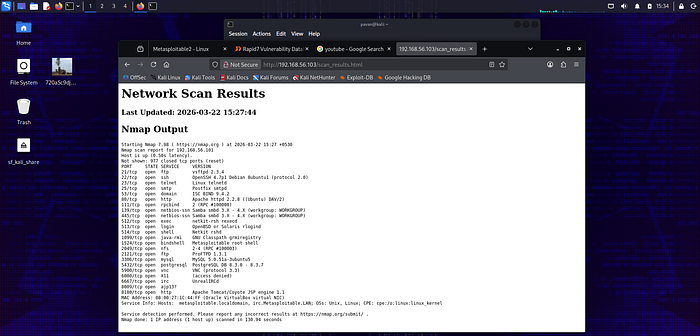
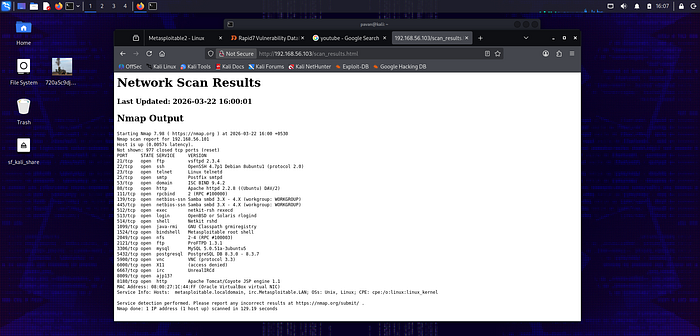
http://192.168.56.103/scan_results.htmlAnd see:
- Live scan results
- Open ports
- Services
- Timestamp
Step 5 — Making It Fully Automatic (CRON JOB)
This is where everything becomes powerful.
I added:
*/10 * * * * /home/pavan/scan_script.shWhat This Means
- Runs every 10 minutes
- Works 24/7
- No manual execution needed
Cron acts like a scheduler (alarm system for Linux)
Step 6 — Full Automation Flow
Now the system works like this:
- Cron triggers script
- Script runs Nmap
- Output converted to HTML
- Webpage updates automatically
- User sees latest scan
Repeat every 10 minutes
Final Output (What I Built)
I successfully created:
✔️ Automated port scanner ✔️ Real-time updating dashboard ✔️ Continuous monitoring system ✔️ Zero manual effort
Security Insights Discovered
From continuous scanning:
- Backdoor on port 1524 → root access
- FTP vulnerable → unauthorized access
- Telnet → plaintext credentials
- SMB → exploitable services
This shows how dangerous unmonitored systems are.
Real-World Use Case
This system can be used for:
- SOC monitoring
- Network auditing
- Detecting unauthorized devices
- Continuous vulnerability tracking
This is exactly how real companies monitor networks.
What I Learned
- Automation is more powerful than manual work
- Bash scripting can build real tools
- Nmap + Masscan = powerful combo
- Cybersecurity = monitoring, not just hacking
Final Thought
Anyone can run a scan… But building a system that runs itself? That's real skill.
About Me
Pavan N CEH Student | Cybersecurity Learner
Building real-world cybersecurity tools and documenting my journey.