
This guide explains the complete, practical setup to make Burp Suite ↔ MCP Proxy ↔ Antigravity work together so Antigravity can interact with live traffic and security data directly from Burp.
Step 1: What You Are Connecting (Architecture)
When configured correctly, the flow looks like this:
Antigravity
     ↓
MCP Client (local)
     ↓
Burp MCP Proxy (Java)
     ↓  SSE (Server-Sent Events)
Burp Suite MCP Extension
     ↓
Live HTTP traffic / Scanner / Repeater
Key idea: Antigravity does NOT talk to Burp directly. It communicates through the MCP proxy using an SSE stream.
Step 2: Requirements
Before starting, ensure:
- Burp Suite Professional or Community running
- Burp MCP Extension installed
- Java (JDK 21+ recommended)
- Antigravity installed and MCP enabled
- Port
9876free locally
Step 3: Setup Burp MCP Server

Inside Burp Suite:
- Go to:
Extensions → Installed - Load the Burp MCP extension
- Open extension settings.
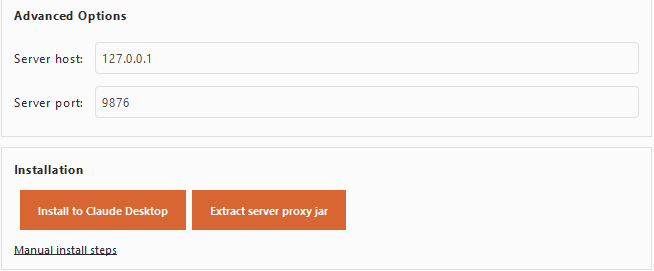
4. Click Extract Server Proxy Jar, and save this new file into some blank folder:
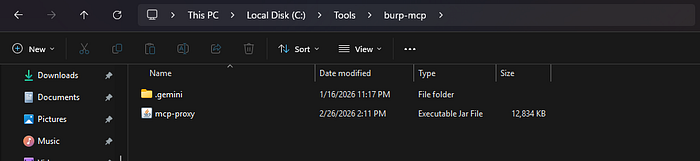
5. Start the MCP server.
Step 4: Test MCP Proxy Manually (IMPORTANT)
Before connecting Antigravity, confirm proxy works.
Run:
java -jar C:\Tools\burp-mcp\mcp-proxy.jar --sse-url http://127.0.0.1:9876
You should see:
Successfully connected to SSE serverIf this step fails, Antigravity will never connect.
Note: You can give this command to codex too, and say use this to interact, this can be second hand for help while testing.
Step 5: Configure Antigravity MCP
Open Antigravity MCP configuration file.
- Click MCP Servers:
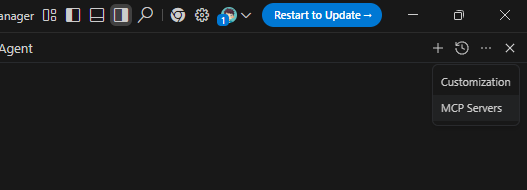
2. Then click Manage MCP Servers:
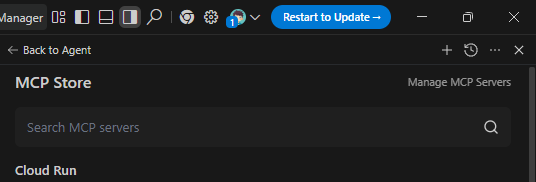
Fill like this in mcp_config.json file:
{
    "mcpServers": {
        "burp": {
            "command": "C:\\Program Files\\Java\\jdk-21\\bin\\java.exe",
            "args": [
                "-jar",
                "C:\\Tools\\burp-mcp\\mcp-proxy.jar",
                "--sse-url",
                "http://127.0.0.1:9876"
            ],
            "disabledTools": []
        }
    }
}
Make sure to use absolute paths in the configuration file. For example, use:
"command": "C:\\Program Files\\Java\\jdk-21\\bin\\java.exe"instead of simply:
"command": "java"Many MCP runners modify or reinterpret CLI arguments when executables are resolved through PATH.
Using the full Java executable path ensures arguments are passed exactly as intended and prevents argument corruption or automatic fallback to incorrect defaults (such as HTTPS/TLS connection errors).
Note: This same problem happens when configuring with Claude Desktop, so use absolute paths
Now come back to Manage MCP tab, and click refresh:
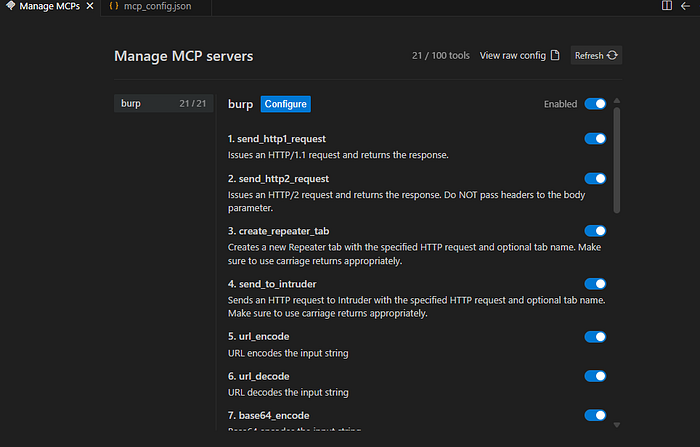
If you see like this, means its configured properly, you can ask the agent to do any task now
Start Connection
Order matters:
- Start Burp Suite
- Ensure MCP extension server is running
- Launch Antigravity
- Antigravity starts MCP proxy automatically
If you see:
https://localhost:9876your arguments were not passed correctly.
Step 7: Confirm It Works (Quick Check)
Inside Antigravity:
Ask it to list Burp tools or inspect traffic.
If connected properly, it can:
- Read Proxy history
- Access requests/responses
- Send items to Repeater
- Analyze vulnerabilities
- Assist during live testing
Step 8: Common Errors & Fixes
Invalid TLS record type code: 72
Cause:
- Proxy trying HTTPS while Burp runs HTTP.
Fix:
- Ensure
--sse-url http://127.0.0.1:9876
Note: if `
http://127.0.0.1:9876` isn't working, try "http://127.0.0.1:9876/sse" as url, no matter you are using Mac, Linux or Windows.
Unknown argument: --sse-url
Cause:
- MCP runner modifying arguments.
Fix:
- Use absolute Java path.
Not connected
Cause:
- SSE server not running.
- Wrong port.
- Burp extension stopped, or Burp-Suite isn't open.
Step 9: How to Use It Effectively?
Once connected, the real use appears during testing:
Live Recon
- Ask Antigravity to summarize proxy traffic.
- Detect interesting endpoints automatically.
Vulnerability Analysis
- Feed requests directly from Burp history.
- Get payload ideas or bypass strategies.
Faster Manual Testing
- Move requests to Repeater using MCP actions.
- Generate attack variations instantly.
Workflow Upgrade
Instead of:
Copy → Paste → Analyze → RepeatYou get:
Observe → Ask → Modify → SendPractical Usage Tip
Keep Burp Proxy recording continuously.
Antigravity performs best when it has:
- session flows
- authentication traffic
- API sequences
More context = smarter analysis.
Usage & Cost
Codex: Codex often refuses or denies actions during heavy workflows, but overall its usage limits are fairly generous compared to others. It works reliably for moderate Burp interactions, though repeated large analysis tasks may still require retries.
Claude: Claude requires a paid subscription (around $17/month), and its usage limits can exhaust quickly during Burp analysis. When processing large requests, for example, analyzing more than ~50 Burp requests in a single query, the free daily limit may be consumed within just a 2–3 messages, and in paid 25–30 messages. The free version is generally insufficient for MCP-based Burp workflows. It consumes a large number of tokens per message, so use it wisely.
Antigravity: Antigravity is bundled with Google One AI Pro, providing access to multiple models (GPT, Opus, Sonnet, Gemini, etc.). When higher-tier models like Opus reach their limit, Gemini usually remains available, allowing continued work without interruption. But this is also not usable in peak hours like Tue-Thu in between 12 pm — 5 pm. If you are from India like me, Jio SIM promotion currently allows redeeming Google AI Pro for free for one year, which significantly extends Antigravity usage limits for MCP workflows.
Note: Avoid buying multiple subscriptions of the same service (for example, two Codex, two Claude, or two Antigravity accounts). It does not meaningfully increase usable limits, in my case, I got only around 10–20% extra effective usage due to shared backend restrictions and rate controls.
If higher throughput is needed, a better approach is using multiple devices/screens or distributing work across different platforms/providers instead of duplicating the same subscription.
Final Result
You now have:
Antigravity AI + Burp Suite + Claude + Codex
= Assisted real-time application security workflow
This setup turns Burp from a manual interception tool into an AI-assisted testing environment.
That's a Wrap!