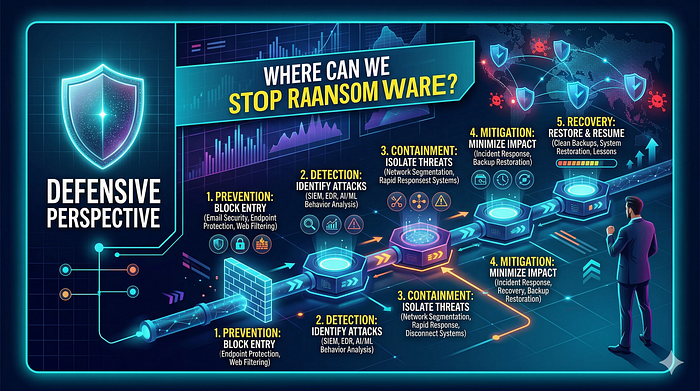

Misconceptions about ransomware often focus on encryption. People think once it starts, it is too late. That is not entirely true. Ransomware is not just one thing. It happens in stages. Every stage lets you stop the attack.
Here is how you can stop it:
Stage 1: Initial Access — Stop It Before It Starts
Ransomware attacks often start with human errors. People open phishing emails, download dangerous attachments, or click fake invoices. Unprotected RDP services can also be forced. This stage can be stopped with:
* Better email filters * Email sandboxing * Disabling macros in Office by default * Using multi-factor authentication (MFA) * Limiting RDP access * Security training for workers
Most ransomware infections can be prevented at this point. Stopping it early is cheap and simple.
Stage 2: Execution — Detect Weird Activity
If the malicious file gets on the computer, you must find it as it runs. Tools can detect weird actions, like:
* Weird use of PowerShell * Strange process starting, like Word starting cmd.exe * Process injection behavior * Unsigned binaries running from temporary folders
Behavioral detection is key here. Regular antivirus looks for known files. Modern ransomware changes constantly. Behavior rarely lies. If Word suddenly spawns PowerShell, that is weird regardless of the file hash.
Stage 3: Privilege Escalation—Contain Damage
If ransomware acquires admin rights, the damage is much bigger. This is why least privilege is important. Users should not have admin access unless they really need it. Logs of privilege escalation attempts can help you detect:
* UAC bypass attempts * Token impersonation * Misuse of built-in Windows tools
Whether ransomware gets to user files or the whole domain often depends on this stage.
Stage 4: Persistence—Watch for Long-Term Access
Ransomware often prepares to survive a restart. It may:
* Change registry Run keys * Create scheduled tasks * Install bad services * Add entries to the startup folder
These actions leave clues. Security teams should monitor:
* Registry changes * New services being installed * Unexpected scheduled tasks
Persistence is loud if you know where to look.
Stage 5: Shadow Copy Deletion—A Red Flag
Deleting shadow copies is a major indicator of ransomware. If you see commands like:
vssadmin delete shadows /all /quiet
This is not a regular user action. Most real programs do not mass delete backups silently. Create alerts for:
* vssadmin usage * wbadmin usage * Bcdedit modifications * Stopping backup services
Stopping this step may prevent total data loss.
Stage 6: Encryption Behavior — Final Detection Window
Even if everything else fails, encryption itself is weird. Clues include:
* Fast file changes * High-entropy file writes * Mass file renaming * Strange CPU spikes * Many files changed in seconds
Modern tools detect such activity as mass encryption. Speed is important here. Rapid action can stop systems before everything is encrypted. Minutes can decide how much data is lost.
Stage 7: Command and Control Communication—Network Defense
Some ransomware families talk to servers outside the network. They may:
* Register the infection ID * Upload encryption keys * Download settings * Check for payment
Network monitoring can find:
* Weird DNS requests * Connections to bad IP addresses * Tor traffic * Unusual outbound POST requests
This scenario is where logging and threat intelligence are useful. Network telemetry can find the attack even if endpoint tools fail.
The Real Lesson
Ransomware is not unstoppable. It is predictable. It follows patterns. And each pattern is an opportunity. Organizations make mistakes relying on just one type of security. True defense needs:
* Endpoint monitoring * Network visibility * Protected backups * Least privilege * User awareness
Security is not about hoping for no attacks. It is about assuming an attack will happen. You should build systems to detect and contain it quickly.