
Introduction
In the previous article of this series, we explored the fundamentals of web applications. We discussed what a web application is, how it works, the different components involved, and the complete workflow of a web request. Understanding those concepts is extremely important because every activity that happens inside a web application leaves traces somewhere in the infrastructure.
Those traces are called logs.

Logs are one of the most valuable sources of information during a security investigation. Whenever a suspicious activity or security alert is triggered, the first place investigators look is the logs generated by different components of the application environment.
Logs help security analysts answer critical questions such as:
- What exactly happened?
- When did it happen?
- From which IP address did the request come?
- Which endpoint or resource was accessed?
- Was the request successful or blocked?
- Did the request interact with the database?
- Were there multiple attempts?
Without logs, investigating web application attacks becomes almost impossible.
In this article, we will explore web application logs in detail. We will understand what logs are, why they are important, where logs are generated, what information they contain, and how they are used during security investigations.
This article will serve as a foundation for analyzing web attacks in upcoming blogs.
What Are Logs?
Logs are records of events that occur within a system, application, or network device.
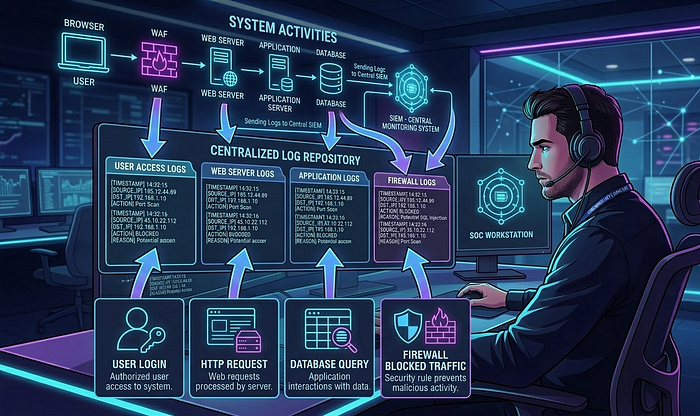
Whenever something happens in a system — such as a user making a request, a server processing a request, a database executing a query, or a firewall blocking a request — the system records that activity in a log file.
A log entry usually contains several pieces of information about an event, such as:
- Timestamp (when the event happened)
- Source IP address
- Destination server
- Requested resource
- HTTP method
- Status code
- User agent
- Error messages
- System actions
These logs create a historical record of activities that occurred in the system.
For security analysts, logs act like digital evidence. They allow investigators to reconstruct events and understand what happened during an incident.
Why Logs Are Important for Security Investigation
Logs play a critical role in detecting and investigating security incidents.
When a suspicious event occurs, logs help investigators understand the sequence of actions that took place before, during, and after the event.
Some key reasons logs are important include:
Incident Detection
Many security tools detect suspicious activity by analyzing logs. Intrusion detection systems, SIEM platforms, and monitoring tools rely heavily on log data.
Attack Investigation
Logs allow analysts to trace attacker activity step by step. Investigators can identify:
- How the attacker entered the system
- Which resources were targeted
- Whether the attack succeeded
- What actions were performed after the attack
Troubleshooting
Logs are also useful for diagnosing system errors and application failures.
Compliance and Auditing
Many industries require organizations to maintain logs for auditing and compliance purposes.
Threat Hunting
Security teams often analyze logs proactively to identify hidden threats that may not have triggered alerts.
In simple terms, logs tell the story of what happened inside a system.
Where Web Application Logs Are Generated
One of the most important things for security analysts to understand is that logs are generated at multiple layers in a web application environment.
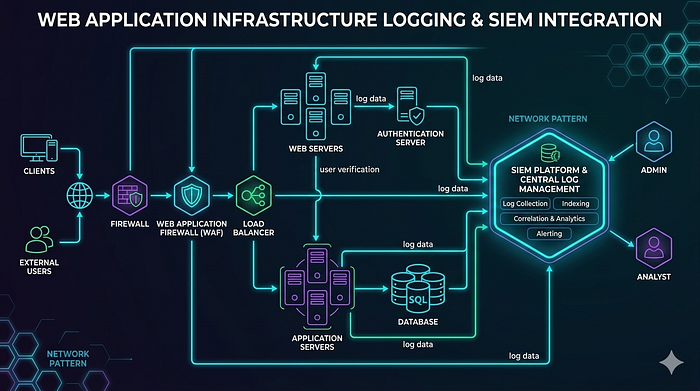
A typical web application infrastructure contains many components, and each component generates its own logs.
Some common log sources include:
- Web servers
- Application servers
- Databases
- Load balancers
- Web Application Firewalls
- Authentication systems
- API gateways
- Operating systems
- Network devices
Each log source provides different types of information. During an investigation, analysts often need to correlate logs from multiple sources to understand the full picture.
Let us explore these log sources one by one.
Web Server Logs
Web server logs are one of the most important log sources for web application investigations.

Every time a user sends a request to a web server, the server records details about the request.
These logs contain valuable information such as:
- Client IP address
- Timestamp
- HTTP method (GET, POST, etc.)
- Requested URL
- HTTP response status code
- User agent
- Referrer
Web server logs allow analysts to see exactly what requests were made to the application.
For example, if an attacker attempts a SQL injection or directory traversal attack, the malicious request often appears directly in the web server logs.
Common web servers include:
- Apache
- Nginx
- Microsoft IIS
These servers maintain access logs and error logs.
Access logs record all incoming requests, while error logs record server errors or application issues.
Application Logs
Application logs are generated by the application itself.
These logs record events related to the internal functioning of the application.
Examples of events recorded in application logs include:
- User login attempts
- Authentication failures
- API calls
- Business logic execution
- Payment processing events
- System exceptions
- Internal errors
Application logs provide deeper insight into what happened inside the application logic.
For example, if a user attempts to log in multiple times with incorrect credentials, the application log will usually record those failed attempts.
This information is extremely valuable when investigating authentication attacks.

Database Logs
Databases also generate logs that record queries and transactions.
These logs may include information such as:
- Executed SQL queries
- Database connections
- Transaction activities
- Query errors
- User privileges used
Database logs are particularly important when investigating attacks like:
- SQL Injection
- Data exfiltration
- Unauthorized data access
For example, if a SQL injection attack successfully executes a malicious query, the database logs may reveal the executed command.
Web Application Firewall Logs
Many organizations deploy a Web Application Firewall (WAF) in front of their applications to detect and block malicious traffic.
A WAF analyzes incoming HTTP requests and applies security rules to identify suspicious patterns.
WAF logs typically record:
- Blocked requests
- Detected attack signatures
- Source IP addresses
- Attack types
- Targeted URLs
Examples of attacks detected by WAF include:
- SQL Injection
- Cross-site scripting
- Command injection
- File inclusion attacks
When a WAF blocks a malicious request, the log entry usually includes the rule that triggered the block.
These logs are extremely useful for identifying attempted attacks.
Load Balancer Logs
Load balancers distribute incoming traffic across multiple servers.
They also generate logs that record connection details.
Load balancer logs may include:
- Client IP address
- Request timestamp
- Target backend server
- Response status
- Request processing time
These logs help investigators determine how traffic was routed inside the infrastructure.
Authentication Logs
Authentication systems generate logs related to user access.
These logs record events such as:
- Successful logins
- Failed login attempts
- Password reset attempts
- Account lockouts
- Multi-factor authentication events
Authentication logs are critical when investigating:
- Brute force attacks
- Credential stuffing
- Account takeover attempts
API Logs
Modern web applications heavily rely on APIs.
API logs record interactions between different services or clients and the application.
These logs may include:
- API endpoint accessed
- Request parameters
- Response status
- Authentication tokens
- Rate limiting events
API logs are important when investigating:
- API abuse
- Data scraping
- Automated attacks
Important Fields in Web Logs
Understanding common log fields helps analysts quickly interpret log entries.
Some common fields include:
Timestamp
Indicates when the event occurred. Accurate timestamps are crucial for reconstructing timelines.
Source IP Address
Identifies the origin of the request.
This helps analysts determine whether the request came from:
- A legitimate user
- A suspicious location
- A known malicious IP
HTTP Method
Indicates the type of request made.
Examples include:
- GET
- POST
- PUT
- DELETE
Requested URL
Shows the exact resource requested by the client.
This field is very useful for identifying attack attempts.
HTTP Status Code
Indicates the result of the request.
Common status codes include:
- 200 (Success)
- 403 (Forbidden)
- 404 (Not Found)
- 500 (Server Error)
User Agent
Identifies the browser or client making the request.
Attack tools often use unusual or automated user agents.
Log Correlation During Investigation
During real investigations, analysts rarely rely on a single log source.
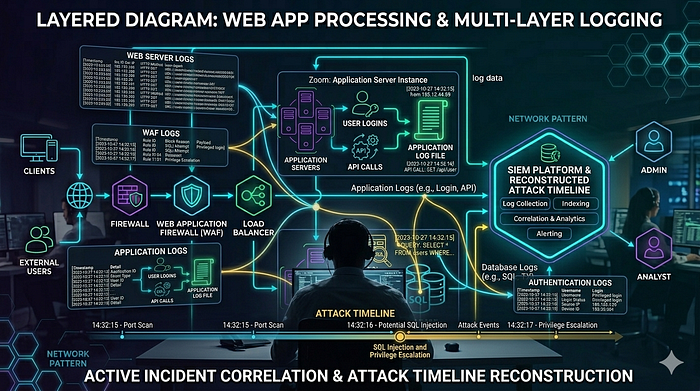
Instead, they correlate information from multiple logs to reconstruct the attack timeline.
For example, a typical investigation might involve:
- Checking WAF logs for blocked attack attempts
- Analyzing web server logs for suspicious requests
- Reviewing application logs for authentication activity
- Checking database logs for executed queries
- Verifying user account activity in authentication logs
By combining these logs, analysts can build a complete picture of the incident.
Challenges in Log Analysis
Although logs are extremely useful, analyzing them can also be challenging.
Some common challenges include:
- Large Volume of Logs: High-traffic applications generate massive amounts of log data.
- Log Noise: Many log entries may be normal system activity, making it difficult to identify suspicious behavior.
- Incomplete Logging: Sometimes systems are not configured to log important events.
- Log Tampering: Attackers may attempt to delete or manipulate logs to hide their activity.
Because of these challenges, organizations often use centralized log management systems.
Centralized Logging and SIEM
Many organizations collect logs from multiple systems and send them to a centralized platform.
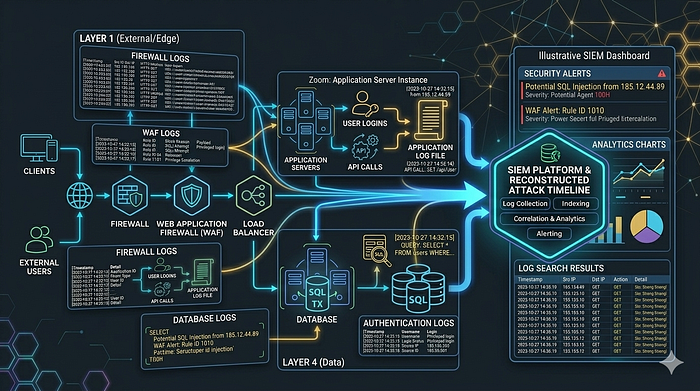
This allows security teams to analyze logs from different sources in one place.
Security Information and Event Management (SIEM) platforms are commonly used for this purpose.
A SIEM system can:
- Aggregate logs
- Correlate events
- Detect suspicious patterns
- Generate alerts
- Support investigations
Centralized logging significantly improves visibility across the infrastructure.
How These Logs Appear in SIEM Platforms
In real-world security operations environments, logs generated by different components of a web application infrastructure are usually collected and analyzed in a centralized platform. Security teams rely on Security Information and Event Management (SIEM) solutions to aggregate logs from multiple sources and analyze them efficiently. One commonly used SIEM platform is Microsoft Sentinel, which collects logs from cloud services, servers, applications, and network devices.
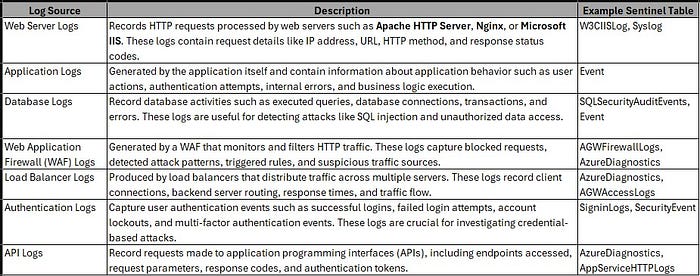
When logs are ingested into a SIEM, they are stored in structured datasets or tables. Each table represents a specific type of log source or telemetry. Security analysts query these tables to investigate alerts, detect suspicious activity, and correlate events across multiple systems. Understanding which table stores which type of log is extremely important during an investigation because it helps analysts quickly locate the relevant data.
For example, web server requests, authentication events, firewall alerts, and database activities may all be stored in different tables within the SIEM platform. During an investigation, analysts often need to query multiple tables and correlate the results to reconstruct the timeline of an attack.
The following table provides a simplified mapping of common web application log sources and the tables where they are typically stored when ingested into Microsoft Sentinel.
Preparing for Web Attack Investigations
Understanding logs is a critical skill for anyone investigating web application attacks.
Security analysts should be familiar with:
- Different types of logs
- Log formats
- Key fields within logs
- Where logs are generated
- How logs are correlated
These skills allow investigators to quickly identify malicious activity and understand how attacks occur.
Conclusion
Logs are one of the most valuable resources during web application security investigations. Every request, action, and event inside a web application environment leaves traces in logs.
In this article, we explored:
- What logs are
- Why logs are important
- Where logs are generated
- Different types of web application logs
- Important log fields
- Log correlation during investigations
- Challenges in log analysis
- The role of centralized logging systems
Understanding these concepts is essential for anyone investigating web application alerts.
In the upcoming articles in this series, we will move from theory to practical investigation techniques. We will start analyzing how common web attacks appear in logs and how security analysts investigate them step by step.
Stay tuned for the next part of the "How to Investigate Web Application Alerts" series.