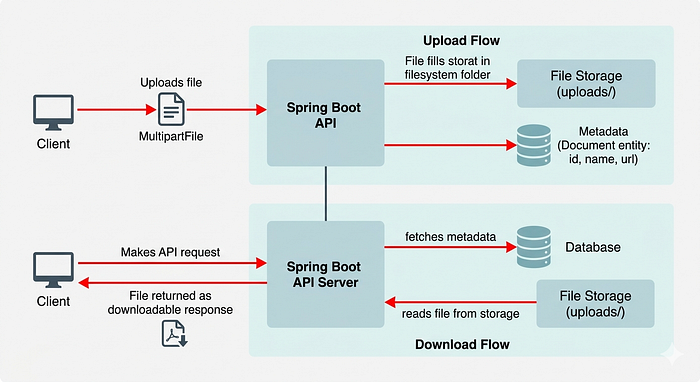
Spring Boot provides a clean and powerful way to handle file uploads and downloads using MultipartFile and Resource abstraction.
This article walks through a complete implementation of:
- File Upload
- File Storage
- Metadata Persistence
- File Download with proper HTTP headers
1. Document Entity
We store file metadata in the database, not the file itself.
@Entity
public class Document {
    @Id
    @GeneratedValue(strategy = GenerationType.IDENTITY)
    private Long id;
    private String name;
    private String url;
}
What this represents:
name→ original file nameurl→ physical storage path
2. File Upload Service
This service handles:
- directory creation
- file storage
- database persistence
@Service
public class DocumentService {
    private final String uploadDir = "uploads/";
    private final DocumentRepository documentRepository;
    public DocumentService(DocumentRepository documentRepository) {
        this.documentRepository = documentRepository;
    }
    public Document uploadFile(MultipartFile file) {
        try {
            // Create directory if it doesn't exist
            File dir = new File(uploadDir);
            if (!dir.exists()) {
                dir.mkdirs();
            }
            // Generate unique filename to avoid collisions
            String fileName = System.currentTimeMillis() + "_" + file.getOriginalFilename();
            Path filePath = Paths.get(uploadDir + fileName);
            // Save file to disk
            Files.write(filePath, file.getBytes());
            // Save metadata to DB
            Document document = new Document();
            document.setName(file.getOriginalFilename());
            document.setUrl(filePath.toString());
            return documentRepository.save(document);
        } catch (Exception e) {
            throw new RuntimeException("Error occurred when uploading file", e);
        }
    }
}
3. Upload Controller
This endpoint handles multipart file upload requests.
@RestController
@RequestMapping("/api/documents")
public class DocumentController {
    private final DocumentService documentService;
    public DocumentController(DocumentService documentService) {
        this.documentService = documentService;
    }
    @PostMapping("/upload")
    public ResponseEntity<Document> upload(@RequestParam("file") MultipartFile file) {
        return ResponseEntity.ok(documentService.uploadFile(file));
    }
}
Key point:
@RequestParam("file")binds the uploaded file from the request- Content-Type must be
multipart/form-data
4. File Download Service
This handles:
- retrieving file metadata
- reading file from disk
- returning it as downloadable response
public ResponseEntity<UrlResource> downloadDocument(
        Integer empId, Integer documentId) throws IOException {
    EmployeeDocument employeeDocument =
        employeeDocumentRepository.findById(documentId)
            .orElseThrow(() -> new ResourceNotFoundException("Document not found"));
    Path filePath = Paths.get(employeeDocument.getUrl()).normalize();
    UrlResource urlResource = new UrlResource(filePath.toUri());
    HttpHeaders headers = new HttpHeaders();
    headers.setContentType(MediaType.APPLICATION_PDF);
    headers.setContentDisposition(
        ContentDisposition.attachment()
            .filename(employeeDocument.getName())
            .build()
    );
    return ResponseEntity.ok()
        .headers(headers)
        .body(urlResource);
}
5. What Happens During Download
Step-by-step flow:
- Fetch document metadata from DB
- Resolve physical file path
- Load file as
UrlResource - Set HTTP headers
- Return file as response
6. Important HTTP Concepts
Content-Type
Tells browser what file type is being returned:
application/pdfimage/pngapplication/octet-stream
Content-Disposition
Controls download behavior:
ContentDisposition.attachment()Forces browser to download instead of opening in tab.
7. Required Dependency
Make sure Spring Web is included:
<dependency>
    <groupId>org.springframework.boot</groupId>
    <artifactId>spring-boot-starter-web</artifactId>
</dependency>
8. Design Summary
This implementation follows a clean separation of concerns:
- Controller → handles HTTP requests
- Service → handles business logic
- Repository → handles persistence
- File system → stores actual files
Database stores only metadata, not heavy binary data.
9. Common Mistakes
- Storing raw files in database instead of filesystem
- Not generating unique filenames → overwrites files
- Missing
multipart/form-datain requests - Not setting proper download headers
- Hardcoding file paths without normalization
10. Final Thoughts
File upload and download is simple on the surface, but production-grade implementation requires careful handling of:
- file storage strategy
- naming collisions
- security risks
- proper HTTP response configuration
A clean separation between file system storage and database metadata is the most scalable approach used in real-world systems.