Salam Alaikum, guys! Hope you're all doing well.
In the modern bug bounty landscape, the "low-hanging fruit" is a myth. The attack surface has evolved. We aren't just looking for basic reflected XSS or simple SQLi anymore; the real battleground is deep within complex APIs. To find the criticals, you have to stop looking at what the front-end UI allows, and start targeting the backend business logic the developer never intended for you to see.
Today, we are talking about Mass Assignment a vulnerability so prevalent and devastating that it consistently holds a top spot in the OWASP API Security Top 10 (currently categorized under API3: Broken Object Property Level Authorization). It is the hidden weapon that can turn a seemingly secure endpoint into a critical severity vulnerability. I'll break down what it is, share my exact custom methodology for hunting it, and show you two real-world scenarios where it paid off big time.

📖 What is Mass Assignment?
In modern web development, frameworks (like Ruby on Rails, Spring, or NodeJS) try to make developers' lives easier by automatically binding incoming HTTP request data (like JSON or form parameters) directly to internal database objects.
Mass Assignment happens when a developer allows the user to update an object without explicitly defining which fields are allowed to be updated. If the database table has a role or is_admin column, and the developer doesn't filter it out, an attacker can simply pass "role":"admin" in the JSON body, and the framework will blindly assign it.
💻 The Developer Mistake (A Simple Code Example)
Here is how a developer might accidentally introduce this vulnerability in Node.js/Express:
// ❌ VULNERABLE CODE: Passing the entire request body to the database
app.put('/api/users/current', async (req, res) => {
    try {
        // The developer expects req.body to only contain {"email": "new@email.com"}
        // But the framework blindly accepts and updates whatever we send!
        await User.update(req.body, { where: { id: req.user.id } });
        res.send("Profile updated!");
    } catch (err) {
        res.status(500).send("Error");
    }
});
To fix this, the developer should have used an allow-list, explicitly stating that only specific fields (like email or bio) can be updated.
🕵️♂️ My Fuzzing Methodology
To find these hidden parameters, you have to look where the app isn't telling you to look. Here is the exact methodology I use to hunt for hidden parameters:
- Map Everything: I open my target and manually click every single function, link, and setting in the application. The goal is to populate my Burp Suite history with as many endpoints and parameters as possible.
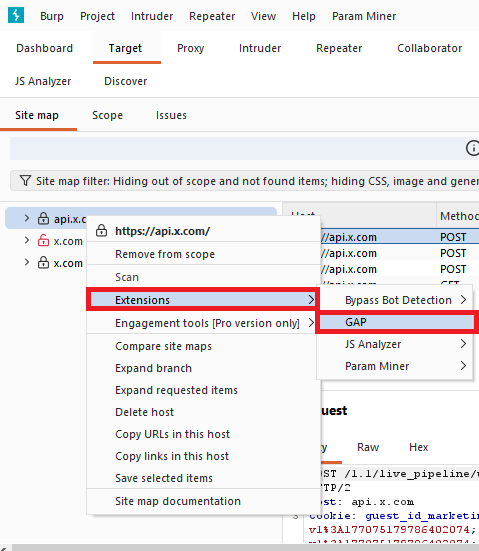
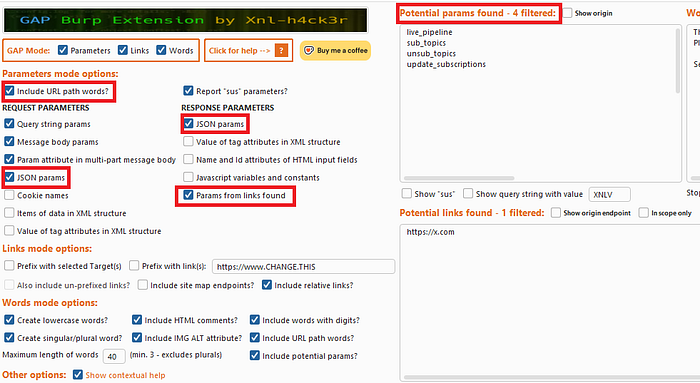
- Build a Custom Wordlist: I use the GAP-Burp-Extension. In the tool options, I configure it to extract all JSON parameters from both the requests and the responses, as well as URL paths. This builds a highly contextual, target-specific wordlist.
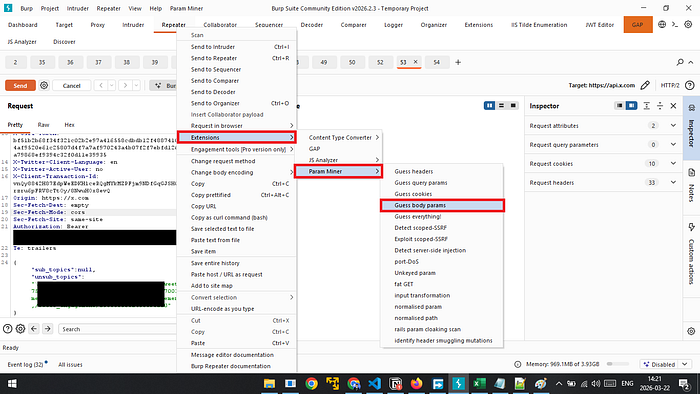
3. Fuzz the Endpoints: Once I have my custom wordlist, I pick an endpoint (GET, POST, PUT, etc.). I fire up Param Miner in Burp.
- If it's a GET request, I use "Guess query params".
- If it's a POST/PUT request, I use "Guess body params".
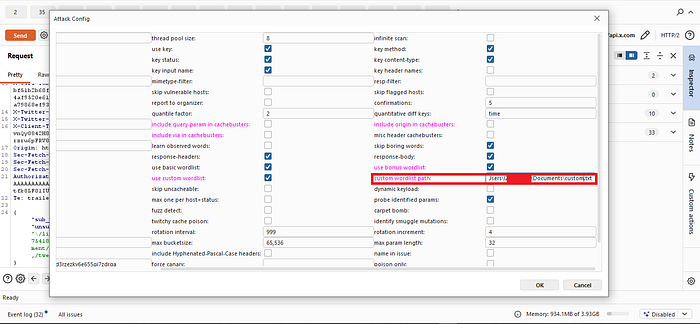
- I load my GAP wordlist and let it run.

🔥 Scenario 1: The Dead End IDOR turned Million-User PII Leak
While hunting on a public bug bounty program, I spent quite a bit of time mapping out the target. Eventually, I stumbled across a GET request that looked like this:
GET /api/v2/managers/{managerId}Naturally, my first instinct was to test for an Insecure Direct Object Reference (IDOR). I swapped the {managerId} with the ID of another user, fully expecting to see their data.
Access Denied.
The endpoint wasn't vulnerable to a standard IDOR. Many hunters would give up here, assuming it's secure. But I decided to dig deeper. I sent the request to Param Miner, loaded up the custom wordlist I generated with GAP, and started fuzzing for hidden query parameters.
Suddenly, Param Miner got a hit: userId.
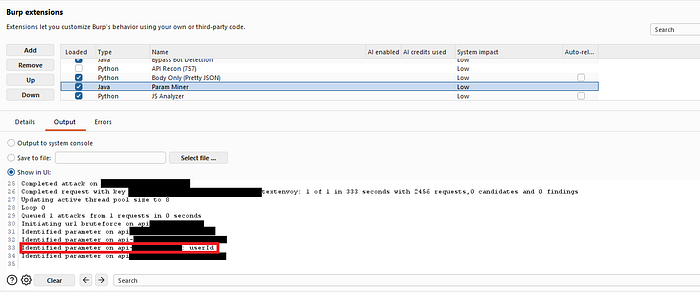
I modified my request to include the hidden parameter:
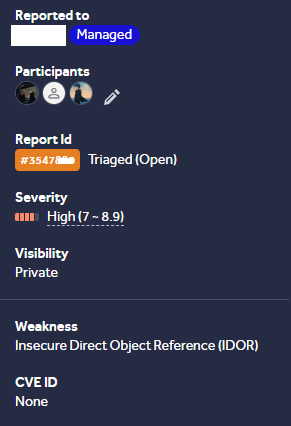
GET /api/v2/managers/12345?userId=[VICTIM_ID]Boom. The server responded with a massive JSON object leaking the Personally Identifiable Information (PII) of the victim. Because of this hidden Mass Assignment parameter, I could access the full names and emails of millions of users on the platform.
🔥 Scenario 2: Chaining Mass Assignment to HTML Injection
This target was a bit trickier. The application only allowed users to log in via OAuth (Google/Apple). Because of this, your profile name in the app was strictly locked to your OAuth name. You couldn't change it in the UI.
The app had an "Invite" feature where you could send an email and a custom message to invite a friend. I tested the message field for HTML injection, hoping I could get an <a> tag to render in the victim's email. It was properly sanitized.

I sat back and thought: What if I can change my name, and inject the HTML payload there? When the email sends, it will say "Invited by [My Name]", and the payload will trigger!
I went to the Settings / Account page and intercepted the background requests. I found a PUT request used to update minor account settings:
PUT /api/users/currentSince there was no UI option to change my name, I fell back to my methodology. I fuzzed the JSON body of this PUT request using Param Miner and my GAP wordlist.
Param Miner flagged a hidden parameter: name.
I intercepted the request and injected my payload:
PUT /api/users/current
Host: exmple.com
Content-Type: application/json

{
  "name": "<a href=\"evil.com\">click here to join</a>",
...
  other_setting
}
To my surprise, the server accepted it! Because the developer failed to filter the allowed update fields, Mass Assignment allowed me to overwrite my OAuth-locked name. When I sent an invite email, the HTML injection executed perfectly in the victim's inbox.

Thank you for reading!
Please share your feedback with me in the comments, and if you have any questions do not hesitate to let me know.
Happy hunting! 🏹
- X (Twitter): @MaroineYoucefi
- LinkedIn: Merouane Youcefi