June 5, 2026
Building a Parallel Security Gate in CI: Combining Secret Scanning, Dependency Audits, and SAST…
One of the biggest challenges in DevSecOps isn’t convincing teams that security matters.
SwayamOps
4 min read
It's integrating security into CI pipelines without turning every pull request into a waiting game.
Developers expect feedback in minutes, not hours. Security teams want comprehensive validation before code reaches production. These goals often seem at odds with each other.
The solution isn't to run fewer security checks.
It's to run them smarter.
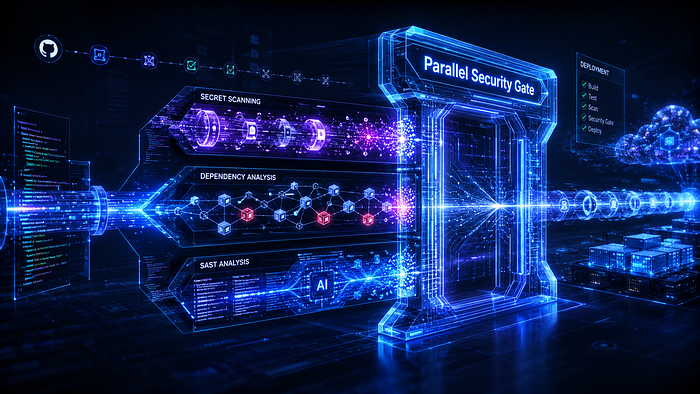
By designing a parallel security gate, teams can execute multiple security validations simultaneously, dramatically reducing pipeline duration while maintaining strong security coverage.
In this article, we'll explore how to orchestrate secret scanning, dependency vulnerability analysis, and static application security testing (SAST) into a single parallel security stage that scales with modern development workflows.
The Problem with Sequential Security Checks
Many teams start with a pipeline that looks like this:
Build
 ↓
Secret Scan
 ↓
Dependency Scan
 ↓
SAST Scan
 ↓
Deploy
Build
↓
Secret Scan
↓
Dependency Scan
↓
SAST Scan
↓
DeployAt first glance, this seems logical.
The problem becomes apparent when each scan takes several minutes.
Example:
| Stage           | Duration |
| --------------- | -------- |
| Secret Scan     | 2 min    |
| Dependency Scan | 3 min    |
| SAST Scan       | 5 min    |
| Stage | Duration |
| --------------- | -------- |
| Secret Scan | 2 min |
| Dependency Scan | 3 min |
| SAST Scan | 5 min |Total security validation time:
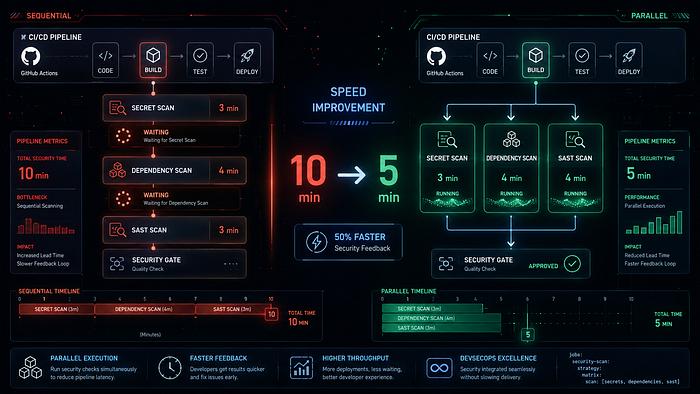
2 + 3 + 5 = 10 minutes2 + 3 + 5 = 10 minutesTen minutes may not sound significant, but across hundreds of pull requests per week, it creates a noticeable bottleneck.
The reality is that these scans are usually independent.
There's no reason they must run one after another.
Thinking About Security as Parallel Work
A better approach is:
┌──────────────┐
              │ Secret Scan  │
              └──────┬───────┘
                     │
Build ───────────────┼─────────────► Security Gate
                     │
              ┌──────┴───────┐
              │ Dependency   │
              │ Scan         │
              └──────┬───────┘
                     │
              ┌──────┴───────┐
              │ SAST Scan    │
              └──────────────┘
┌──────────────┐
              │ Secret Scan  │
              └──────┬───────┘
                     │
Build ───────────────┼─────────────► Security Gate
                     │
              ┌──────┴───────┐
              │ Dependency   │
              │ Scan         │
              └──────┬───────┘
                     │
              ┌──────┴───────┐
              │ SAST Scan    │
              └──────────────┘
Instead of waiting for one scan to finish before starting the next, all scans execute simultaneously.
Using the earlier example:
Secret Scan      2 min
Dependency Scan  3 min
SAST Scan        5 min
Secret Scan 2 min
Dependency Scan 3 min
SAST Scan 5 minTotal duration becomes:
5 minutes5 minutesThe overall time now equals the longest-running job rather than the sum of all jobs.
This simple orchestration pattern can cut security validation times by more than half.
The Three Core Security Checks
A practical security gate typically includes three categories of validation.
Each protects against a different risk.
1. Secret Scanning
Secret scanning identifies sensitive information accidentally committed to source control.
Examples include:
- API keys
- Cloud credentials
- Database passwords
- GitHub tokens
- Private keys
Tools commonly used:
- Gitleaks
- GitHub Secret Scanning
- TruffleHog
Example finding:
AWS_SECRET_ACCESS_KEY=abcd1234...AWS_SECRET_ACCESS_KEY=abcd1234...Even if the code functions correctly, this represents a serious security risk.
Secret scanning helps prevent credential exposure before code is merged.
2. Dependency Vulnerability Scanning
Modern applications depend heavily on third-party libraries.
The risk isn't always your code.
Sometimes it's someone else's.
Consider:
requests==2.19.0requests==2.19.0A package version that was safe years ago may now have known vulnerabilities.
Tools commonly used include:
- pip-audit
- Dependabot
- Snyk
- OWASP Dependency Check
Typical findings:
Package: urllib3
Version: 1.25.0
Known Vulnerability Found
Fix Available: 1.26.18Package: urllib3
Version: 1.25.0
Known Vulnerability Found
Fix Available: 1.26.18Dependency scanning helps secure the software supply chain.
3. Static Application Security Testing (SAST)
SAST analyzes source code for insecure patterns and vulnerabilities.
Examples include:
- SQL Injection
- Command Injection
- Cross-Site Scripting
- Path Traversal
- Unsafe Deserialization
Tools include:
- CodeQL
- Semgrep
- SonarQube
- Checkmarx
Example:
query = f"SELECT * FROM users WHERE id='{user_input}'"query = f"SELECT * FROM users WHERE id='{user_input}'"A SAST engine can recognize the injection risk even before the application is executed.
Designing the Security Gate
The goal is simple:
All Security Checks Must Pass
          ↓
Deployment Allowed
All Security Checks Must Pass
↓
Deployment AllowedIf any security control fails:
Secret Scan  ❌
Dependency   ✅
SAST         ✅
Result: Block Merge
Secret Scan ❌
Dependency ✅
SAST ✅
Result: Block MergeOr:
Secret Scan  ✅
Dependency   ❌
SAST         ✅
Result: Block Merge
Secret Scan ✅
Dependency ❌
SAST ✅
Result: Block MergeEvery scan acts as an independent validator.
Implementing Parallel Security Gates in GitHub Actions
GitHub Actions makes parallel execution straightforward.
Each job runs independently unless dependencies are explicitly defined.
Example:
name: Security Gate
on:
  pull_request:
  push:
    branches:
      - main
jobs:
  secret-scan:
    runs-on: ubuntu-latest
    steps:
      - uses: actions/checkout@v4
      - name: Run Gitleaks
        uses: gitleaks/gitleaks-action@v2
  dependency-scan:
    runs-on: ubuntu-latest
    steps:
      - uses: actions/checkout@v4
      - name: Install Dependencies
        run: |
          pip install pip-audit
      - name: Audit Packages
        run: pip-audit -r requirements.txt
  sast-scan:
    runs-on: ubuntu-latest
    permissions:
      security-events: write
      contents: read
    steps:
      - uses: actions/checkout@v4
      - uses: github/codeql-action/init@v3
        with:
          languages: python
      - uses: github/codeql-action/autobuild@v3
- uses: github/codeql-action/analyze@v3name: Security Gate
on:
pull_request:
push:
branches:
- main
jobs:
secret-scan:
runs-on: ubuntu-latest
steps:
- uses: actions/checkout@v4
- name: Run Gitleaks
uses: gitleaks/gitleaks-action@v2
dependency-scan:
runs-on: ubuntu-latest
steps:
- uses: actions/checkout@v4
- name: Install Dependencies
run: |
pip install pip-audit
- name: Audit Packages
run: pip-audit -r requirements.txt
sast-scan:
runs-on: ubuntu-latest
permissions:
security-events: write
contents: read
steps:
- uses: actions/checkout@v4
- uses: github/codeql-action/init@v3
with:
languages: python
- uses: github/codeql-action/autobuild@v3
- uses: github/codeql-action/analyze@v3All three jobs begin at approximately the same time.
GitHub automatically manages the parallel execution.
Adding a Final Security Approval Gate
Some teams prefer a dedicated gate before deployment.
The pattern looks like:
Secret Scan
      │
Dependency Scan
      │
SAST Scan
      │
      ▼
Security Gate
      │
      ▼
Deploy
Secret Scan
│
Dependency Scan
│
SAST Scan
│
▼
Security Gate
│
▼
DeployIn GitHub Actions:
deploy:
  needs:
    - secret-scan
    - dependency-scan
    - sast-scan
  runs-on: ubuntu-latest
  steps:
    - run: echo "Deploying application"
deploy:
needs:
- secret-scan
- dependency-scan
- sast-scan
runs-on: ubuntu-latest
steps:
- run: echo "Deploying application"Deployment only proceeds when all security jobs succeed.
This creates a clear security checkpoint.
Real-World Pipeline Example
A typical pull request workflow might look like:
Pull Request Created
         ↓
Build
         ↓
 ┌───────────────────────┐
 │ Secret Scan           │
 ├───────────────────────┤
 │ Dependency Scan       │
 ├───────────────────────┤
 │ SAST Analysis         │
 └───────────────────────┘
         ↓
 Security Gate Passed
         ↓
 Merge Allowed
Pull Request Created
↓
Build
↓
┌───────────────────────┐
│ Secret Scan │
├───────────────────────┤
│ Dependency Scan │
├───────────────────────┤
│ SAST Analysis │
└───────────────────────┘
↓
Security Gate Passed
↓
Merge AllowedDevelopers receive comprehensive security feedback without waiting for sequential scans.
Avoiding Common Mistakes
Running Everything Sequentially
Security controls often don't depend on each other.
Running them in sequence wastes time.
Parallel execution should be the default design.
Making Every Finding a Blocker
Not every issue deserves an immediate failure.
Many organizations classify findings by severity:
| Severity | Action |
| -------- | ------ |
| Critical | Block  |
| High     | Block  |
| Medium   | Review |
| Low      | Track  |
| Severity | Action |
| -------- | ------ |
| Critical | Block |
| High | Block |
| Medium | Review |
| Low | Track |This prevents alert fatigue.
Ignoring Scan Performance
Security pipelines should remain fast.
Developers are more likely to embrace security controls when feedback arrives quickly.
Monitor execution times and optimize regularly.
Treating Security as a Separate Process
The strongest DevSecOps programs don't have separate "security pipelines."
They have pipelines with security built in.
Security becomes part of the definition of done.
Expanding Beyond the Core Three
As organizations mature, additional security gates often include:
- Container image scanning
- Infrastructure-as-Code scanning
- License compliance checks
- SBOM generation
- Policy-as-Code validation
The same orchestration principle applies:
Independent Checks
       ↓
Run in Parallel
       ↓
Single Security Decision
Independent Checks
↓
Run in Parallel
↓
Single Security DecisionThe architecture scales naturally as security requirements grow.
Final Thoughts
The goal of DevSecOps isn't to add more gates.
It's to add smarter ones.
By orchestrating secret scanning, dependency vulnerability analysis, and SAST as parallel jobs, teams can significantly improve security coverage without creating unnecessary delays for developers.
A well-designed security gate provides:
- Faster feedback
- Better developer experience
- Stronger security posture
- Reduced pipeline duration
- Consistent enforcement across repositories
Most importantly, it transforms security from a late-stage review activity into an automated quality check that happens every time code changes.
How is your team currently handling security validation in CI? Are your scans running sequentially, or have you adopted a parallel security gate approach? Share your architecture, lessons learned, or favorite DevSecOps practices in the comments — I'd love to hear how others are balancing speed and security.