
![Yoel Yosief [ Orit01 ]](https://miro.medium.com/v2/resize:fill:88:88/1*ibVdyr1f4KVjpWlwI5MoXg.jpeg)
Scan
As always, begin by scanning the target. A quick scan reveals:
sudo nmap -sVC -p- -Pn -T4 10.132.34.20

We can see 3 different open ports: - 21 FTP - 22 SSH - 80 HTTP
We can also notice that the FTP port allows you to log anonymously so this should be the go to.
Port 21: FTP
By logging to the FTP server, you can enumerate what it contains, you get:

The directory contains a "welcome.txt" file and a hidden directory named ".the_whale_tree". Extract the file using: get <FILE_NAME>. Navigating to and enumerating the hidden directory reveals:

Two hidden files, ".road_poneglyph.jpeg" and ".secret_room.txt," are also available for extraction.
After retrieving these three files from the FTP server, examine each one.
File: welcome.txt
The file "welcome.txt" contains:

This is a reference to the One Piece Zou "island," an important location in the series' history.
File: .sercret_room.txt
The file ".secret_room.txt" has a promising name and contains:

Inuarashi and Nekomamushi rule Zou, where one of the four Road Poneglyphs is located (see .road_poneglyph.jpeg).
Luffy, Inuarashi, and Nekomamushi discuss the quest to find the One Piece and become Pirate King. To reach Laugh Tale, the island containing the One Piece, they must acquire all four Road Poneglyphs.
Big Mom and Kaido each possess one, while the location of the final Road Poneglyph remains unknown.
Each Poneglyph, written in an ancient language, provides a key to Laugh Tale. This information answers Task 2 Question 1.
File: .road_poneglyph.jpeg
By this point, the principles of steganography should be clear; data can be concealed within images through a variety of methods and locations. In this instance, Steghide can be used without a password to reveal the hidden message:
steghide extract -sf .road_poneglyphe1.txtThis will produce a file named "road_poneglyph1.txt" which, as anticipated, is encoded, encrypted, or both.

Info: In the manga, the Poneglyphs are written in an ancient language. Only one person is known to be able to read them.
Attempting to decode the provided text using methods such as base32 and Morse code may prove unproductive. Similar to the "Road Poneglyphs" in One Piece, individual elements may lack meaning in isolation.

The ".secret_room.txt" file suggests that a complete solution requires multiple "keys," implying a more comprehensive approach is necessary.
Conclusion — Port 21: FTP The FTP server yielded two key pieces of information:
- One Road Poneglyph
- The locations of two additional Road Poneglyphs
We will now proceed to analyze the web server. As the SSH username and password remain unknown, brute-forcing is not a recommended approach.
Port 80: HTTP
Page: /index.html
By going to the webpage, you arrive on this page:
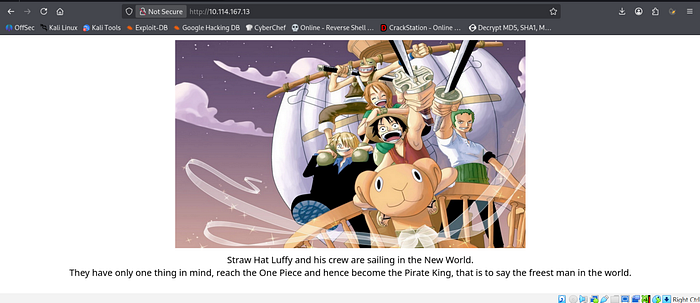
By reading the text, you can know what you need to do next: - "You need to find the Log Pose to be able to reach the next island."
Web enumeration:

Enumerating in this manner will likely limit discovery to only the "/images" and "/css" directories. Further investigation into domain names or subdomains may prove unfruitful.
If you give a look at the source code, you will find an interesting comment:

The comment seems to be base32 encoded. If you decode it you get:

Here's a more professional re-write of the provided text:
Alright, you've received a sentence that serves as a definite hint.
The question itself also contains a hint: "Only Sea, It's Not Terrible." The capitalization of these words points to the use of Open-Source Intelligence (OSINT).
Let's recap what we know:
- Webpage text: "You need to find the Log Pose."
- There are precisely 3472 possible locations.
- Question hint: "OSINT."
- Enumeration alone appears insufficient.
Open-Source Intelligence
Now that we've established the need for OSINT, the initial step is to define our target: "What are we looking for?"
I recognize that I inadvertently created a rabbit hole that many followed, leading them to discover some of the room answers online. Indeed, it's possible to find or deduce almost all of the answers using OSINT.
However, two answers remain inaccessible without properly exploiting the machine. The presence of the word "Apache" in subsequent questions led some to correctly infer a connection to the website. There are indeed two methods to navigate to another island and explore the Apache Sea.
So, what is the first method?
Primarily, we understand the necessity of OSINT to locate something. According to the webpage text, this "something" is a "Log Pose," and we have a peculiar number, "3472."
Considering your previous actions:
Most of you likely:
- Checked the webpage.
- Examined the source code.
- Performed enumeration (pages/subdomains/domains).
- Investigated files in /images and /css.
We'll address the files from /images and /css later, as they represent the second method. For now, let's exclude them. Only one of the options above could yield a different output: "Enumeration."
To achieve a different result through enumeration, you'd typically need one of the following:
- Different extensions.
- A different wordlist.
Bearing these possibilities in mind, let's consider the significance of the number "3472" associated with "places." What could it represent?
- 3472 extensions? Highly improbable.
- 3472 entries in a wordlist? This is more plausible. Could this be the number of entries in a relevant list?
The next step is to search online for a list with 3472 entries related to a "Log Pose" (the term used in the webpage text).
While searching Google for terms like "Log Pose list 3472" might not yield immediate results due to indexing limitations, there's a well-known platform that proves invaluable for computer-related resources, including code and lists: GitHub.
Let's leverage GitHub, restricting our search to this specific website, and search for "Log Pose," as it's the designated name.

We get 31 results (the number of results may change depending on when you are reading this), not so bad.
You can look at them individually or sort them by "Release Date" to check the latest ones. Both case scenario, you should find one that catches you eye:

The description indicates that this resource is intended to guide users to the next challenge. This is precisely the desired outcome.
It may also be useful to note the similarity in usernames between GitHub and TryHackMe.
Upon accessing the repository, the following will be displayed:

It contains a txt file so let's give it a look:

At this point, you know that you found what you were looking for, a list with 3472 entries that is somehow a "Log Pose".
Get this list and save it into a file.
Now it is time to use it !
Enumeration
In this situation, with a list like this, you should be tempted to use it for enumeration, so let's do that.
You will get this result:
gobuster dir -u http://ip_target -w /logpose.txt -x html
Yes, you get 1 result.
Conclusion — Page: /index.html
After a bit of decoding and a bit of OSINT, you successfully got the url of the next island. Time to go there and see what it hides.
Page: /dressrosa.html
Info: /dressrosa.html is not the actual name of the page but let's say it's close enough.
By going to the recently discovered webpage, you arrive on this page:

First interesting thing is that you get the answer to Task 2 Question 2 within the text itself.
Then, you can notice that whenever your mouse pointer passes above the black "image", the black will disappear and let you see a part of the image that is behind it.
If you download the image behind, you will notice that it is named "rabbit_hole.png". If you look at it, here is what you will get:

Alright, so we have 3 encoded and/or encrypted strings.
Let's find out what each of them means:
The provided text describes a multi-layered decoding process:
- Hex decode: "key:im on oti oti"
- Base91 decode: "ito ito no mi:yek"
- Vigenere cipher:
- Attempts to decrypt with "imonotioti" yields: "Dvfgfhnnzo iz songq smankiil"
- Attempts to decrypt with "itoitonomi" yields: "Doflamingo is still standing"
The successful decryption with "itoitonomi" reveals "Doflamingo is still standing," but the text warns that this is a rabbit hole, as is any attempt at steganography on the image.
Source code
Analysis is crucial in pentesting, often revealing valuable information. While the webpage's source code seems uninteresting (except for the rabbit_hole.png URL), deeper exploration is needed. Fortunately, with only a CSS stylesheet present, something interesting might be found within it.

The webpage uses a background image set in the CSS stylesheet, not the HTML source. This image is behind "rabbit_hole.png," which is behind black boxes. Recall that wordlist enumeration on "/index.html" revealed "/images" and "/css." The CSS stylesheet is in "/css," offering a shortcut to avoid previous OSINT.
Steganography
Let's download this image and give a look at it:

Info: This is the final punch Luffy delivers to Doflamingo in the Manga.
Steganography is required again. (Spoiler: you'll need it again later in this box.)
The metadata can be accessed with a simple filecommand:

Interesting, a comment that gives us the location of another image.
By downloading and looking at this other image, we get:

Info: This is the actual image from the scan where Doflamingo gets hit by the attack of the last image. He got defeated.
Well, I did not lie with the previous image, it wasn't the last time you would have to do some steganography within this box.
This time you need to use the strings command and the last line of the output will give you:
strings king_kongPgun.jpg

Spoiler alert: Once again this won't be the last time you need to do some steganography in this box but this will come later.
The interesting thing here is that you get the location of the next island, you can go there.
Conclusion — Page: /dressrosa.html
After a bit of code analysis and a bit of steganography, we got the location of the next island, /whole_c4k3.php
Page: /cake.php
Info: Same as before, /cake.php is not the actual name of the page.
By going to this webpage, you get:

The text has the answer to Task 2 Q3. Big Mom's territory means a Road Poneglyph is nearby; we must find it.
Injection
The first thing that may come up to your mind seeing a page like this with an input form is: "Some sort of injection might work". So let's try a bit:

The "I did not expect that" message indicates the form isn't vulnerable to injection. The message is simply triggered by any submission, regardless of content, as the input is not processed. Testing different inputs would eventually reveal this behavior, indicating a rabbit hole that is not exploitable.
Cookie Poisoning
By checking the source code of the webpage, you can see:

Info: In the Manga, Big Mom is crazy about cakes.
Could that be a hint for what needs to be done ? Yes, it is.
Cakes is a hint for cookie.
If you give a look at the cookies of the webpage, you get:

The value is "NoCakeForYou", not much to say that this is unusual. Moreover, the source code comment was "Big Mom likes cakes".
What if we edit the value and put "CakeForYou" instead ?

Reload the webpage and you get the following text displayed below the form:

Nice, we got our second Road Poneglyph and we even got the location of the next island.
Info: The value of the edited cookie is irrelevant, you could have put whatever you want. As long as it is not "NoCakeForYou", it will work just fine.
Conclusion — Page: /cake.php
After some cookie poisoning, you get the location of the next island and a copy of the second Road Poneglyph.
Info: As for the first Road Poneglyph, trying to decode it alone is pointless. You would just create yourself another rabbit hole.
Page: /arbitrary.html
Info: Once again, /arbitrary.html is not the actual name of the page.
By going to the webpage, you get:

Info: Buggy being the favorite character of Eichiro Oda, the manga artist who created One Piece, I had to include him in this room.
Alright, we get the answer to Task 2 Question 4 by reading the text.
Then you need to decide which game you want to play against him.
Let's start with the brick breaker:
Brick Breaker
If you follow the brick breaker link, you will end up on this page:

And you will be able to play a brick breaker with your keyboard arrows if you want to chill out a bit.
If you lose, you will get this prompt:

By playing the game you will get an info about the game its, also this time this is rabbit hole.
Brain Teaser
By following the Brain Teaser link, you get:

info: As it is a brain teaser, there is no hint about what needs to be done.
But as I checked the source code i found another link:

Page: /onigashima.php
Info: Did you guess that this wasn't the actual name of the webpage ?
By going to this webpage, you get:

Kaido is the main antagonist of the current arc in One Piece. Not much to say that the One Piece community is currently living one of the most exciting moments of the entire manga.
Wait, according to the file ".secret_room.txt", Kaido owns a Road Poneglyph. We must find it.
If you are on a webpage like this, you have several options but one of your first bets should be:
File upload:
is often prioritized over login form brute-forcing because guessing usernames and passwords for a login form would take longer. When exploring file upload vulnerabilities, focus on identifying allowed file types and the upload directory.
This can be achieved by testing various file extensions and observing the server's response or leveraging OSINT and website analysis tools.
The file upload form is misleading. Although it displays a "File uploaded" message, the file is not actually saved on the server and cannot be accessed. The form is non-functional.
Next step I took is to steganography for the images- kaido.jpeg.
stegseek kaido.jpeg
Then, we obviously need to give a look at the file we just got, "kaido.jpeg.out". It contains:
steghide extact -sf kaido.jpeg
Nice, it contains a username. We can now perform another brute force attack but on the login form this time.
First thing first, we need to know the error message for our command so let's try our username with a random password, we get:

The system displays "ERROR" for incorrect passwords. After identifying the required parameters through source code analysis or tools like Burp Suite, a brute-force attack can be launched using Hydra or a similar tool.
I used Burp Suite to intercept the requests needed for Hydra's brute-force attack.

Then Hydra:


If now we use these credentials to login, we get the following output:

Perfect, we got the third Road Poneglyph. Only one left to be able to reach Laugh Tale !
Conclusion: Page /onigashima.php
After an unsuccessful file upload and 2 brute force attacks, we finally got our hand on the third Road Poneglyph.
However, we don't know yet where is the last one.
Fourth Road Poneglyph
The location of the final Road Poneglyph may seem elusive.
However, its whereabouts are subtly hinted at through a word puzzle. Consider the concluding sentence displayed upon successfully logging in.
After successfully circumventing Kaido's security measures, the final sentence reads: "Unfortunately, the location of this last Poneglyph is …"
The text following the ellipsis denotes the actual location of the Poneglyph.

Last Poneglyph:

(All 4 )Road Poneglyphs Message
According to the file ".secret_room.txt" we got from the FTP server: - Each of the Road Poneglyph gives one of the keys to reach Laugh Tale.
Each Road Poneglyph alone is useless but all of them together reveals the meaning.
So you need to concatenate them all. The string you get seems to be base32 encoded, let's decode it, we get:

We get the credentials>Username:Password
Laugh Tale
Alright, so when you log in. You'll reach luffy's home directory.

Info: The actual username is not luffy, however it is the name of the group user.
If you list the home directory, you get:

By reading this, you will find the answer to the Task 3 Question 1.
Info: In the Manga, the pirate Teach is the one who defeated Luffy's brother and who delivered him to the Navy. Following this event, Luffy's brother has been sentenced to death. Teach is considered by a lot as the final antagonist of the Manga. Others believe that the final arc will be to take down the World Government.
Now that you are logged in, you obviously want to escalate privileges. You can use an enumeration tool such as linpeas if you wish to but I won't as the vectors to escalate your privileges are pretty obvious and easy to find.
The first action I took that could escalate privileges was using the `find` command with SUID and `exec`.


You will notice that you get a lot of useless results from this command but there is one which is very unusual, y
Do you see the file named "gomugomunooo_king_kobraaa" owned by luffy_vs_teach ?
This is definitely not a standard file.
Info: In the Manga, "Gomu gomu no king cobra" is one of Luffy's attack.
If you launch the program, you get:

You realise that python has been renamed into cobra and then the exploit becomes obvious.
Let's check the website gtfobins to exploit it: https://gtfobins.github.io/gtfobins/python/
We can find the following there:

Alright, so let's use this to elevate our privileges:

Nice, we just got luffy_vs_teach password !
Now if we give a look at the file "luffy_vs_teach.txt", we get:

Now that you have obtained luffy_vs_teach's credentials, you can access a fully interactive shell by exiting the current shell and executing the following command: su 7uffy_vs_T3@ch You will then be prompted to enter the password you previously obtained.

Note: This is the most straightforward method for obtaining a fully interactive shell as luffy_vs_teach; however, alternative methods may also be viable.
Having successfully exploited an SUID, we will now investigate two additional common privilege escalation methods:
cron jobs and sudo configurations.
Our examination of cron jobs did not reveal any exploitable avenues.
However, an analysis of the sudo rights reveals the following:

"The less utility may be executed with root privileges, potentially simplifying exploitation.
Consult GTFOBins for further information: https://gtfobins.github.io/gtfobins/less/. Please review the linked resource."
Easy, let's do it and we get:

Let's set the nc listener on the port 4444 as this is the port we used in the script and let's try to run the script as sudo, we get:

Perfect we are now root !
All is left to do now is to find the One Piece.
One Piece
An initial assumption might be to locate the One Piece within the root directory; however, this search will prove unsuccessful.
Similarly, a file system-wide search for a file named "OnePiece" (or a similar variant) will not yield the desired result.
It can be inferred that examining the contents of each file is necessary.
It is smarter, to search only through specific directories with a command like this:

You then get a mysterious file that stands out, let's call it "one_piece.txt" (obfuscated on this image). By looking at the content of this file we get:

Having located the One Piece, you have realized your ambition and acceded to the title of Pirate King.
Thank you for reading
Yoel Yosief{Orit01}