A website sends a request. The server replies. Data moves back and forth silently.
Normally, you never see it.
But what if you could intercept that conversation, inspect every detail, and even modify it before it reaches the server?
Welcome to the world of Burp Suite — one of the most powerful tools used by ethical hackers, penetration testers, and bug bounty hunters worldwide.
If you're serious about learning web application security, Burp Suite isn't just a tool. It's practically your daily companion in the hacking lab.
In this guide, inspired by the original tutorial from Bugitrix, we'll explore how Burp Suite works, why it's so important in cybersecurity, and how beginners can start using it like real security professionals.
For the original learning resource, check the source article here: https://www.bugitrix.com/blog/learn-for-free-3/burpsuite-for-beginners-6#blog_content
Let's step inside the hacker workflow.

Why Every Ethical Hacker Uses Burp Suite
Modern websites are complex systems with thousands of requests happening behind the scenes.
When you log in to a website, submit a form, or click a button, your browser sends HTTP requests to the server. The server processes those requests and sends responses back.
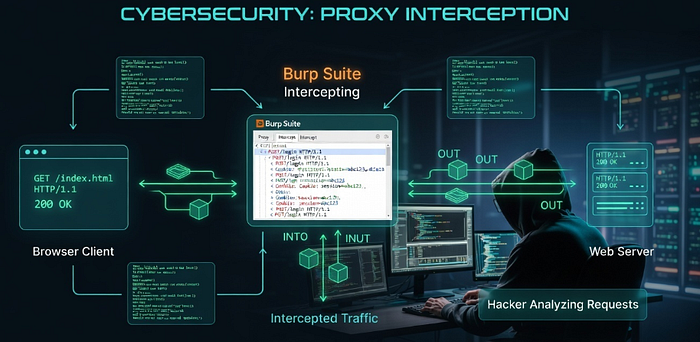
Burp Suite acts as a man-in-the-middle proxy, sitting between your browser and the web application. This allows security testers to intercept and manipulate traffic before it reaches the server.
In simple terms:
Browser → Burp Suite → Web Server Web Server → Burp Suite → Browser
This small shift gives hackers massive visibility.
Using Burp Suite, ethical hackers can:
- Inspect requests and responses
- Modify parameters and headers
- Test authentication systems
- Replay requests repeatedly
- Automates certain vulnerability tests
- Discover security flaws like XSS or SQL injection
This is why Burp Suite is widely considered one of the most essential tools in web penetration testing.
If you're entering the bug bounty world, mastering Burp Suite is almost mandatory.
What Exactly Is Burp Suite?
Burp Suite is a web application security testing platform developed by PortSwigger.
It contains multiple tools inside a single interface designed for discovering vulnerabilities in web applications.
You can think of it as the Swiss Army knife of web hacking.
Instead of using multiple tools for different tasks, Burp bundles everything together:
- Traffic interception
- Request manipulation
- Automated scanning
- Attack automation
- Response comparison
- Data encoding and decoding
This makes it the go-to toolkit for:
- Ethical hackers
- Bug bounty hunters
- Penetration testers
- Security researchers
- Application security engineers

Burp Suite Editions: Which One Should You Use?
Before installing Burp Suite, you'll notice it comes in different editions.
Community Edition (Free)
Best for beginners and learners.
Features include:
- Intercept Proxy
- Repeater
- Limited Intruder functionality
- Decoder
- Comparer
- Extensions support
While some advanced automation features are missing, the Community Edition is more than enough to start learning web security.
Professional Edition
Designed for professional pentesters and bug bounty hunters.
Additional features include:
- Automated vulnerability scanner
- Full Intruder attack automation
- Faster scanning
- Project saving
- Advanced extensions
For beginners, the Community Edition is the perfect starting point.

Installing Burp Suite: The First Step into Web Hacking
Getting started with Burp Suite is surprisingly simple.
Step 1: Download Burp Suite
Download the Community Edition from the PortSwigger website.
Step 2: Launch the Application
When opening Burp Suite for the first time, choose:
Temporary Project → Use Burp Defaults → Start Burp
This launches the main dashboard.
Step 3: Configure Your Browser
Burp works by routing browser traffic through a proxy.
By default, Burp listens on:
127.0.0.1:8080
This means your browser must send requests through this proxy so Burp can intercept them.
You can either:
- Use Burp's built-in browser, or
- Configure Chrome/Firefox manually
Once configured, every request from your browser will pass through Burp Suite.
Now the fun begins.
Understanding the Core Burp Suite Tools
Burp Suite contains multiple modules, each designed for a specific testing workflow.
Let's explore the most important ones beginners should know.
Proxy
This is the heart of Burp Suite.
The Proxy intercepts traffic between your browser and the web application.
When intercept is enabled, every request stops inside Burp before reaching the server.
You can:
- Inspect request headers
- Modify parameters
- Change cookies
- Manipulate authentication tokens
It's the hacker's microscope.
Repeater
Repeater allows you to send the same request multiple times with modifications.
This is extremely useful when testing vulnerabilities like:
- SQL Injection
- XSS
- Authentication bypass
- Parameter manipulation
Instead of repeating the entire action in the browser, you simply tweak the request and resend it instantly.
Efficient. Fast. Hacker-approved.
Intruder
Intruder automates attacks.
Instead of manually modifying requests, Intruder can send thousands of requests with different payloads.
Common use cases include:
- Brute forcing login credentials
- Fuzzing parameters
- Username enumeration
- Payload testing
This tool helps discover weaknesses faster during security testing.
Decoder
Sometimes applications encode data in formats like:
- Base64
- URL encoding
- Hex
The Decoder tool helps security testers quickly encode and decode data to understand how applications process information.
Comparer
Comparer lets you analyze the differences between two responses.
This can reveal subtle changes in behavior that indicate security flaws.
For example:
- Response length differences
- Hidden parameters
- Authorization weaknesses

A Real Example: Intercepting a Login Request
Let's simulate a simple scenario.
Imagine you visit a login page.
When you submit the login form, your browser sends a request like this:
POST /login.php
username=admin&password=1234
Burp Suite intercepts this request before it reaches the server.
Now you can modify it.
For example:
username=admin' OR '1'='1
password=anything
If the application is vulnerable to SQL Injection, this manipulation might bypass authentication.
This is how security researchers test applications for vulnerabilities.
Of course, these tests must always be performed only on authorized systems or security labs.
Practical Tips to Master Burp Suite Faster
Learning Burp Suite takes practice, but these strategies can accelerate your progress.
Learn the Shortcuts
Burp becomes dramatically faster when you know the shortcuts.
Example workflows:
- Right click → Send to Repeater
- Right click → Send to Intruder
These small habits save massive time.
Practice on Realistic Labs
Never test random websites.
Instead, use legal practice platforms such as:
- PortSwigger Web Security Academy
- DVWA (Damn Vulnerable Web Application)
- WebGoat
These environments simulate real vulnerabilities.
Build Your Own Payload Lists
Successful hackers maintain custom payload collections for:
- XSS
- SQL Injection
- SSRF
- Authentication bypass
Over time, these payloads become your personal hacking toolkit.
Common Beginner Mistakes
New security learners often struggle with the same issues.
Here are a few to avoid.
Testing Without Understanding HTTP
Burp Suite revolves around HTTP communication.
Before mastering the tool, you must understand:
- Requests
- Responses
- Headers
- Cookies
- Status codes
Without this knowledge, Burp will feel confusing.
Relying Only on Automation
Automated scanners are useful, but manual testing is where real bugs are found.
Bug bounty hunters often discover vulnerabilities by manually analyzing requests and application logic.
Burp Suite is designed to empower this process.
Ignoring Workflow
Professional testers follow a structured process:
- Map the application
- Intercept traffic
- Analyze parameters
- Test with Repeater
- Automate with Intruder
- Document findings
Consistency is key.
The Future of Web Application Security
Web applications are evolving quickly.
Modern architectures now include:
- APIs
- Microservices
- Cloud infrastructure
- GraphQL
- AI-driven platforms
As attack surfaces grow, tools like Burp Suite are becoming even more powerful.
New trends in web security testing include:
- API security testing
- Automated attack simulations
- AI-assisted vulnerability detection
- DevSecOps integration
But one thing remains constant.
Manual testing skills will always matter.
And Burp Suite remains the best place to develop those skills.
Where to Learn Burp Suite and Ethical Hacking
Learning cybersecurity alone can be overwhelming.
That's why communities and structured learning platforms matter.
If you want beginner-friendly cybersecurity resources, tutorials, and practical learning paths, explore:
Bugitrix is a cybersecurity learning platform focused on making complex topics simple and actionable for learners.
You can also join the growing cybersecurity community here:
Telegram Community https://t.me/bugitrix
For professional insights, networking, and cybersecurity discussions, follow the Bugitrix LinkedIn page:
https://www.linkedin.com/in/bugitrix-com/
Learning cybersecurity becomes much easier when you surround yourself with people who are on the same journey.
Final Thoughts
Every great web hacker starts with one fundamental skill:
Understanding how web applications communicate.
Burp Suite gives you the ability to observe, manipulate, and analyze that communication in real time.
Once you master this tool, you begin seeing the internet differently.
Login forms become attack surfaces. APIs become puzzle boxes. Requests become opportunities to uncover hidden vulnerabilities.
The path to becoming a skilled ethical hacker doesn't start with advanced exploits.
It starts with tools like Burp Suite and the curiosity to explore how things work under the hood.
If you're serious about entering the world of cybersecurity, start learning, start practicing, and keep hacking responsibly.
And if you want structured resources, community discussions, and real cybersecurity insights, explore Bugitrix and connect with the community today.
Telegram: https://t.me/bugitrix Website: https://bugitrix.com LinkedIn: https://www.linkedin.com/in/bugitrix-com/