

This is a wlakthrough of my hands-on experience exploring VAmPI, a deliberately vulnerable API designed to simulate real-world security issues based on OWASP API TOP 10. VAmPI is a great sandbox for Practicing and understanding how APIs works, how they can break, and how attackers might exploit them, as it's a lightweight, self-contained docker, and includes common vulnerabilities you'd commonly find in production APIs.
It is no new thing now that APIs are the backbone of modern applications , I made a previous post here explaining the concept of API and their Security Risks.
Phase 1: Setting Up VAmPI
Installing VAmPI using Docker
docker run -p 5000:5000 erev0s/vampi:latestRunning this command, launches the VAmPI.
To confirm that VAmPI is UP and running, I check http://127.0.0.1:5000 on my browser.

Phase 2: Importing the OpenAPI file from Github to Postman
a. To import the OpenAPI spec we'd be working with from Github to Postman, we'd need to access the API documentation of VAmPI on their Github repository.
Download the OpenAPI spec from:
https://github.com/erev0s/VAmPI/blob/master/openapi_specs/openapi3.yml
b. After downloading the OpenAPI spec, I proceededto opening the swagger file on https://editor.swagger.io
After oprnng the fileon swagger, I Imported the file using the "Import file" option under the "File" dropdown.
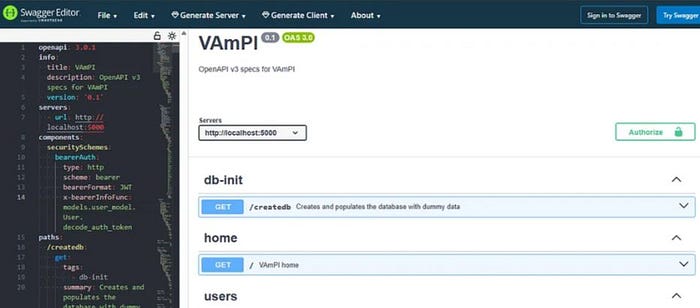
c. Now that I have successfully downloaded the OpenAPI spec file, I proceeded to Importing the downloaded OpenAPI spec to Postman.
Open Postman, Click on the Import and select the OpenAPI file.
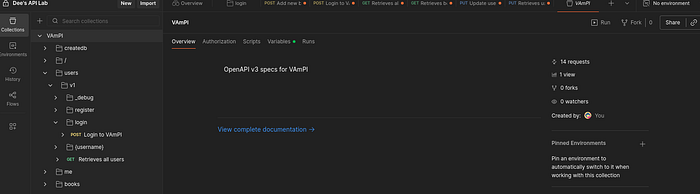
Set the BaseURL to match my local setup: In my case, I changed the baseURL to http://127.0.0.1:5001.
Below are all the endpoints we'll be working with,
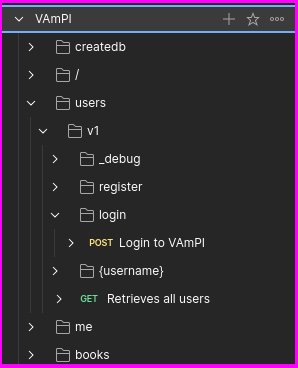
Phase 3: Registering User Accounts
a. Initializing the Database
I initialized the VAmPI's database using the /createdb endpoint;
Endpoint; GET /createdb
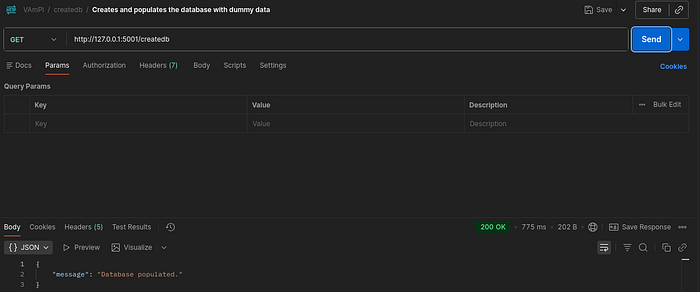
This populated the system with default users, books, and admin accounts, which were critical for the exploitation steps that followed.
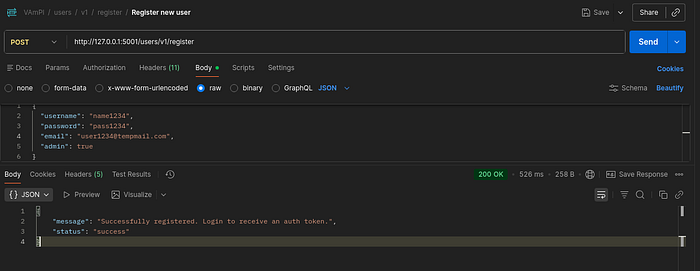
b. Registering New Users
Endpoint: POST /users/v1/register
To Register new users, I used the/users/v1/register endpoint to create my own user account.
{
  "username": "name190",
  "email": "user@tempmail.com",
  "password": "pass190"
}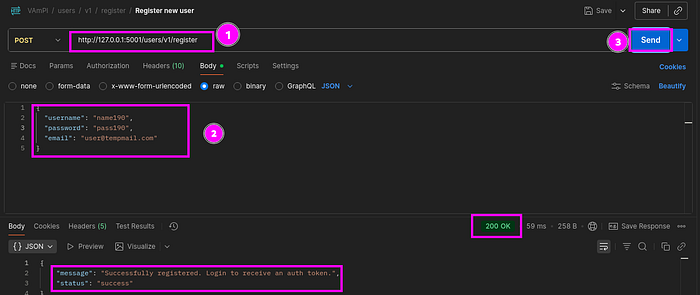
The API esponded with a "201 Created", confirming that the User was successfully registered.
Phase 3: Logging In and Capturing a JWT
I logged in using the login endpoints;
Endpoint: POST /users/v1/login
{
  "username": "name123",
  "password": "pass123"
}
The response upon successful login included a JSON Web Token (JWT);

This token is critical, as it is used to authorize future requests by adding it to the Authorization header.
Authorization: Bearer <jwt_token>I stored this token as an environment variables in Postman, and set up the Authorization tab to use the Bearer Token type. This allowed for easy reuse of the token automatically across all authenticated requests.
Phase 4: Exploring Authenticated Endpoints
With the Token set, I was now able to explore authenticated endpoints;
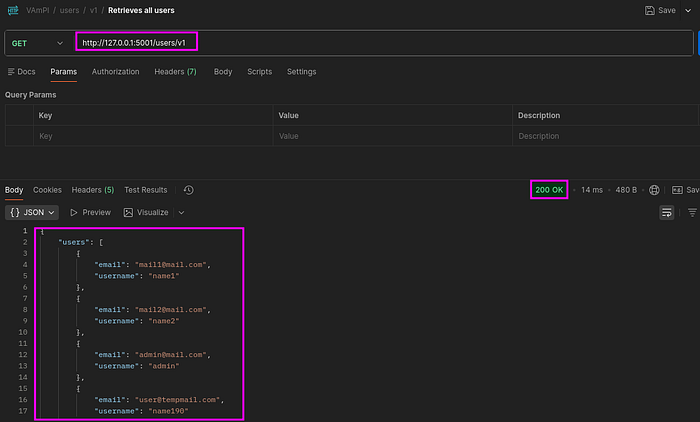
a. GET /me returned the profile of currently authenticated user.
b. GET /users/v1/_debug, this endpoint exposed a full dump of all users in the system, including plaintext passwords and admin flags.
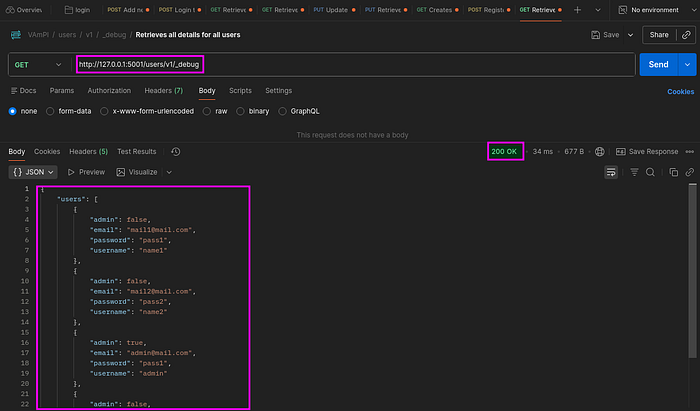
The last discovery — exposure of all users in the system, including admin flags was alarming and this confirmed the presense of "Excessive Data Exposure" which can be mapped to OWASP API03:2023 — Broken Object Property Level Authorization.
Impact: It allows unauthenticated users to access properties of an objects that are considered sensitive, including usernames, email addresses, passwords, and even exposes high.privilege accounts.
Risk: High
Mitigation: Remove debug endpoints from production, keep returned data structures to bare minimum and require authetication for sensitive endpoints.
2. Mass Assignment
From the excessive data exposure, I took note of the parameter; admin:false, which could tell us if a user has administrative privilleges or not.
Proceeding to see if we could create a new user by setting the parameter admin:true in our case.
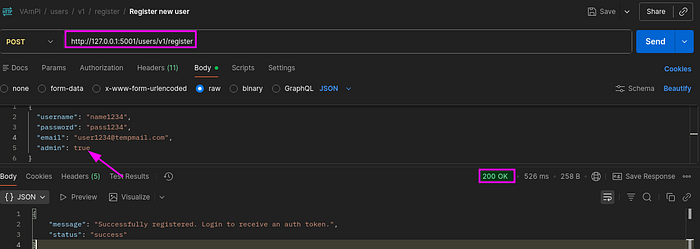
From the response, I was able to register a new user with admin:true Parameter, giving the new user admin privilleges.
The API blindly trusting all fields in the incoming JSON body without whitelisting or filtering is a classic indicator of mass assignments.
This Vulnerability can be mapped to Broken Object Property Level Authorization (BOPLA)
Impact: This can allow an attacker to escalate privilleges by simply modifying request parameters to assign themselves administrative privilleges allowing them to gain access to sensitive data and functions.
Risk: High
Mitigation: Always validate and sanitize requests, and if possible avoid using functions that automatically binds a clients input into code variables, internal objects or object properties.
3. Broken Object Level Authorization
BOLA occurs when an API fails to verifies users requests for resources, thereby allowing User A to access User B's resources.
To test for this Vulnerability in VAmPI, I created another User
Step 1: Create another user
Endpoint: POST /users/v1/register
Step 2: Log in
Endpoint: POST /users/v1/login
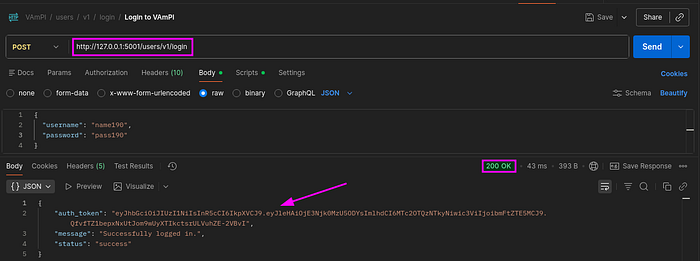
Capture the token and save as an environment variable
Step 3: Create a book entry
Endpoint: POST /books/v1
Remember to authorize using the token you saved from earlier.
Add your book title and Secret,
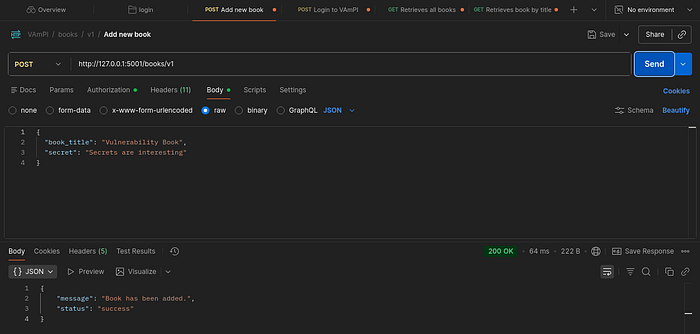
Successfully added a book.
Step 4: Create a Book entry as another User
Remember to set the Authrorization with the token.
Add your book title and Secret and send:
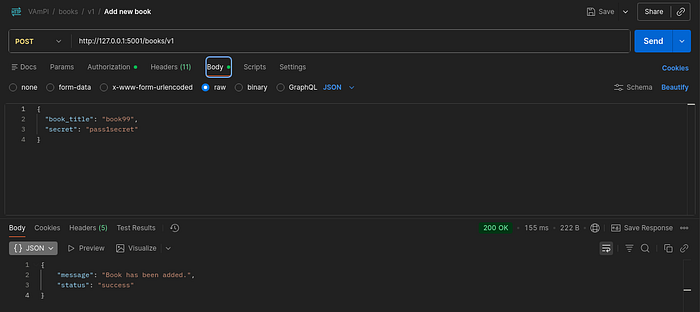
Successfully added book.
To test for BOLA I proceeded to use User A to access User B's resource by providing User B's book title.
Endpoint: GET /books/v1/{book_title}
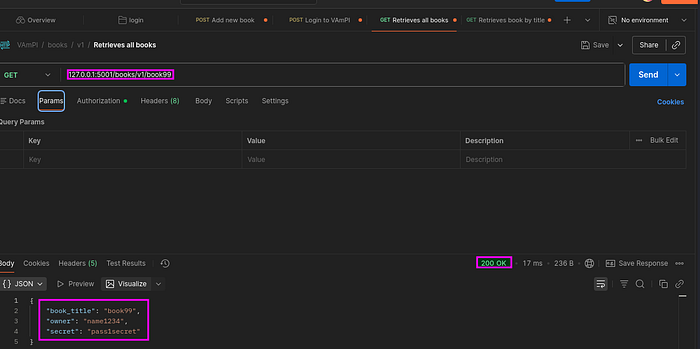
As shown above I was able to retrieve and view the resource of the book created by User B.
This vulnerability is a clear indication of the presence of Broken Object Level Authorization — API1:2023
Risk: High
Impact: This could allow an attacker gain access to resources belonging to other users, exposing sensitive data and in the process compromising users privacy.
Mitigation: Prefer the use of random and unpredictable values as GUID for record IDs, and also validate ownership of resources server side before returning data or allowing modifications.
4. Unauthorized Password Change: Broken Function Level Authorization — OWASP API5
Using User A's JWT, I attempted to change the password for User B
Endpoint: /users/v1/:username/password
{
  "password": "newpass12"
}
The request was successful, there were no access checks to ensure that only the rightful user could update their own credentials.
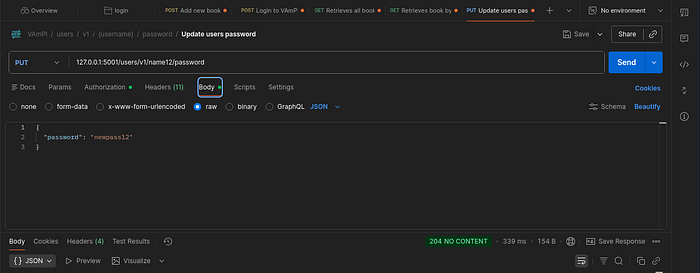
This vulnerability is an indication of the presence of BFLA — API5:2023
Risk: High
Impact: An unauthorized user having access to change the password of another user could result to account takeover.
Mitigation: make sure all administrative controllers inherit from an abstract controller that implements authorization checks based on the users group or roles.
Conclusion:
During the course of this API penetration test of VAmPI, critical vulnerabilities from the OWASP API Top 10 were identified including ; excessive data exposure, mass assignment, BOLA and BFLA. All of these findings goes to further highlight the importance of strict authorization and input validation to prevent issues like privilege escalations and account takeovers.