
This lab shows something very interesting: Even when SameSite=Strict cookies are enabled (which are considered very secure), CSRF can still be possible if there is a client-side redirect vulnerability.
I suggest watching the video before reading this article. Seeing the attack in action first will make the concept much clearer when you go through the explanation below.
Here is the video link — click here
What Does This Lab Show?
The website has:
- SameSite=Strict session cookies
- An email change feature
- A client-side redirect functionality
Normally, SameSite=Strict makes CSRF very difficult. But because of a redirect issue inside the website, it can still be bypassed.
What Are SameSite=Strict Cookies?
SameSite cookies are used to improve security.
Rule of SameSite=Strict
- If the request comes from the same website → cookie is sent ✅
- If the request comes from a different website → cookie is NOT sent ❌
This means if an attacker tries to perform a CSRF attack from an external website, the browser will not send the session cookie, and the attack should fail.
That's why SameSite=Strict is considered strong protection.
So Where Is the Problem?
SameSite=Strict only blocks cross-site requests. But if the request is generated inside the same site, the browser will still send the cookie.
👉 This is where client-side redirect becomes important.
How the SameSite Bypass Works?
The website contains a feature in the comment section:
- It redirects using a postId parameter
- This parameter is user-controlled
That means whatever value we give in postId the website redirects to that location. If we manipulate it carefully, we can force the website to redirect internally to: "/my-account/change-email".
Since this redirect happens inside the same website, the browser thinks: "This is a same-site request." So it sends the SameSite=Strict session cookie. And the email gets changed.
Important Observation: Email Change Endpoint
The change-email endpoint:
- Accepts GET requests
- Changes the email when proper parameters are provided
This makes exploitation easier.
Steps to Solve the Lab
Step 1: Login
- Login using lab credentials.
Step 2: Find the Redirect Behavior
- Open any blog post.
- Add a comment.
- Click Post Comment.
- Intercept the request using Burp Suite.
- Send the request to Repeater.
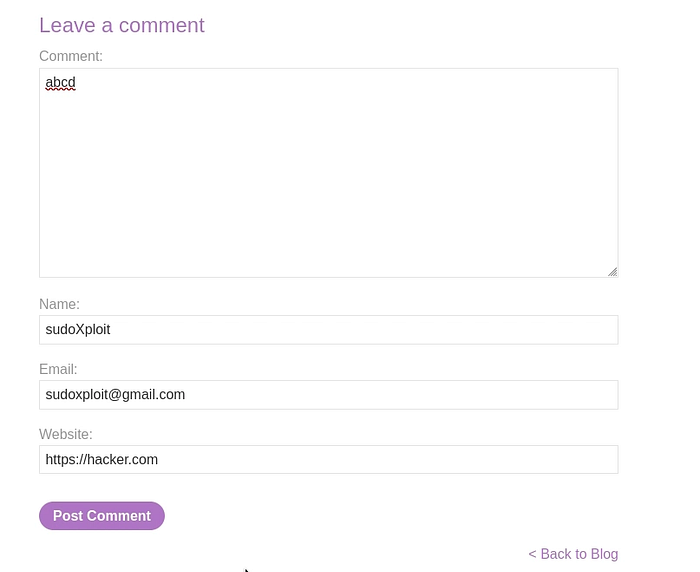
Step 3: Modify the Request
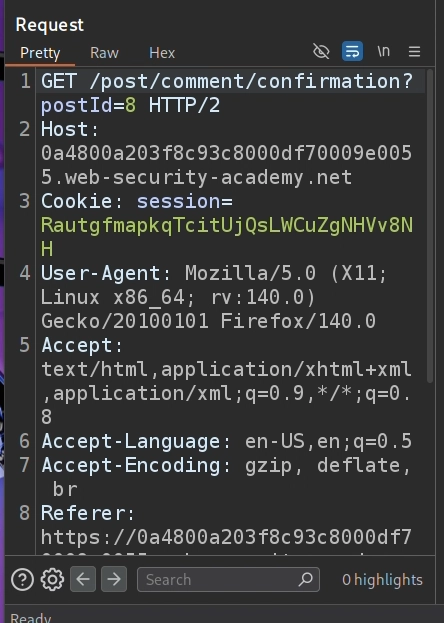
Replace the request path with:
/post/comment/confirmation?postId=1/../../my-account/change-email?email=hacker@gmail.com%26submit=1Send the request. If successful, you will see: "302 Found". This confirms redirection is happening.
Final Working Payload
<script>
location = 'https://target.web-security-academy.net/post/comment/confirmation?postId=1/../../my-account/change-email?email=hacker@gmail.com%26submit=1';
</script>- Deliver this payload to the victim.
Why This Works?
Because:
- Redirect happens inside the same website
- Browser treats it as a same-site request
- SameSite=Strict does not block it
- Sensitive action is allowed via GET
SameSite=Strict is strong, but not perfect. Internal redirects can bypass it.
More CSRF Links: