
Not a Medium member? You can read this article for free by clicking here.
When I was studying Computer Science, I specialised in System Administration. That was what I wanted to do. I wanted to keep programming as my hobby. Still, because of the twists of my life, I have ended up working as a Software Engineer.
Still, I never stopped managing infrastructures. Most of my early work experience focused on Software Engineering. And yet, because I worked at startups, I ended up managing the servers too.
For the past few months, I have been testing some self-hosted WAF (Web Application Firewall) solutions to protect some small sites I am managing. And there were two Docker-ready tools I have been running for this: BunkerWeb & SafeLine.
My love-hate story with BunkerWeb
After implementing it, BunkerWeb worked error-free for more than half a year. However, one day something happened, and an issue kept some sites down for more than 6 hours until a friend of mine restarted the server (re-launching BunkerWeb in the process).
After that case, we started to notice some weird behaviours. The sites that had served content for months were now experiencing persistent problems.
There was one time that BunkerWeb was down due to a Redis issue. But the real and persistent issue was when the whole service was down because BunkerWeb was stuck at "generating certificates". It was "impossible" to move forward; the system didn't respond at all.
Furthermore, after some work, checks and adjustments to restore the system, we faced another problem: we were auto-banned by BunkerWeb's 403 FORBIDDEN error page as soon as we logged in to the Web UI (management console).
During all this time, testing and experiencing, we learned some things. And these are the problems we discovered and fixed along the way.
Problem #1) Error generating certificates
BunkerWeb's Let's Encrypt integration blocked the entire WAF while attempting to generate SSL certificates for the services it was handling.
This error occurred because Let's Encrypt uses HTTP to generate certificates, but BunkerWeb was running behind Cloudflare's Reverse Proxy, and Cloudflare upgraded all HTTP requests to HTTPS.
In other words, it was impossible for Let's Encrypt to generate the certificates based on the current settings. The system was unable to generate the certificates, so it got stuck.
We solved this case by editing the service. For the Front Service section, we disabled the Auto Let's Encrypt parameter. Instead, we enabled the Use Custom SSL parameter. Then, we prioritised the plain-text certificates, so we passed both the Cert and Key from Cloudflare's Origin Server, ensuring Cloudflare and BunkerWeb could connect successfully.
The services are now up and running, and BunkerWeb Scheduler no longer needs to generate SSL certificates for the system.
Problem #2) Auto-Ban when logging into the Web UI
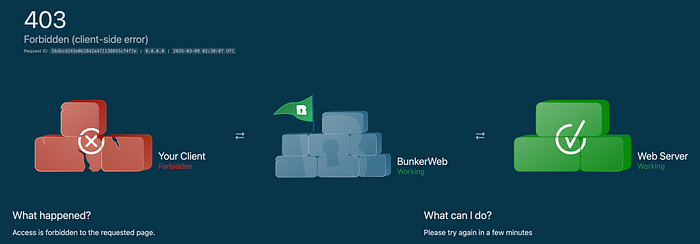
The BunkerWeb's Web UI is accessible via Tailscale (so we reach the server using a CGNAT IP Address).
We realised that BunkweWeb has predefined IP tracking rules for Class A, B and C sub-networks. However, it does not include CGNAT networks by default.
To ensure our access, we applied two updates to the Global Settings to ensure they work for the entire BunkerWeb service.
The first update was under the Real IP module. We added the CGNAT network range (100.64.0.0/10) to the trusted IP lists.
The second update was under the Whitelist module. In a nutshell, we added the same CGNAT network range as waitlisted origins.
With these two updates, we didn't face any other issues establishing connections to BunkerWeb.
Please clap and follow!
👏 Enjoyed this article? Please give it a round of applause by clicking the 👏 button below. Your support means the world to me!
📚 Want to stay updated with my latest posts? Hit the "Follow" button to join my community, and ✉️ Subscribe to my mailing list for weekly updates.
Thank you for reading and engaging! Your feedback and support inspire me to share more valuable insights with you. 🙌