
A beginner bug bounty story about discovering a CAPTCHA bypass in a NASA reporting system and learning the importance of persistence.
WHO AM I
I'm Krishnan,S a third-year Cyber Security student and a self-taught beginner in bug bounty hunting.
I document what I learn, the mistakes I make, and the progress I achieve — so others starting out can learn with me.
For me, this journey isn't just about rewards or recognition — it's about passion, learning, and helping secure the web, one step at a time.
How I Discovered the Bug
- When I first started learning bug bounty hunting, National Aeronautics and Space Administration was actually one of the first programs I wanted to test.
- At that time, I had zero real bug bounty experience. I was reading many write-ups on Medium and posts on LinkedIn where security researchers shared their stories about receiving recognition from companies.
- Seeing those posts motivated me. One thing that caught my attention was the NASA Letter of Appreciation that some researchers received.
At that moment I set a small personal goal:
One day I want to find a valid bug and receive that letter too.
So I began learning basic web vulnerabilities and started doing reconnaissance on the NASA scope.
Recon
During reconnaissance I discovered the following subdomain
https://oigforms.nasa.govWhile exploring the functionality of the site, I found a page:
https://oigforms.nasa.gov/wp_cyberhotline.htmlThis page allows users to privately report cyber abuse or security issues to the NASA Office of Inspector General.
The form included several security controls such as:
- Required input fields
- Google reCAPTCHA
At first glance, everything looked properly protected.
And Something Strange Happened
To test the form, I entered some random text and clicked Submit.
At first I thought it might be a temporary glitch.
So I tested again.
This time I did not enter anything in the form and simply clicked the submit button.
Instead of blocking the request, the page responded with a message indicating a change from FALSE to TRUE.
This was unusual.
Investigating With DevTools
To understand what was happening, I opened Browser DevTools → Network Tab and submitted the form again.
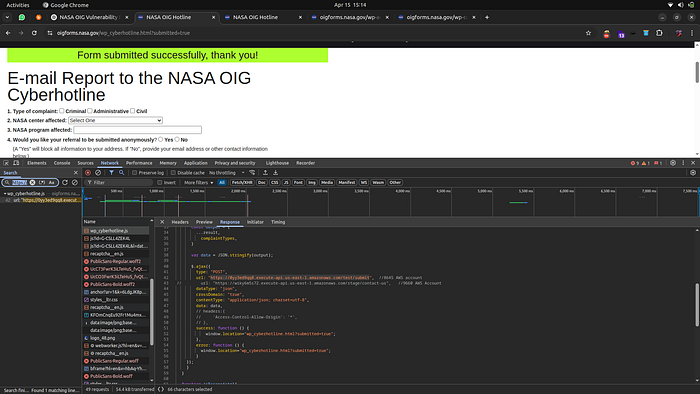
There I noticed that when the submit button was clicked, the browser sent a request to the following backend API:
https://0yy3ed9qq8.execute-api.us-east-1.amazonaws.com/test/submitThe request was being sent even when required fields and CAPTCHA validation were missing.
This suggested that validation was happening only on the frontend.
So I decided to test the API directly.
Testing the Backend API
I created a direct POST request using curl:
curl -w "\n[Status Code: %{http_code}]\n" -s -o /dev/null -X POST \
'https://0yy3ed9qq8.execute-api.us-east-1.amazonaws.com/test/submit' \
-H 'Content-Type: application/json' \
-d '{
  "whichForm": "cyberhotline",
  "type": "Civil",
  "center": null,
  "program": "BypassedCAPTCHA",
  "email": "attacker@example.com",
  "details": "This message bypassed CAPTCHA and validation.",
  "complaintTypes": ["Civil"]
}'
The server returned:
200 OKEven though no CAPTCHA token was provided.
This confirmed that the backend API did not validate CAPTCHA or required fields.
Spam Automation Test
To demonstrate the impact, I created a small automation script that sent multiple requests to the API.
#!/bin/bash
for i in {1..10}; do
curl -X POST https://0yy3ed9qq8.execute-api.us-east-1.amazonaws.com/test/submit
done
The backend accepted all requests successfully.
This meant an attacker could potentially send thousands of fake reports automatically.
Impact
The vulnerability allowed
- Complete CAPTCHA bypass
- No authentication or validation
- API returning 200 OK for almost any request
- Attackers flooding the system with spam reports
Initial Response From the Security Team
After submitting the report through Bugcrowd, I received a response from the triage team.

In simple terms, they wanted to confirm whether the endpoint was truly processing submissions or just returning a generic success response.
Clarification to the Security Team
- When submitting the form through the website, the request fails if the CAPTCHA or required fields are missing.
- However, sending requests directly to the backend API still returns HTTP 200 OK, even without CAPTCHA or required fields.
- This confirmed that validation was happening only on the frontend, allowing attackers to bypass the website and interact directly with the backend API.
After providing this clarification, the report was reviewed again.
The issue was eventually triaged as valid

After the fix was implemented, the report status changed to Resolved, and I received a Letter of Appreciation from National Aeronautics and Space Administration.
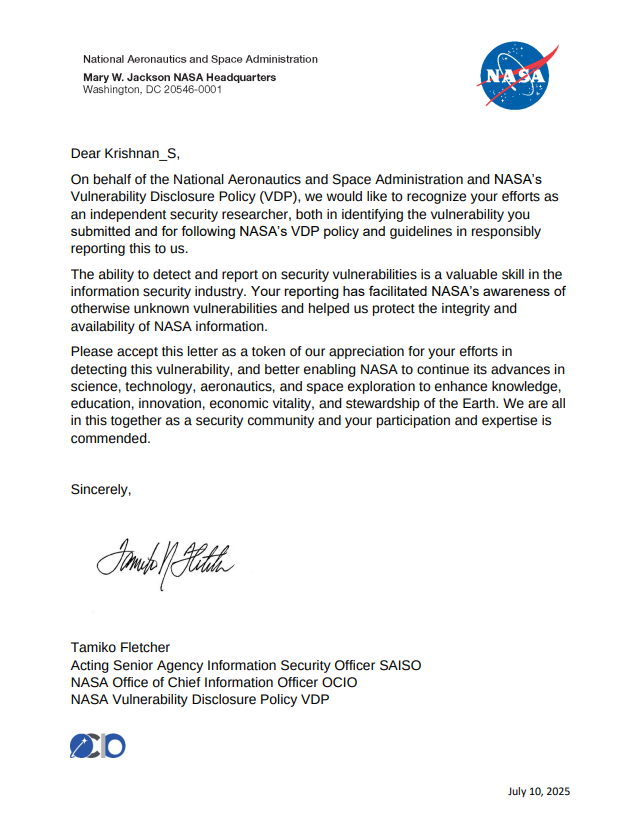
For me, this was a very special moment because NASA was one of the first targets I started testing when I entered bug bounty hunting.
But this success did not come immediately.
Before this report, I had already submitted 11 reports that were marked as:
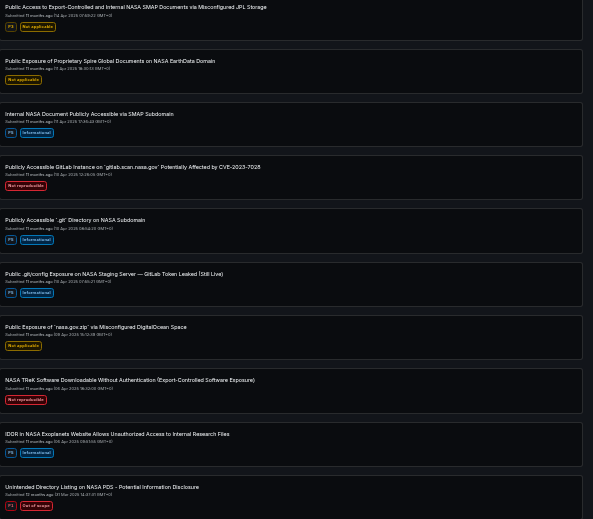
- Duplicate
- Informational
- Not Applicable
At first, it was discouraging. But every report helped me understand how applications work and how security teams evaluate vulnerabilities.
This experience taught me an important lesson:
Persistence matters more than anything in bug bounty hunting.
If you are just starting out and facing duplicates or rejected reports, don't get discouraged.
Keep learning. Keep testing. Keep reporting.
Your next valid bug might be one request away.
Thanks for reading — see you in another write-up soon! 🚀