
The Issue
Managing a modern OpenShift environment can quickly become complex especially as clusters grow and multiple teams interact with shared resources. For OpenShift administrators, maintaining security, enforcing compliance, and preventing configuration drift across environments is a constant challenge.
Even in well-managed clusters using GitOps tools like Argo CD, drift can still occur. Users may create or modify resources outside of the desired state, introducing inconsistencies that are not immediately corrected. While GitOps ensures what should exist, it doesn't always react in real time to what is happening.
This is where a new approach becomes valuable — simplifying OpenShift management through real-time, event-driven automation.
In this guide, we'll walk through how to build a self-healing security and compliance engine for OpenShift by combining:
- GitOps (Argo CD) for desired state enforcement
- Streaming events with Apache Kafka
- Real-time decision making with Event-Driven Ansible
- Automated remediation using Ansible Automation Platform
The result is a system that doesn't just detect drift — it responds to it immediately, enforcing policies as changes occur and reducing the operational burden on administrators.
The goal, having many of your security teams sleeping easier at night.
🎯 What We'll Cover
In this guide, we will:
- Design a self-healing automation pipeline for OpenShift
- Configure logging and event streaming into Kafka
- Filter and identify actionable security events
- Use Event-Driven Ansible to trigger automation in real time
- Enforce policies (like ServiceAccount restrictions) automatically
- Integrate everything into a GitOps-driven workflow
Prerequisites
Before we begin, ensure your OpenShift environment is properly configured to support logging, kafka, gitops, along with a ansible controller and event driven ansible controller.
This guide assumes that you have configured these pieces already, well at least up & running in your environment.
Required OpenShift Components
You must have the following operators installed in your cluster:
- Red Hat OpenShift Gitops Operator
- Streams for Apache Kafka Operator
- Red Hat OpenShift Logging Operator
Required Ansible Components
You must have the following Ansible pieces in place:
- Ansible Automation Platform Controller
- Event Driven Ansible :
🔧Building the Self-Healing Security and Compliance Engine for OpenShift
📦 Step 1: Deploying the Platform with Argo CD
To begin you need to conceptualize your project directory that will be use for ArgoCD, it helps to plan out how to manage a project of this scope.
I arrived on the following:
📦 OpenShift Event-Driven Automation Platform
│
├── 🧠 Automation (AAP + EDA)
│   ├── aap/
│   │   ├── playbooks/
│   │   │   ├── alerts/
│   │   │   └── enforcement/
│   │
│   ├── playbooks/              # Global shared playbooks
│   └── rulebooks/              # ✅ Global EDA rulebooks (controller-visible)
│
├── ⚙️ Platform Applications
│   ├── apps/
│   │   ├── normalizer/         # 🔄 Take noisy, raw OpenShift logs and turn them into clean, actionable events
│   │   │   ├── base/
│   │   │   └── overlays/
│   │   │       ├── dev/
│   │   │       └── prod/
│
├── 🌐 Cluster Configurations (GitOps Managed)
│   ├── clusters/
│   │   ├── dev/
│   │   │   ├── argocd-apps/    # 🚀 Parent ArgoCD app will reconcile all child applications
│   │   │   ├── kafka/          # 📦 Contains all YAML files related to Kafka deployment on OpenShift
│   │   │   ├── logging/        # 📜 Contains all YAML files related to Logging deployment on OpenShift
│   │   │   ├── log-automation/ # 🔁 Child ArgoCD app - deploys logging pipeline workflow within OpenShift
│   │   │   ├── normalizer/
│   │   │   ├── namespaces/     # 🧩 Used to define project namespaces (managed by ArgoCD)
│   │   │   ├── networkpolicy/  # 🔐 Defines network rules for Kafka & logging flows (ArgoCD managed)
│   │   │   ├── rbac/           # 🔑 RBAC policies for Kafka, logging, and automation access (ArgoCD managed)
│   │   │   ├── secrets-external/
│   │   │   └── platform-components/ # 🏗️ Child ArgoCD app - deploys baseline cluster state & resources to manage OpenShift
│   │   │       ├── automation/ # ⚙️ Configure OpenShift resources to allow for automation
│   │   │       │   └── aap-access/
│   │   │       │       ├── cluster-rbac/
│   │   │       │       ├── namespace-rbac/
│   │   │       │       │   ├── banana/
│   │   │       │       │   └── file-server/
│   │   │       │       └── serviceaccount/
│   │   │       └── compliance-baseline/ # 🛡️ Default state you wish for the cluster to maintain
│   │   │
│   │   └── prod/
│   │       ├── argocd-apps/    # 🚀 Parent ArgoCD app for production environment
│   │       ├── kafka/          # 📦 Kafka deployment manifests on OpenShift (ArgoCD managed)
│   │       ├── logging/        # 📜 Logging deployment manifests for OpenShift
│   │       ├── normalizer/
│   │       ├── namespaces/     # 🧩 ArgoCD-managed namespaces
│   │       ├── networkpolicy/  # 🔐 ArgoCD-managed network rules
│   │       ├── rbac/           # 🔑 ArgoCD-managed access control
│   │       └── secrets-external/
│
├── 🏗️ Execution Environments
│   └── ee_build/
│
├── 📜 Scripts & Tooling
│   └── scripts/
│
└── 📚 Documentation
    └── docs/
I created a GitHub repo with the following directories, that ArgoCD would used to manage the state of our OpenShift cluster.
⚙️Configuring ArgoCD managed YAML resources
The following YAML files will be used to configure the parent ArgoCD app:
#Root App ArgoCD Manifest — located at cluster/dev/root-app.yaml
apiVersion: argoproj.io/v1alpha1
kind: Application
metadata:
  name: dev-home-ocp-eda-apps
  namespace: openshift-gitops
spec:
  destination:
    namespace: openshift-gitops
    server: https://kubernetes.default.svc
  project: default
  source:
    repoURL: https://github.com/philip860/openshift-event-driven-automation.git
    targetRevision: eda-log-tuning
    path: clusters/dev/argocd-apps
  syncPolicy:
    automated:
      prune: true
      selfHeal: true
    syncOptions:
      - CreateNamespace=true
#Child App ArgoCD Manifest — located at cluster/dev/argocd-apps/platform-components-app.yaml
apiVersion: argoproj.io/v1alpha1
kind: Application
metadata:
  name: dev-platform-components
  namespace: openshift-gitops
spec:
  destination:
    server: https://kubernetes.default.svc
    namespace: openshift-gitops
  project: default
  source:
    repoURL: https://github.com/philip860/openshift-event-driven-automation.git
    targetRevision: eda-log-tuning
    path: clusters/dev/platform-components
  syncPolicy:
    automated:
      prune: true
      selfHeal: true
#Child App ArgoCD Manifest — located at cluster/dev/argocd-apps/audit-filter-app.yaml
apiVersion: argoproj.io/v1alpha1
kind: Application
metadata:
  name: audit-filter
  namespace: openshift-gitops
spec:
  project: default
  source:
    repoURL: https://github.com/philip860/openshift-event-driven-automation.git
    targetRevision: eda-log-tuning
    path: clusters/dev/audit-filter
  destination:
    server: https://kubernetes.default.svc
    namespace: kafka
  syncPolicy:
    automated:
      prune: true
      selfHeal: true
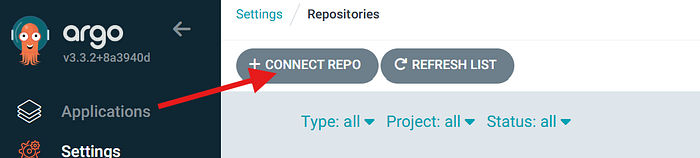
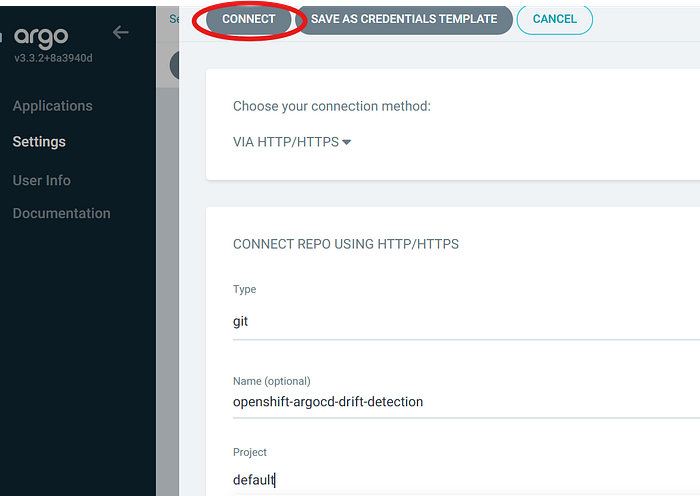
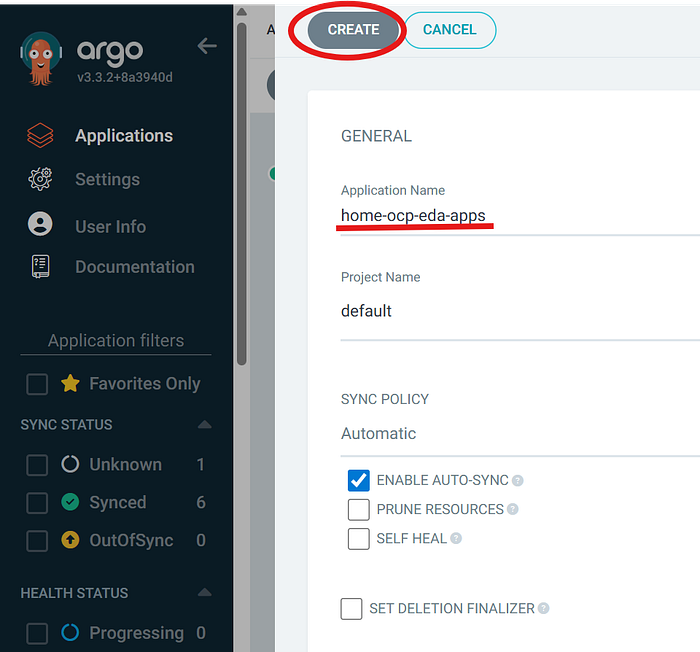
Once you have your created the initial ArgoCD application YAML files & pushed to your git repo, now you need to configure ArgoCD to use it.



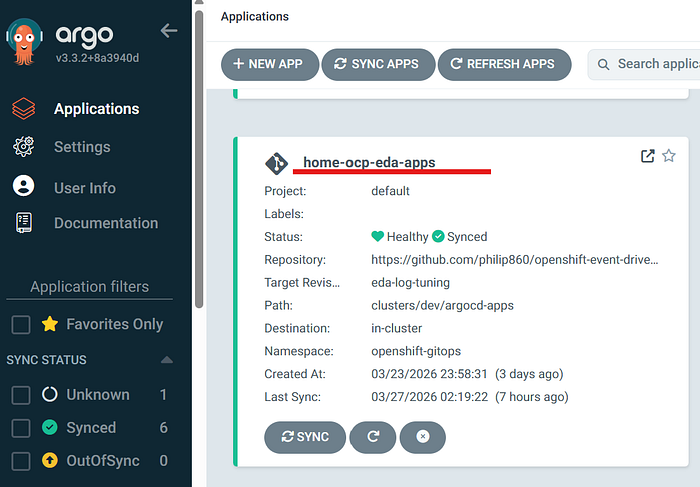
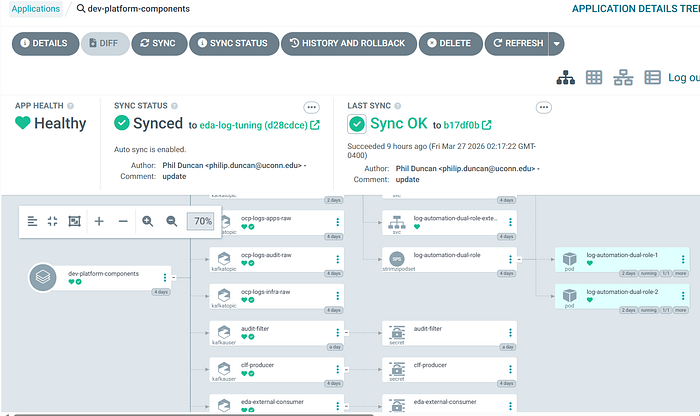
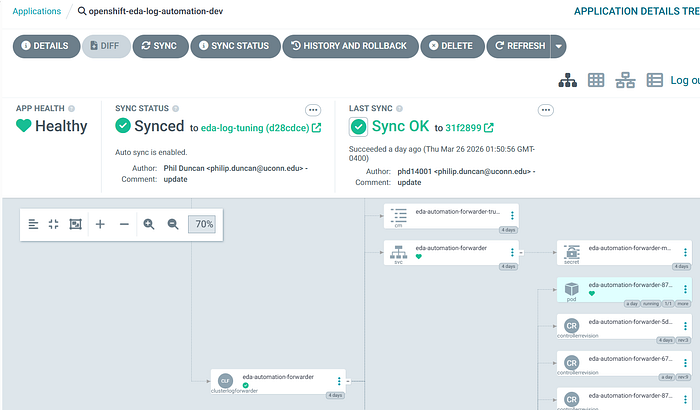
After successfully creating the ArgoCD application, when you click on it you should see something similar to this:
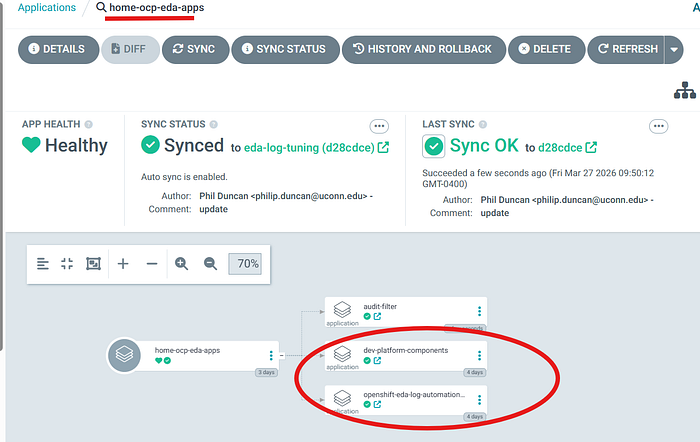
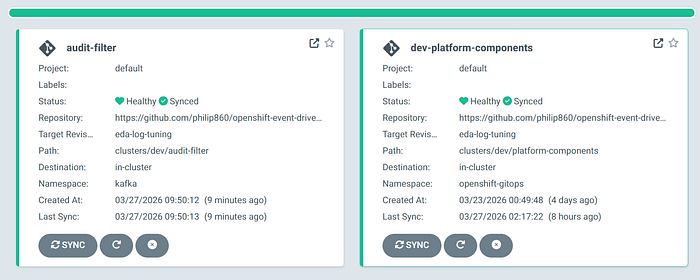
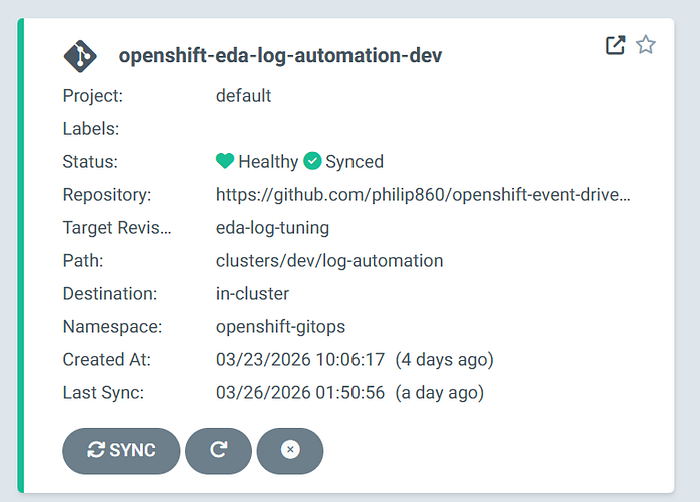
This will create 3 additional child ArgoCD apps in your ArgoCD window. When you make a change to any files in your github repo, all you need to do is sync the parent home-ocp-eda-apps, and it will reconcile the changes to all the children apps.
📦 Step 2: Configuring Kafka
📦 dev/kafka/  # 📦 Contains all YAML files related to Kafka deployment on OpenShift
│
├── audit-filter-user.yaml    # 🔑 Kafka RBAC for audit-filter service (consumes/produces filtered events)
├── clf-producer-user.yaml    # 🔑 OpenShift Cluster Logging Kafka RBAC (log forwarder producer access)
├── eda-consumer-user.yaml    # 🔑 Kafka RBAC rules for EDA account (consumes actionable events)
├── kafka-cluster.yaml        # 🏗️ Defines Kafka cluster (brokers, listeners, storage, config)
├── kafka-nodepool.yaml       # ⚙️ Defines Kafka node roles/pools (scaling and broker placement)
├── kafka-topics.yaml         # 📡 Defines Kafka topics (audit, apps, infra event streams)
├── kafka-user.yaml           # 👤 Base/shared Kafka user configuration (authentication + default ACLs)
└── kustomization.yaml        # 📦 Kustomize entry point to deploy all Kafka resources via ArgoCD
# audit-filter-user.yaml file
apiVersion: kafka.strimzi.io/v1beta2
kind: KafkaUser
metadata:
  name: audit-filter
  namespace: kafka
  labels:
    strimzi.io/cluster: log-automation
spec:
  authentication:
    type: tls
  authorization:
    type: simple
    acls:
      - resource:
          type: topic
          name: ocp.logs.audit.raw
          patternType: literal
        operations:
          - Read
          - Describe

      - resource:
          type: topic
          name: ocp.events.actionable.v4
          patternType: literal
        operations:
          - Write
          - Describe

      - resource:
          type: group
          name: audit-filter-v1
          patternType: literal
        operations:
          - Read
#clf-producer-user.yaml file
apiVersion: kafka.strimzi.io/v1beta2
kind: KafkaUser
metadata:
  name: clf-producer
  namespace: kafka
  labels:
    strimzi.io/cluster: log-automation
spec:
  authentication:
    type: tls
  authorization:
    type: simple
    acls:
      - resource:
          type: topic
          name: ocp.events.actionable.v4
          patternType: literal
        operations:
          - Write
          - Describe

      - resource:
          type: topic
          name: ocp.logs.apps.critical
          patternType: literal
        operations:
          - Write
          - Describe
#eda-consumer-user.yaml file
apiVersion: kafka.strimzi.io/v1beta2
kind: KafkaUser
metadata:
  name: eda-external-consumer
  namespace: kafka
  labels:
    strimzi.io/cluster: log-automation
spec:
  authentication:
    type: tls
  authorization:
    type: simple
    acls:
      - resource:
          type: topic
          name: ocp.events.actionable.v4
          patternType: literal
        operations:
          - Read
          - Describe

      - resource:
          type: topic
          name: ocp.logs.apps.critical
          patternType: literal
        operations:
          - Read
          - Describe

      - resource:
          type: group
          name: eda-edgepulse-main-v4
          patternType: literal
        operations:
          - Read

      - resource:
          type: group
          name: eda-edgepulse-apps-v1
          patternType: literal
        operations:
          - Read

      - resource:
          type: group
          name: eda-edgepulse-enforcement-v1
          patternType: literal
        operations:
          - Read
#kafka-cluster.yaml file
apiVersion: kafka.strimzi.io/v1beta2
kind: Kafka
metadata:
  name: log-automation
  namespace: kafka
  annotations:
    strimzi.io/kraft: enabled
    strimzi.io/node-pools: enabled
spec:
  kafka:
    version: 4.1.0
    metadataVersion: 4.1-IV1
    listeners:
      - name: tls
        port: 9093
        type: internal
        tls: true
        authentication:
          type: tls

      - name: external
        port: 9095
        type: nodeport
        tls: true
        authentication:
          type: tls
        configuration:
          preferredNodePortAddressType: InternalIP
          bootstrap:
            nodePort: 32095
          brokers:
            - broker: 0
              nodePort: 32096
              advertisedHost: 10.0.0.106
            - broker: 1
              nodePort: 32097
              advertisedHost: 10.0.0.106
            - broker: 2
              nodePort: 32098
              advertisedHost: 10.0.0.106

    authorization:
      type: simple
    config:
      offsets.topic.replication.factor: 3
      transaction.state.log.replication.factor: 3
      transaction.state.log.min.isr: 2
      default.replication.factor: 3
      min.insync.replicas: 2
      num.partitions: 3
      auto.create.topics.enable: false
      compression.type: producer
      log.retention.hours: 72

  entityOperator:
    topicOperator: {}
    userOperator: {}
#kafka-nodepool.yaml file
apiVersion: kafka.strimzi.io/v1beta2
kind: KafkaNodePool
metadata:
  name: dual-role
  namespace: kafka
  labels:
    strimzi.io/cluster: log-automation
spec:
  replicas: 3
  roles:
    - controller
    - broker
  storage:
    type: ephemeral
#kafka-topics.yaml file
apiVersion: kafka.strimzi.io/v1beta2
kind: KafkaTopic
metadata:
  name: ocp-logs-audit-raw
  namespace: kafka
  labels:
    strimzi.io/cluster: log-automation
spec:
  topicName: ocp.logs.audit.raw
  partitions: 12
  replicas: 3
  config:
    retention.ms: 259200000
    segment.ms: 86400000
    compression.type: lz4
    cleanup.policy: delete
    min.insync.replicas: 2
---
apiVersion: kafka.strimzi.io/v1beta2
kind: KafkaTopic
metadata:
  name: ocp-logs-infra-raw
  namespace: kafka
  labels:
    strimzi.io/cluster: log-automation
spec:
  topicName: ocp.logs.infra.raw
  partitions: 12
  replicas: 3
  config:
    retention.ms: 259200000
    segment.ms: 86400000
    compression.type: lz4
    cleanup.policy: delete
    min.insync.replicas: 2
---
apiVersion: kafka.strimzi.io/v1beta2
kind: KafkaTopic
metadata:
  name: ocp-logs-apps-raw
  namespace: kafka
  labels:
    strimzi.io/cluster: log-automation
spec:
  topicName: ocp.logs.apps.raw
  partitions: 24
  replicas: 3
  config:
    retention.ms: 259200000
    segment.ms: 86400000
    compression.type: lz4
    cleanup.policy: delete
    min.insync.replicas: 2
---
apiVersion: kafka.strimzi.io/v1beta2
kind: KafkaTopic
metadata:
  name: ocp-logs-apps-critical
  namespace: kafka
  labels:
    strimzi.io/cluster: log-automation
spec:
  topicName: ocp.logs.apps.critical
  partitions: 3
  replicas: 3
  config:
    retention.ms: 86400000
    segment.ms: 3600000
    compression.type: lz4
    cleanup.policy: delete
    min.insync.replicas: 2
---
apiVersion: kafka.strimzi.io/v1beta2
kind: KafkaTopic
metadata:
  name: ocp-events-actionable-v4
  namespace: kafka
  labels:
    strimzi.io/cluster: log-automation
spec:
  topicName: ocp.events.actionable.v4
  partitions: 3
  replicas: 3
  config:
    retention.ms: 86400000
    segment.ms: 3600000
    compression.type: producer
    cleanup.policy: delete
    min.insync.replicas: 2
#kafka-user.yaml file
apiVersion: kafka.strimzi.io/v1beta2
kind: KafkaUser
metadata:
  name: eda-log-automation
  namespace: kafka
  labels:
    strimzi.io/cluster: log-automation
spec:
  authentication:
    type: tls
  authorization:
    type: simple
    acls:
      - resource:
          type: topic
          name: ocp.logs.audit.raw
          patternType: literal
        operations:
          - Read
          - Describe

      - resource:
          type: topic
          name: ocp.logs.infra.raw
          patternType: literal
        operations:
          - Read
          - Describe

      - resource:
          type: topic
          name: ocp.logs.apps.raw
          patternType: literal
        operations:
          - Read
          - Describe

      - resource:
          type: topic
          name: ocp.logs.apps.critical
          patternType: literal
        operations:
          - Read
          - Describe

      - resource:
          type: topic
          name: ocp.events.actionable
          patternType: literal
        operations:
          - Read
          - Write
          - Describe

      - resource:
          type: topic
          name: ocp.events.actionable.v4
          patternType: literal
        operations:
          - Read
          - Write
          - Describe

      - resource:
          type: group
          name: normalizer
          patternType: prefix
        operations:
          - Read
          - Describe

      - resource:
          type: group
          name: eda
          patternType: prefix
        operations:
          - Read
          - Describe

      - resource:
          type: group
          name: console-consumer
          patternType: prefix
        operations:
          - Read
          - Describe
#kustomization.yaml file
resources:
  - kafka-cluster.yaml
  - kafka-topics.yaml
  - kafka-user.yaml
  - kafka-nodepool.yaml
  - clf-producer-user.yaml
  - eda-consumer-user.yaml
  - audit-filter-user.yaml
*These resources provide the necessary configuration for Kafka and ensure that OpenShift backend services have the appropriate access.
📄Step 3: Configuring OpenShift Logging
📦 logging/  # 📜 Contains all YAML files related to Logging deployment on OpenShift
│
├── clusterlogforwarder.yaml   # 📡 Defines log forwarding pipeline (routes OpenShift logs to Kafka)
├── kustomization.yaml         # 📦 Kustomize entry point to deploy logging resources via ArgoCD
│
└── log-automation/            # 🔁 Child ArgoCD app - deploys logging pipeline workflow within OpenShift
    ├── kustomization.yaml     # 📦 Kustomize entry point for log automation components  # 📦 Kustomize entry point to deploy logging resources via ArgoCD
#clusterlogforwarder.yaml file
apiVersion: observability.openshift.io/v1
kind: ClusterLogForwarder
metadata:
  name: eda-automation-forwarder
  namespace: openshift-logging
spec:
  serviceAccount:
    name: log-collector

  collector:
    resources:
      requests:
        cpu: 25m
        memory: 512Mi
      limits:
        cpu: 200m
        memory: 1024Mi

  outputs:
    - name: kafka-critical-apps
      type: kafka
      kafka:
        url: tls://log-automation-kafka-bootstrap.kafka.svc:9093
        topic: ocp.logs.apps.critical
      tls:
        ca:
          key: ca-bundle.crt
          secretName: kafka-output-tls
        certificate:
          key: tls.crt
          secretName: kafka-output-tls
        key:
          key: tls.key
          secretName: kafka-output-tls

    - name: kafka-audit-actionable
      type: kafka
      kafka:
        url: tls://log-automation-kafka-bootstrap.kafka.svc:9093
        topic: ocp.events.actionable.v4
      tls:
        ca:
          key: ca-bundle.crt
          secretName: kafka-output-tls
        certificate:
          key: tls.crt
          secretName: kafka-output-tls
        key:
          key: tls.key
          secretName: kafka-output-tls

  inputs:
    - name: critical-apps
      type: application
      application:
        includes:
          - namespace: file-server

  filters:
    - name: protected-audit
      type: kubeAPIAudit
      kubeAPIAudit:
        omitStages:
          - RequestReceived
        rules:
          - level: Metadata
            namespaces:
              - file-server
              - compliance-baseline
            verbs:
              - create
              - update
              - patch
              - delete
            resources:
              - group: rbac.authorization.k8s.io
                resources:
                  - rolebindings
                  - roles
              - group: ""
                resources:
                  - secrets
                  - serviceaccounts
              - group: networking.k8s.io
                resources:
                  - networkpolicies

          # Drop everything else that did not match above
          - level: None

  pipelines:
    - name: critical-apps-to-kafka
      inputRefs:
        - critical-apps
      outputRefs:
        - kafka-critical-apps

    - name: audit-to-actionable-kafka
      inputRefs:
        - audit
      filterRefs:
        - protected-audit
      outputRefs:
        - kafka-audit-actionable
#logging/kustomization.yaml file
resources:
  - clusterlogforwarder.yaml
#log-automation/kustomization.yaml file
apiVersion: kustomize.config.k8s.io/v1beta1
kind: Kustomization

resources:
  - ../logging
  - ../normalizer
*These resources provide the necessary configuration for logging to ensure we are forwarding the desired logs in OpenShift services to Kafka.
Step 4: Configuring OpenShift Resouce Access For Ansible
# In order to enable Event-Driven Ansible We must provide automation with controlled access to the OpenShift API using RBAC.
This access is defined through Roles and RoleBindings and managed declaratively with Argo CD.
#Under the dev/platform-compents directory is where these resources reside.
📦 platform-components/  # 🏗️ Child ArgoCD app - deploys baseline cluster state & resources to manage OpenShift
│
├── automation/                     # ⚙️ Configure OpenShift resources to allow for automation
│   └── aap-access/                # 🔐 Grants AAP/EDA access into the cluster
│       ├── cluster-rbac/          # 🔑 Cluster-wide roles and bindings for automation services
│       ├── namespace-rbac/        # 🔑 Namespace-scoped RBAC definitions
│       │   ├── banana/            # 📂 RBAC rules for banana namespace
│       │   └── file-server/       # 📂 RBAC rules for file-server namespace
│       └── serviceaccount/        # 👤 Service accounts used by AAP/EDA for authentication
│
└── compliance-baseline/           # 🛡️ Default state you wish for the cluster to maintain (desired configuration)
#aap-access/namespace-rbac/file-server/role.yaml file
apiVersion: rbac.authorization.k8s.io/v1
kind: Role
metadata:
  name: aap-sa-policy-enforcer
  namespace: file-server
  labels:
    app.kubernetes.io/part-of: aap-access
rules:
  - apiGroups: [""]
    resources: ["serviceaccounts"]
    verbs: ["get", "list", "watch", "delete"]
#aap-access/namespace-rbac/file-server/rolebinding.yaml file
apiVersion: rbac.authorization.k8s.io/v1
kind: RoleBinding
metadata:
  name: aap-sa-policy-enforcer
  namespace: file-server
  labels:
    app.kubernetes.io/part-of: aap-access
subjects:
  - kind: ServiceAccount
    name: cluster-automation-sa
    namespace: cluster-automation
roleRef:
  apiGroup: rbac.authorization.k8s.io
  kind: Role
  name: aap-sa-policy-enforcer
#aap-access/namespace-rbac/file-server/kustomization.yaml file
apiVersion: kustomize.config.k8s.io/v1beta1
kind: Kustomization

resources:
  - role.yaml
  - rolebinding.yaml
#aap-access/serviceaccount/serviceaccount-cluster-automation-sa.yaml file
apiVersion: v1
kind: ServiceAccount
metadata:
  name: cluster-automation-sa
  namespace: cluster-automation
  labels:
    app.kubernetes.io/name: cluster-automation-sa
    app.kubernetes.io/part-of: aap-access
#aap-access/serviceaccount/kustomization.yaml file
apiVersion: kustomize.config.k8s.io/v1beta1
kind: Kustomization

resources:
  - serviceaccount-cluster-automation-sa.yaml
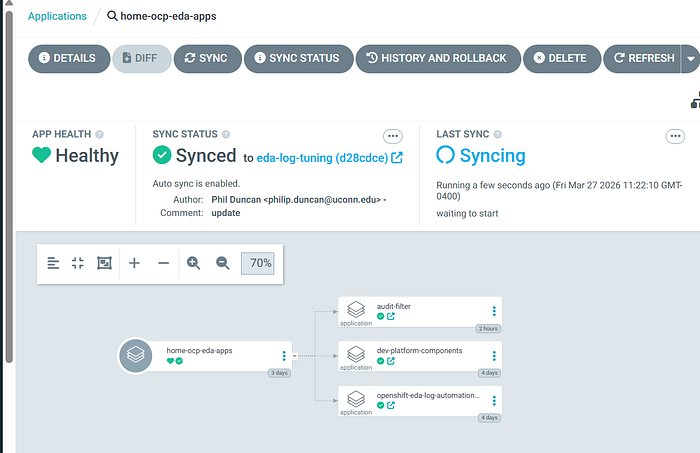
Step 5: Deploying these resources to OpenShift
#To deploy these resources, return to Argo CD and sync the parent application.
Step 6: Configuring Event-Driven Ansible
#At this point OpenShift should now be exporting its logs via Kafka at https://hostname:32095
Test Case: The security team requires stricter controls to prevent unauthorized access to the OpenShift cluster. Access must be limited to identity provider-authenticated users or approved administrators, including restrictions on ServiceAccount creation.
You have been tasked with implementing a solution that enforces these policies and aligns with security governance standards.
#Event-Driven Ansible Rulebook
---
- name: OCP EdgePulse Enforcement
  hosts: all

  sources:
    - ansible.eda.kafka:
        host: "10.0.0.106"
        port: 32095
        topic: "ocp.events.actionable.v4"
        group_id: "eda-edgepulse-enforcement-v1"
        security_protocol: SSL
        cafile: /etc/eda/kafka/ca.crt
        certfile: /etc/eda/kafka/user.crt
        keyfile: /etc/eda/kafka/user.key

  rules:
    - name: Enforce unauthorized serviceaccount creation
      condition: >
        event.body is defined and
        event.body.log_type is defined and
        event.body.log_type == "audit" and
        event.body.log_source is defined and
        event.body.log_source == "kubeAPI" and
        event.body.kind is defined and
        event.body.kind == "Event" and
        event.body.objectRef is defined and
        event.body.objectRef.namespace is defined and
        event.body.objectRef.namespace in ["file-server", "compliance-baseline"] and
        event.body.objectRef.resource is defined and
        event.body.objectRef.resource == "serviceaccounts" and
        event.body.verb is defined and
        event.body.verb == "create"
      action:
        run_job_template:
          name: "OpenShift Cluster Enforcement - ServiceAccount"
          organization: "Default"
          job_args:
            extra_vars:
              ansible_eda_summary:
                event_type: "audit_serviceaccount_create"
                source_topic: "ocp.events.actionable.v4"
                timestamp: "{{ event.body.timestamp | default('') }}"
                auditID: "{{ event.body.auditID | default('') }}"
                verb: "{{ event.body.verb | default('') }}"
                user: "{{ event.body.user.username | default('') }}"
                user_groups: "{{ event.body.user.groups | default([]) }}"
                namespace: "{{ event.body.objectRef.namespace | default('') }}"
                resource: "{{ event.body.objectRef.resource | default('') }}"
                name: "{{ event.body.objectRef.name | default('') }}"
                subresource: "{{ event.body.objectRef.subresource | default('') }}"
                apiGroup: "{{ event.body.objectRef.apiGroup | default('') }}"
                requestURI: "{{ event.body.requestURI | default('') }}"
                responseCode: "{{ event.body.responseStatus.code | default('') }}"
                sourceIPs: "{{ event.body.sourceIPs | default([]) }}"
              ansible_eda:
                ruleset: "OCP EdgePulse Enforcement"
                rule: "Enforce unauthorized serviceaccount creation"
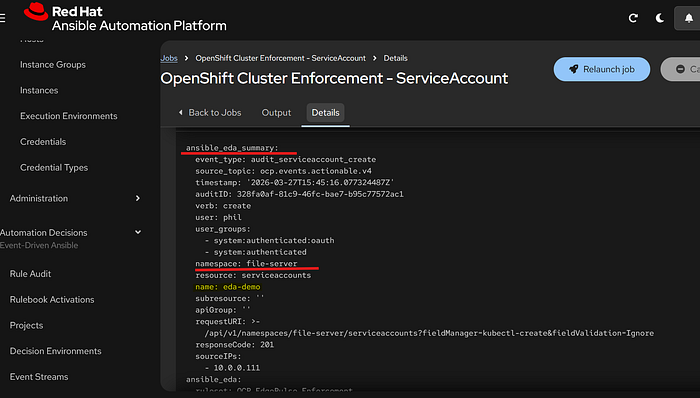
#When an event in OpenShift matches the defined policy such as the creation of a ServiceAccount by a user, Event-Driven Ansible triggers the corresponding playbook in the Ansible Automation Platform controller.
#Ansible Automation Platform Controller Playbook
---
- name: Enforce ServiceAccount creation policy
  hosts: localhost
  gather_facts: false

  vars:
    admin_groups:
      - ocp-cluster-admins
      - ocp-platform-admins

    ocp_api_host: "{{ lookup('env', 'OCP_API_HOST') | default('', true) }}"
    ocp_bearer_token: "{{ lookup('env', 'OCP_BEARER_TOKEN') | default('', true) }}"
    ocp_verify_ssl_raw: "{{ lookup('env', 'OCP_VERIFY_SSL') | default('false', true) }}"
    ocp_verify_ssl: "{{ ocp_verify_ssl_raw | string | lower in ['true', '1', 'yes', 'on'] }}"

  tasks:
    - name: Show incoming event summary
      ansible.builtin.debug:
        var: ansible_eda_summary

    - name: Show incoming EDA metadata
      ansible.builtin.debug:
        var: ansible_eda
      when: ansible_eda is defined

    - name: Validate OpenShift API credential inputs
      ansible.builtin.fail:
        msg: >-
          Missing OpenShift API credential values.
          host='{{ ocp_api_host }}'
          token_present='{{ (ocp_bearer_token | length) > 0 }}'
      when:
        - ocp_api_host | length == 0 or ocp_bearer_token | length == 0

    - name: Normalize event fields
      ansible.builtin.set_fact:
        sa_namespace: "{{ ansible_eda_summary.namespace | default('') }}"
        sa_name: "{{ ansible_eda_summary.name | default('') }}"
        creator_user: "{{ ansible_eda_summary.user | default('') }}"
        creator_groups: "{{ ansible_eda_summary.user_groups | default([]) }}"
        audit_id: "{{ ansible_eda_summary.auditID | default('') }}"
        request_uri: "{{ ansible_eda_summary.requestURI | default('') }}"
        response_code: "{{ ansible_eda_summary.responseCode | default('') }}"
        event_timestamp: "{{ ansible_eda_summary.timestamp | default('') }}"

    - name: Validate required event fields
      ansible.builtin.fail:
        msg: >-
          Missing required fields for enforcement.
          namespace='{{ sa_namespace }}'
          name='{{ sa_name }}'
          user='{{ creator_user }}'
      when:
        - sa_namespace | length == 0 or sa_name | length == 0 or creator_user | length == 0

    - name: Determine authorization from admin_groups
      ansible.builtin.set_fact:
        matched_admin_groups: "{{ creator_groups | intersect(admin_groups) }}"
        is_authorized: "{{ (creator_groups | intersect(admin_groups)) | length > 0 }}"

    - name: Show authorization decision
      ansible.builtin.debug:
        msg:
          - "event_type={{ ansible_eda_summary.event_type | default('unknown') }}"
          - "creator_user={{ creator_user }}"
          - "creator_groups={{ creator_groups }}"
          - "admin_groups={{ admin_groups }}"
          - "matched_admin_groups={{ matched_admin_groups }}"
          - "is_authorized={{ is_authorized }}"
          - "namespace={{ sa_namespace }}"
          - "serviceaccount={{ sa_name }}"
          - "ocp_api_host={{ ocp_api_host }}"
          - "validate_certs={{ ocp_verify_ssl }}"

    - name: Read ServiceAccount state
      kubernetes.core.k8s_info:
        host: "{{ ocp_api_host }}"
        api_key: "{{ ocp_bearer_token }}"
        validate_certs: "{{ ocp_verify_ssl }}"
        api_version: v1
        kind: ServiceAccount
        namespace: "{{ sa_namespace }}"
        name: "{{ sa_name }}"
      register: sa_info
      no_log: false

    - name: Log when ServiceAccount is already absent
      ansible.builtin.debug:
        msg:
          - "No enforcement action needed."
          - "ServiceAccount {{ sa_namespace }}/{{ sa_name }} does not exist."
      when: sa_info.resources | length == 0

    - name: Log allowed ServiceAccount creation
      ansible.builtin.debug:
        msg:
          - "AUTHORIZED SERVICEACCOUNT CREATION"
          - "namespace={{ sa_namespace }}"
          - "name={{ sa_name }}"
          - "creator={{ creator_user }}"
          - "matched_admin_groups={{ matched_admin_groups }}"
          - "auditID={{ audit_id }}"
          - "requestURI={{ request_uri }}"
      when:
        - sa_info.resources | length > 0
        - is_authorized

    - name: Delete unauthorized ServiceAccount
      kubernetes.core.k8s:
        host: "{{ ocp_api_host }}"
        api_key: "{{ ocp_bearer_token }}"
        validate_certs: "{{ ocp_verify_ssl }}"
        state: absent
        api_version: v1
        kind: ServiceAccount
        namespace: "{{ sa_namespace }}"
        name: "{{ sa_name }}"
      when:
        - sa_info.resources | length > 0
        - not is_authorized
      no_log: true

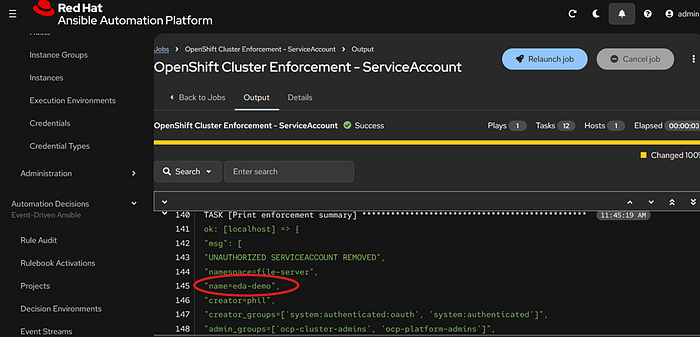
    - name: Print enforcement summary
      ansible.builtin.debug:
        msg:
          - "UNAUTHORIZED SERVICEACCOUNT REMOVED"
          - "namespace={{ sa_namespace }}"
          - "name={{ sa_name }}"
          - "creator={{ creator_user }}"
          - "creator_groups={{ creator_groups }}"
          - "admin_groups={{ admin_groups }}"
          - "matched_admin_groups={{ matched_admin_groups }}"
          - "reason=User is not in approved admin_groups list"
          - "auditID={{ audit_id }}"
          - "requestURI={{ request_uri }}"
          - "responseCode={{ response_code }}"
          - "timestamp={{ event_timestamp }}"
      when:
        - sa_info.resources | length > 0
        - not is_authorized
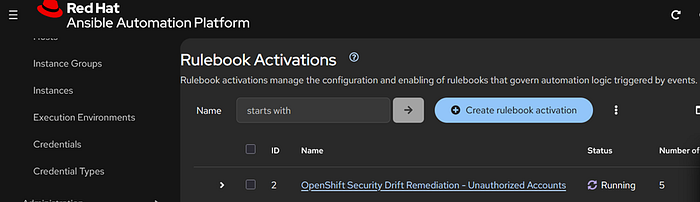
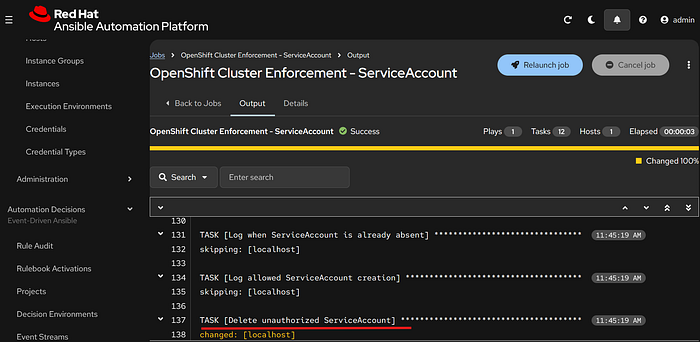
Triggering Event-Driven Ansible from OpenShift Events:
#In this example, we will simulate an unauthorized user creating a ServiceAccount in OpenShift and observe how the system responds.

🧾 Recap
In this guide, we built a self-healing security and compliance engine for OpenShift by combining GitOps, event streaming, and real-time automation.
At a high level, this solution brings together four key components:
- OpenShift The platform where applications run and where events (such as resource creation or modification) occur.
- ArgoCD Ensures the cluster maintains a consistent, desired state by managing all platform resources declarative through Git.
- Apache Kafka Captures and streams real-time OpenShift events, enabling visibility into what is happening inside the cluster.
- Event-Driven Ansible Listens to events from Kafka, evaluates them against defined policies, and triggers automation to enforce compliance.
🚀 Looking Ahead: Expanding Event-Driven Automation
While this guide focused on enforcing Service Account policies, this same architecture can be extended to many other use cases, such as:
- Monitoring and remediating unauthorized role or permission changes
- Enforcing network policies or namespace restrictions
- Detecting and responding to suspicious activity or misconfiguration
- Automating incident response workflows based on audit events