
As he reaches the last quarter of his A+ certification education, the graduate begins to think about what will come next for him. Perhaps it's projects that exercise his new abilities (or maybe ones that exercise old ones). He was inspired by a familiar face last night and was inspired to at least start thinking about it somewhat seriously:
He appreciates Maddy's down-to-earth, straightforward (almost blunt) approach to job-hunting and cybersecurity that demystifies the process, listing clear actionable steps to take, or at the very least giving a starting point for other ideas and projects.
While these and other kinds of projects would be a good idea to attempt, he'll be focusing on this certification first: finish one thing, move on to the next. Today will be about Wireless and Mobile Device security. He may be able to get through mobile devices somewhat quickly since he and others are supposedly "always on their damn phones."
Dion
Intro to Wireless Security
Whereas Core 1 dives fairly deeply into the overall nature of wireless technologies and standards, Core 2 will instead be focusing on configuration of and security practices around wireless networks, building on Core 1 knowledge
Demos will use certain tools to crack protected networks; knowledge of these tools is NOT required for the exam: simply note just how little time it takes to crack the network
Wireless Encryption
Wireless Encryption — ensures that data transmitted over Wi-Fi networks is secure + protectors from unauthorized access; Evolution of WEP → WPA → WPA2 → WPA3
Wi-Fi Protected Access 2 (WPA2) — gold standard for wireless encryption for Wi-Fi networks, uses Adv. Encryption Standard (AES), a symmetric encryption algorithm widely regarded for its strength + efficiency but requires AES-compatible hardware
- Key Reinstallation Attacks (KRACKs) exploit flaws in the WPA2 four-way handshake; as such, strong passwords + other modern security practices should be used to mitigate threat
Wi-Fi Protected Access 3 (WPA3) — upgraded WPA2, introduces AES-GCMP (Galois/Counter Mode Protocol) to provide even stronger encryption + authentication
- Also uses Simultaneous Authentication of Equals (SAE) to protect against brute-force attacks by making password-cracking exponentially more difficult
- Introduces Forward Secrecy: even if an encryption key is compromised, all previous sessions + historical data will remain secure
- Enterprise settings take advantage of WPA3's 802.1x Authentication to support additional security protocols + stronger encryption levels
- Includes Wi-Fi Easy Connect to simply the process of connecting screenless/input-less IoT devices via FNC or QR codes
- Not all legacy devices support WPA3 and must connect to older, less secure standards; many environments operate in a WPA2/3 mixed mode that may compromise some of WPA3's advanced security features

Using a dictionary key to crack a pre-shared key in a WPA2-protected network does not take very long (from OS startup to displaying the password only took just under 5 MINUTES!!); goes to show just how easy it can be to crack a weakly-secured Wi-Fi network, further justifying security practices + long passwords

Wireless Authentication Protocols
Remote Authentication Dial-In User Service (RADIUS) — cross-platform client-server protocol that authenticates users, authorizes services, and accounts for service usage whether offline or on-network; provides central administration of dial-up, VPN, and wireless network authentications
- Operates in Application (7th) Layer of OSI Model utilizing UDP for making connections
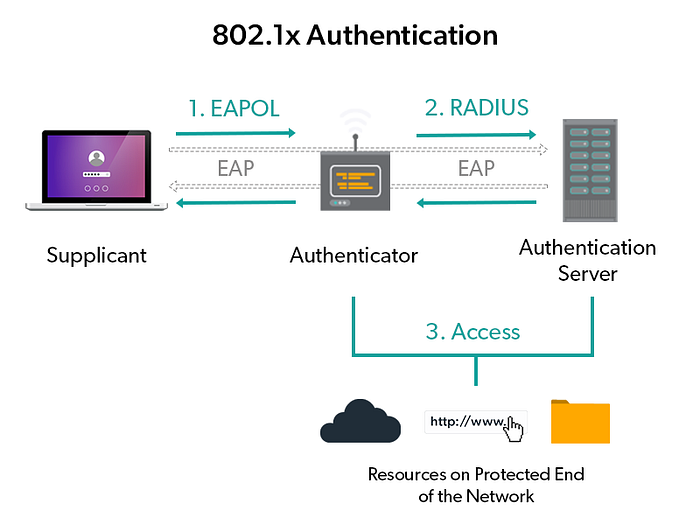
- Can be used to support 802.1x and EAP
- 3 factors for operation, all comms encrypted w/ shared secret key (or better yet, IPSec): Supplicant — any device asking to be authenticated using RADIUS Authenticator — switch/access point that passes request along Authentication server — centralized device that performs authentication
Terminal Access Controller Access Control System Plus (TACACS+) — Cisco-proprietary protocol to provide separate authentication, authorization, and accounting services, like RADIUS but provides more granular access control + uses TCP instead of UDP
Diameter — P2P protocol most commonly used in 3G, IP multimedia systems, and LTE 4G Cellular networks
Lightweight Directory Access Protocol (LDAP) — cross-platform database that centralizes client + object info on the network in a hierarchical manner (a simplified X.5000 directory service)
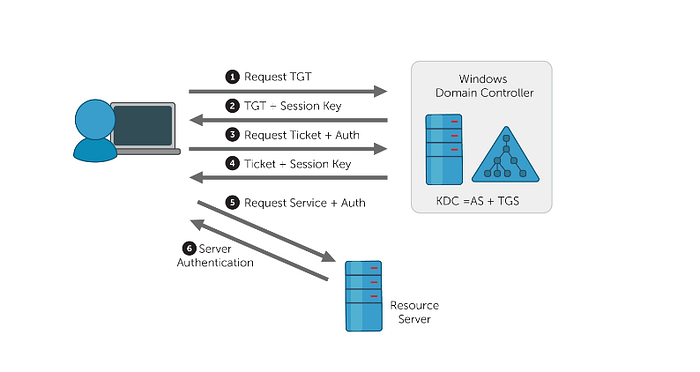
Active Directory — Microsoft's single sign-on (SSO) authentication system that organizes everything: clients, servers, devices, users Kerberos — performs Active Directory's authentication + authorization via symmetric encryption + a Key Distribution Center
802.1x — standardized framework used for port-based authentication on wired/wireless networks; utilizes other methods for actual authentication since it is only a framework (i.e., RADIUS, TACACS+); requires same factors as RADIUS: supplicant, authenticator, and authentication server
- RADUS vs. TACACS+, which to pick? - Either do(n't) support certain protocols, it depends on what is needed - TACACS+ = more secure, slower /// RADIUS = less secure, faster - If working in a Cisco-device network, TACACS+ If not, RADIUS for its cross-platform capabilities
Extensible Access Protocol (EAP) — framework in a series of protocols that allows for numerous different mechanisms for authentication
- EAP-MD5 = simple passwords, challenging handshake for remote access EAP-TLS = public key infrastructure, digital cert on both client + server EAP-TTLS = digital cert on server, password on client EAP-FAST = protected access cred establishes mutual authentication EAP-PEAP = server certs, Act.Direct. for client password authentication LEAP = Lightweight EAP only for Cisco devices
Wireless Network Security Practices
Server Set ID (SSID) — wireless network's broadcasted name
- Easy-to-remember name, but personal info is broadcasted Hard-to-remember name, but doesn't actually mitigate attack
- Some security experts recommend disabling SSID broadcast to mitigate penetration; in practice, though, broadcast-disabling doesn't change much, and non-broadcasted SSIDs can still be discovered easily
- CompTIA recommends disabling, so stick with this for the exam
Encryption Settings — prioritize most secure (WPA3) to least secure (WPA2 w/ TKIP); NEVER use WPA/WEP due to their weakness
- Encryption scheme determined in wireless access point configuration, setting a strong passphrase as the encryption's password/symmetric key
Guest Access — allows visitor to connect to WAP for Internet-access separate from the main Wi-Fi network, usually password-less
- Still a risk: guest network is part of your network; Best to disable guest access + only allow trusted people
Channel-Changing — swapping frequency bands + their channel counts
- 2.4GHz = 11 channels; 1, 6, 11 are most used
- 5/6GHz = many more, auto-selection will often work just fine (Still an option to manually select, if necessary/desired)
Wireless Security Configuration Extra Notes
- Use of (omni)directional antennas + access point location (ceiling? Network closet?) depends on floor plans and desired Wi-Fi coverage
- Upon first use, firmware updates should always be applied
- In practice: Wireless Protection Setup (WPS), while in theory better for its ability to make device configuration easier, has flawed implementation resulting in security vulnerabilities; it is best to turn it off
- Firewall configuration is found in a location that varies by device: look for Firewall / NAT Forwarding / Security / related terminology
- When setting up port forwarding/mapping: think from the perspective of "outside the network reaching into it: what is the communicated message's protocol name (service name), what port is it entering from (external port), what device is it going to (device IP), and where on the device is it going (internal port) and how (protocol)"
Mobile Device Security
Mobile devices wirelessly connect in a variety of ways: Wi-Fi (most commonly for Internet), Bluetooth (for short-range peripheral device connectivity), etc. etc.
As such, security comes in many forms: - Wi-Fi connections can be encrypted + secured w/ something like WPA3 - Check manufacturer to see if BT devices use at least AES encryption w/ a strong key; if not, maybe pass on the device or use wired alternative(s) - Software firewalls, while false for large devices (PCs, laptops), are rare for small mobile devices (phones, tablets), though some do exist; more commonly, firewalls exist on mobile devices as a VPN - Remote backup apps (iCloud, Google Sync, OneDrive, Dropbox, Box, etc.) are useful for those who forget to sync w/ desktops
Many mobile devices are equipped with Lock Screens to block device use as a first line of defense:
- Swipe gestures ("unlock", no security), passcodes (PIN, password), patterns (dots), biometrics (fingerprint, face)
- Failed log-in attempt counters prevent repeated failed log-ins, locking the device after some count, possibly limiting future counts or extending lockout time; some extreme casers can remotely wipe all data4
- If failed multiple times, biometric locks will often default to using a passcode to allow access
Mobile Device Deployment Model — how employees are provided w/ mobile devices + apps to use as part of job functions
- Corporate-Owned, Business Only (COBO) — devices purchased by company, only used by employees for work-related purposes; most secure, restrictive, and expensive Corporate-Owned, Personally Enabled (COPE) — company provides devices used for work and/or personal use by employees; may cause privacy concerns for employees if putting personal data on company property; employees still subject to acceptable use policies Choose Your Own Device (CYOD) — employee chooses device from approved list(s) of vendors/devices; can limit device selection to mitigate vulnerabilities + reduce support overhead Bring Your Own Device (BYOD) — employees bring their own devices + connect to the corporate network; cost-effective for employee, but may introduce many security/legal issues; may require employees to only bring compatible devices
- Companies that allow BYOD may incorporate Storage Segmentation on devices to create a logical separation between work + personal data
- Mobile Device Management (MDM) will allow B/CYOD devices to be admin-controlled to push software updates, monitor security, etc.
Mobile Device Hardening: 10 ways to increase security
- Update device to the latest software regularly + often
- Install an antivirus/anti-malware solution
- Train users on proper security + use of their device
- Only install apps from official app stores/vendors
- Do not root/jailbreak devices
- Only use V2 SIM cards to counter SIM cloning
- Turn off all unnecessary device features (Wi-Fi, geo-tracking, etc.)
- Turn on voice + data encryption
- Use strong password + biometrics for log-in
- Don't allow BYOD; opt for CYOD or something more secure
Ultimately, the goal is to ensure the organization has a good security policy for mobile devices
Mobile Device Security Threats
Mobile variants of malware still exist, and actions can be taken against it:
- Antivirus applications from 3rd party
- Regular/Scheduled updates + patches Apple = more secure (short patch-release cycle) than, say, Google/Android
- Only install apps from official vendors (App Store, Play Store, etc.) (While w/-malware apps may be there too, still better to go official than not)
- Practice safe Internet usage (avoid phishing + pretexting, etc.)
- No jailbreaking of devices or custom firmware/ROMs
The are measures to take against device theft:
- Ensure good device backup access
- Add passwords, disk encryption, ands other safeguards to protect sensitive personal data
- Set up device tracking in some way (official, 3rd party); some of these apps can remotely lock or wipe devices too
- Enlist law enforcement help: never find your device alone
Job Hunting
Applications
- Blue Collar Services — Mechatronics & Robotics Tech A straightforward technician position, nearby location, standard job requirements
- Actalent — Robot Data Collection Technician Entry-level data collection position, standard assistance role in a laboratory setting
Research, Follow-Ups, and More
A follow-up email was sent to the family friend connection. He hopes things will go well in this regard.
As he applies, he's happy to find that his feed on Indeed emails and homepage is being populated with more related jobs (robotics, IT, ML) rather than others (developer, SWE, educator).
Summary
A majority of the second half of the Wireless Security section revolved around live demonstrations that were more difficult to take notes on without transcribing dialogue use to the unique setup (specific router, specific floor plan, specific settings explored), but his notes should cover everything that was discussed.
He also decided to skip over demos for mobile device security configurations since he's already intimately familiar with mobile devices and best practices for securing them.
While he finished relatively early today, he'll want to revisit and tweak some past entries this week as well as give himself a bit of the weekend since he'll be majorly busy tomorrow.
Checkpoints
- 2.3 — Compare/Contrast wireless security protocols + authentication methods
- 2.10 — Given a scenario, apply security settings on SOHO wireless/wired networks
- 2.7 — Explain common methods for securing mobile/embedded devices
- Dion — Sections 20, 21
- Applications sent: 2
Major Takeaways
- Wireless encryption plays a critical role in Wi-Fi network security: WPA2 introduced robust AES-CCMP encryption but is still vulnerable to things like KRACK; WPA3 includes new security enhancements (SAE, Forward Secrecy, AES-GCMP)
- Several different authentication protocols + frameworks exist in enterprise networks: RADIUS, TACACS+, Diameter, LDAP, Active Directory + Kerberos, 802.1x, and variations of EAP
- Wireless network security has many considerations: SSID broadcasting, encryption usage, guest network access configuration, or in-frequency channel selection
- Upon router set-up, there are several things to consider: router location, default credential changes, firmware updates, other configurations (DHCP reservation, static WAN IP, UPnP config, content/IP filtering, screen subnet config for servers)
- For best security: change SSID, disable SSID broadcast, enable encryption (preferably WPA3 w/ PSK, if not then WPA2), disable guest access, enable wireless isolation, turn off WPS, use channels 1/6/11
- Firewalls configure what is allowed to go into a network; opening ports increases vulnerability, so any forward-facing servers/services should be placed in a screened subnet/DMZ w/ port forwarding enabled
- When securing wireless + mobile devices: secure wireless connectivity first, then implement some mobile firewall/VPN and ensure routine remote backups
- Mobile devices can be locked in a variety of ways (none, passcodes, patterns, biometrics); failed log-in attempts can result in different outcomes (lockout, remote wipe)
- Mobile security: no jailbreaking, no custom firmware/ROMs, only official store/vendor apps, always keep OS updated
- Ensure your organization has a sound management model for mobile devices (COBO, COPE, CYOD, BYOD) + has good security policies for hardening mobile devices