June 6, 2026
The Windows Concept Journey — NetBIOS Name (Network Basic Input Output System Name)
A NetBIOS name is the legacy Windows networking name used to identify a computer on a local network. In most Windows environments, the…

Shlomi Boutnaru, Ph.D.
1 min read
A NetBIOS name is the legacy Windows networking name used to identify a computer on a local network. In most Windows environments, the computer name\host name\NetBIOS name are typically the same or very similar. The key difference is that they serve different purposes: the computer name is the user-friendly name displayed by Windows, the host name is used by TCP/IP networking and DNS, and the NetBIOS name is used by older Windows networking protocols for local name resolution. Although NetBIOS is largely maintained for backward compatibility, it often mirrors the computer name. Hence, making the distinction less noticeable in small home or office networks (https://superuser.com/questions/368602/difference-between-netbios-host-name-and-computer-name).
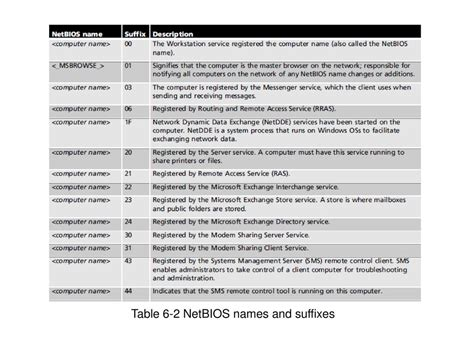
Overall, a NetBIOS name consists of a 16 character ASCII sequence, though Microsoft limits the actual hostname to 15 characters. The final 16th byte as a NetBIOS Suffix to identify specific services or record types (such as a host or domain controller) — as shown in the table below (https://slideplayer.com/slide/12397468/). Configured during Windows networking setup, this name is a sequence of alphanumeric characters that explicitly forbids the use of special symbols like "/:*?"<>|". Also, to align with DNS restrictions, modern NetBIOS names cannot consist entirely of digits, cannot start or end with a hyphen (-) or full-stop (.), and Microsoft strongly advises avoiding full-stops altogether to prevent applications from confusing NetBIOS names with domain names (https://en.wikipedia.org/wiki/NetBIOS).
Lastly, when resolving a NetBIOS name it typically follows a structured fallback sequence involving WINS, NBNS and LMHOSTS (it starts of course from the NetBIOS cache). If the client is configured as a hybrid node (H-node), it first queries a WINS (Windows Internet Name Service) server, which is Microsoft's implementation of an NBNS (NetBIOS Name Server). WINS/NBNS acts as a centralized, dynamic database that automatically registers and maps NetBIOS names to IP addresses across different subnets (https://learn.microsoft.com/en-us/windows-server/networking/technologies/wins/wins-top). If the WINS server is unreachable or the name isn't found in its database, it will broadcast the name query to the local subnet, and if that still fails, it looks up the name in the local LMHOSTS file (https://learn.microsoft.com/en-us/openspecs/windows_protocols/ms-nbte/b0f1011b-372e-4024-a0c1-4d8a60334ca4).
See you in my next writeup ;-) You can follow me on twitter — @boutnaru (https://twitter.com/boutnaru). Also, you can read my other writeups on medium — https://medium.com/@boutnaru. You can find my free eBooks at https://TheLearningJourneyEbooks.com.