

How Two-Factor Authentication quietly stands between hackers and everything you own online.
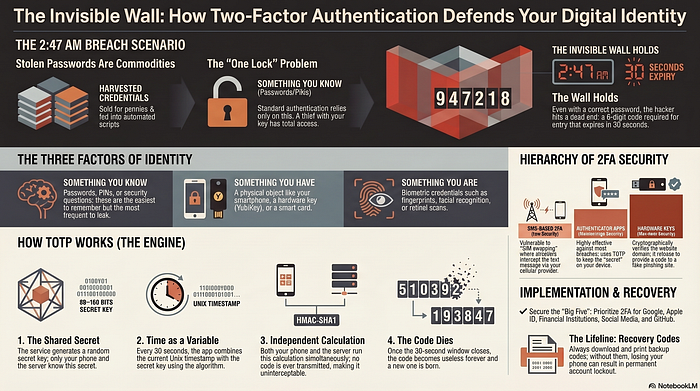
It was 2:47 AM in Moscow when someone typed your email address and password into a login form — and got it right. The credentials were harvested months ago in a breach you never heard about, sold for pennies on a dark-web forum, and finally plugged into an automated script that works through stolen lists like a bored accountant checking attendance. The hacker hit Enter.
And then — nothing. A cold wall. A six-digit code was required. A code that would expire in 30 seconds, exist only on your phone, and that no breach could have captured because it didn't exist yet.
That wall is Two-Factor Authentication, and this is how it works.
"A password is something you know. 2FA adds something you have — and that combination is what makes break-ins exponentially harder."
TL;DR
The One Lock vs. Two Locks Problem
Imagine your front door has one lock. A thief who steals your key can walk right in. Now imagine a second lock — one where the key is generated fresh every 30 seconds and lives only in a small device in your pocket. Even if the thief has the first key, they're still locked out.
That's the entire intuition. Authentication is classically built on three factors:
1. Something you know Passwords, PINs, security questions. Easy to remember, easy to leak.
2. Something you have Your phone, a hardware key (like a YubiKey), a smart card. Physical possession required.
3. Something you are Fingerprints, face recognition, retinal scans. Your biology as your credential.
Two-Factor Authentication (2FA) requires at least two of these in combination. Typically: your password (know) + your phone (have). The hacker who steals your password from a database breach only has factor one. Without factor two — the one sitting in your pocket — they go nowhere.
A Real Login, Step by Step
Let's walk through exactly what happens when you log into, say, your Gmail account with 2FA enabled.
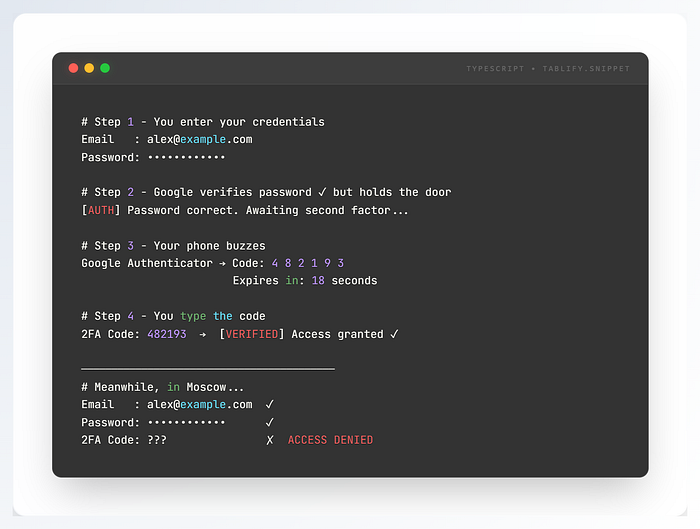
The code in the hacker's world doesn't exist. It was generated by an algorithm running inside your authenticator app — and by the time they'd try to guess it (1-in-1,000,000 odds), it has already expired and a new one has been born.
The Magic Behind the Six Digits — TOTP Explained
The most common 2FA method — used by Google Authenticator, Authy, and Microsoft Authenticator — is called TOTP: Time-based One-Time Password. Here's the elegant machinery under the hood:
1. A shared secret is born When you set up 2FA, the service generates a random secret key (usually 80–160 bits). You scan it as a QR code. Now both your phone and the server know this secret — and only them.
2. Time becomes the variable Every 30 seconds, the app takes the current Unix timestamp (divided by 30 to get a "time slot" number) and combines it with the secret key using an algorithm called HMAC-SHA1.
3. The output is trimmed to 6 digits The HMAC output is a long hash. A specific portion is extracted and reduced to the 6-digit code you see. Both your phone and the server run this same calculation independently and arrive at the same number.
4. Verification happens, then the code dies The server compares codes. Match → you're in. After 30 seconds, the time slot increments and a completely new code is derived. The old one is useless forever.
⚡ Key Insight: No code is ever transmitted between your phone and the server during generation. Both sides compute it independently using the same inputs (secret + time). This is why even intercepting your Wi-Fi traffic at the café doesn't help an attacker — there's no code traveling over the wire to steal.
Not All 2FA Is Created Equal
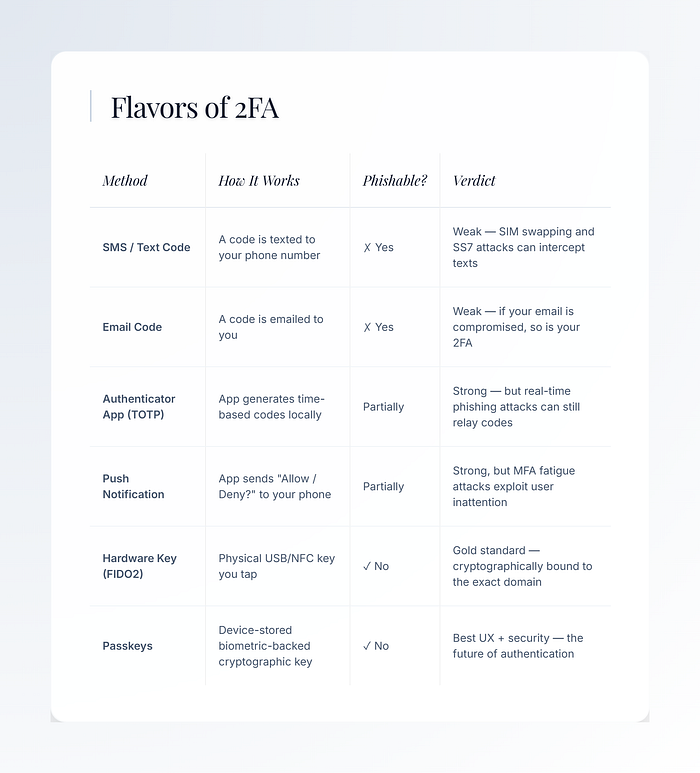
2FA comes in several flavors, and their security levels vary dramatically. Here's an honest comparison:
Real-World Stories Where 2FA Made All the Difference
🏦 The Bank That Wasn't Breached
In 2022, the Uber breach exposed employee credentials via a social engineering attack on a contractor. The attacker obtained valid login credentials — but Uber's internal systems used push-based 2FA. The attacker allegedly spammed the contractor with approval requests until, exhausted at 1 AM, they approved one. The lesson: 2FA is powerful, but fatigue is the human exploit.
📱 The Gmail You Almost Lost
A journalist discovered their Gmail credentials for sale on a dark-web marketplace. They hadn't been hacked — yet. Because they'd enabled Google's 2-Step Verification years earlier, every attempt by buyers of their credentials hit a wall. The account survived a period during which hundreds of login attempts were made from IP addresses across six countries.
🎮 The Crypto Wallet Robbery That Couldn't Happen
Imagine a crypto exchange user whose email, password, and even their two-factor SMS code were intercepted via a SIM swap. Their exchange account was drained in 11 minutes. The same attack attempted on a colleague who used a hardware YubiKey? Complete failure. The key cryptographically verifies the exact website domain — a fake phishing site gets a different key, so the authentication silently fails.
"The hardware key doesn't just verify you — it verifies the site. You can't be phished if your key refuses to talk to impostors."
How to Turn It On Right Now
Most major services have 2FA buried somewhere in Settings → Security → Two-Step Verification. Here's the fastest path for the big ones:
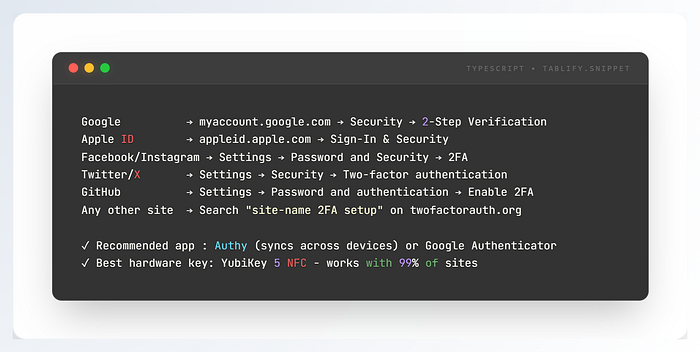
⚠️ Don't Skip This: When you enable 2FA, most services give you backup recovery codes. Download them. Print them. Lock them in a drawer. These are your lifeline if you ever lose your phone. Losing your authenticator app access without backup codes can permanently lock you out of your own accounts.
The Bottom Line
Passwords are broken — not in theory, but in practice. Billions of them sit in breach databases, for sale or free. The password you're most proud of may already be in someone's spreadsheet. Two-Factor Authentication doesn't fix passwords; it makes them irrelevant to an attacker who has them but nothing else.
It's not perfect. Nothing is. But enabling 2FA on your critical accounts — email, banking, social media, anything with payment info — makes you exponentially harder to hack than the billions of people who haven't. Hackers are opportunists. They move to easier targets.
Turn it on. Use an authenticator app at minimum. Graduate to a hardware key if you want serious protection. And sleep soundly knowing that at 2:47 AM, the wall held.
Did This Click for You?
Security knowledge is only useful when it spreads. Help it reach someone who needs it.
👏 Clap on Medium! — Long-press the clap button to applaud up to 50 times. Every clap helps this reach more readers.
🔔 Follow Me!!— Get every new post delivered straight to your Medium feed.
🔗 Share it!!! — Send this to one person you know who still reuses passwords. It might be the nudge they need.
💬 Leave a Comment
I'd love to hear from you: Do you use 2FA? What method — SMS, app, or hardware key? Have you ever had an account saved by it — or worse, been locked out of one because you forgot your backup codes? Tell your story below. Every comment helps someone else learn. 👇