In the world of cybersecurity, we love to talk about "Zero-Day Exploits" and "AI-Driven Attacks." They sound sophisticated. They sound dangerous. But if you analyze real-world breach data, the culprit is rarely a super-advanced AI.
It is usually much more boring: An open port.
As a cybersecurity researcher, I spend a lot of time with tools like Nmap and Wireshark. What consistently surprises me is how often I find critical services — such as MySQL Databases (Port 3306) or Remote Desktop (Port 3389) — exposed directly to the public internet.
The Scale of the Problem: It's Not Manual, It's Automated
Many developers fall into the trap of "Security by Obscurity." They think, "Who would ever find my specific IP address among billions?"
The reality? Shodan and Masscan.
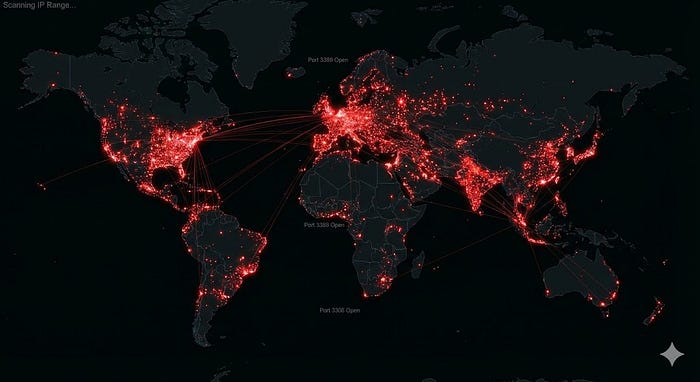
Attackers do not search for you manually. They use automated scanners that can sweep the entire IPv4 address space in under 6 minutes.
- The Attacker's View: When a bot scans your IP, it doesn't just see "Port 22 Open." It performs Banner Grabbing. It sees:
SSH-2.0-OpenSSH_8.2p1 Ubuntu-4ubuntu0.1
Now the bot knows your OS, your SSH version, and exactly which CVEs (vulnerabilities) to try against you.
The "Silent" Danger: IoT and Databases
The situation gets worse with the Internet of Things (IoT) and cloud databases.
- The Printer Vulnerability (Port 9100): In one network analysis I performed, a printer had port 9100 open via UPnP. Through this single port, an attacker could not only print malicious messages but potentially use the device as a pivot point to flood the internal network.

- The "Meow" Attacks: A famous automated attack script simply looked for open MongoDB (Port 27017) and Elasticsearch databases without passwords. It didn't steal data; it just deleted it and left the word "Meow." Thousands of databases were wiped instantly because of a simple open port.
How to Defend Yourself: A Hardening Checklist
You don't need expensive AI tools to fix this. You need rigorous Security Hygiene.
1. The Principle of Least Privilege (Network Layer)
If a service (like a database) doesn't need to be touched by the public internet, it shouldn't be reachable.
- Solution: Bind services to
localhost(127.0.0.1) or use a VPN (like WireGuard) to access internal tools.
2. Change Default Ports (Noise Reduction)
Running SSH on a non-standard port (e.g., 2244 instead of 22) will not stop a targeted human hacker. However, it significantly reduces the log noise from automated bots that are hard-coded to hit port 22.
- Config: Edit
/etc/ssh/sshd_config-> ChangePort 22toPort 2244.
3. Master the Firewall (UFW)
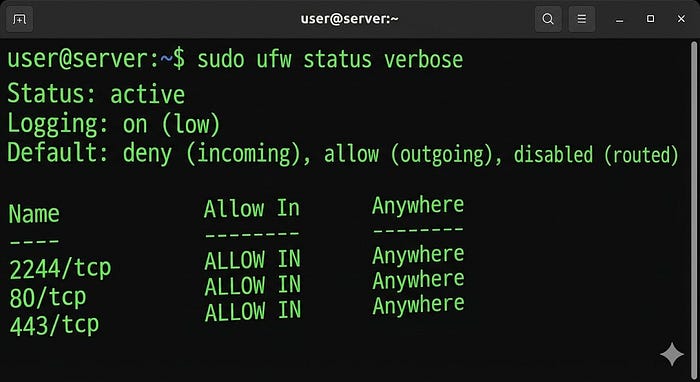
Every Linux server administrator should be comfortable with ufw (Uncomplicated Firewall). It is the first line of defense.
The "Deny All" Strategy: Instead of blocking bad IPs, block everything and only allow what you need.
# 1. Deny all incoming traffic by default
sudo ufw default deny incoming

# 2. Allow SSH on your custom port
sudo ufw allow 2244/tcp

# 3. Allow Web Traffic
sudo ufw allow 80/tcp
sudo ufw allow 443/tcp

# 4. Enable the Firewall
sudo ufw enable
⚠️ Important Warning:
Before running sudo ufw enable, double-check that you have allowed your SSH port (Step 2). If you forget this and enable the firewall, you will lock yourself out of your own server!
Conclusion
Cybersecurity isn't always about the "next big thing." It is about mastering the basics. Before we build complex AI-driven defenses, we must ensure we aren't leaving the digital front door wide open.

If you are interested in Network Security and System Hardening, feel free to connect with me on LinkedIn: www.linkedin.com/in/akhil-akash-bindla