
In my 8+ years of working with Oracle technologies, I have realized that the biggest barrier to trying new tech isn't the code — it's the setup.
Right now, if you want to experiment with AI, you usually have to create five different accounts for five different AI models (like ChatGPT, Claude, or Gemini). It's confusing for students and a management headache for professionals.
Today, I'm sharing a "shortcut" I use: OpenRouter.

What is OpenRouter?
Think of it as a Universal Adapter for AI. Instead of getting 10 different keys for 10 different AI providers, you get one key that connects to almost every major AI model in existence.
Why this is the best way to start in 2026:
- Zero Cost: You can access high-quality "Free" models without even adding a credit card.
- One Dashboard: You see all your usage in one place.
- Future-Proof: If a better AI model comes out tomorrow, you don't need a new account. You just change one setting in your app.
Step-by-Step: Getting Your Key
Whether you are a student building your first project or a professional architecting a new solution, here is how you get started in under 60 seconds:
- Create Your Account Go to OpenRouter.ai. You can sign up instantly using your Google or GitHub account.
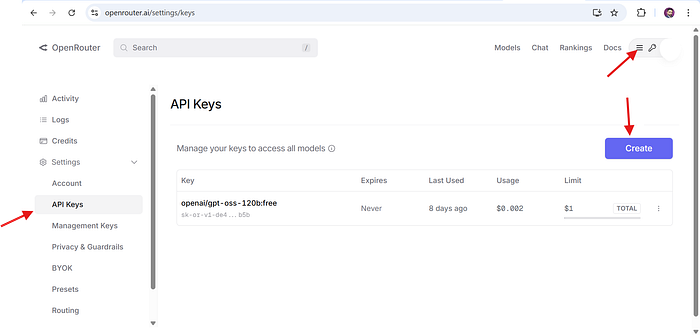
2. Navigate to "Keys" Click on your profile icon in the top right corner and select Keys.
3. Generate Your Key Click the "Create Key" button. Give it a simple name like My_First_AI_Project.
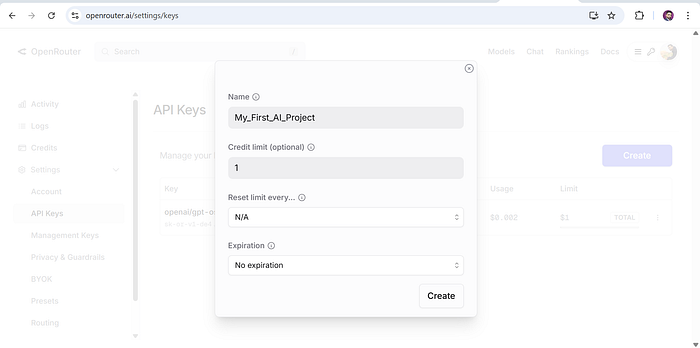
4. Set a "Safety Switch" (Professional Tip) Even if you are using free models, I always recommend setting a "Credit Limit" (like $1 or $5). This is a great habit for Cost Governance — it ensures you never spend more than you intended.
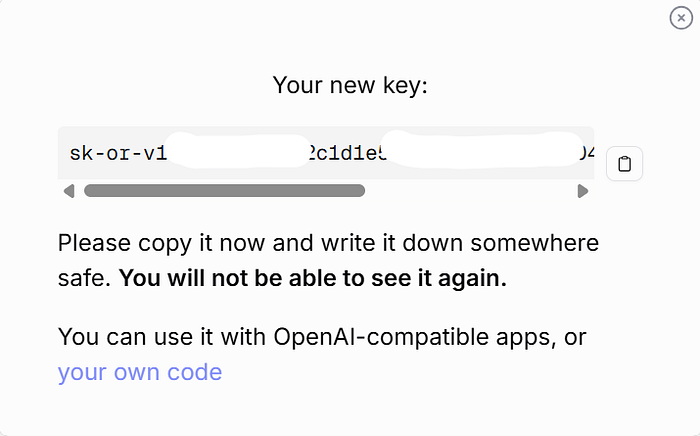
5. Secure the Key Click "Create" and copy the key immediately. Store it in a safe place (like a password manager or a private note). For security reasons, OpenRouter will never show this exact key to you again.
Finding Your "Free" Playground
Now that you have your key, you need to know which AI models you can use for free. OpenRouter makes this very easy:
- Browse the Models: Go to the OpenRouter Models page.
- Filter for Free: In the search or filter bar, simply type ":free".
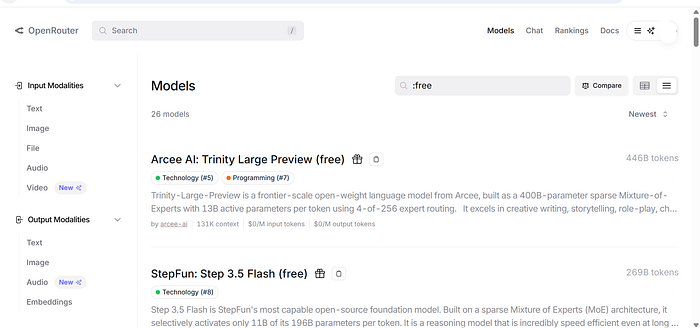
- This will show you a list of high-quality models (like OpenAI,Llama 3, Gemini etc) that cost $0 to use.
- Check the Docs: * Click on any model name (e.g., OpenAI: gpt-oss-120b (free)).
- On that model's page, you will see a "Quickstart" tab.
- This tab gives you the exact "code snippet" you need to copy-paste into your application to start chatting with that specific AI.
What Can You Do With This?
Now that you have your "Universal Key," you are ready to build. You can plug this into Python scripts, web apps, or enterprise tools.
Personally, I use this key to power a custom AI Assistant inside Oracle APEX. It allows me to switch between different AI "brains" instantly to see which one gives my users the best answers.
What's Next?
Now that we have our key, we need a place to use it.
In my next post, I will show you exactly how to take this key and configure it within an application (using Oracle APEX as our example). We will move from "having a key" to "having a working AI."
Are you a student or a pro? Let me know in the comments which AI model you're planning to try first!