
Hello Hunters!! 👋
This is my first write-up, so if there are any mistakes, sorry for that. 😅
I'm Akshay Kumar, and today I want to share a very simple but super effective bug bounty trick that helped me discover multiple sensitive endpoints and interesting hidden functionalities inside web applications.
Most developers leave commented code inside production pages during development or testing. Many hunters ignore this part completely.
But sometimes… those comments hide gold. 🔥
In this article, I'll show how I used a simple Match & Replace trick in Burp Suite to automatically uncomment HTML comments and reveal hidden endpoints, internal paths, admin panels, debug APIs, and other juicy findings.
🚀 The Idea
Normally websites contain hidden HTML comments like this:
<!--
<a href="/admin-panel">Admin</a>
-->
or
<!-- API Endpoint:
/api/v2/internal/users
-->
These are invisible in the browser because they are commented.
But if we remove:
<!--and
-->the hidden content becomes visible.
That's where the trick starts.
🛠️ Burp Suite Match & Replace Trick
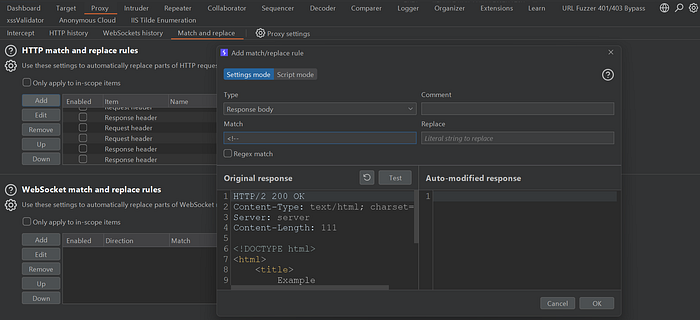
Instead of manually checking source code on every page, I automated the process using Burp Suite Match & Replace.
Steps:
- Open Burp Suite
- Go to:
Proxy → Options → Match and Replace- Add a new rule
Replace:
<!--with:
(blank)Then add another rule:
Replace:
-->with:
(blank)Now Burp automatically removes comment tags from responses.
🎯 What Happened Next?
After enabling this rule and browsing the target normally, I started noticing extra content appearing inside pages.
Some examples:
- Hidden admin endpoints
- Old API versions
- Internal dashboard paths
- Debug routes
- Staging links
- Backup pages
- Developer notes
- Unlinked functionalities
Some endpoints were directly accessible.
Some required authentication.
And some exposed sensitive information that developers forgot to remove.
🔥 Real Finding Example
I found hidden endpoints like:
/internal-api/users
/dev-dashboard
/staging-login
/api/v1/debug
Some pages returned:- User data
- Internal error messages
- API documentation
- Debug information
One endpoint even exposed sensitive application behavior that could help further exploitation.
🧠 Why This Works
Developers often:
- Comment features during testing
- Hide unfinished functionality
- Leave temporary debug routes
- Forget to clean production code
Bug hunters usually focus only on visible attack surface.
But hidden comments can reveal:
- New attack paths
- Sensitive APIs
- Forgotten features
- Internal infrastructure
This becomes a perfect recon technique.
⚡ Pro Tip
You can combine this technique with:
- Wayback URLs
- JavaScript endpoint extraction
- Secret finding
- Parameter mining
- Content discovery tools
This increases chances of finding high-impact vulnerabilities.
🛡️ Security Impact
Even if the endpoint itself is not vulnerable, exposing hidden internal paths can help attackers:
- Map internal infrastructure
- Discover admin functionality
- Find old APIs
- Locate staging environments
- Perform deeper attack chaining
This information leakage can significantly increase attack surface visibility.
✅ Remediation
Developers should:
- Remove unnecessary comments before production
- Avoid exposing internal endpoints in frontend code
- Disable debug functionality
- Review application source regularly
- Perform security reviews before deployment
🎯 Final Thoughts
Sometimes the easiest techniques give the best results.
This was not some advanced exploit or crazy bypass.
Just a simple recon trick:
"Uncomment everything and look deeper."
And honestly, many hunters still ignore this area.
So next time while testing a target, don't skip HTML comments. Hidden functionality may already be waiting for you there. 👀
Happy Hunting 🔥