
Background
A couple of years ago, I published P0lyn0m1c0n, a tool for crafting customized, target-aware password wordlists. Today, I'm thrilled to introduce its latest, most advanced version. Here is a breakdown of what's new and how you can leverage it in your next assessment.
Why Another Wordlist Tool?
If you've done any password attacks, you know the drill. Type hashcat followed by a generic wordlist and wait. Generic wordlists are great, but they miss something important: people build passwords around context.
Employees don't pick random strings. They pick the company name. They add the current year. They throw in their department, an exclamation mark, maybe a leet substitution they think is clever. A password like Ec0rp2026! will never be in a generic list — but it's exactly the kind of password a real person sets.
P0lyn0m1c0n exists to bridge that gap. Instead of brute-forcing every possible combination, it takes a target (a company name, a domain) and mutates it into the patterns humans actually use. The result is a compact, high-relevance wordlist tuned for the engagement in front of you.
The Core Idea: Mutation, Not Brute Force
There are two ways to build a wordlist:
Brute force generate every combination of characters up to length N. Tools like `crunch` do this. Exhaustive, but enormous.
Mutation start from words a human would actually use, and apply realistic transformations.
P0lyn0m1c0n is firmly in camp two. It takes known words and layers on the transformations that show up in real-world password dumps: year suffixes, month names, leet substitutions, common numeric and symbol endings, and corporate vocabulary.
How It Works
The tool runs as an interactive wizard (or fully via CLI flags — more on that later). Here's a run against a fictional target, ecorp.
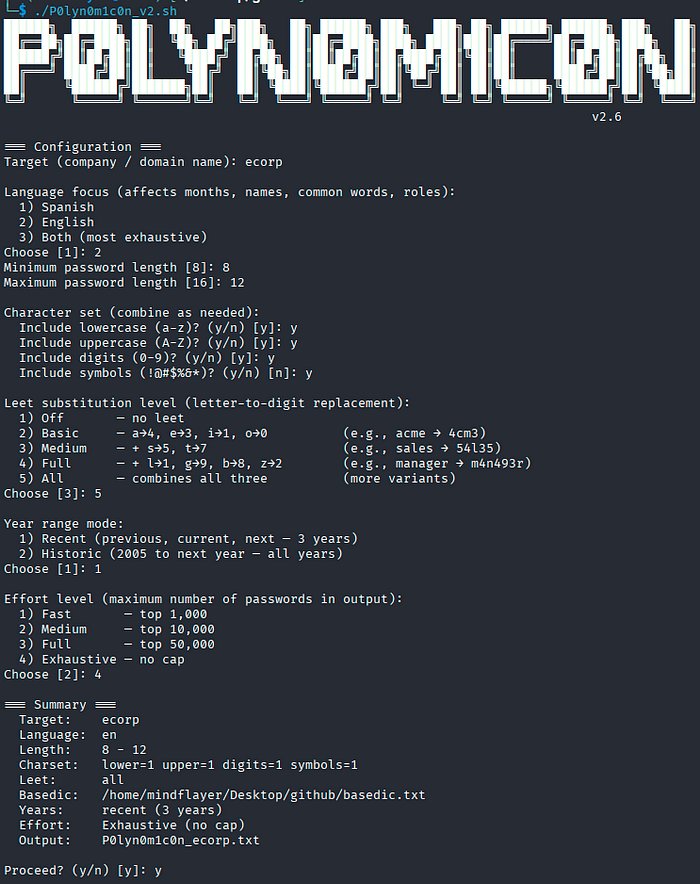
You walk through a handful of choices:
Language focus.
Passwords are cultural. A Spanish-speaking workforce produces empresa2026, administrador123, etc; an English-speaking one produces ecorp2026 or admin123. P0lyn0m1c0n lets you pick Spanish, English, or both — and it adapts months, common passwords, first names, and role vocabulary accordingly.
Length range.
Match the target's actual password policy. If the org enforces 8–12 characters, there's no point generating 20-character candidates that will never be valid.
Character set.
Pick any combination of lowercase, uppercase, digits, and symbols. This works as a constructor, not just a filter — if you disable symbols, the tool reshapes candidates to fit rather than silently dropping most of them.
Leet substitution.
Five levels, from off to "all." Basic handles the classics (a→4, e→3, i→1, o→0), so ecorp becomes 3c0rp. Higher levels add s→5, t→7 and beyond. The all mode emits multiple leet variants per word, since different people leet to different depths.
Year mode.
This one matters more than it looks. People set Company2025! and then forget to rotate it — so last year's password is still live. Others get ahead of a forced rotation and set next year's password early. P0lyn0m1c0n's "recent" mode covers previous, current, and next year for exactly this reason. "Historic" mode walks all the way back to 2005 for older or long-lived accounts.
Effort level.
This caps the output: 1,000 / 10,000 / 50,000 / uncapped. Candidates are generated in priority tiers — the most probable patterns first — so "Fast" mode still gives you the best 1,000, not a random 1,000.
The Shared Base Dictionary
One design decision worth calling out: the base dictionary.
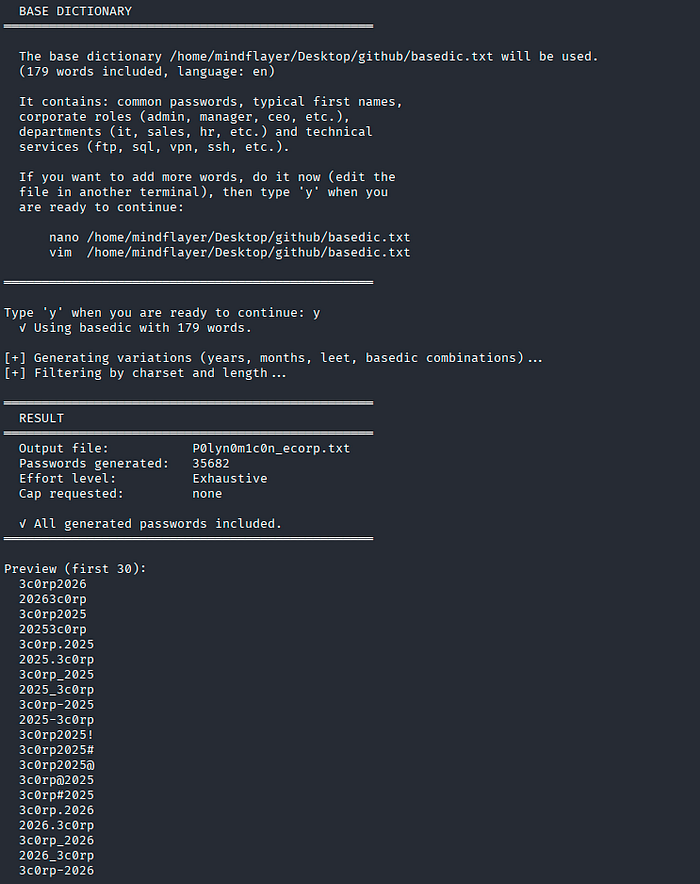
Rather than asking you to supply a wordlist or generate one, P0lyn0m1c0n always generates a base dictionary automatically — seeded with the most common passwords, typical first names, corporate roles (admin, manager, ceo), departments (it, sales, hr), and technical service accounts (ftp, sql, vpn, ssh) — all matched to your chosen language.
Then it pauses. The tool tells you exactly where the file lives and waits. If you have engagement-specific intel — founder names, product names, the city the HQ is in, an internal project codename — you drop it into that file and type `y` to continue. Those custom words flow through the same mutation pipeline as everything else.
This matters because the highest-value passwords are almost always tied to information specific to the target that no generic list could contain.
CLI Mode for Automation
The interactive wizard is great for one-off runs, but P0lyn0m1c0n also takes full CLI flags so you can drop it into scripts and pipelines:
#Print help
./P0lyn0m1c0n_v2.sh -h

# Quick run, Spanish focus, top 10k
./P0lyn0m1c0n_v2.sh -t acme

# password list, English, capped at 10k
./P0lyn0m1c0n_v2.sh -t globex -l en --min 8 --max 16 --charset LUDS --leet medium --effort medium -y --no-prompt

# Maximum coverage for offline cracking
./P0lyn0m1c0n_v2.sh -t hooli -l both --charset LUDS --leet all --years historic --effort all -y --no-prompt
A Note on Output Size
The tool is honest with you. If your constraints are tight — short max length, no symbols, single language — you simply can't generate 10,000 distinct candidates. When that happens, P0lyn0m1c0n doesn't pad with garbage. It tells you exactly how many it produced, why the number came up short, and which knobs to turn to widen the set.
In the run above, an uncapped exhaustive pass against ecorp produced 35,682 unique candidates — every one of them a realistic, human-shaped password rather than random noise.
Wrapping Up
P0lyn0m1c0n started as a small script and grew into something genuinely useful for focused password auditing. The philosophy stayed constant throughout: relevance beats volume. A tight list of 10,000 candidates shaped around how real people build passwords will routinely outperform a generic list a thousand times its size.