1. If we wanted to list all the .txt files in the current directory, what command would we want to use? The command used is ls .txt. The ls (list) command in Linux displays the contents of a directory, showing files and subdirectories. This command provides detailed information such as file names, access permissions, sizes, and modification dates. The ls command is very important for navigating the file system and viewing detailed file information in Linux.
2. What command can we use to read the contents of the file/etc/passwd? The command to read the contents of the /etc/passwd file is to use the cat command, which stands for "concatenate". This command is used to view a list of all files, which will be displayed through the terminal.
3. If we wanted to search for the string Error in all fileas in the /var/log directory, what would our command be? The command used is grep -r "Error" /var/log. This command is very useful for searching for strings in large files, such as log files. The -r option plays an important role in instructing the system to search for the string not only in the main file, but also in all subdirectories under /var/log. This grep command can dramatically speed up investigations by allowing users to search for patterns such as URLs, email addresses, MD5 hashes, and much more.
4. What would be the commands to calculate MD5 and SHA1 hashes of the file /etc/passwd? The commands used to calculate the MD5 and SHA1 hashes of the file /etc/passwd are the md5sum and sha1sum commands. The command md5sum /etc/passwd is used to obtain the MD5 hash value, and the command sha1sum /etc/passwd is used to obtain the SHA1 hash value. Both commands accept input and produce a fixed-length string, also known as a hash or checksum. If the contents of the file change, even slightly, the hash will be different. This can be useful for detecting whether a file has been modified or corrupted.
5. Use the file command to determine the type of the file /usr/bin/cat and explain the output in 2–3 sentences. Use the following command: file /usr/bin/cat. The result usually shows that the file is a 64-bit LSB executable for the x86–64 architecture and is dynamically linked. This means that /usr/bin/cat is an executable binary file (program) in the Linux system and uses system libraries when it is run.
6. What command can we use to display all printable strings of length ≥ 8 in the file/bin/bash? The command used is strings -n 8 /bin/bash. The strings command is used to display printable characters from a binary file, and the -n 8 option means that only strings with a minimum length of 8 characters are displayed. This command is also useful for identifying suspicious character sequences
7. Given the following output of the file command, can you determine what's wrong with this file? Based on the following output:
$ file image.jpg image.jpg: ELF 64-bit LSB pie executable, x86–64, version 1 (SYSV), dynamically linked, interpreter /lib64/ld-linux-x86–64.so. 2, BuildID[sha1]=3ab23bf566f9a955769e5096dd98093eca750431, for GNU/Linux 3.2.0, not stripped
The file is actually an ELF executable file (Linux program), not a JPEG image file. So what is wrong is the file extension (.jpg) because the content is not an image, but a binary program.
8. If we wanted to look for files modified in the last 30 minutes in /home/directory, what command would we want to use? To find files modified in the last 30 minutes in the /home directory, use the command find/home -type f -mmin -30, where find /home searches within the /home directory, -type f specifies only files, and -mmin -30 specifies files modified less than 30 minutes ago. This command is used to find various types of files, directories, files with specific permissions, and files that have been recently modified.
9. What command can we use to display information about all active TCP connections on the system? The command used is netstat. This command provides useful information about active connections on a system. The information displayed by this tool includes the local and remote addresses and ports of active connections. Here is one of the commands used: netstat -t.
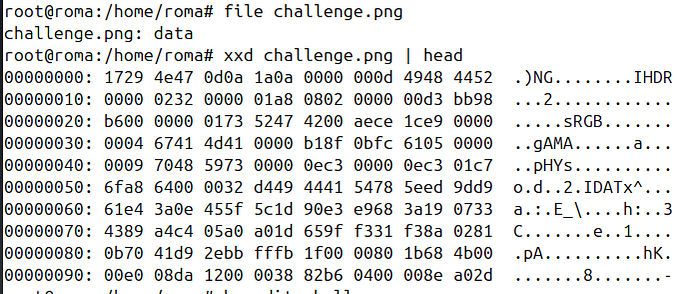
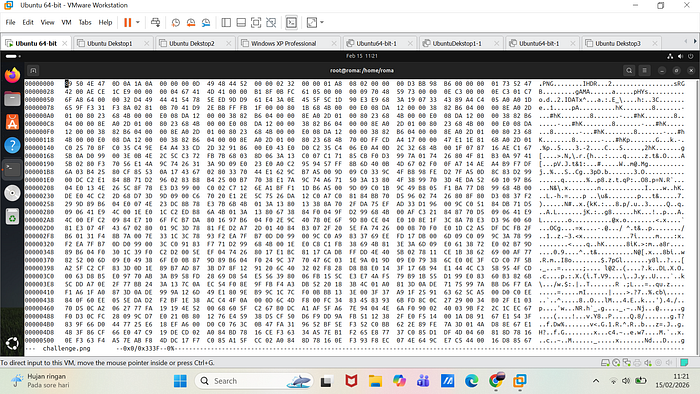
10. Given this corrupted image file, can you fing a way to recover and view its contents? Hint 1: A quick google search for "magic bytes" might help. Hint 2: Explore how hexedit can help you are. You may download the image using following command: curl https://raw.githubusercontent.com/vonderchild/digital-forensics-lab/main/Lab%2001/files/challenge.png -o challenge.png
The challenge.png file was initially not recognized as an image file because the magic bytes in the header had been altered. Based on a check using xxd, the first two bytes did not match the expected PNG signature (89 50 4E 47 0D 0A 1A 0A). Using hexedit, I changed the first two bytes from 17 29 to 89 50. After saving, the file was successfully recognized as PNG image data and could be opened normally. This shows that the file was not actually damaged, but only manipulated in the header (magic bytes).