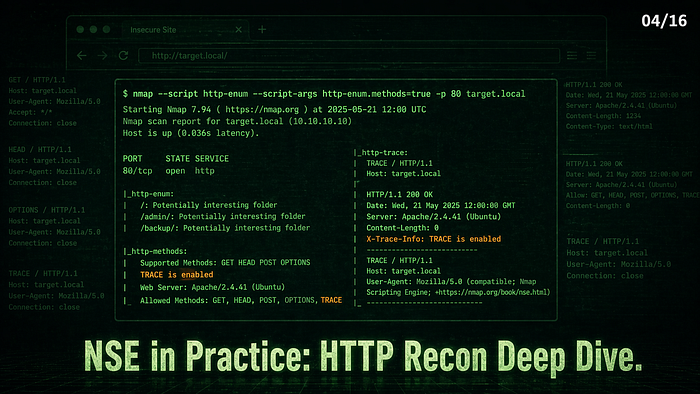


A single Nmap command found a Git repository, a PHP info page, an upload directory, and an ancient PHP version — in 14 seconds. No browser required.
Series: Nmap — The Tool You Think You Know | Part 4 of 16
Web servers are one of the most common targets you'll scan. Port 80 or 443 open — now what? Most people open a browser. The better move is running NSE HTTP scripts first. They provide structured information you can use directly in reports, and they do it in under a minute.
This article covers the HTTP scripts worth knowing, how to target specific paths, and how to chain them into a workflow that takes a web server from "port 80 open" to a complete attack surface picture in one command.
📌 Before we start: All examples were run against INE Labs and OffSec Proving Grounds Play. IPs are redacted. The lab machines are intentionally vulnerable — findings here represent real misconfigurations, not fabricated output.
Why HTTP Gets Its Own NSE Article
Nmap ships with dozens of HTTP-specific scripts — typically between 50 and 80, depending on your version. That's not because web scanning is simple — it's because web servers expose so much through headers, response codes, directory structures, and authentication prompts that each deserves its own probe.
The scripts in this article fall into four groups:
- Fingerprinting — what exactly is this server
- Discovery — what paths and services are accessible
- Configuration — what's misconfigured
- Vulnerability detection — what's exploitable
The Full Command We're Building Toward
Before breaking down individual scripts, here's the combined command that produces everything at once:
nmap --script "http-title,http-server-header,http-headers,http-methods,http-enum,http-robots.txt" \
  -sV -p 80,443,8080,8443 x.x.x.x
We'll run all components individually first, so you understand what each contributes.
Fingerprinting Scripts
http-title, http-server-header, http-favicon
nmap --script "http-title,http-server-header,http-favicon" -p 80,443 x.x.x.x
PORT    STATE  SERVICE
80/tcp  open   http
|_http-server-header: Apache/2.4.6 (Unix)
|_http-title: Site doesn't have a title (text/html).
443/tcp closed https
Three things in one shot. Apache/2.4.6 on Unix confirmed. No page title — raw default install or intentionally bare. Port 443 closed — HTTPS not configured. The combination of an older Apache version with no HTTPS is already worth noting before touching a browser.
http-favicon Returns an MD5 hash of the favicon. Specific frameworks have known favicon hashes — tools like Shodan use this to identify applications across the internet. A hash that matches a known CMS is immediate intelligence without visiting the site.
Discovery Scripts
http-enum — The Most Valuable HTTP Script
nmap --script http-enum -p 80 x.x.x.x
PORT   STATE SERVICE
80/tcp open  http
| http-enum:
|   /admin/: Possible admin folder
|   /admin/admin.php: Possible admin folder
|   /login.php: Possible admin folder
|   /robots.txt: Robots file
|   /image/: Potentially interesting directory w/ listing on 'apache/2.4.38 (debian)'
|   /img/: Potentially interesting directory w/ listing on 'apache/2.4.38 (debian)'
|_  /manual/: Potentially interesting folder
Nmap done: 1 IP address scanned in 22.67 seconds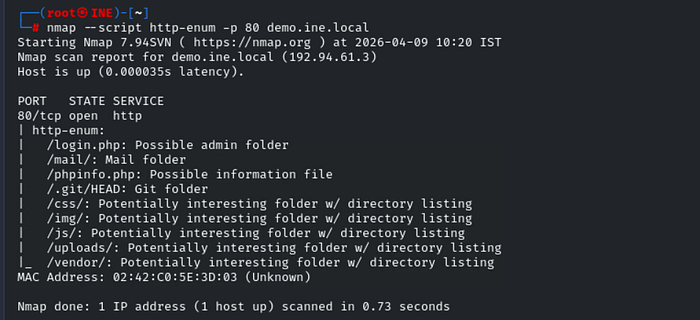
Three admin-adjacent paths found. /admin/admin.php is an admin login panel — direct target. /login.php is an authentication endpoint. Directory listing enabled on /image/ and /img/ — The server is exposing directory contents, meaning you can browse those folders like a file system.
Notice apache/2.4.38 (debian) In the output, the server version leaked through directory listing headers. We know the exact Apache version without even running -sV.
http-enum checks against a fingerprint database of hundreds of known application paths. It takes longer than other scripts (~22 seconds) because it's making multiple HTTP requests. Worth the wait.
http-robots.txt
nmap --script http-robots.txt -p 80 x.x.x.x
PORT   STATE SERVICE
80/tcp open  http
Nmap done: 1 IP address scanned in 0.21 seconds
Empty output. No robots.txt on this target. Valid negative result — not a failed scan. When http-robots.txt returns findings, the paths listed are exactly what the site operator doesn't want indexed, and therefore exactly what you check first. The absence here just means one less information source.
Configuration Scripts
http-methods — Basic and Path-Specific
nmap --script http-methods -p 80 x.x.x.x
| http-methods:
|_  Supported Methods: GET POST OPTIONS HEAD
No dangerous methods on the root path. GET, POST, OPTIONS, HEAD — standard. No PUT, DELETE, or TRACE. Clean result here.
Now test a specific application path:
nmap --script http-methods --script-args http-methods.url-path='/api/' -p 80 x.x.x.x
| http-methods:
|   Supported Methods: POST OPTIONS GET HEAD
|_  Path tested: /api/
The Path tested field confirms your script argument worked — essential when testing specific endpoints rather than root. If this had returned PUT or DELETE on /api/, that's an immediate finding — a REST API accepting write operations from unauthenticated requests.
http-auth-finder — What's Protecting This Server?
nmap --script http-auth-finder -p 80 x.x.x.x
| http-auth-finder:
|   Spidering limited to: maxdepth=3; maxpagecount=20; withinhost=target
|   url                          method
|_  http://x.x.x.x:80/login.php  FORM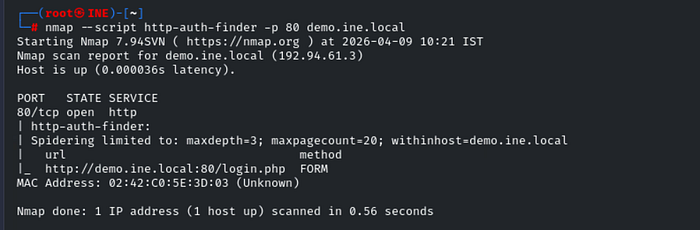
The script spidered the application to depth 3, checked 20 pages, and found /login.php using FORM-based authentication. (withinhost=target In the output means the spider stayed within the target host — it didn't follow external links.) This tells you the authentication mechanism — FORM auth means credentials are POST'd in the request body. No Basic auth (base64 in headers). No Digest auth.
For an attacker: FORM auth is the target for password spraying. For a defender: FORM auth without rate limiting or account lockout is a weakness worth noting in the report.
Vulnerability Scripts
http-shellshock — CVE-2014-6271
nmap --script http-shellshock --script-args uri=/gettime.cgi -p 80 x.x.x.x
| http-shellshock:
|   VULNERABLE:
|   HTTP Shellshock vulnerability
|     State: VULNERABLE (Exploitable)
|     IDs:  CVE:CVE-2014-6271
|       This web application might be affected by the vulnerability known
|       as Shellshock. It seems the server is executing commands injected
|       via malicious HTTP headers.
|     Disclosure date: 2014-09-24
|     References:
|       http://seclists.org/oss-sec/2014/q3/685
|       https://cve.mitre.org/cgi-bin/cvename.cgi?name=CVE-2014-6271
|_      https://cve.mitre.org/cgi-bin/cvename.cgi?name=CVE-2014-7169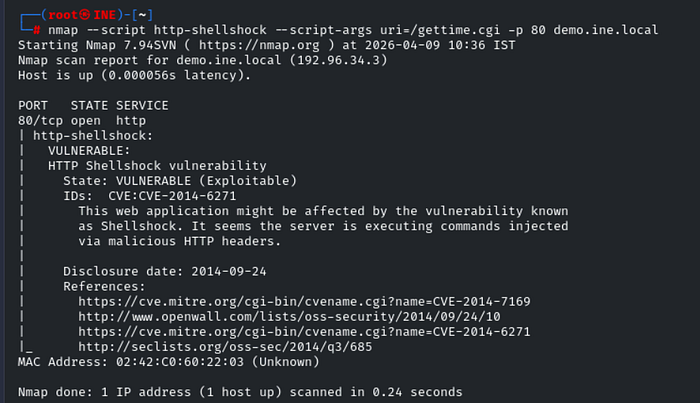
VULNERABLE (Exploitable). Shellshock — a Bash code injection vulnerability from 2014 — confirmed on a CGI endpoint. The script injects malicious HTTP headers and detects command execution. CVE-2014–6271 plus its companion CVE-2014–7169 are both referenced. Everything a report needs in one output.
Shellshock (2014) still appears on unpatched and legacy systems. The uri argument pointed the script at the CGI endpoint — always test any .cgi path found by http-enum with this script.
State: Exploitable. This goes directly into Metasploit in Part 7.
http-wordpress-enum — CMS Detection and Version Enumeration
nmap --script http-wordpress-enum -p 80 x.x.x.x
| http-wordpress-enum:
|   Search limited to top 100 themes/plugins
|   themes:
|     twentyfifteen 1.8
|     twentysixteen 1.3
|_    twentyseventeen 1.3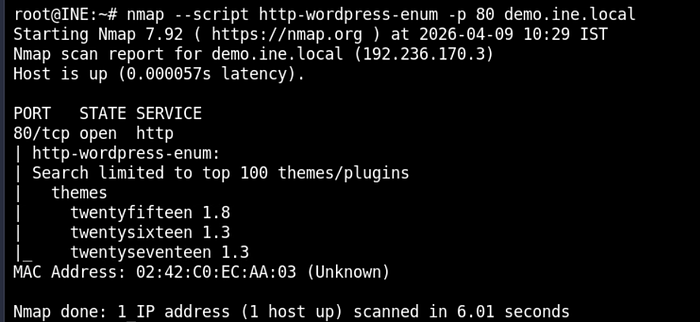
WordPress is confirmed to be running. Three default themes — twentyfifteen, twentysixteen, twentyseventeen — All outdated versions are still present. twentyfifteen 1.8 is from 2015 with known vulnerabilities. The default themes still present indicate limited maintenance. From here: wpscan, credential attacks against /wp-admin/, plugin enumeration.
💡 Increase search depth for more thorough results:
--script-args http-wordpress-enum.search-limit=200
The Full Chained Scan — Where Everything Comes Together
nmap --script "http-title,http-server-header,http-headers,http-methods,http-enum,http-robots.txt" \
  -sV -p 80,443 x.x.x.x
PORT   STATE SERVICE  VERSION
80/tcp open  http     Apache httpd (PHP 5.5.9-1ubuntu4.25)
|_http-title: Attack Defense Demo Blog
|_http-server-header: Apache
| http-headers:
|   Server: Apache
|   X-Powered-By: PHP/5.5.9-1ubuntu4.25
|   Set-Cookie: PHPSESSID=xxxxx; path=/
|   Expires: Thu, 19 Nov 1981 08:52:00 GMT
|   Cache-Control: no-store, no-cache, must-revalidate
|_  (Request type: HEAD)
| http-methods:
|_  Supported Methods: GET HEAD OPTIONS
| http-enum:
|   /login.php: Possible admin folder
|   /mail/: Mail folder
|   /phpinfo.php: Possible information file
|   /.git/HEAD: Git folder
|   /css/: Potentially interesting folder w/ directory listing
|   /img/: Potentially interesting folder w/ directory listing
|   /js/: Potentially interesting folder w/ directory listing
|   /uploads/: Potentially interesting folder w/ directory listing
|_  /vendor/: Potentially interesting folder w/ directory listing
Nmap done: 1 IP address scanned in 14.08 seconds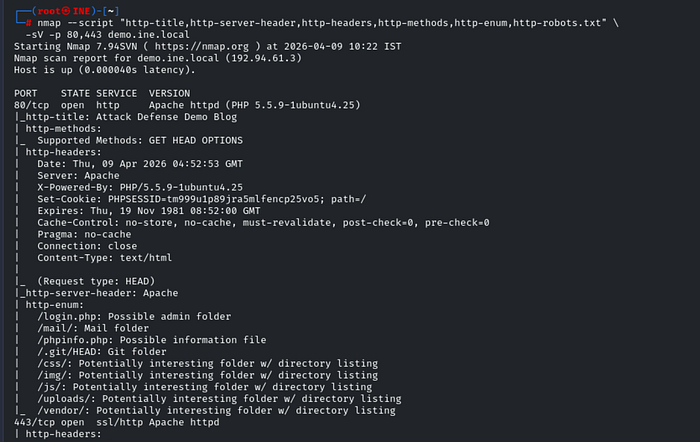
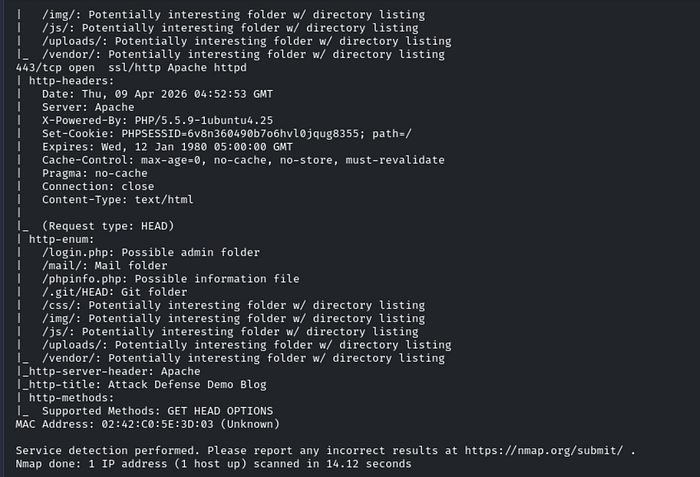
14 seconds. Here's what this output is actually saying:
PHP/5.5.9-1ubuntu4.25 — PHP 5.5 reached end of life in July 2016. This server has run a PHP version with no security patches for nearly a decade. Any PHP vulnerability disclosed after 2016 is potentially unpatched here.
X-Powered-By: PHP/5.5.9 — The tech stack is fully disclosed in a response header. Disable with expose_php = Off in php.ini. Never acceptable in production.
/.git/HEAD — A Git repository is accessible at the web root. Source code, commit history, credentials stored in old commits, and internal configuration paths may all be readable. Pull it with git-dumper or manually fetch /.git/config first.
/phpinfo.php — The PHP configuration file is publicly accessible. Exposes server paths, loaded modules, environment variables, database credentials stored in the environment, and sometimes SSH keys. Should never be publicly accessible.
/uploads/ With directory listing, the upload directory is browsable. If the application allows file uploads, this is where they land, and you can enumerate them.
PHPSESSID cookie without HttpOnly flag — session cookie is accessible to JavaScript. An XSS vulnerability anywhere on the site becomes a session hijacking attack.
Six distinct findings. One command. 14 seconds.
Reading Output as a Priority List
The findings above translate directly to a report:
Finding                        Priority    Action
-----------------------------  ----------  ------------------------------------------
/.git/HEAD accessible          CRITICAL    Dump repo with git-dumper
/phpinfo.php accessible        CRITICAL    Read, screenshot, remove immediately
Shellshock VULNERABLE          CRITICAL    Exploit path confirmed, see Part 7
PHP 5.5.9 (EOL 2016)           HIGH        Patch cycle review needed
X-Powered-By header            MEDIUM      Disable in php.ini
/uploads/ directory listing    HIGH        Disable directory listing in Apache
No HTTPS on port 443           MEDIUM      TLS configuration required
PHPSESSID no HttpOnly          MEDIUM      Add HttpOnly flag in session config
Using --script-args for HTTP Scripts
# Test methods on a specific path
--script-args http-methods.url-path='/api/'
# Set a custom base path for enumeration
--script-args http-enum.basepath='/webapp/'
# Increase WordPress search depth
--script-args http-wordpress-enum.search-limit=200
# Set a custom User-Agent
--script-args http.useragent='Mozilla/5.0'
# Target a specific CGI for shellshock
--script-args uri=/cgi-bin/vulnerable.cgi
Multiple arguments comma-separated:
nmap --script http-enum \
  --script-args http-enum.basepath='/app/',http.useragent='Mozilla/5.0' \
  -p 80 x.x.x.x
The HTTP Recon Workflow
A staged approach based on what you find at each step:
Stage 1 — Identify (seconds):
nmap --script "http-title,http-server-header,http-favicon" -sV -p 80,443,8080,8443 x.x.x.xStage 2 — Discover (minutes):
nmap --script "http-enum,http-robots.txt,http-auth-finder" -p 80,443 x.x.x.xStage 3 — Configuration check (seconds):
nmap --script "http-headers,http-methods" -p 80,443 x.x.x.xStage 4 — Targeted vuln check:
# Run based on what previous stages found
nmap --script http-shellshock --script-args uri=/cgi-bin/found.cgi -p 80 x.x.x.x
nmap --script http-wordpress-enum -p 80 x.x.x.x
Or everything at once when you have time:
nmap --script "http-title,http-server-header,http-headers,http-methods,http-enum,http-robots.txt,http-auth-finder,http-wordpress-enum" \
  -sV -p 80,443,8080,8443 x.x.x.x
What's Next
You now have a complete HTTP recon toolkit — from fingerprinting through vulnerability detection — backed by real outputs from real lab machines.
In Part 5, we shift to Windows networks. SMB — port 445 — is where Windows engagements live and die. NSE has an entire suite of SMB scripts that enumerate shares, users, signing configuration, and vulnerabilities without credentials. Including the script that confirms EternalBlue — the vulnerability behind WannaCry.
Part 5 ← Link will be live once published
🔒 Legal reminder: All examples here were run against INE Labs and OffSec Proving Grounds Play — authorized lab environments. Only run these scripts against systems you own or have explicit written permission to test.
Part of the series: Nmap — The Tool You Think You Know