A lot of meaningful work has gone into CoPilot over the last several releases, and I wanted to take a moment to pull that work together in one place.
If you've been following the project for a while, thank you. We truly appreciate the feedback, ideas, testing, and support that have helped shape the platform. If this is your first time hearing about CoPilot, you're catching it at a really exciting point in its growth.
CoPilot continues to evolve as a practical way to help operators work more effectively across an open-source security stack. The goal has never been to build just another interface. The goal has been to create a platform that helps security teams, MSSPs, and defenders move faster, gain better visibility, and manage their environments more efficiently.
Over the latest releases, we've added a number of features that move us further in that direction.
A Better Starting Point: Improved Navigation and Health Visibility
One of the first things users will notice is that we've continued refining the layout and organization of the platform. What was previously labeled as Alerts is now more clearly presented as SIEM, and we've expanded several categories to make new functionality easier to access.
One area I'm especially excited about is the updated Health Check experience. We introduced a new Metrics Overview that builds on top of the InfluxDB-backed data already being collected from endpoints. Instead of just surfacing high-level health information, CoPilot now gives you more direct visibility into the actual metrics being gathered. You can filter by host and adjust the time range to dig into what's happening at a much more useful level.
This gives operators a clearer path from "something feels off" to "here is the exact metric behavior I need to inspect."
Snapshot and Restore Management Directly in CoPilot
We've also added the ability to work with snapshot and restore functionality directly from inside CoPilot.
For teams managing cold storage and retention in their SIEM stack, this is a big step forward. Instead of treating snapshot repository management as something completely outside of the platform, CoPilot now gives you a way to configure and manage it from the interface itself.
There is still some prerequisite configuration required on the underlying Wazuh Indexer / OpenSearch side, whether you are using a shared file system or S3-backed storage, but once that is done, snapshot repositories can be registered and managed directly in CoPilot.
The goal here is simple: reduce friction and make common operational tasks more accessible from one place.
Detection Rule Provisioning Continues to Grow
Another area that has seen major improvement is detection rule provisioning.
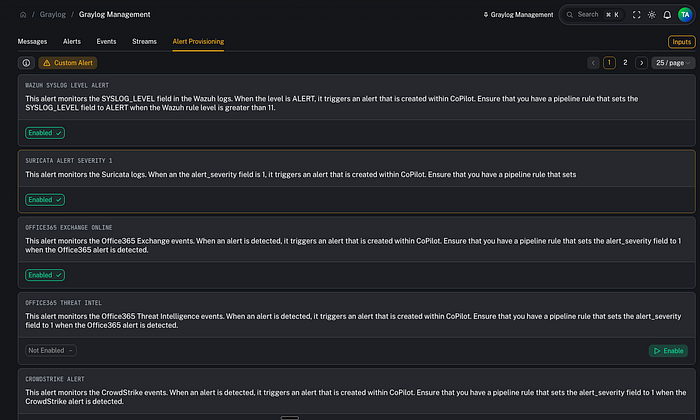
Under Graylog management and alert provisioning, we've continued expanding the catalog of detection content available to operators. That includes support across multiple technologies and vendors, from Fortinet and Palo Alto to broader detection use cases.
This matters because creating a platform is only part of the challenge. The other half is helping teams operationalize it quickly. A growing detection rule catalog reduces the amount of manual work needed to start building meaningful visibility and alerting across the stack.
More Granular Alert Visibility with Tag-Based Access Control
One of the more important additions in recent releases is tag-based access control for alerts.
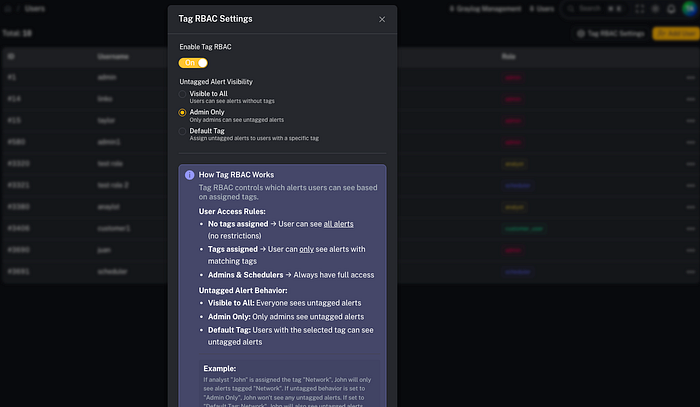
Traditionally, alert visibility is often handled at a customer or tenant level. That works well in many cases, but sometimes it is not granular enough. Within a single customer environment, different users may need access to different categories of alerts.
A simple example is a network-focused user who does not need to see endpoint or Office 365-related detections. With tag-based access control, admins can now assign alert visibility based on tags and user assignments rather than relying solely on broad customer-level access.
This gives teams much more flexibility in how they expose data to end users and internal stakeholders. It is a cleaner model for environments where not everyone should see everything.
Event Search Built Directly into CoPilot
This is one of the features I'm most excited about.
We introduced a brand-new Event Search capability directly inside CoPilot. This allows users to select a customer, choose an event source, and search data being collected in the SIEM stack without leaving the platform.
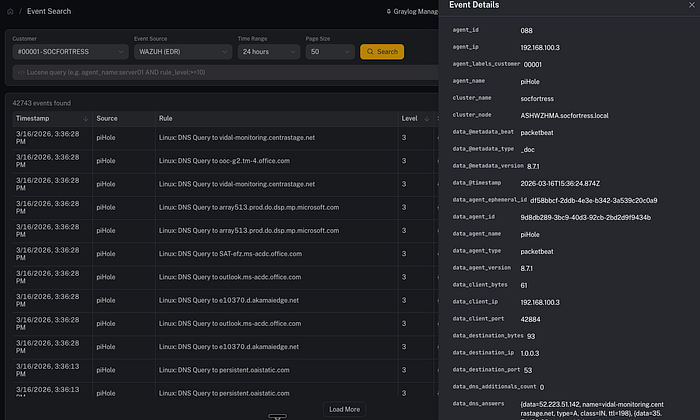
That means pulling in events from sources such as Wazuh, Office 365, firewalls, and other integrated technologies, then filtering on event metadata directly from the CoPilot interface.
This is a major usability improvement because it brings operational visibility closer to the alerting and case-management workflow. Instead of constantly switching contexts, users can inspect surrounding events, apply field-based filters, and pivot directly from alerts into related telemetry.
That kind of workflow matters in real environments. Faster pivots mean faster investigations.
Event Sources Designed with Scalability in Mind
To support event search properly, we also introduced an Event Sources model under customer configuration.
This is an important design choice because CoPilot is built with scalability and multi-tenancy in mind. Rather than hardcoding a single event retrieval pattern, CoPilot lets you define event sources for each customer, including the index pattern, event type, and time field name.
That gives operators a structured way to tell CoPilot where the data lives and how it should be interpreted. Whether the source is endpoint telemetry, antivirus data, cloud integrations, or network security logs, CoPilot can now load those sources in a more flexible and scalable way.
It also lays a stronger foundation for what comes next.
Alert-to-Event Pivoting
Another improvement built on top of the event search work is the ability to pivot directly from an alert into the related event context.
That means an alert is no longer just an isolated object. It becomes an entry point into the surrounding telemetry. You can view the related event, adjust time ranges, add and remove filters, and quickly explore nearby activity without having to manually rebuild the search elsewhere.
This is the kind of feature that saves analysts time and reduces friction during investigations.
CoPilot Searches: Reusable Search Content for Operators
We also introduced CoPilot Searches, which I think will become a really powerful part of the platform.
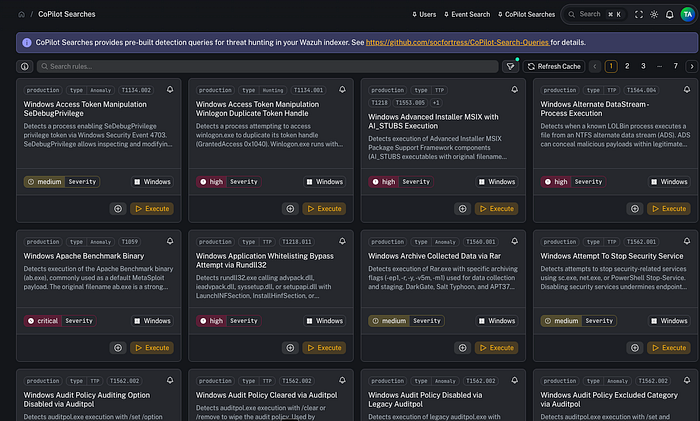
The idea here is to provide pre-built search queries in a reusable YAML-driven format. We took inspiration from how other platforms structure repeatable detections and searches, then built an approach that lets these searches be leveraged directly inside CoPilot.
Users can provision a Graylog alert from one of these searches or execute the search dynamically on demand. That opens the door for a much more flexible operator experience where teams can both alert on content and use the same content interactively for hunting and validation.
This is an area I'm especially excited to continue building out.
Patch Tuesday Visibility, Built In
We also added a dedicated Patch Tuesday feature that brings Microsoft's monthly patch reporting directly into CoPilot.
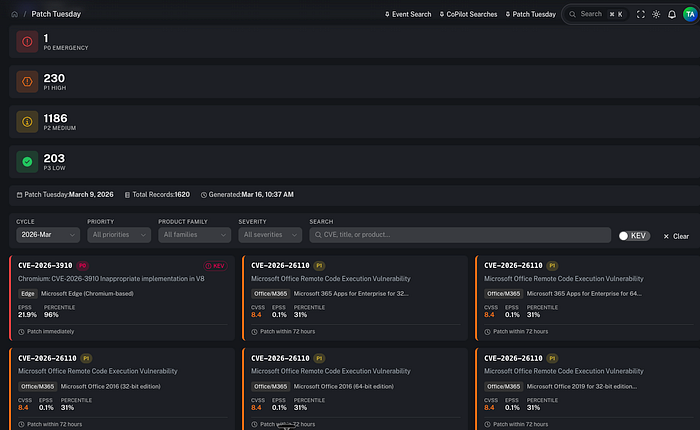
Instead of chasing those updates manually, users can now access the latest Patch Tuesday information and related Microsoft knowledge base references directly from the platform.
It is a straightforward feature, but it solves a real operational problem: important patch intelligence should be easy to find and reference in the same place teams are already working.
Security Configuration Policy Assessment Support
Another major addition is around Security Configuration Assessment support.
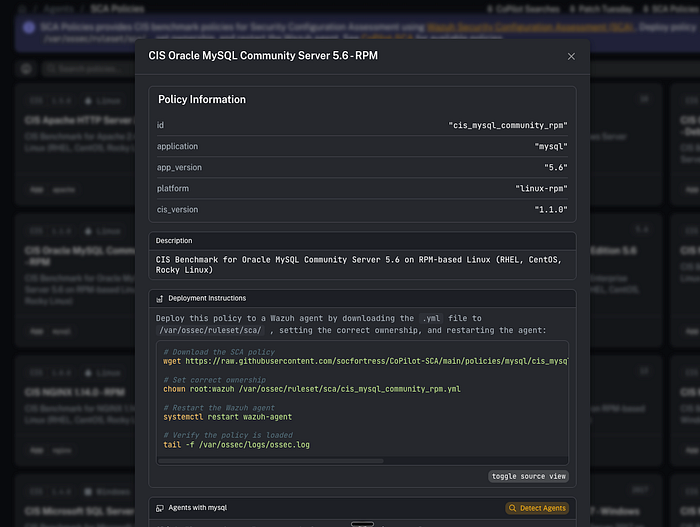
If you've worked with Wazuh, you know it includes built-in SCA functionality for evaluating the configuration state of operating systems and applications. We wanted to make that more actionable inside CoPilot.
Now users can browse a growing catalog of policies covering technologies such as Apache, IIS, NGINX, MySQL, and more. CoPilot can help identify endpoints that may be running relevant applications, making it easier to determine where these checks should be applied.
That is especially useful for MSSPs and teams onboarding multiple customer environments where documentation may be incomplete. Instead of guessing where to deploy configuration assessments, CoPilot helps narrow the scope by detecting endpoints likely to be running the applications in question.
This turns SCA into something much more operational and approachable.
Better Reporting and GitHub Audit Capabilities
Under report creation, we also added new categories for vulnerability reports and SCA reports, helping teams formalize and present findings more effectively.
We also introduced a new GitHub Audit capability under Tools. This gives users a way to assess GitHub repositories and organizations for best practices such as MFA enforcement, secret scanning, and other security-related controls.
In a way, it extends the same philosophy behind configuration assessment into the GitHub ecosystem: make it easier to see what is configured well, what is missing, and what should be tightened up.
Where This Is Going
One thing I mentioned in the video, and I think it is worth repeating, is that some of these features are laying the groundwork for what comes next.
For example, the event search capability is not just useful on its own. It also serves as a foundation for eventually bringing more dashboarding and data visualization directly into CoPilot. That kind of convergence is where things get really exciting, because it allows the platform to keep growing into a more complete operational workspace.
Final Thoughts
The biggest takeaway from these recent releases is this: CoPilot is becoming more useful, more scalable, and more operator-friendly with each iteration.
From better health visibility and snapshot management to event search, tag-based access control, Patch Tuesday reporting, SCA policy support, and GitHub auditing, these are not just isolated features. They are pieces of a broader effort to make CoPilot a practical platform for real-world security operations.
There is still plenty more to build, and we are continuing to move quickly. But I'm genuinely excited about the direction the platform is headed and the progress that has already been made.
If you've been following the project, thank you again for being part of the journey. And if you're just discovering CoPilot, now is a great time to take a look.
Learn More
- CoPilot GitHub: https://github.com/socfortress/CoPilot
- Documentation: https://docs.socfortress.co
Need Help?
The functionality discussed in this post, and so much more, are available via the SOCFortress platform. Let SOCFortress help you and your team keep your infrastructure secure.
Website: https://www.socfortress.co/
Contact Us: https://www.socfortress.co/contact_form.html