"When people tell me they've learned from experience, I tell them the trick is to learn from other people's experience." — Warren Buffett
Introduction
If you're reading this, you're probably preparing for the eLearnSecurity Junior Penetration Tester (eJPT) certification. I recently passed the exam and want to share my honest experience, the concepts that tripped me up, and the insights that would have saved me hours of confusion. This isnot a walkthrough, it's the guide I wish I had before sitting the exam.
What Is eJPT?
eJPT is a beginner-friendly penetration testing certification by eLearnSecurity (now INE). It's practical, hands-on, and tests your ability to perform real reconnaissance, enumeration, and exploitation in a lab environment. No multiple choice theory — you actually hack things.
My Reconnaissance Approach
The most important lesson: enumerate everything before you exploit anything.
Step 1: Host Discovery
nmap -sn 192.168.X.X/24Step 2: Full Service Detection
nmap -sS -sV -sC -O 192.168.X.X/24Save this output. You will refer back to it constantly throughout the exam.
Step 3: Enumerate Each Service Thoroughly
For every open port ask yourself:
- Can I access this anonymously?
- Are there default credentials?
- Is this version vulnerable?
Key Services and How to Approach Them
FTP (Port 21)
Always try anonymous login first:
ftp <target>
# username: anonymous
# password: anything
FTP servers often contain sensitive files — notes, credentials, or even web shells left by administrators.
SMB (Port 445)
SMB enumeration was critical:
# List shares anonymously
smbclient -L //<target> -N
# Full enumeration
enum4linux -a <target>
# RID brute force to find all users
crackmapexec smb <target> -u 'guest' -p '' --rid-brute
Once you have usernames, brute force with hydra:
hydra -l username -P /usr/share/wordlists/rockyou.txt <target> smbHTTP (Port 80)
Always check:
- What web server is running (Apache, IIS)?
- What application is hosted (WordPress, Drupal)?
- Is directory listing enabled?
- Any hidden files or directories?
dirb http://<target> /usr/share/wordlists/dirb/common.txt -X .txt,.aspx,.phpWordPress Specific Tips
wp-config.phpcontains database credentials — always read it- Use
wpscanwith aggressive detection for thorough plugin discovery:
wpscan --url http://<target>/wordpress/ --enumerate u,ap --plugins-detection aggressive- Plugin enumeration with just passive detection misses many plugins — always use aggressive mode
Credential Management — My Most Important Lesson
Keep a running list of every credential you find. In my exam, credentials found on one machine worked on others. Password reuse across services is extremely common in lab environments.
Maintain a simple table like this as you go:
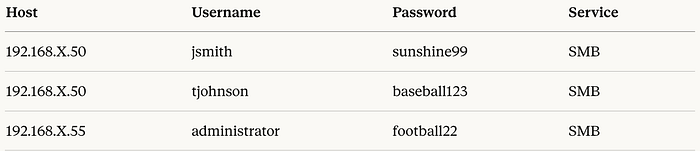
Always try every credential you find across all services and all hosts. One password can unlock multiple machines.
Exploitation Tips
Drupal (Drupalgeddon2)
If you find Drupal, check the version and try via Metasploit:
use exploit/unix/webapp/drupal_drupalgeddon2
set RHOSTS <target>
set TARGETURI /drupal/
run
Web Shells on IIS
If you find a .aspx web shell already uploaded on an IIS server — use it. It's likely intentional and gives you direct command execution in the browser.
Post Exploitation — Always Run These
ip addr       # Find all network interfaces - identify dual-homed hosts
ip route      # Find routing information
cat /etc/passwd  # Find all users on Linux
The Network Architecture — Understanding DMZ and Internal Networks
Before anything else, understand this. It will save you significant confusion during the exam.
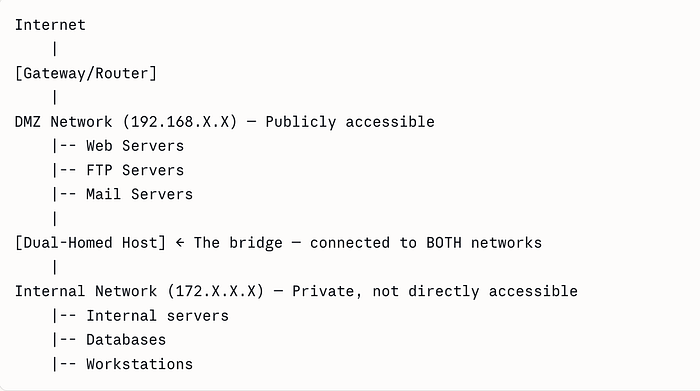
DMZ (Demilitarized Zone):
- The public-facing zone of the network
- Hosts here are directly accessible and enumerable
- Think web servers, FTP servers, mail servers
- Typically a range like
192.168.100.0/24
Internal Network:
- Completely private — not reachable directly from outside
- Only accessible by pivoting through a compromised DMZ host
- Different IP range entirely — typically
172.16.0.0/16or10.0.0.0/8 - Contains the most sensitive services and data
Dual-Homed Host:
- The most critical concept in the exam
- A single machine with two network interfaces — one facing DMZ, one facing internal
- Compromising this host gives you a foothold into the internal network
- How to identify: after getting a shell, run
ip addrand look for interfaces in two completely different IP ranges
My honest advice: Practice pivoting in at least 3–4 INE labs before exam day. If you encounter internal network questions without hands-on practice, you will panic. I nearly did.
The Challenges I Faced — Real Talk
This section is the most important part of this blog. These are the mistakes I made and the lessons they taught me.
1. I Went Through Questions Serially — Big Mistake
This was my biggest mistake. I started answering questions one by one in order. What I should have done is read ALL questions first before touching a single tool.
Here's why: many questions are grouped around the same IP address. If you are already working on 192.168.100.50, look at ALL questions related to that host simultaneously — how many users, what services, what version, what files. Answer everything about that host before moving on.
Going back to a host you already left wastes enormous time.
2. I Didn't Note Things Down Properly
When I found a username on one host, I didn't write it down immediately thinking I'd remember it. I didn't. When I needed it 30 minutes later I had to re-enumerate the same machine.
Make a proper notes file from minute one:
HOST: 192.168.100.50
OS: Windows Server 2012 R2
Services: HTTP(80), SMB(445), RDP(3389)
Users: admin, mike, vince
Passwords: admin:superman, mike:diamond, vince:greenday
Files found: wp-config.php, flag.txt
This structured approach saves you from going in circles.
3. I Underestimated the Chain Effect of Wrong Answers
I assumed the passing score was simply 70%. But here's the reality check: out of 45 questions you need around 32 correct. That sounds manageable until you realise that reconnaissance questions are chained.
If you get the IP of a host wrong, every follow-up question about that host like its users, services, passwords, flags will also be wrong. One wrong recon answer can cascade into 4–5 wrong answers. This is why thorough enumeration at the start is not optional.
4. I Left Questions Unanswered — Never Do This
Towards the end I was tired and left 4–5 questions unanswered. That was a critical mistake. Even a guess is better than leaving it blank. The questions are multiple choice, eliminate obviously wrong answers and make your best guess.
Time is enough if you stay calm. The exam gives you sufficient time. The panic of feeling rushed is what kills you, not the actual time limit. Take a breath, work methodically on each IP, and trust your preparation.
5. The Internal Network Concept Panicked Me
When I first saw questions about the internal network during the exam, I froze for a moment. I had not practiced pivoting enough. The concept of a dual-homed host acting as a bridge between DMZ and internal networks is not intuitive until you have done it hands-on.
My advice: Do not go into the exam without having practiced pivoting at least 3–4 times in INE labs. The theory makes sense but your hands need to know the commands automatically under pressure.
6. Plugin Enumeration — Passive Detection Is Not Enough
I initially ran wpscan with default passive detection and got incomplete results. Always run with --plugins-detection aggressive — you will find significantly more plugins and potentially more vulnerabilities.
Topics You Must Know Cold
Based on my experience, focus heavily on:
Networking:
- DMZ vs Internal network concepts
- Dual-homed hosts and pivoting
- IP ranges and subnetting basics
Enumeration:
- Nmap flags and when to use them
- SMB enumeration with enum4linux and crackmapexec
- Web application enumeration with dirb and wpscan
- FTP anonymous access
Web Applications:
- WordPress structure — especially wp-config.php
- Drupal vulnerabilities
- Plugin enumeration
- Web shell usage on IIS
Credentials:
- Password reuse across services
- Brute forcing with hydra
- Reading config files for credentials
- rockyou.txt is your best friend
Final Tips — The Summary That Matters
- Read ALL questions before starting — group them by IP and answer everything about one host before moving on
- Note everything immediately: users, passwords, services, file paths
- Try every credential on every host: password reuse is real
- Never leave a question blank: guess if you must
- Stay calm — time is enough: panic is your only real enemy
- Practice pivoting before the exam: internal network questions will come
- Use aggressive detection: passive enumeration misses things
Conclusion
eJPT is an excellent starting certification for anyone serious about penetration testing. It's fair, practical, and genuinely teaches you real skills. The exam rewards patience, methodical thinking, and thorough enumeration over rushing and guessing.
The candidates who fail are usually not failing because they lack technical knowledge, they fail because of poor note-taking, rushing through questions serially, and leaving the exam before answering everything.
Go in prepared, stay organised, and trust your process.
Good luck — you've got this! 🚀
This blog was written based on personal lab practice experience. No exam questions or answers were disclosed in accordance with INE's exam policies.