

When working with data in Python, we often need a way to store and retrieve information quickly. Imagine saving phone contacts, student records, or product details — each item has a unique identity and associated information.
This is where Python dictionaries become extremely powerful.
In this article, we'll explore what dictionaries are, how they work, and how they are used in real-life scenarios.
What is a Dictionary in Python?
A dictionary is a way to store information in Python using pairs of data.
Each piece of information has:
- a key → the name or label
- a value → the actual information
Think of it like a real dictionary where a word has a meaning.
In Python:
- the key is like the word
- the value is like its meaning
Unlike lists (which use position numbers), dictionaries use unique keys to find values quickly and easily.
student = {
    "name": "Praveen",
    "age": 21
}
Here:
"name" → key
- "Praveen" → value
- "age" → key
- 21 → value
Instead of remembering positions, you can directly ask for the value using the key.

Key Features of Dictionaries
- Store information in pairs Each item has a key (label) and a value (data).
- Keys must be unique Every key should be different so Python can find the correct value.
- Values can be anything Values can be numbers, text, lists, or even another dictionary.
- Very fast to access data You can quickly get information using its key.
- Can be changed (mutable) You can add, update, or remove items anytime.
Example:
person = {
    "name": "Praveen",
    "age": 21,
    "hobbies": ["reading", "music"]
}- Keys are unique → name, age, hobbies
- Values include text, number, and list
Accessing Values
You can access values using their keys.
print(student["name"])Output:
Praveen— This is faster and more meaningful than remembering index numbers.
Adding and Updating Data
Dictionaries are mutable, so you can add or update entries.
Add a new key:
student["marks"] = 85Update value:
student["age"] = 22Updated dictionary:
{'name': 'Praveen', 'age': 22, 'course': 'Computer Science', 'marks': 85}Removing Items
student.pop("marks")— Removes the key and its value.
Real-Life Use Case 1: Phone Book
A dictionary is perfect for storing contacts.

In our daily life, we store many contacts in our mobile phones — friends, family members, teachers, and colleagues. Each contact has a name and a phone number.
When we want to call someone, we don't scroll through the entire list manually. Instead, we search the person's name, and the phone instantly shows the correct number.
This is exactly how a Python dictionary works.
— The name acts as the key — The phone number acts as the value
This structure makes storing and retrieving contacts quick and easy.
Why Dictionaries Are Ideal for Phone Contacts?
Think about your mobile phone's contact list.
Each contact has:
- a name → used to identify the person
- a phone number → the information you want
This is exactly how a Python dictionary works.
— The name acts as the key — The phone number acts as the value
Example:
phone_book = {
    "Amit": "9876543210",
    "Neha": "9123456780",
    "Ravi": "9988776655"
}

print(phone_book["Neha"])
Output:
9123456780— Instead of searching through a list, you get instant results.
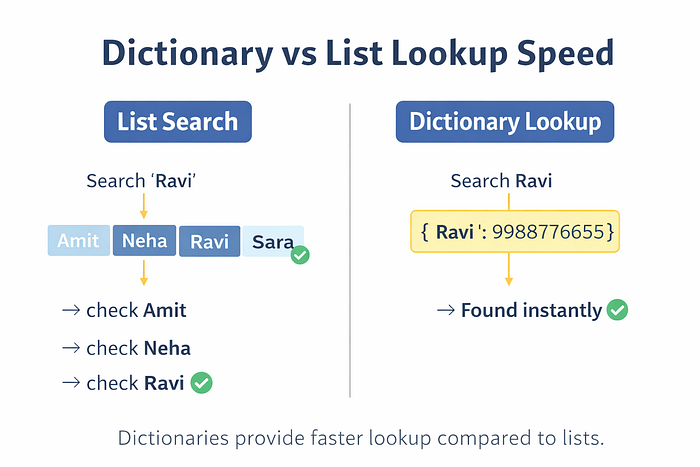
Dictionary vs List Lookup Speed
When working with data, we often need to find a specific item quickly. The speed at which Python retrieves data depends on the data structure used.
Both lists and dictionaries store data, but they locate information in very different ways.
Looping Through a Dictionary
Sometimes we need to display or process all the data stored in a dictionary. Instead of accessing each key manually, Python allows us to loop through a dictionary and retrieve its contents easily.
Looping is useful when working with large datasets such as student records, phone contacts, or product lists.
Example:
for key, value in student.items():
    print(key, ":", value)
Output:
name : Praveen
age : 22
course : Computer Science
Useful for displaying structured data.
Nested Dictionaries
Sometimes we need to store more detailed information instead of just a single value.
For example, storing only a student's name is not enough. We may also want to store:
- marks
- course
- age
- attendance
In such cases, a dictionary can store another dictionary as its value. This is called a nested dictionary.
In simple words: — A dictionary inside another dictionary.
Why Use Nested Dictionaries?
Nested dictionaries help organize complex data in a structured and meaningful way.
Instead of storing data randomly, everything stays grouped and easy to access.
Example:
students = {
    101: {"name": "Praveen", "marks": 90},
    102: {"name": "Rahul", "marks": 85}
}

print(students[101]["name"])
Output:
PraveenUsed in real databases and APIs.
Nested Dictionary Structure
A nested dictionary is organized like a hierarchy, where each main key contains another dictionary with related details.
Think of it like a folder system:
- Main folder → Student ID
- Files inside → student details
This structure keeps complex information organized and easy to access.

Real-Life Use Case 2: Student Records
Schools store student information using IDs.

In schools and colleges, thousands of students are enrolled every year. To manage this large amount of information efficiently, each student is assigned a unique ID number.
This ID acts like a special identifier that helps teachers and administrators quickly find student details such as name, marks, attendance, and course information.
Instead of searching through long lists of names, the system simply uses the student ID to retrieve the correct record instantly.
This is exactly how Python dictionaries work.
— The student ID acts as the key — The student name or details act as the value
Example:
students = {
    101: "Sapna",
    102: "Rahul",
    103: "Anita"
}

print(students[102])
Output:
Rahul— Dictionaries allow quick lookup using unique IDs.
Why Dictionaries Are So Fast?
Python dictionaries are very fast because they use a technique called hashing.
When you store a value with a key, Python converts that key into a unique number (called a hash value) and stores the data at a specific location in memory.
When you look up the value using the same key, Python calculates the hash again and jumps directly to that location instead of searching through all items.
This direct access makes dictionaries extremely fast.
Ideal for:
- databases
- caching
- large datasets
- fast lookups
Common Beginner Mistakes:
- Using duplicate keys
- Forgetting quotes around string keys
- Accessing missing keys directly
Correct method:
print(student.get("email", "Not available"))When Should You Use Dictionaries?
Use dictionaries when:
✔ Data has unique identifiers ✔ Fast lookup is required ✔ Structured data is needed ✔ Relationships must be stored
Common Applications:
- Phone contacts
- Student databases
- Login systems
- Product catalogs
- API responses
- Inventory management
Conclusion:
Python dictionaries are one of the most powerful and useful data structures. By storing data as key–value pairs, they make data organization, retrieval, and management efficient and intuitive.
From phone books and shopping carts to databases and APIs, dictionaries are everywhere in real-world applications.
If you want fast lookup, structured storage, and scalable data handling, dictionaries are the perfect choice.
Master dictionaries, and you unlock real-world programming power.